Introduction
Thank you for choosing the Liectroux L200 Robot Vacuum Cleaner. This intelligent 3-in-1 device is designed to simplify your cleaning routine by sweeping, vacuuming, and mopping simultaneously. Equipped with advanced sensors and smart control features, the L200 ensures efficient and thorough cleaning of various floor types. This manual provides essential information for safe operation, setup, maintenance, and troubleshooting to help you get the most out of your robot vacuum.

Сүрөт: Жогорку view of the Liectroux L200 Robot Vacuum Cleaner, showing its sleek black design and control buttons.
Маанилүү коопсуздук нускамалары
Please read these safety instructions carefully before using your Liectroux L200 Robot Vacuum Cleaner and keep them for future reference. Failure to follow these instructions may result in electric shock, fire, or serious injury.
- Бул шайманды 8 жаштан жогорку балдар жана физикалык, сезүү же акыл-эс жөндөмү начар же тажрыйбасы жана билими жок адамдар колдонсо болот, эгерде алар көзөмөлгө алынган же шайманды коопсуз колдонуу боюнча нускама алган болсо жана келтирилген коркунучтарды түшүнсө. .
- Балдар шайман менен ойнобошу үчүн аларды көзөмөлгө алуу керек.
- Тазалоо жана колдонуучу тейлөөнү балдар көзөмөлсүз жасабашы керек.
- Use only the original power adapter provided by the manufacturer.
- Роботту нымдуу чөйрөдө же сууга жакын жерде колдонбоңуз.
- Do not allow the robot to pick up large objects, sharp objects, or liquids.
- Ensure the charging base is placed on a flat, stable surface against a wall, with clear space around it.
- Тазалоодон мурун, чаташып же бузулуп калбаш үчүн, полдон бош калган кабелдерди, майда нерселерди же морт нерселерди алып салыңыз.
- Эгерде робот бузулган же иштебей калган болсо, аны иштетпеңиз. Жардам алуу үчүн кардарларды колдоо кызматына кайрылыңыз.
- Do not store the appliance with water in the reservoir. Always empty the water tank after use.
Продукт бүттүview
Компоненттер
- Liectroux L200 Robot Vacuum Cleaner
- Заряддоо базасы
- Кубаттуу адаптер
- Dustbin (integrated with water tank)
- Моп Pad
- Каптал щеткалар (2 жуп, бири алмаштыруу үчүн)
- Тазалоо куралы
- Алыстан башкаруу
- User Manual
Негизги өзгөчөлүктөрү
- 3-бирде тазалоо: Sweeps, vacuums, and mops simultaneously for comprehensive floor care.
- Integrated Dustbin & Water Tank: Efficient design for both dry and wet cleaning.
- Акылдуу навигация: Equipped with anti-collision and anti-drop sensors to navigate around obstacles and prevent falls.
- Автоматтык түрдө заряддоо: Returns to the charging base automatically when battery is low.
- Колдонмону башкаруу: Full control and scheduling via a dedicated smartphone application.
- Үн жардамчысынын шайкештиги: Works with Alexa and Google Assistant for hands-free control.
- Күчтүү соргуч: Effectively removes dust, hair, pet fur, and debris.
- Ичке дизайн: Про азfile allows it to clean under furniture.

Сүрөт: асты view of the Liectroux L200, showing the side brushes, main brush area, and mop pad attachment.
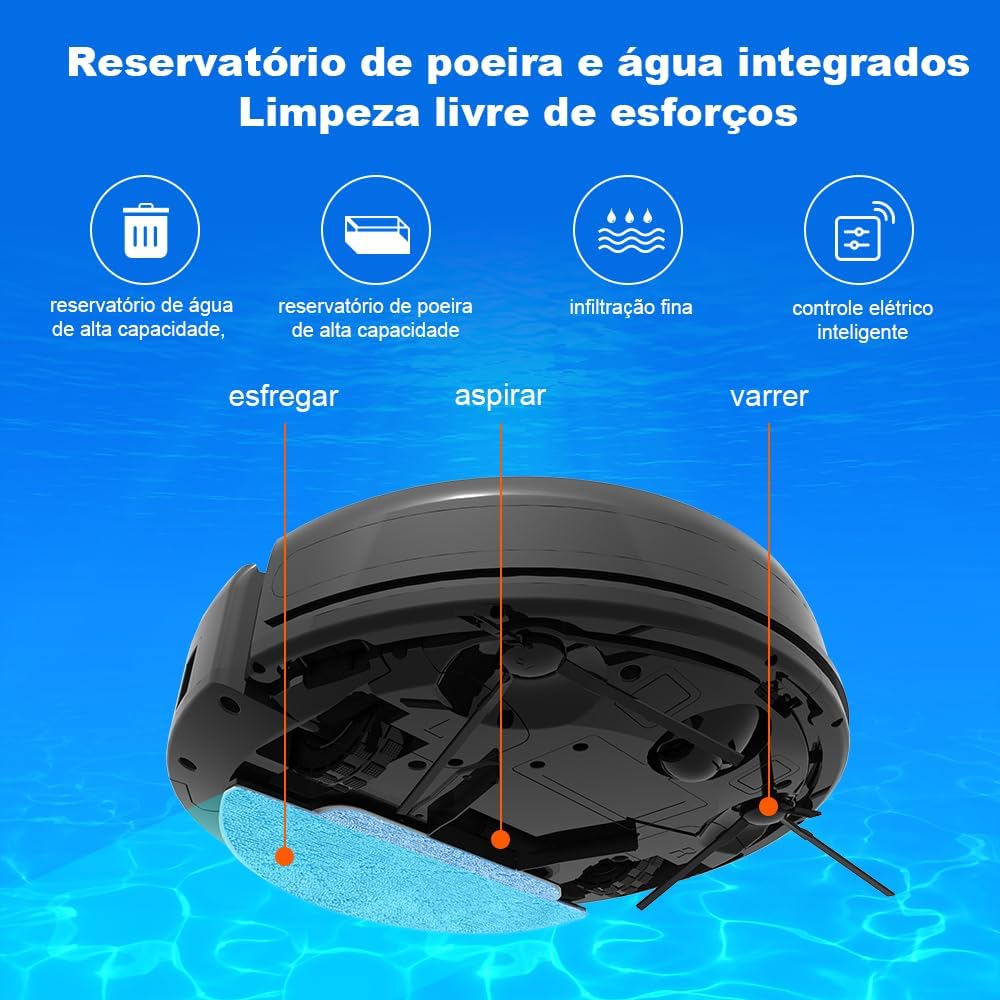
Image: Diagram illustrating the integrated dustbin and water tank, highlighting the sweeping, vacuuming, and mopping functions.
Жайгашуу
1. Пакеттен чыгаруу жана алгачкы жайгаштыруу
- Бардык компоненттерди таңгактан кылдаттык менен алып салыңыз.
- Choose a suitable location for the charging base. Place it against a wall on a hard, level surface. Ensure there is at least 1 meter (3 feet) of clear space in front of the base and 0.5 meters (1.5 feet) on either side.
- Connect the power adapter to the charging base and plug it into a power outlet. Ensure the cable is neatly tucked away to prevent entanglement.
2. Баштапкы заряддоо
Place the robot vacuum onto the charging base. Ensure the charging contacts on the robot align with those on the base. The indicator light on the robot will show charging status. For first use, fully charge the robot (approximately 4-5 hours).
3. Installing Side Brushes and Mop Pad
- Turn the robot over. Press the side brushes onto their respective posts until they click into place.
- Attach the mop pad to the water tank module. Fill the water tank with clean water (do not add cleaning solutions directly to the tank). Slide the water tank module into the designated slot on the robot until it clicks.
4. Connecting to the App (Optional but Recommended)
- Download the "Liectroux" app from your smartphone's app store (iOS or Android).
- Каттоо эсебин жана кирүү.
- Follow the in-app instructions to add your Liectroux L200. This typically involves putting the robot in pairing mode (refer to the robot's specific pairing instructions, usually by pressing and holding a button) and connecting to your home Wi-Fi network (2.4GHz only).

Image: Screenshot of the Liectroux app interface on a smartphone, showing remote control, cleaning modes, scheduling, and adjustable suction power options.
Иштеп жатат
Тазалоо циклин баштоо
- Роботтон: Press the power button on the robot to start an automatic cleaning cycle.
- Алыстан башкарууну колдонуу: Use the dedicated buttons on the remote control to start/stop cleaning, select cleaning modes, or send the robot back to the charging base.
- Колдонмо аркылуу: Open the Liectroux app, select your device, and tap "Start Clean" or choose a specific cleaning mode.
- Үн менен башкаруу: If connected to Alexa or Google Assistant, use voice commands like "Alexa, start cleaning with Liectroux L200" or "Hey Google, tell Liectroux L200 to go home."
Тазалоо режимдери
- Автоматтык тазалоо: Робот акылдуу навигациялап, бардык жеткиликтүү аймакты тазалайт.
- Таза так: The robot cleans a specific area in a spiral pattern, ideal for concentrated dirt.
- Edge Clean: Робот дубалдарды жана эмеректердин четтерин тазалайт.
- Пландалган тазалоо: Set specific times for the robot to automatically start cleaning via the app.
Water Output Adjustment (Mopping Function)
The Liectroux L200 allows you to adjust the water output level for mopping via the app, depending on your floor type and desired moisture level.
- Төмөн: Minimal water output, suitable for delicate floors or light mopping.
- Орточо: Standard water output for general mopping.
- Жогорку: Maximum water output for heavily soiled areas or robust mopping.

Image: Illustration showing the three adjustable water output levels (High, Medium, Low) for the mopping function.
Техникалык тейлөө
Regular maintenance ensures optimal performance and extends the lifespan of your Liectroux L200. Always turn off the robot before performing any maintenance.
1. Emptying the Dustbin and Water Tank
- Press the release button to remove the integrated dustbin/water tank module.
- Open the dustbin cover and empty the collected debris into a trash can.
- Суу сактагычтан калган сууну бошотуңуз.
- Rinse the dustbin and water tank with clean water. Allow them to air dry completely before reinserting.
2. Фильтрлерди тазалоо
- Чыпка топтомун таштанды челектен чыгарыңыз.
- Чаңды кетирүү үчүн чыпканы акырын басыңыз. HEPA чыпкасын суу менен жуубаңыз.
- The primary filter can be rinsed with water. Ensure it is completely dry before reassembly.
- Replace filters every 3-6 months, or as indicated by the app, depending on usage.
3. Cleaning Side Brushes and Mop Pad
- Remove the side brushes by pulling them upwards. Remove any tangled hair or debris.
- Detach the mop pad from the water tank module. Wash the mop pad with water and mild detergent. Allow it to air dry completely.
- Replace side brushes and mop pads as they show signs of wear.
4. Сенсорлорду жана заряддоо контакттарын тазалоо
- Wipe the anti-drop sensors (located on the bottom of the robot) and anti-collision sensors (on the bumper) with a clean, dry cloth.
- Clean the charging contacts on both the robot and the charging base with a dry cloth.
Проблемаларды чечүү
If you encounter issues with your Liectroux L200, refer to the following common problems and solutions:
| Көйгөй | Мүмкүн себеп | Чечим |
|---|---|---|
| Робот күйбөйт жана заряддалбайт. | Батареянын аздыгы; заряддоо контакттары кир; кубат адаптери туташкан эмес. | Ensure robot is on charging base; clean charging contacts; check power adapter connection. |
| Робот бат-баттан тыгылып калат. | Obstacles on floor; tangled brushes; uneven surfaces. | Clear cables, rugs, and small objects; clean side brushes; ensure robot operates on suitable surfaces. |
| Начар тазалоо көрсөткүчү. | Full dustbin; dirty filters; worn brushes. | Empty dustbin; clean/replace filters; clean/replace brushes. |
| Mopping function not working or leaking. | Water tank empty; mop pad not properly attached; tank damaged. | Fill water tank; ensure mop pad is correctly attached; inspect tank for damage. |
| Колдонмого туташуу маселелери. | Incorrect Wi-Fi password; 5GHz Wi-Fi network; robot not in pairing mode. | Verify Wi-Fi password; ensure 2.4GHz network is used; reset robot to pairing mode. |
Эгер көйгөй чечилбесе, Liectroux кардарларды колдоо кызматына кайрылыңыз.
Техникалык шарттар
| Өзгөчөлүк | Деталь |
|---|---|
| Бренд | LIECTROUX |
| Модел | L200 |
| Түс | Кара |
| Тtage | 110-220 Volts (Bivolt) |
| Power Source | Батарея менен иштейт (литий-ион) |
| Батареянын иштөө мөөнөтү | Up to 120 minutes (approx.) |
| Өзгөчөлүктөр | Scheduling, Anti-collision, Automatic Recharge, Anti-drop |
| Шайкеш түзмөктөр | Virtual Assistants (Alexa, Google Assistant) |
| Материал | ABS |
| Продукциянын өлчөмдөрү | Болжол менен 39.2 x 43 x 7.5 см (L x W x Y) |
| Салмагы | 2.3 кг |
Кепилдик жана колдоо
The Liectroux L200 Robot Vacuum Cleaner comes with a standard manufacturer's warranty. For specific warranty terms and conditions, please refer to the documentation included with your purchase or contact the seller.
Кепилдиктин кеңейтилген параметрлери
Extended warranty plans may be available for purchase to provide additional coverage beyond the standard warranty period. Please check with your retailer or the official Liectroux channels for details on available extended warranty options.
Кардарларды колдоо
For technical assistance, troubleshooting, or warranty claims, please contact Liectroux Brasil Oficial, the authorized seller. You can typically find their contact information on your purchase receipt or on the product's listing page.
For general inquiries or to explore other Liectroux products, visit the official Liectroux store on Amazon: Liectroux Brasil дүкөнү


