Продукт бүттүview
This manual provides detailed instructions for the Syncwire Bluetooth 5.4 FM Transmitter Car Adapter, Model SW-XC965. This device allows you to stream audio wirelessly from your Bluetooth-enabled devices to your car's FM radio, make hands-free calls, and fast charge multiple devices simultaneously.
Негизги өзгөчөлүктөрү
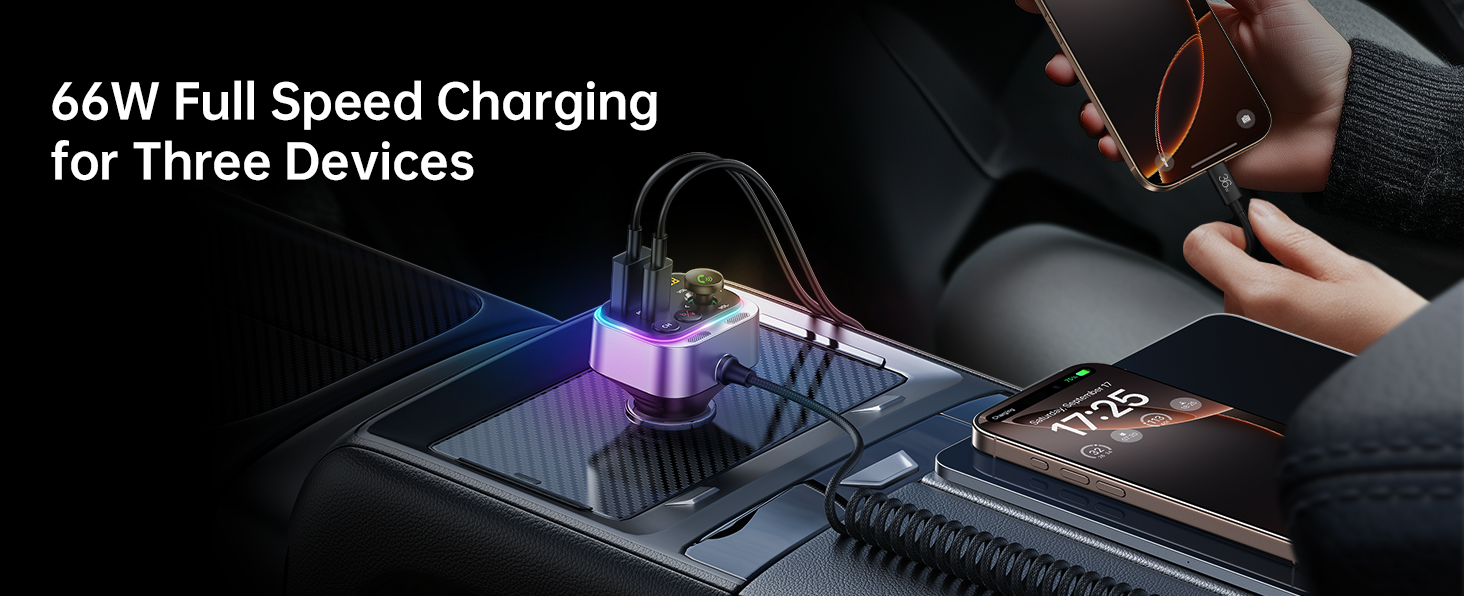
- 66W Fast Charge Adapter with USB-C Coiled Cable
- Latest Bluetooth 5.4 Chip for stable connection
- Stronger Dual Mics with CVC Noise Reduction for clear calls
- Bass Boosted & Hi-Fi Stereo Music
- LED Ambient Light Control
- Wide Compatibility with smartphones and vehicles (12-24V)


Кутуда эмне бар
- Syncwire Bluetooth 5.4 FM өткөргүч унаа адаптери
- 3 жылдык кепилдик
Орнотуу нускамалары
1-кадам: Күйгүзүү
Insert the Syncwire FM Transmitter into your car's cigarette lighter socket. The device will power on automatically and its LED display will light up.
Step 2: Tune FM Radio
Select an unused FM frequency on your car's radio. Choose a frequency that has no existing radio station broadcasting on it, typically indicated by static or a clear, empty channel.

Adjust your car's FM radio to an empty frequency, such as 103.00 MHz. Step 3: Match FM Frequency
On the Syncwire FM Transmitter, adjust its FM frequency to match the one you selected on your car radio. Use the 'CH' button or the multi-function knob to change the frequency.
Step 4: Pair Bluetooth
On your smartphone or Bluetooth-enabled device, enable Bluetooth and search for available devices. Select "SW-XC965" from the list to pair. Once paired, audio from your device will be transmitted to your car's speakers.
Pair your mobile device with the transmitter by selecting "SW-XC965" in your Bluetooth settings.
Иштөө нускамалары
Controls Overview
- FM Display: Учурдагы FM жыштыгын көрсөтөт.
- Multifunction Button (FM+/- / Volume+/- / Answer/Hang up/Reject):
- Үнүн жөндөө үчүн бураңыз.
- Чалууларга жооп берүү/аяктоо үчүн басыңыз.
- Long press to reject calls.
- Музыканы ойнотуу/тындыруу үчүн кыска басыңыз.
- Rotate to change FM frequency (after pressing CH button).
- CH баскычы: Press to enter FM frequency adjustment mode.
- Deep Bass/Light Switch ('b' button):
- Short press to activate/deactivate Deep Bass mode.
- Long press to turn the LED ambient light on/off.
- Large Mic: Үнсүз чалуу үчүн.
- USB-C кабели: Integrated coiled cable for charging.
- QC 3.0 Port: Quick Charge 3.0 USB-A port for fast charging.
- PD 30W Port: Power Delivery 30W USB-C port for fast charging.
Музыканы ойнотуу
Once paired via Bluetooth, music from your device will automatically play through your car's FM radio.
Deep Bass & Hi-Fi Stereo
To enhance your audio experience, press the 'b' button to toggle between standard mode and deep bass mode. This feature provides authentic Hi-Fi sound with boosted bass.

Hands-Free Чалуу
The transmitter features a dual-mic system with CVC noise suppression and echo-canceling technology for clear call quality.

- Чакырууга жооп берүү: Көп функционалдуу баскычты кыска басыңыз.
- Чакырууну аяктоо: Чалуу учурунда көп функциялуу баскычты кыска басыңыз.
- Чакырууну четке кагуу: Көп функциялуу баскычты көпкө басыңыз.
Заряддоо түзмөктөрү
The Syncwire FM Transmitter is equipped with a 66W combined power output, including a PD 3.0 port, a QC 3.0 port, and a 6ft built-in coiled USB-C cable. This allows you to charge up to three devices simultaneously.


LED Ambient Light Control
The transmitter features a vibrant LED display. You can turn the light on or off by long pressing the 'b' button according to your preference.

Техникалык тейлөө
To ensure optimal performance and longevity of your Syncwire FM Transmitter:
- Аппаратты таза, жумшак, кургак чүпүрөк менен сүртүңүз.
- Аппаратты экстремалдык температурага, тике күн нуруна же нымдуулукка дуушар кылуудан алыс болуңуз.
- Түзмөктү өз алдынча бөлүктөргө бөлүүгө же оңдоого аракет кылбаңыз. Оңдоо иштери үчүн ыйгарым укуктуу тейлөө кызматкерлерине кайрылыңыз.
- Ensure the cigarette lighter socket is clean and free of debris for a stable connection.
Проблемаларды чечүү
| Көйгөй | Чечим |
|---|---|
| No power/device not turning on |
|
| Статикалык же начар аудио сапаты |
|
| Bluetooth туташпай жатат |
|
| Заряддоо жай же иштебей жатат |
|
Техникалык шарттар
| Өзгөчөлүк | Деталь |
|---|---|
| Модель номери | SW-XC965 |
| Bluetooth версиясы | 5.4 |
| Киргизүү көлөмүtage | 12-24V |
| Заряддоо порттору | 1x PD 3.0 (USB-C), 1x QC 3.0 (USB-A), 1x Integrated USB-C Coiled Cable |
| Жалпы кубаттуулук | 66 Вт чейин |
| Микрофон | Dual Mics with CVC Noise Reduction |
| Кабелдин узундугу | 6ft (1.8m) coiled USB-C cable |
| Элемент Салмагы | 3.84 унция (0.11 килограмм) |
| Өлчөмдөр | 3.62 x 3.46 x 1.93 дюйм |
Кепилдик жана колдоо
This Syncwire product comes with a 3-year warranty. For technical support, warranty claims, or further assistance, please visit the official SYNCWIRE webсайтка же кардарларды тейлөөгө кайрылыңыз.
Official SYNCWIRE Store: SYNCWIRE Amazon Store
Коопсуздук маалыматы
Refer to general wireless audio adapter safety guidelines.
Продукт видеосу
Бул видео визуалдык көрүнүштү камсыз кылатview of the Syncwire Bluetooth 5.4 FM Transmitter, showcasing анын өзгөчөлүктөрү жана дизайны.


