1. Киришүү
This manual provides detailed instructions for the setup, operation, and maintenance of your TMEZON C31 Two-Way Video Calling Smart Camera. This device is designed to offer comprehensive indoor monitoring with advanced features such as two-way video and audio communication, 1080P HD resolution, 360-degree panoramic view, motion detection, and night vision. It is suitable for monitoring pets, children, or elderly family members, and for general home security.
2. Продукт бүтүп калдыview жана өзгөчөлүктөрү
The TMEZON C31 Smart Camera integrates several functionalities to enhance your home monitoring experience:
- Two-Way Video/Audio Communication: Features a 2.8-inch high-definition display and two-way video calling, enabling direct interaction with individuals or pets in the camera's vicinity.
- One-Button Call: Facilitates easy video calls between the camera and mobile phones. This is particularly useful for users who may find mobile phone operation challenging, such as elderly individuals or young children.
- 1080P HD WiFi Video: Delivers crystal clear, smooth live video, allowing you to monitor your home, children, elderly, or pets from anywhere. The camera operates on 2.4G WiFi networks (5G is not supported).
- Wide Angle & 360° Panoramic View: Equipped with a motion-activated sensor and a wide viewing angle, offering 360° horizontal and 60° vertical rotation for comprehensive coverage without blind spots.
- Crystal Clear Night Vision: Ensures clear visibility in low-light conditions, allowing for continuous monitoring around the clock.
- Кыймылды аныктоо жана эскертүүлөр: Provides real-time notifications to your mobile device upon detecting movement, ensuring you are aware of any activity.

Figure 2.1: TMEZON C31 Smart Camera highlighting key features like 1080P resolution, PTZ control, two-way video, one-button call, alarm push, motion tracking, two-way audio, night vision, local/cloud storage, and motion detection.

Figure 2.2: Illustration of the two-way video feature, showing a child communicating with a parent via the camera and a smartphone.
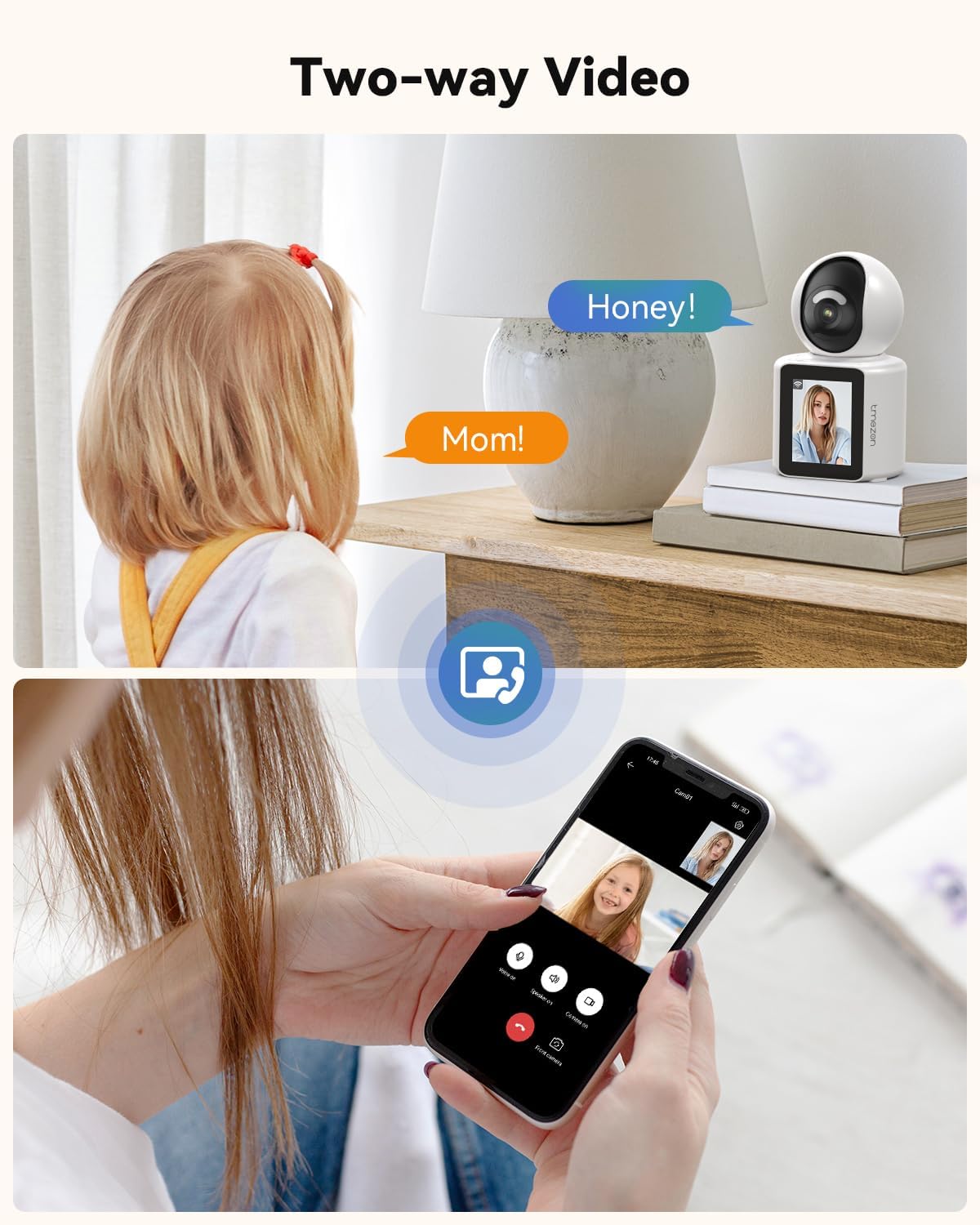
Figure 2.3: A hand pressing the call button on the camera, initiating a video call, emphasizing the ease of use for one-click communication.
3. Кутуда эмне бар
Upon unpacking your TMEZON C31 Smart Camera, please ensure all the following components are present:
- TMEZON C31 Smart Camera Unit
- Кубаттуу адаптер
- USB кубат кабели
- Колдонуучунун Колдонмосу (бул документ)

Figure 3.1: The camera unit, power adapter, and USB cable are shown as included accessories.
4. Орнотуу нускамалары
4.1 Камераны күйгүзүү
- Connect the USB power cable to the camera's Type-C port.
- Кубат адаптерин стандарттуу электр розеткасына сайыңыз.
- The camera will power on and display a welcome message on its screen.
4.2 Колдонмону жүктөп алуу жана орнотуу
- Scan the QR code provided in the quick start guide or on the product packaging using your smartphone's camera. This will direct you to download the "Im Cam" application.
- Alternatively, search for "Im Cam" in your device's app store (App Store for iOS, Google Play Store for Android) and install the application.
- Жаңы аккаунтка катталыңыз же сизде мурунтан эле бар болсо кириңиз.
Video 4.1: This video demonstrates the initial setup process, including connecting the camera to power and downloading the "Im Cam" application via QR code.
4.3 Wi-Fiга туташуу
The camera supports 2.4GHz Wi-Fi networks only. Ensure your smartphone is connected to a 2.4GHz Wi-Fi network during the setup process.
- Open the "Im Cam" app and follow the on-screen instructions to add a new device.
- Select "Wi-Fi Camera" as the connection method.
- The app will guide you through connecting the camera to your home Wi-Fi network. This typically involves scanning a QR code displayed on your phone with the camera's lens or using Bluetooth for initial pairing.
- If the device is not in the correct state for configuration, press and hold the reset button on the back of the device for more than 5 seconds to perform a reset.
- Once connected, the camera will display "Connecting..." and then confirm successful network connection.
Video 4.2: This video illustrates the process of connecting the camera to your Wi-Fi network using the mobile application.
5. Иштөө нускамалары
5.1 Колдонмо аркылуу алыстан мониторинг жүргүзүү
Once the camera is connected to the app, you can view live video, control the camera's movement, and access various features from your smartphone.
- Open the "Im Cam" app and select your camera from the device list.
- The live feed will appear. You can pinch to zoom in/out and use on-screen controls to pan (360° horizontally) and tilt (60° vertically) the camera.
- Ensure the app has access to your microphone and local network for full functionality.
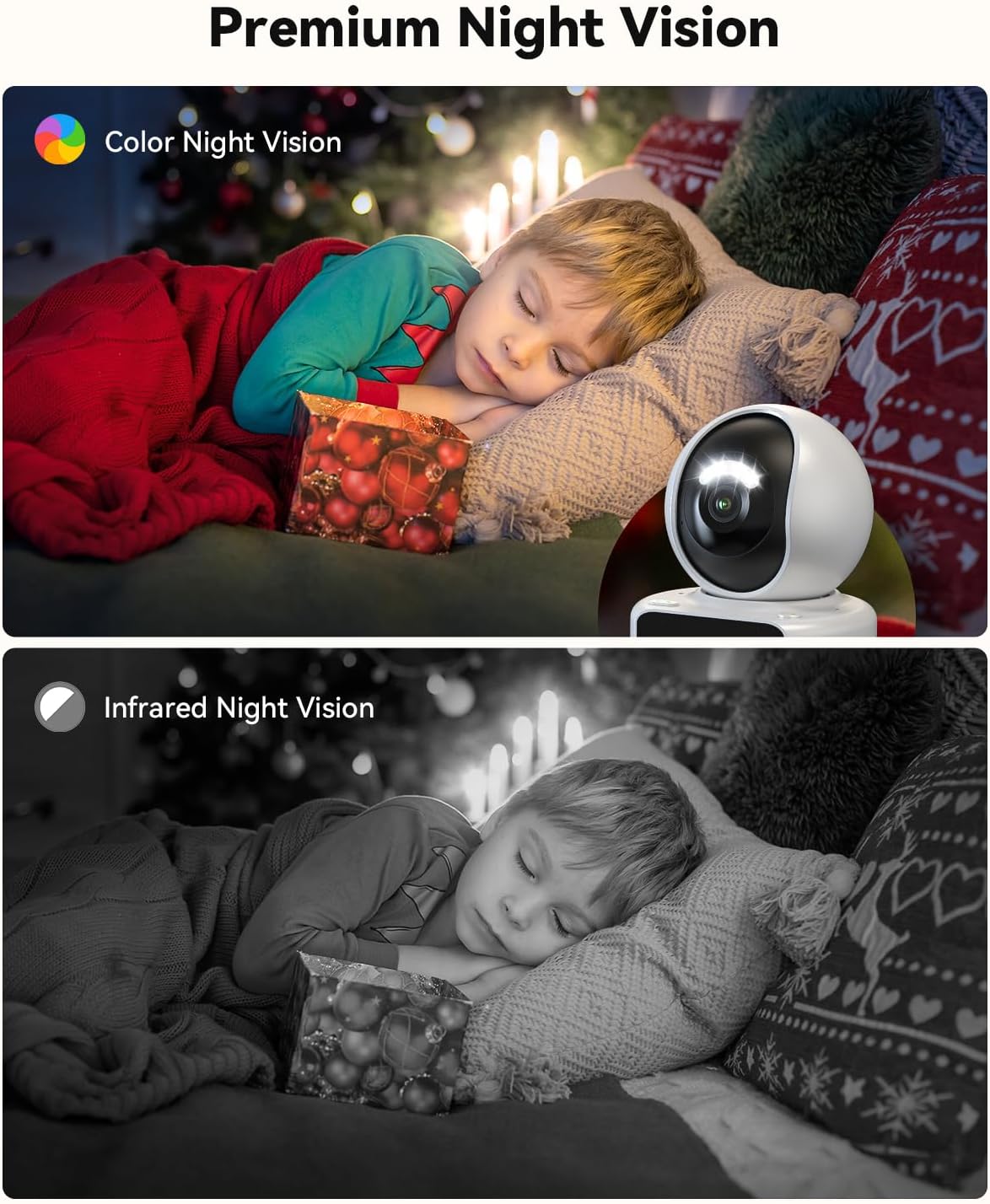
Figure 5.1: The camera's 360° panoramic view capability, allowing users to monitor an entire room from their smartphone.
5.2 Two-Way Video and Audio Calls
The camera supports both voice and video calls, allowing for real-time communication.
- Initiating a Call from the Camera: Press the call button on the camera unit. This will initiate a video call to the pre-configured mobile device(s) in the app settings.
- Receiving a Call on the Camera: When a call is initiated from the app to the camera, the camera's screen will display an incoming call notification. The user near the camera can answer the call directly from the camera unit.
- Initiating a Call from the App: Түз эфирден view in the "Im Cam" app, you can select "Voice Call" or "Video Call" to communicate with the person or pet near the camera.
Video 5.2: This video demonstrates the two-way video and audio calling feature, showing how to initiate and receive calls between the camera and a smartphone.

Figure 5.3: An illustration of video calls between two TMEZON C31 devices, emphasizing automatic connection after initiation.
5.3 Кыймылды аныктоо жана көзөмөлдөө
The camera is equipped with motion detection and tracking capabilities to keep you informed of any activity.
- When motion is detected, the camera can automatically track the movement.
- You will receive instant notifications on your mobile device through the "Im Cam" app.

Figure 5.4: The camera's motion tracking feature, showing it following a baby's movement within its field of view.
5.4 Түнкү көрүнүш
The camera provides clear surveillance even in complete darkness.
- Камера автоматтык түрдө жарык аз болгон шарттарда түнкү көрүү режимине өтөт.
- This ensures continuous monitoring and recording without interruption.

Figure 5.5: Comparison of color night vision and infrared night vision, demonstrating the camera's ability to capture clear images in the dark.
5.5 Сактоо параметрлери
Камера жаздырылган тамак-аш үчүн жергиликтүү жана булут сактагычын колдойтtage.
- Micro SD картасы: Жергиликтүү сактагыч үчүн атайын уячага Micro SD картаны (128 ГБ чейин, кошулган эмес) салыңыз.
- Булуттагы сактагыч: Cloud storage options may be available through the "Im Cam" app (subscription may be required).
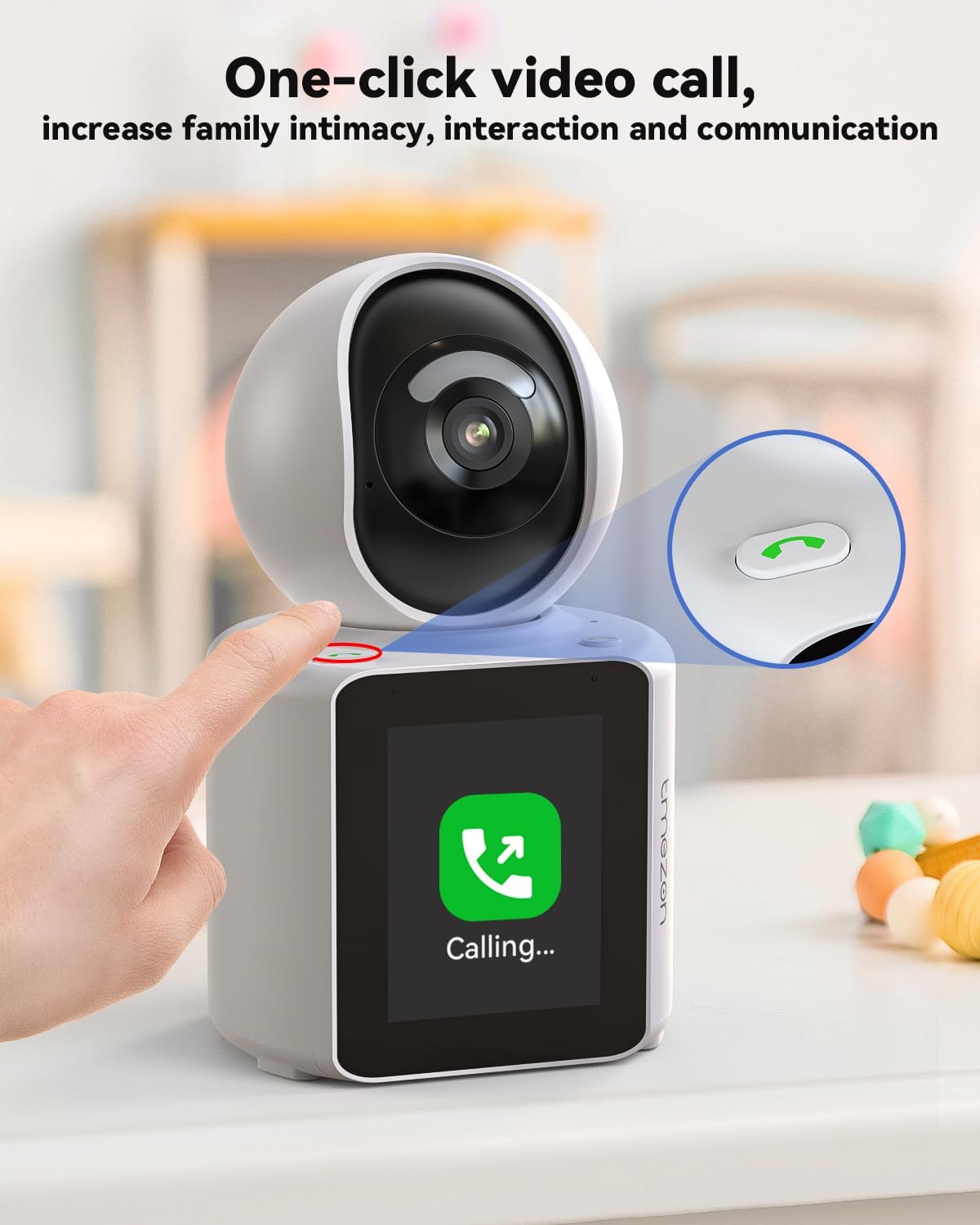
Figure 5.6: The camera unit showing the Micro SD card slot for local video storage.
5.6 Камераны бөлүшүү мүмкүнчүлүгү
You can share access to your camera with other family members or trusted individuals through the "Im Cam" app.
- Колдонмодо камеранын жөндөөлөрүнө өтүп, бөлүшүү опциясын табыңыз.
- Add the other party's account (they must also have an "Im Cam" account) to grant them viewмүмкүндүк алуу.
- Note: The camera supports only one user to simultaneously watch the surveillance screen.

Figure 5.7: The "Im Cam" app interface demonstrating how to share camera access with family members.
6. Техникалык тейлөө
- Тазалоо: Use a soft, dry cloth to clean the camera lens and body. Avoid using liquid cleaners or aerosols.
- Программалык камсыздоо жаңыртуулары: Regularly check the "Im Cam" app for firmware updates to ensure optimal performance and access to new features.
- Жайгашкан жери: Place the camera on a stable surface or mount it securely to prevent accidental falls. Ensure it is within range of your 2.4GHz Wi-Fi network.
7. Кыйынчылыктарды
| Көйгөй | Мүмкүн себеп | Чечим |
|---|---|---|
| Камера Wi-Fi'га туташа албай жатат. | Incorrect Wi-Fi password, 5GHz network used, weak signal, or temporary network issue. | Ensure you are connecting to a 2.4GHz Wi-Fi network. Verify the Wi-Fi password. Move the camera closer to the router. Try resetting the camera (press and hold reset button for 5 seconds) and re-pairing. |
| No live video feed in the app. | Camera offline, poor internet connection, or app permissions. | Check if the camera is powered on and connected to Wi-Fi. Verify your phone's internet connection. Ensure the "Im Cam" app has necessary permissions (microphone, local network). Restart the app. |
| Эки тараптуу аудио бүдөмүк же жаңырыктуу. | Interference, microphone/speaker too close, or network latency. | Ensure there is no obstruction near the microphone or speaker. Avoid placing the camera too close to other audio devices. Check your network stability. |
| Кыймылды аныктоо эскертмелери алынган жок. | Motion detection settings disabled, app notifications off, or camera offline. | Verify motion detection is enabled in the app settings. Check your phone's notification settings for the "Im Cam" app. Ensure the camera is online. |
| Camera screen is blank or unresponsive. | Электр кубаты көйгөйү, программалык камсыздоонун иштебей калышы. | Check power connection. Try unplugging and replugging the camera. If unresponsive, perform a hard reset. |
8. Техникалык шарттар
| Өзгөчөлүк | Деталь |
|---|---|
| Модель номери | C31 |
| Видео тартуунун резолюциясы | 1080p |
| Байланыш технологиясы | Зымсыз (Wi-Fi) |
| Зымсыз байланыш технологиясы | Wi-Fi (2.4 ГГц гана) |
| Шайкеш түзмөктөр | Smartphone (via APP) |
| Controller Type | APP |
| Power Source | Кубаттуу адаптер |
| Ички/тышкы колдонуу | Indoor |
| Өзгөчө өзгөчөлүк | 360° PTZ (Pan/Tilt/Zoom) |
| Эскертүү түрү | Кыймыл гана |
| Продукциянын өлчөмдөрү | 3.94 x 3.94 x 3.94 дюйм |
| Элемент Салмагы | 1.7 фунт |
| Монтаж түрү | Шыпка орнотуу, дубалга орнотуу |
| Видео тартуу форматы | MPEG-4 |
| Батареялар керекпи? | Жок |
9. Кепилдик жана колдоо
Кепилдик жөнүндө маалымат жана техникалык колдоо алуу үчүн расмий TMEZON сайтына кайрылыңыз webсайтка же түздөн-түз кардарларды тейлөөгө кайрылыңыз. Кепилдик дооматтар үчүн сатып алуу дүмүрчөгүңүздү сактаңыз.
Manufacturer: TMEZON


