1. Киришүү
Сатып алганыңыз үчүн рахматasing the XTRONS IQ82A3AP Car Stereo GPS system. This device is specifically designed for Audi A3 models manufactured between 2003 and 2012. It integrates advanced features such as Android 12 operating system, an 8-core processor, 8GB RAM, 256GB ROM, GPS navigation, Wi-Fi, 4G connectivity, Bluetooth, Apple CarPlay, and Android Auto. This manual provides essential information for proper installation, operation, and maintenance of your new car stereo. Please read this manual thoroughly before using the product to ensure safe and optimal performance.
2. Коопсуздук маалыматы
- Кесиптик орнотуу сунушталат: Due to the complexity of vehicle electrical systems, professional installation by a qualified technician is strongly recommended to prevent damage to the unit or your vehicle.
- Электр камсыздоо: Ensure the unit is connected to a 12V DC power supply with negative grounding. Incorrect voltagе зыян келтириши мүмкүн.
- Зымдар: Do not modify or cut any wires unless explicitly instructed. Incorrect wiring can lead to malfunctions or electrical hazards.
- Айдоо коопсуздугу: Айдап бара жатып, түзмөктүн татаал функцияларын иштетпеңиз же видеолорду көрбөңүз. Жол коопсуздугун ар дайым биринчи орунга коюңуз.
- Температура: Аппаратты экстремалдык температурага же түз күн нуруна узак убакытка калтыруудан сактаңыз.
- Нымдуулук: Keep the unit away from water and excessive moisture to prevent electrical shock or damage.
- Тазалоо: Тазалоо үчүн жумшак, кургак чүпүрөктү колдонуңуз. Абразивдүү тазалагычтардан же эриткичтерден качыңыз.
3. Пакеттин мазмуну
Please check the contents of your package against the list below. If any items are missing or damaged, contact your retailer.
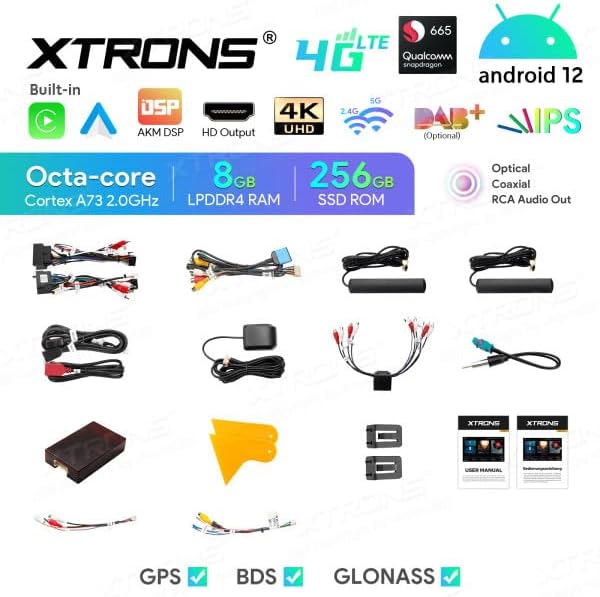
Image: All components included in the XTRONS IQ82A3AP package.
- XTRONS IQ82A3AP Head Unit
- Электр кабели
- CANBUS декодери
- GPS антеннасы
- 4G Антенна
- USB кабелдери
- RCA Output Cables
- SIM картаны окугуч
- External Microphone Input Cable (Microphone not included)
- User Manual
- Installation Tools/Brackets
- TPMS Support Kit (TPMS sensors not included)
4. Продукт бүтүп калдыview
The XTRONS IQ82A3AP is an advanced car multimedia system featuring an 8-inch HD touchscreen display. It runs on Android 12 and is powered by an 8-core processor with 8GB RAM and 256GB internal storage.
4.1 Негизги өзгөчөлүктөрү
- Операция системасы: Android 12
- Процессор: Octa-core Cortex A73 2.0GHz
- Эстутум: 8GB LPDDR4 RAM
- Сактагыч: 256GB SSD ROM
- Дисплей: 8 дюймдук HD экран (1280x720 чечилиште)
- Байланыш: Built-in WiFi, 4G LTE (with SIM card reader), Bluetooth, USB
- Навигация: GPS, BDS, GLONASS support
- Смартфон интеграциясы: Built-in Apple CarPlay and Android Auto
- Аудио: AKM DSP, Optical and Coaxial RCA Audio Out, Equalizer
- Видео: 4K UHD Video Playback, HD Output
- Унаа интеграциясы: CANBUS support for steering wheel controls and vehicle information display.
- Кеңейтүү: Support for DAB+, OBD2, DVR, External Microphone, TPMS (accessories sold separately).
4.2 Өлчөмдөр
Refer to the diagram below for the physical dimensions of the head unit to ensure compatibility with your vehicle's dashboard.
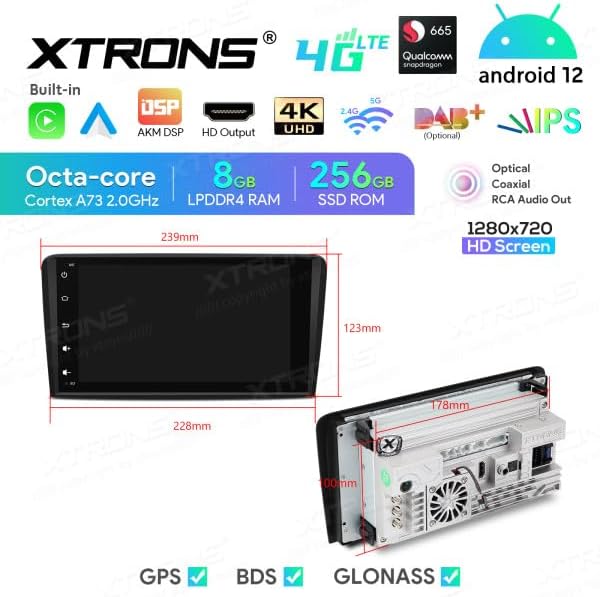
Сүрөт: алдыңкы жана каптал view dimensions of the XTRONS IQ82A3AP head unit. Front panel width is approximately 228mm at the top and 239mm at the bottom, with a height of 123mm. The main unit depth is 178mm.
5. Орнотуу
5.1 Орнотуу
Installation of the XTRONS IQ82A3AP requires technical knowledge and experience with car audio systems. It is highly recommended to have the unit installed by a certified professional to avoid damage to the unit or your vehicle's electrical system. Incorrect installation can void your warranty.
- Унаа шайкештиги: This unit is designed for Audi A3 models (2003-2012). Ensure your vehicle's dashboard opening matches the unit's dimensions.
- Батареяны ажыратыңыз: Before starting any installation, disconnect the vehicle's negative battery terminal to prevent electrical shorts.
- Эски бирдикти алып салуу: Carefully remove the existing car stereo and any associated trim panels.
- Зымдарды туташтыруу: Connect the provided wiring harness, CANBUS decoder, GPS antenna, 4G antenna, and other necessary cables. Ensure all connections are secure. Refer to the wiring diagram provided with the unit for specific connections.
- Монтаждоо: Secure the head unit into the dashboard using the provided brackets and screws.
- Батареяны кайра туташтыруу: Бардык туташуулар орнотулгандан жана түзмөк бекем орнотулгандан кийин, унаанын аккумуляторун кайра туташтырыңыз.
5.2 Баштапкы күйгүзүү жана конфигурация
Орнотуудан кийин, блокту күйгүзүңүз жана баштапкы орнотуу үчүн экрандагы көрсөтмөлөрдү аткарыңыз.
- Биринчи жүктөө: The system may take longer to boot up for the first time.
- Тил орнотуулары: Select your preferred language (e.g., Italian, English).
- Убакыт жана дата: Set the correct time zone, date, and time.
- Wi-Fi туташуусу: Connect to an available Wi-Fi network to enable internet access and download updates.
- 4G SIM Card: Insert your 4G SIM card into the provided reader for mobile data connectivity.
- GPS калибрлөө: Ensure the GPS antenna is properly positioned for optimal signal reception. The system will automatically detect GPS satellites.
6. Иштөө нускамалары
This section details the primary functions and operations of your XTRONS IQ82A3AP unit.
6.1 Негизги интерфейс жана башкаруу элементтери
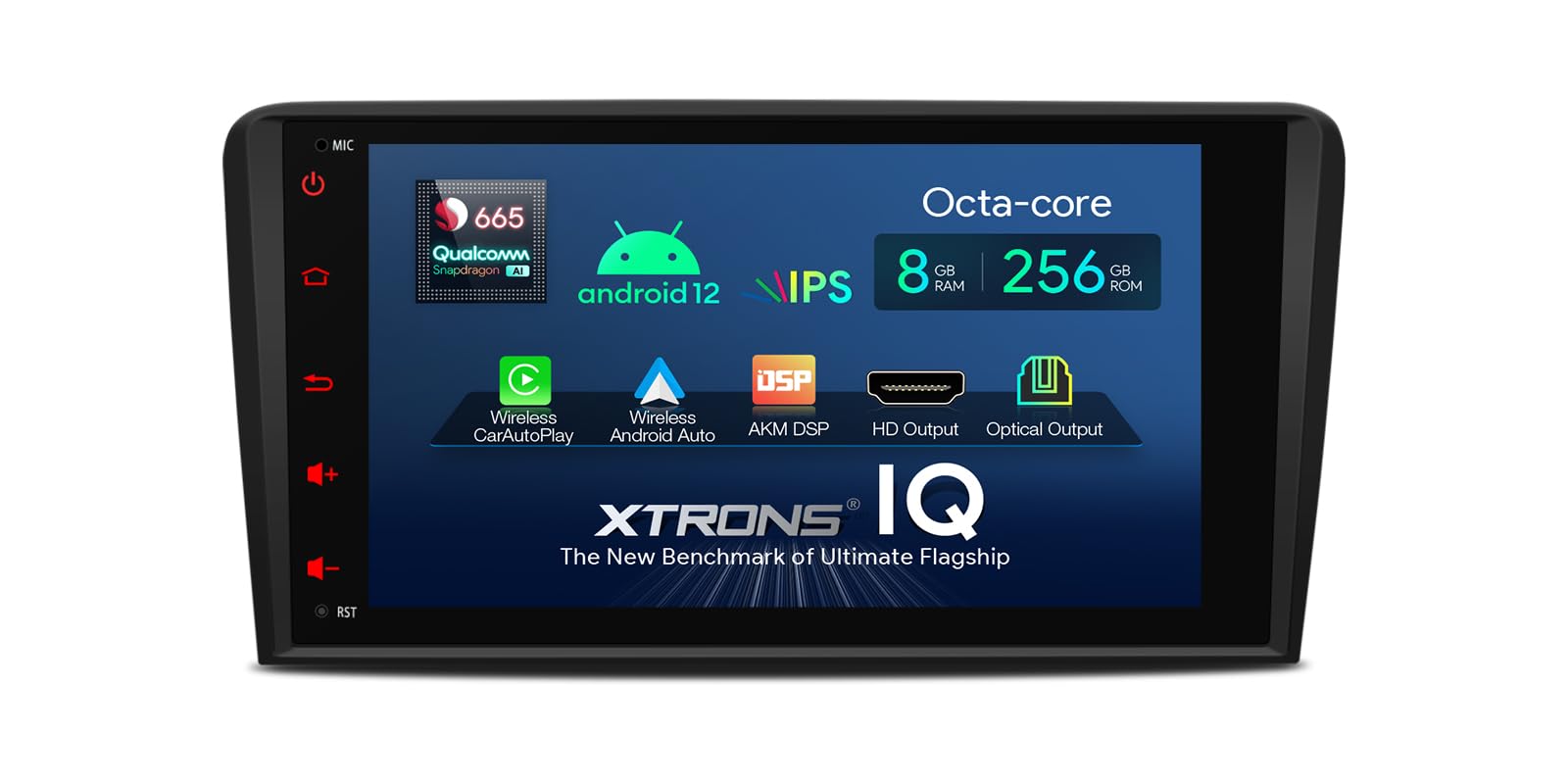
Image: Main user interface of the XTRONS IQ82A3AP, showing navigation, music, and Bluetooth shortcuts.
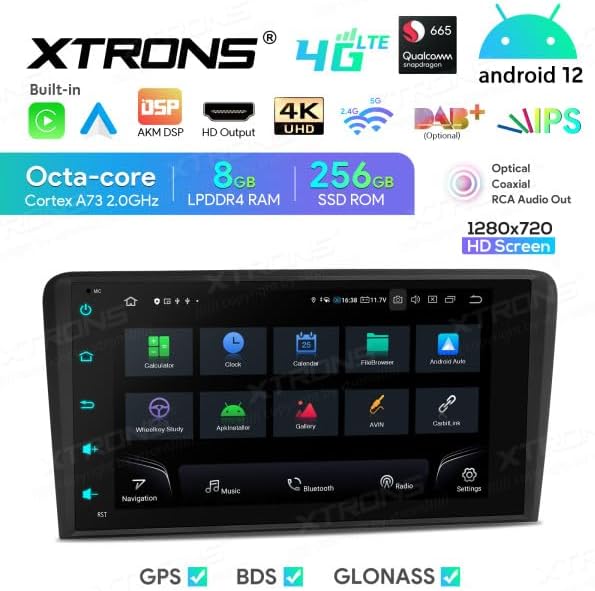
Image: Applications screen displaying various pre-installed and user-downloaded apps.
The unit features an intuitive touchscreen interface. Swipe left or right to access different screens and applications. Physical buttons on the side provide quick access to common functions like Home, Back, Volume, and Power.
6.2 Navigation (GPS/BDS/GLONASS)
The unit supports multiple satellite navigation systems for accurate positioning. Tap the "Navigation" icon on the home screen to launch the pre-installed navigation application or any other navigation app you download from the Google Play Store.
- Маршрутту пландаштыруу: Enter your destination to get turn-by-turn directions.
- Карта жаңыртуулары: Connect to Wi-Fi or 4G to download map updates.
6.3 Bluetooth байланышы
Телефонуңузду Bluetooth аркылуу туташтырып, үнсүз чалуу жана аудио агымы.
- "Орнотуулар" > "Bluetooth" бөлүмүнө өтүңүз.
- Enable Bluetooth on both the head unit and your smartphone.
- Издөө available devices on your smartphone and select "XTRONS IQ82A3AP" (or similar name).
- Жупташтыруу кодун эки түзмөктө тең ырастаңыз.
- Once paired, you can access your phonebook, make calls, and play music.
6.4 Wi-Fi and 4G Internet
The unit supports both Wi-Fi and 4G connectivity for internet access.
- Wi-Fi: Go to "Settings" > "Network & Internet" > "Wi-Fi" to connect to a local Wi-Fi hotspot.
- 4G: Insert a valid 4G SIM card into the provided SIM card reader. The unit will automatically detect the network. Ensure the 4G antenna is properly connected.
6.5 Apple CarPlay жана Android Auto
The unit has built-in support for Apple CarPlay and Android Auto, allowing seamless integration with your smartphone for navigation, music, messages, and more.
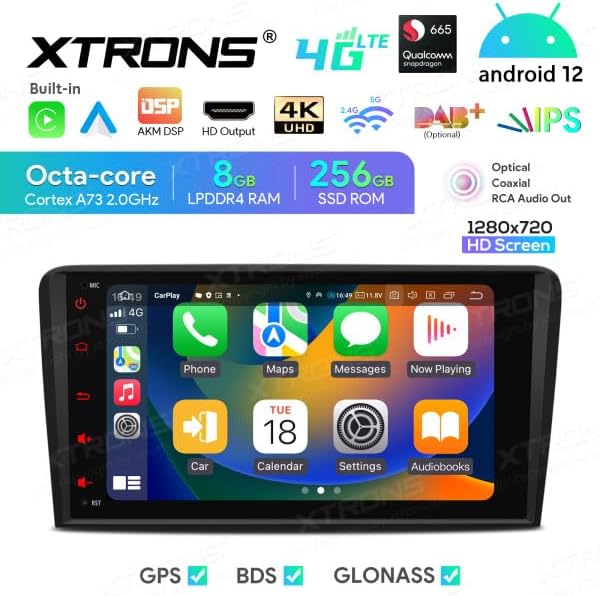
Image: Apple CarPlay interface displayed on the unit.

Image: Android Auto interface displayed on the unit.
- Байланыш: Connect your iPhone or Android phone via a USB cable to the unit's USB port.
- Ишке киргизүү: The system should automatically detect and launch CarPlay or Android Auto. If not, tap the corresponding icon on the app screen.
6.6 DSP эквалайзери
The built-in Digital Signal Processor (DSP) allows for advanced audio customization. Access the equalizer settings to adjust sound frequencies, balance, fader, and other audio enhancements to suit your preferences.

Image: DSP Equalizer interface showing various frequency bands and audio settings.
6.7 USB Playback and Screen Mirroring
- USB ойнотуу: Connect a USB drive to the unit's USB port to play audio, video, or view images. The unit supports up to 128GB USB drives.
- Экранды чагылдыруу: Use the screen mirroring function to display your smartphone's screen directly on the head unit. Refer to the specific app (e.g., Zlink, EasyConnect) for instructions.
6.8 CANBUS интеграциясы
The included CANBUS decoder ensures seamless integration with your Audi A3's existing systems. This allows the unit to support original steering wheel controls and display vehicle information on the board display (if applicable).
- Рулдун башкаруу элементтери: Configure the steering wheel buttons through the unit's settings to control audio playback, volume, and calls.
- Унаа жөнүндө маалымат: Certain vehicle data may be displayed on the unit or the original vehicle display, depending on the vehicle model and CANBUS configuration.
6.9 Кошумча аксессуарлар (кошулбайт)
The XTRONS IQ82A3AP supports various optional accessories to enhance its functionality:
- DAB+ Box: Санариптик аудио берүү үчүн.
- OBD2 Diagnostic Tool: Унааларды диагностикалоо үчүн.
- DVR Camera: For dash camera recording.
- Тышкы микрофон: Чалуунун сапатын жакшыртуу үчүн.
- TPMS (Tire Pressure Monitoring System) Kit: To monitor tire pressure.
7. Техникалык тейлөө
7.1 Агрегатты тазалоо
- Use a soft, dry, lint-free cloth to clean the screen and exterior surfaces.
- Do not use abrasive cleaners, waxes, or solvents as they may damage the finish or screen.
- Тазалоочу суюктуктарды түз эле агрегатка чачуудан алыс болуңуз.
7.2 Программалык камсыздоо жаңыртуулары
Periodically check for software updates to ensure optimal performance and access to new features. Updates can typically be found in the system settings under "About device" or "System updates". Connect to a stable Wi-Fi network before downloading and installing updates.
Note: Software updates are provided by the manufacturer, and their availability is not guaranteed indefinitely.
8. Кыйынчылыктарды
If you encounter issues with your XTRONS IQ82A3AP, refer to the following common problems and solutions. If the problem persists, contact customer support.
| Көйгөй | Мүмкүн себеп | Чечим |
|---|---|---|
| Түзмөк күйбөйт. | Электр энергиясы жок; зымдар туура эмес туташтырылган; сактагыч күйүп кеткен. | Check power connections; verify wiring according to diagram; check vehicle's fuse box and unit's fuse. |
| Үн жок. | Үн өтө төмөн; үнсүз иштетилген; динамик зымдары маселеси. | Increase volume; check mute setting; verify speaker connections. |
| GPS сигналы начар же жоголду. | GPS antenna improperly placed or disconnected; environmental interference. | GPS антеннасынын таза болушун текшериңиз view асмандын жана коопсуз байланышта. |
| Bluetooth байланышы көйгөйлөрү. | Bluetooth not enabled; device not discoverable; interference. | Ensure Bluetooth is enabled on both devices; make device discoverable; try re-pairing. |
| Сенсордук экран жооп бербейт. | System freeze; temporary software glitch. | Restart the unit (press and hold power button); perform a factory reset (data will be lost). |
9. Техникалык шарттар
| Өзгөчөлүк | Деталь |
|---|---|
| Бренд | XTRONS |
| Модел | IQ82A3AP |
| Операция системасы | Android 12 |
| Процессор | Окта ядролуу |
| RAM | 8 ГБ |
| ROM (ички сактагыч) | 256 ГБ |
| Screen Size | 8 дюйм |
| Screen Resolution | 1280x720 HD |
| Сенсордук экран түрү | Capacitive |
| Байланыш технологиясы | Bluetooth, Wi-Fi, 4G, Apple CarPlay, Android Auto, USB |
| Өзгөчөлүктөр | Bluetooth, GPS, BDS, GLONASS, DSP, 4K UHD Video, HD Output, CANBUS |
| Монтаж түрү | On-dash |
| Камтылган компоненттер | SIM Card Reader, TPMS Support Kit |
| Унаа кызматынын түрү | Automobile (Audi A3 2003-2012) |
10. Кепилдик жана колдоо
XTRONS products are designed for reliability and performance. For warranty information, please refer to the warranty card included with your product or visit the official XTRONS webсайт. Кепилдик дооматтар үчүн сатып алганыңыздын далилин сактаңыз.
For technical support, troubleshooting assistance, or inquiries about optional accessories, please contact XTRONS customer service through their official webсайтка же продуктуну сатып алган сатуучуга.


