Introduction
This manual provides essential information for the safe and efficient use of your Itel L4365 43-inch Full HD Smart LED TV. Please read these instructions carefully before operating the device and retain them for future reference.
The Itel L4365 is a 43-inch Full HD Smart LED TV featuring a resolution of 1920x1080 pixels, a 60 Hz refresh rate, and a 178-degree wide viewing angle. It includes smart features such as built-in Wi-Fi, Chromecast, and pre-installed streaming applications.
Маанилүү коопсуздук маалыматы
Өрт, электр шок жана жаракат алуу коркунучун азайтуу үчүн бул телевизорду колдонууда ар дайым негизги коопсуздук чараларын сактаңыз.
- Телевизорду жамгырга же нымга тийгизбеңиз.
- Телевизорду ачпаңыз casing; бардык тейлөөлөрдү квалификациялуу кызматкерлерге тапшырыңыз.
- Телевизордун айланасын туура желдетүүнү камсыз кылыңыз.
- Телевизор менен кошо берилген кубат шнурын гана колдонуңуз.
- Телевизорду күн нурунан, жылуулук булактарынан жана күчтүү магнит талаасынан алыс кармаңыз.
Орнотуу колдонмосу
1. Кутудан чыгаруу жана Пакеттин мазмуну
Carefully remove the TV and all accessories from the packaging. Verify that all components are present:
- Itel L4365 Smart LED TV
- Алыстан башкаруу
- Электр кабели
- Колдонуучунун Колдонмосу (бул документ)
- Кепилдик картасы
- Table Stand Components
- Wall Mount Bracket (if included)
2. Телевизордун стендин же дубалга орноткучту орнотуу
You can choose to place the TV on a table using the included stand or mount it on a wall. For wall mounting, professional installation is recommended.
Стол стенди орнотуу:
- Экранга зыян келтирбөө үчүн телевизорду жумшак, тегиз бетке ылдый каратып коюңуз.
- Стенддин компоненттерин телевизордун түбүндөгү бурама тешиктер менен тегиздеңиз.
- Берилген бурамалар менен стенддерди бекитиңиз. Алардын бекем кысылганын текшериңиз.
- Сыналгыны этияттык менен тик абалына туруктуу, түз жерде көтөрүңүз.
Дубалга орнотуу:
If using a wall mount, refer to the instructions provided with your specific wall mount kit. Ensure the wall can support the weight of the TV. Amazon Home Services can arrange installation.
3. Тышкы түзмөктөрдү туташтыруу
The Itel L4365 TV offers various connectivity options:
- HDMI порттору (x2): Приставкаларды, Blu-ray ойноткучтарын, оюн консолдорун же HDMI иштетилген башка түзмөктөрдү туташтырыңыз.
- USB порттору (x2): Медиа ойнотуу үчүн USB сактагыч түзмөктөрдү туташтырыңыз.
- RJ45 Порт: Connect to your local area network (LAN) for wired internet access.
- AV киргизүү: Композиттик видео жана стерео аудиону колдонгон эски түзмөктөр үчүн.
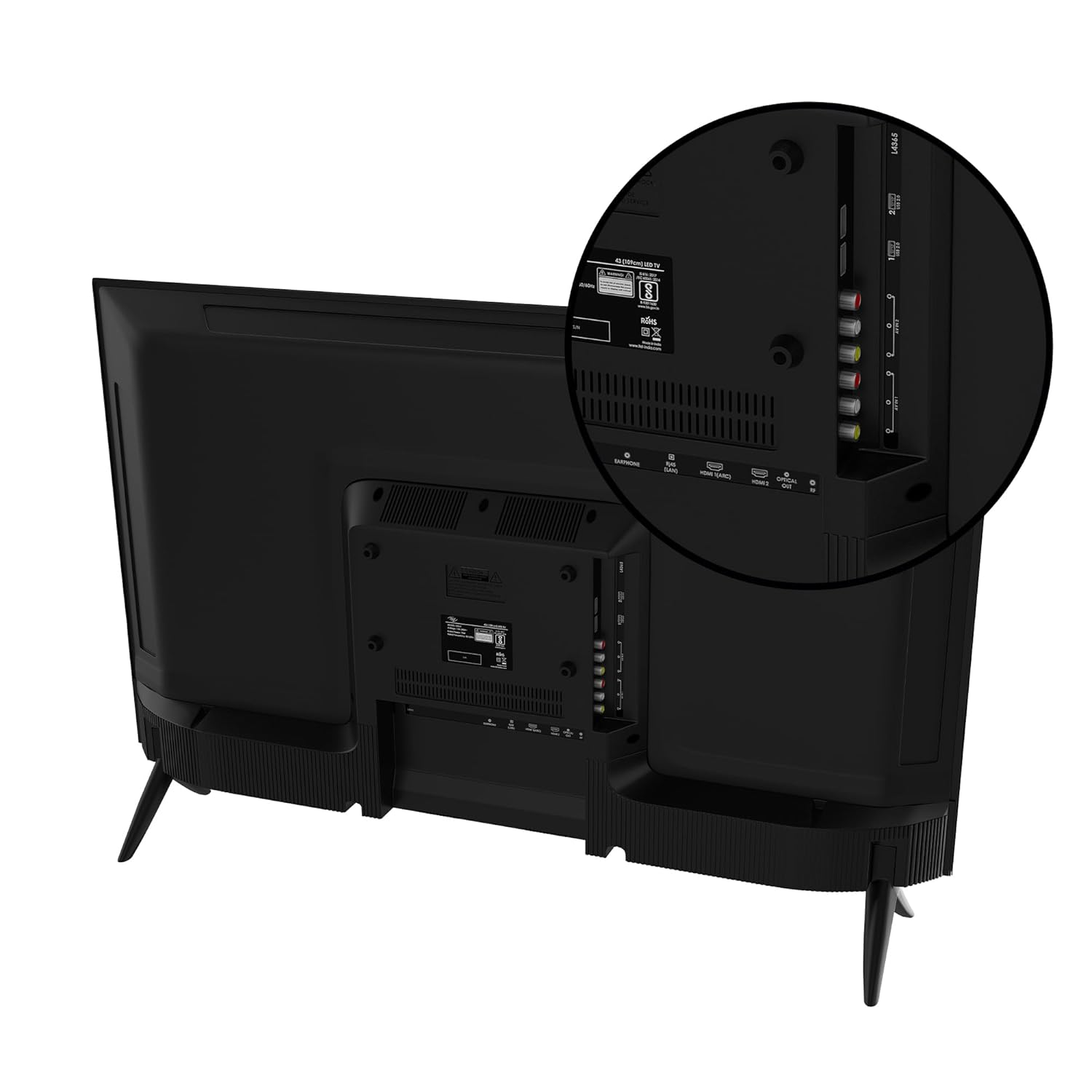
Сүрөт: Арткы view of the Itel L4365 TV, highlighting the HDMI, USB, and other input ports for connecting external devices.
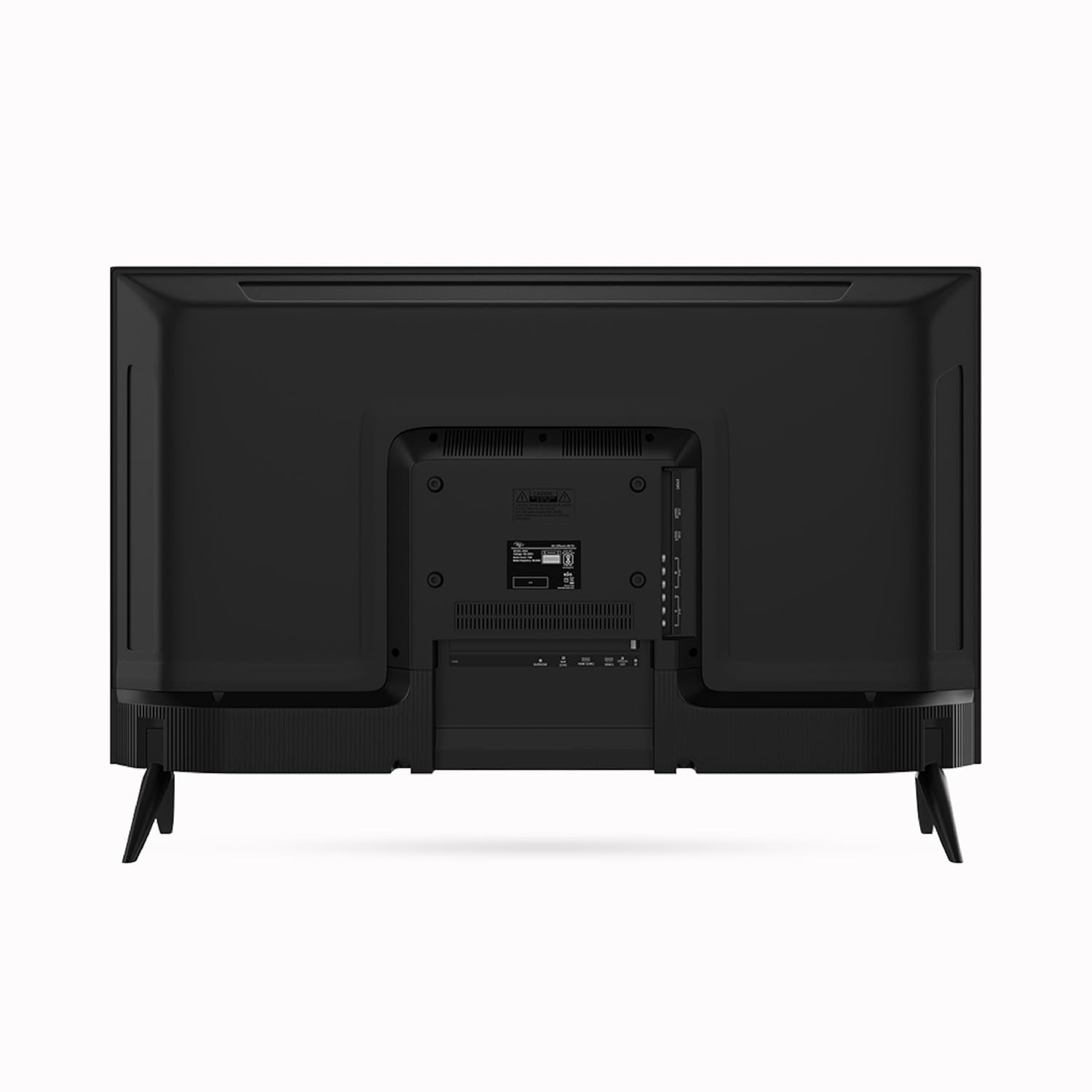
Сүрөт: Толук арткы бети view of the Itel L4365 TV, showing the overall design and stand attachment points.

Сүрөт: Side profile of the Itel L4365 TV, illustrating its slim design.
4. Телевизорду күйгүзүү
- Кубат шнурын сыналгынын кубат киресине, анан дубал розеткасына бекем туташтырыңыз.
- Сыналгыны күйгүзүү үчүн сыналгыдагы же пульттун кубат баскычын басыңыз.
- Баштапкы орнотуу үчүн, анын ичинде тилди тандоо, тармакка туташуу жана каналдарды сканерлөө үчүн экрандагы көрсөтмөлөрдү аткарыңыз.
Иштөө нускамалары
1. Алыстан башкаруу
The TV comes with a smart remote control featuring direct keys for popular streaming services. Ensure batteries are correctly inserted. The remote uses infrared technology.
2. Smart TV өзгөчөлүктөрү
Your Itel L4365 TV is equipped with a range of smart features for enhanced entertainment:
- Алдын ала орнотулган колдонмолор: Access popular streaming services like Netflix, Prime Video, and YouTube directly.
- Wi-Fi туташуусу: Интернетке кирүү үчүн үйүңүздөгү зымсыз тармакка туташыңыз.
- Chromecast камтылган: Мазмунду шайкеш келген смартфонуңуздан же планшетиңизден түз эле телевизорго чыгарыңыз.

Image: The Itel L4365 TV displaying logos of pre-installed OTT applications such as YouTube, Zee5, SonyLIV, and Prime Video.

Image: The Itel L4365 TV demonstrating Chromecast Built-in functionality, with a smartphone mirroring its display to the TV.
3. Дисплей орнотуулары
The TV features a Full HD Crystal Clear Display with Dynamic Contrast and Dynamic Colour Enhancer. You can adjust picture settings such as brightness, contrast, color, and sharpness through the TV's menu to suit your viewартыкчылыктарды алуу.

Image: The Itel L4365 TV highlighting its frameless design for an immersive viewтажрыйбасы.
4. Аудио орнотуулары
The TV is equipped with 12+12 Watts output and Dolby Audio, providing a rich sound experience. You can select from built-in multi-scenario sound effects (e.g., Standard, Music, Movie) or customize equalizer settings via the audio menu.

Image: The Itel L4365 TV integrated into a living room, with visual cues representing 24W Dolby Audio for an immersive sound experience.
Техникалык тейлөө
Телевизорду тазалоо
- Тазалоодон мурун дайыма сыналгыдан ажыратыңыз.
- Экранды жана шкафты сүртүү үчүн жумшак, кургак чүпүрөктү колдонуңуз.
- өжөр белгилери үчүн, жеңил гampкездемени суу же жумшак, абразивдүү эмес экран тазалагыч менен сүртүңүз. Тазалоочу каражатты эч качан түз экранга чачпаңыз.
- Спирт, бензол, эритүүчү же башка учуучу заттарды колдонуудан алыс болуңуз, анткени алар сыналгыга зыян келтириши мүмкүн.
Кам көрүү жана сактоо
- Желдетүүчү тешиктерди жаппаңыз.
- Сыналгыга оор нерселерди коюудан алыс болуңуз.
- If storing the TV for an extended period, ensure it is kept in a cool, dry place, preferably in its original packaging.
Проблемаларды чечүү
Колдоо кызматына кайрылуудан мурун, кеңири таралган көйгөйлөрдү чечүү үчүн төмөнкү чечимдерди колдонуп көрүңүз:
| Көйгөй | Мүмкүн болгон себеп / Чечим |
|---|---|
| Күч жок | Ensure the power cord is securely connected to both the TV and the power outlet. Check if the power outlet is working. |
| Сүрөт жок, бирок үн бар | Check the input source. Press the 'Source' button on the remote to select the correct input (HDMI, AV, etc.). |
| Үн жок, бирок сүрөт бар | Check the volume level. Ensure 'Mute' is not activated. Check audio settings in the TV menu. |
| Пульт иштебей жатат | Батареяларды текшерип, алмаштырыңыз. Пульт менен сыналгынын IR сенсорунун ортосунда эч кандай тоскоолдуктар жок экенин текшериңиз. |
| Smart features not connecting to Wi-Fi | Ensure your Wi-Fi router is on and working. Re-enter the Wi-Fi password in the TV's network settings. Try restarting both the TV and the router. |
Техникалык шарттар
Detailed technical specifications for the Itel L4365 Smart LED TV:

Сүрөт: алдыңкы view of the Itel L4365 TV with its physical dimensions (width 965mm, height 570mm, depth 85mm) clearly indicated.
| Өзгөчөлүк | Деталь |
|---|---|
| Бренд | Itel |
| Модел | L4365 |
| Screen Size | 43 дюйм (108 см) |
| Дисплей технологиясы | LED |
| Резолюция | Толук HD (1920 x 1080 пиксел) |
| Жаңыртуу ылдамдыгы | 60 Гц |
| Viewбурч | 178 градус |
| Аспект катышы | 16:9 |
| Үн чыгаруу | 12 Вт + 12 Вт (жалпысынан 24 Вт) |
| Аудио технологиясы | Dolby Audio, Built-in Multi-Scenario Sound Effects |
| HDMI порттору | 2 |
| USB порттору | 2 |
| Байланыш | Wi-Fi, RJ45 (LAN) |
| Smart Features | Netflix, Prime Video, YouTube, Chromecast Built-in |
| Эс | 512MB RAM + 4GB Storage |
| Монтаж түрү | Table Mount / Wall Mount |
| Продукциянын өлчөмдөрү (LxWxH) | 965 x 85 x 570 см (болжол менен 96.5 x 8.5 x 57 см) |
| Элемент моделинин номери | L4365 |
| Дата биринчи жеткиликтүү | 11 январь 2024 жыл |
Кепилдик маалымат
The Itel L4365 Smart LED TV comes with a 2 жылдык кепилдик provided by Itel from the date of purchase. Please retain your purchase receipt for warranty claims. For detailed terms and conditions, refer to the warranty card included in the package or visit the official Itel webсайт.
Кардарларды колдоо
For installation, wall mounting, or product demonstration services, please contact Amazon Home Services. For any other product-related inquiries, technical assistance, or warranty support, please contact Itel customer support. You can find toll-free numbers and contact details on the official Itel brand webсайт.
зыярат кылыңыз Itel Store on Amazon көбүрөөк маалымат алуу үчүн.


