AquilaPro Laser Measuring Tool
User Manual
Модел: KL02060
1. Киришүү
This manual provides comprehensive instructions for the safe and effective use of your AquilaPro Laser Measuring Tool. Designed for precision and ease of use, this compact device offers various measurement modes for both professional and home applications. Please read this manual thoroughly before operation and retain it for future reference.

Figure 1: AquilaPro Laser Measuring Tool
2. Коопсуздук маалыматы
WARNING: Laser Radiation
- Лазердик нурга тике карабаңыз.
- Лазердик нурга түздөн-түз көз тийбеңиз.
- Лазерди адамдарга же жаныбарларга багыттабаңыз.
- Бул колдонмодо сүрөттөлгөндөй гана колдонуңуз.
- Балдар жетпеген жерде сактаңыз.
- Аппаратты ажыратууга же өзгөртүүгө аракет кылбаңыз.
This device emits Class 2 laser radiation. Maximum output power is less than 1mW at 635nm.
3. Продукт бүтүп калдыview
The AquilaPro Laser Measuring Tool features a compact metal fuselage with an HD display for clear readings. Familiarize yourself with the device's components and controls:

2-сүрөт: Түзмөктүн компоненттери жана башкаруу элементтери
- Экран: Displays measurements, modes, and battery status.
- UNIT/Laser Button: Activates laser for measurement, short press for single measurement, long press to switch units.
- +/- баскычы: For addition and subtraction measurements.
- PRESET/History Button: Accesses measurement history and preset values.
- FUNC/Reference Button: Cycles through measurement functions (Area, Volume, Pythagorean, etc.) and switches front/rear reference point.
- Power/Backlight Button: Long press to power on/off, short press to toggle backlight.
4. Орнотуу
4.1 Аппаратты заряддоо
The device is equipped with a rechargeable lithium-ion battery. Before first use, fully charge the device using the provided USB-C cable.
- Connect the USB-C cable to the charging port at the bottom of the device.
- Кабелдин экинчи учун USB кубат адаптерине (кошумча эмес) же компьютердин USB портуна туташтырыңыз.
- Экрандагы батареянын индикатору заряддоо абалын көрсөтөт.
- A full charge provides approximately 10,000 single measurements.

3-сүрөт: USB-C заряддоо порту
4.2 Күйгүзүү/өчүрүү
- Күйгүзүү: көпкө басыңыз Күч баскычы () 2 секундга.
- Өчүрүү: көпкө басыңыз Күч button for 2 seconds. The device will also automatically power off after 45 seconds of inactivity to conserve battery.
5. Негизги операция
5.1 Бирдиктүү өлчөө
- Түзмөктү күйгүзүңүз.
- Лазер нурун максаттуу бетке багыттаңыз.
- баскычын кыска басыңыз UNIT/Laser button. The measurement will be displayed on the screen.

Figure 4: Taking a Field Measurement
5.2 Бирдикти которуу
The device supports switching between meters (m), inches (in), and feet (ft).
- көпкө басыңыз UNIT/Laser button to cycle through the units.
- Release the button when your desired unit is displayed.

Figure 5: Unit Conversion Display
5.3 Reference Point Switching (Datum)
You can set the measurement reference point to either the front or rear of the device.
- баскычын кыска басыңыз FUNC/Reference button to toggle between front and rear datum.
- The display will indicate the active reference point.

Figure 6: Front or Rear Measuring Reference
6. Advanced Measurement Modes
The AquilaPro Laser Measuring Tool offers several advanced modes for complex measurements:

Figure 7: Multiple Measurement Modes
- Үзгүлтүксүз өлчөө: Provides real-time distance updates as you move the device. Useful for scanning and finding minimum/maximum distances.
- Аянтты өлчөө: Беттин аянтын эсептөө үчүн узундугун жана туурасын өлчөйт.
- Көлөмдү өлчөө: Мейкиндиктин көлөмүн эсептөө үчүн узундугун, туурасын жана бийиктигин өлчөйт.
- Пифагордук өлчөө: Calculates indirect distances using the Pythagorean theorem (e.g., height of a building).
- Кошумча/кемитүү: Allows you to add or subtract measurements.
To select an advanced mode, short press the FUNC/Reference button repeatedly until the desired mode icon appears on the display. Follow the on-screen prompts to perform the measurements for each mode.
6.1 Addition/Subtraction Function
This function allows you to add or subtract consecutive measurements.
- After taking a measurement, press the +/- button to enter addition or subtraction mode.
- Take the next measurement. The device will automatically add or subtract it from the previous value.
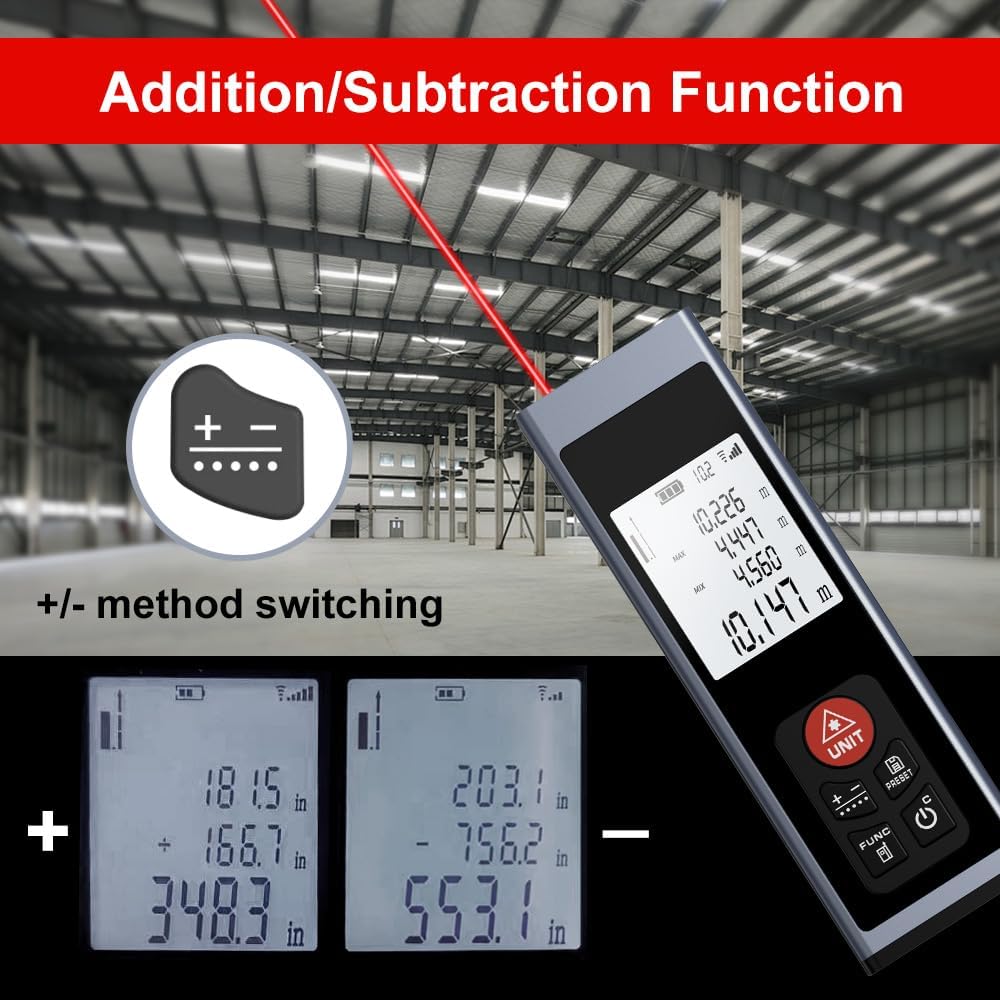
Figure 8: Addition/Subtraction Function
6.2 Memory Storage Function
The device can store up to 28 sets of measurement data.
- үчүн view stored data, short press the PRESET/History баскычы.
- Use the arrow buttons (if available, or cycle through with PRESET) to navigate through the stored measurements.

Figure 9: Memory Storage Display
7. Расмий продукт Video
Watch this official video from the seller for a quick introduction to the AquilaPro Laser Measuring Tool.
Video 1: AquilaPro Laser Measuring Tool Introduction (Source: AQUILA OPTICS)
8. Техникалык тейлөө
- Тазалоо: жумшак колдонуу, damp Түзмөктү тазалоо үчүн чүпүрөктү колдонуңуз. Абразивдүү тазалоочу каражаттарды же эриткичтерди колдонбоңуз.
- Сактагыч: Аппаратты салкын, кургак жерде, тике күн нурунан жана экстремалдык температурадан алыс сактаңыз.
- Батареяга кам көрүү: If storing for extended periods, charge the battery every 3 months to prolong its lifespan.
- Суу каршылык: The device is rated IP54, meaning it is protected against dust and splashing water. Do not immerse in water.
9. Кыйынчылыктарды
| Көйгөй | Мүмкүн себеп | Чечим |
|---|---|---|
| Түзмөк күйбөй жатат. | Low battery; Device is off. | Charge the battery; Long press the Power button. |
| Туура эмес окуулар. | Unstable surface; Obstruction in laser path; Incorrect reference point. | Ensure stable surface; Clear laser path; Check and adjust reference point (front/rear datum). |
| Дисплей күңүрт же окулбайт. | Backlight off; Low battery. | Short press Power button to toggle backlight; Charge the battery. |
| Лазер көрүнбөйт. | Bright ambient light; Laser not activated. | Use in lower light conditions; Short press UNIT/Laser button. |
10. Техникалык шарттар
| Өзгөчөлүк | Деталь |
|---|---|
| Бренд | AquilaPro |
| Модель аты | KL02060 |
| Өлчөө диапазону | 197 фут (60 м) |
| Тактык | ±0.078 inch (2mm) |
| Материал | Алюминий |
| Түс | Кара |
| Продукциянын өлчөмдөрү (LxWxH) | 1.1"L x 0.6"W x 3.4"H |
| Батарея түрү | Заряддалуучу литий-ион |
| Эл аралык коргоо рейтинги | IP54 (чаңга жана чачыратууга туруктуу) |
| Камтылган компоненттер | Lanyard |
11. Кепилдик жана колдоо
This AquilaPro Laser Measuring Tool comes with a 1 жылдык өндүрүүчү кепилдик сатып алынган күндөн тартып. Кепилдик дооматтары үчүн сатып алганыңыздын далилин сактап коюңуз.
For technical support or warranty inquiries, please contact AquilaPro customer service through the retailer's platform or visit the official AquilaPro store on Amazon: AquilaPro Amazon Store.