1. Киришүү
This manual provides detailed instructions for the safe and effective operation of your AquilaPro KL02100 Laser Measuring Tool. Please read this manual thoroughly before using the device to ensure proper functionality and to prevent potential hazards. This device is designed for accurate distance measurement in various applications.
2. Коопсуздук маалыматы
WARNING: Laser Radiation. Do not stare into beam. Class II Laser Product.
- The AquilaPro KL02100 emits a visible laser beam with a power output of less than 1mW.
- Avoid direct eye exposure to the laser beam. Never point the laser at people or animals.
- Do not disassemble or modify the device. Unauthorized modifications can result in hazardous laser radiation exposure.
- Аппаратты балдар жетпеген жерде сактаңыз.
- Бул колдонмодо сүрөттөлгөндөй гана колдонуңуз.
3. Продукт бүтүп калдыview
The AquilaPro KL02100 is a compact and versatile laser distance meter. Familiarize yourself with its components and display.
3.1 Аппараттын компоненттери
The device features a durable aluminium casing, an HD display, and intuitive buttons for various functions.

Сүрөт: алдыңкы view of the AquilaPro KL02100 Laser Measuring Tool.
3.2 Display and Button Layout
The device's display provides measurement readings and status indicators. The buttons control power, measurement functions, unit switching, and reference point selection.

Сүрөт: деталдуу view of the AquilaPro KL02100 display and button functions. Labels indicate 'screen', 'Single measurement / Unit switch', 'Addition / subtraction measurement', 'Funtion / Front/rear reference', 'History / Preset value setting', and 'Power / Backlight button'.
4. Орнотуу
4.1 Аппаратты заряддоо
The AquilaPro KL02100 features a built-in Lithium-Ion battery and is USB rechargeable. Connect the device to a standard USB power source using the provided cable. The battery indicator on the display will show charging status.
4.2 Күйгүзүү/өчүрүү
- Күйгүзүү үчүн: басыңыз Кубат/Арткы жарык баскычы (
 ) кыскача.
 - Өчүрүү үчүн: басып, кармап туруңуз Кубат/Арткы жарык баскычы for approximately 3 seconds. The device will also automatically power off after a period of inactivity to conserve battery.
5. Иштөө нускамалары
5.1 Basic Measurement (Single Measurement)
- Түзмөктү күйгүзүңүз.
- Лазер нурун максаттуу бетке багыттаңыз.
- басыңыз Single measurement / Unit switch button () once. The measurement will be displayed instantly.
5.2 Үзгүлтүксүз өлчөө
- басып, кармап туруңуз Single measurement / Unit switch button (
 ) for approximately 2 seconds. The device will enter continuous measurement mode, displaying real-time distance updates as you move.
 - басыңыз Single measurement / Unit switch button again to exit continuous measurement.
5.3 Бирдикти которуу
To change the measurement unit (meters, inches, feet), briefly press the Single measurement / Unit switch button () while the device is idle (not actively measuring). The unit will cycle through m, in, ft.
5.4 Benchmark Switching (Front/Rear Datum)
The device allows you to select the measurement reference point: either from the front edge of the device or the rear edge. This is crucial for accurate measurements depending on your placement of the tool.

Image: Illustration of front and rear datum points for measurement. The device can measure from its front edge or its rear edge.
To switch the benchmark, press the Function / Front/rear reference button () briefly. An icon on the display will indicate the currently selected reference point.
5.5 Multiple Measurement Modes
The AquilaPro KL02100 supports various measurement functions for different applications.

Image: Visual representation of the different measurement modes available on the device, including single, continuous, area, volume, Pythagorean, and addition/subtraction.
To cycle through measurement modes, press the Function / Front/rear reference button () repeatedly until the desired mode icon appears on the display.
- Length Measurement: Standard single or continuous measurement.
- Аянтты өлчөө: Measure two sides (length and width) to calculate the area.
- Көлөмдү өлчөө: Measure three sides (length, width, height) to calculate the volume.
- Pythagorean Measurement (Indirect Measurement): Used to calculate inaccessible distances (e.g., height of a building) by measuring two or three other distances. Follow the on-screen prompts for each segment measurement.
- Кошумча/кемитүү: Add or subtract measurements.
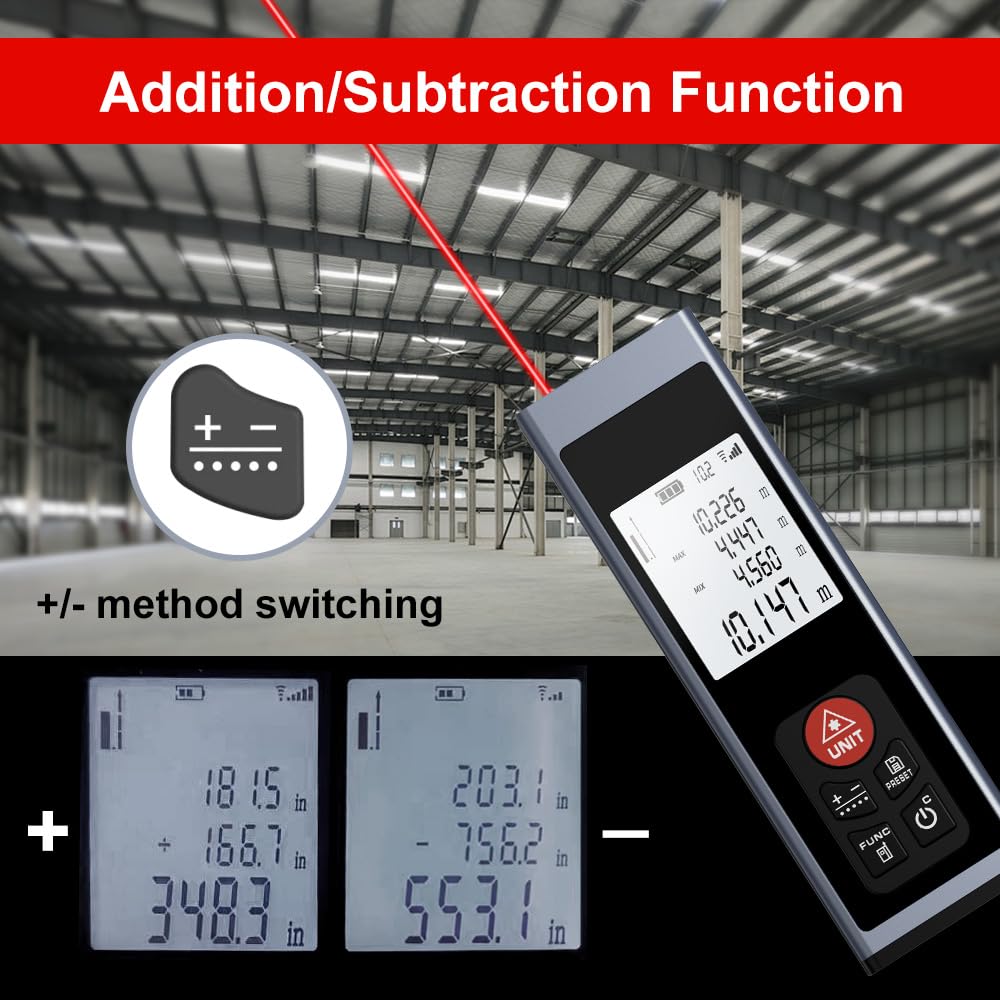
Image: The device display illustrating the addition and subtraction functions, showing how multiple measurements are combined or differentiated.
5.6 Field Measurement
The real-time measurement mode allows for on-the-go calculations from walls and various surfaces as you move, providing dynamic distance updates.

Image: A hand holding the AquilaPro KL02100, demonstrating its use for field measurements with the laser beam active.
6. Техникалык тейлөө
- Тазалоо: жумшак колдонуу, damp cloth to clean the device. Do not use abrasive cleaners or solvents. Pay special attention to keeping the laser lens clean for accurate measurements.
- Сактагыч: Аппаратты салкын, кургак жерде, тике күн нурунан жана экстремалдык температурадан алыс сактаңыз.
- Батарея: Батареянын ден соолугун сактоо үчүн, аппарат көп колдонулбаса да, батареяны үзгүлтүксүз толтуруңуз.
7. Кыйынчылыктарды
| Көйгөй | Мүмкүн себеп | Чечим |
|---|---|---|
| Түзмөк күйбөйт | Батареянын аздыгы; Аппараттын бузулушу | Charge the battery; Contact support if issue persists |
| Туура эмес өлчөөлөр | Dirty laser lens; Incorrect benchmark setting; Unstable surface | Clean the laser lens; Verify benchmark (front/rear); Ensure stable measurement surface |
| Лазердик нур көрүнбөйт | Bright ambient light; Device malfunction | Use in lower light conditions; Contact support |
8. Техникалык шарттар
- Бренд: AquilaPro
- Модель номери: KL02100
- Өлчөө диапазону: 328 фут (100 м)
- Тактыгы: ±0.078 inch (2mm)
- Бирдиктер: Meters (m), Inches (in), Feet (ft)
- Лазердик класс: II класс, <1мВт
- Батарея түрү: Lithium-Ion (Rechargeable via USB)
- Материал: Алюминий
- Элемент Салмагы: 25 грамм
- Продукциянын өлчөмдөрү: 28L x 15W x 86H Millimeters
- Сууга туруктуулук деңгээли: IP54
- Камтылган компоненттер: Lanyard
9. Кепилдик жана колдоо
For warranty information and technical support, please refer to the documentation provided at the point of purchase or contact AquilaPro customer service. Keep your purchase receipt as proof of purchase.