Продукт бүттүview
The DYNAVIN D9-DMI Ultra Flex is an advanced Android car radio navigator designed to upgrade your in-car entertainment and navigation experience. It features a 6.5-inch high-resolution anti-glare touchscreen, integrated GPS navigation, wireless CarPlay, and Android Auto compatibility. This unit seamlessly integrates with your vehicle's existing systems, including steering wheel controls, climate control, and parking sensors, for a cohesive user experience.
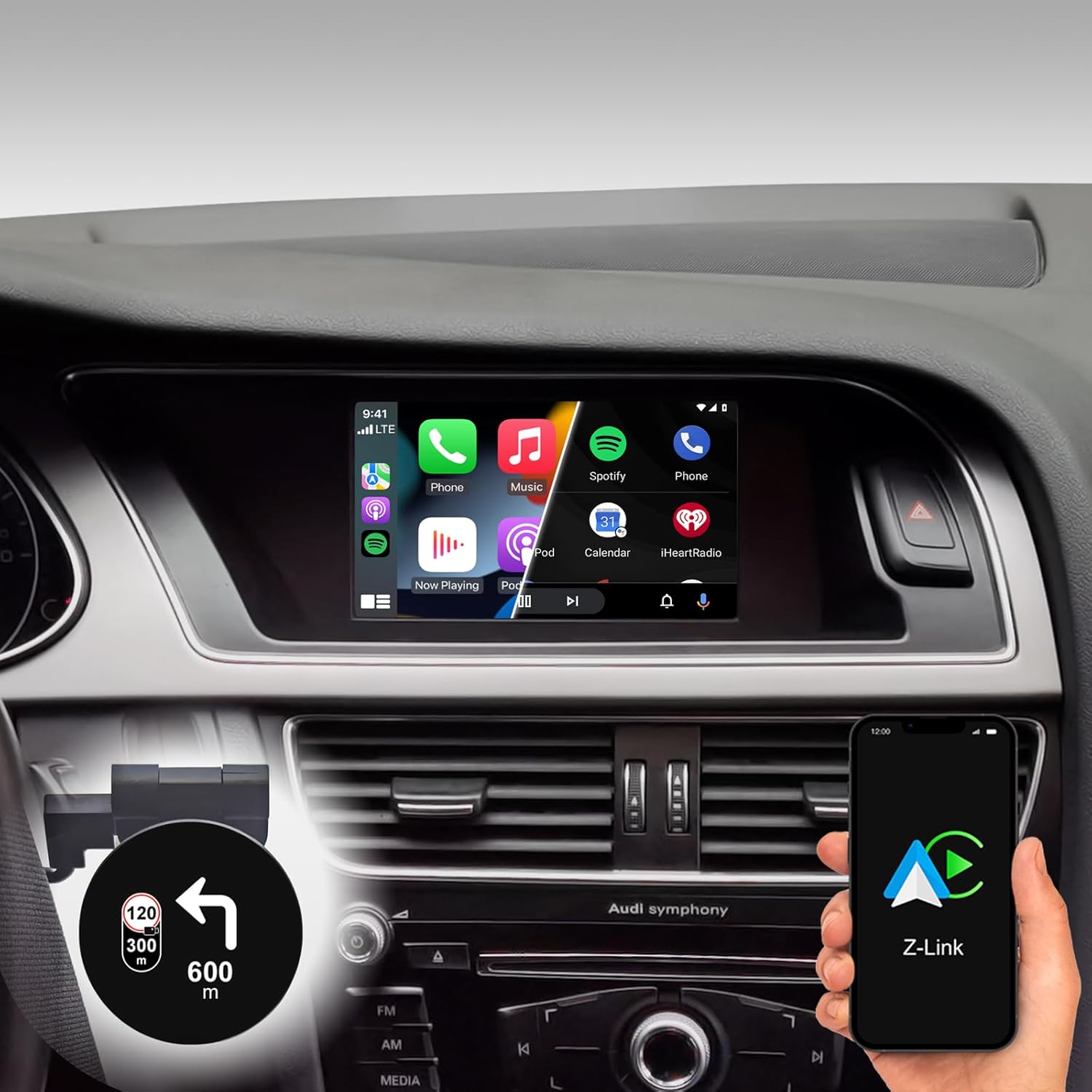
Figure 1: DYNAVIN D9-DMI Ultra Flex Car Radio Navigator installed in an Audi dashboard, showcasing its CarPlay interface and integration with navigation features.
Шайкештик
This Android Navi Radio is specifically designed for Audi vehicles equipped with a Concert or Symphony radio. Please verify your vehicle's radio type before installation to ensure compatibility.
- Audi A4: 2007 – 2015
- Audi A5: 2007 – 2016
- Audi Q5: 2008 – 2017
- Audi S4: 2009 – 2016
- Audi S5: 2009 – 2016
The unit is compatible with the original AUDI sound system and can receive the AUDI vehicle menu.

Figure 2: Compatible Audi Concert and Symphony radio units.

Figure 3: How to check your car's system version for compatibility.
Негизги өзгөчөлүктөрү
- Дисплей: 6.5-inch high-resolution (1024 x 600 pixels) anti-glare touchscreen.
- Операция системасы: Android 11 OS with quad-core CPU and 4 GB RAM.
- Байланыш: Wireless CarPlay, Android Auto, and Smartphone Mirroring.
- Навигация: Integrated GPS navigation with Dynaway app (31-day trial, activation code required), including speed camera information.
- Аудио: Highly sensitive FM-RDS tuner with 15 presets for clear, noise-free playback. Supports audio streaming via smartphone/USB.
- Микрофон: Мыкты чалуу сапаты үчүн ызы-чууну азайтуучу компакттуу санариптик кош микрофон.
- Интеграция: Integrated CANBUS solution for seamless control via steering wheel, air conditioning display, and parking sensor information.
- Башын көтөрүүчү дисплей (HUD): Included HUD shows navigation directions, vehicle speed, and speed camera alerts.
- Dynapp Pack: Access to Google Playstore, third-party app installation, and display of speed limits (31-day trial, activation code required).

Figure 4: DYNAVIN's commitment to quality and experience.

Figure 5: The innovative Dynavin Digital Dual-Microphone.

Figure 6: Upgrade your Audi system with the DYNAVIN DMI Ultra Flex.
Орнотуу жана орнотуу
Installation of the DYNAVIN D9-DMI Ultra Flex requires careful attention to detail. It is recommended to have the installation performed by a qualified professional. The unit integrates with your vehicle's existing wiring and CAN-BUS system.
Камтылган компоненттер:
Ensure all components listed below are present in your package before beginning installation.

Figure 7: Complete list of accessories included in the package.
- Dynavin Radio Unit
- Туташуу кабели
- DAB Антенна
- DAB / CAN Interface
- Арткы камера кабели
- GPS антеннасы
- USB кеңейтүү кабели
- Антенна адаптери
- Микрофон
- Climate Control Cable
- HUD 150 (Head-up Display)
- BT/Wi-Fi антеннасы
- Демонтаждоо куралдары
- Quick колдонмо
Орнотуу кадамдары (Жалпы):
Refer to the included Quick Guide for detailed, step-by-step installation instructions specific to your Audi model. Professional installation is highly recommended.
- Даярдоо: Disconnect the vehicle's battery. Use the provided disassembly tools to carefully remove the original radio unit and trim.
- Зымдар: Connect the Dynavin radio unit using the supplied connection cables, ensuring all connections are secure. Integrate the DAB/CAN interface and connect the GPS antenna, DAB antenna, and BT/Wi-Fi antenna.
- Микрофонду орнотуу: Install the compact digital dual microphone in a suitable location, typically near the rearview mirror or steering column, for optimal call quality.
- Head-up Display Installation: Mount the HUD 150 unit on your dashboard or windshield as per the instructions, ensuring it does not obstruct your view.
- CAN-BUS интеграциясы: Ensure the CAN-BUS connections are correctly made to enable steering wheel control, climate display, and parking sensor integration.
- Сыноо: Reconnect the vehicle's battery. Power on the unit and perform initial function tests for radio, navigation, CarPlay/Android Auto, and vehicle system integration.
- Кайра чогултуу: Башкаруу панелинин компоненттерин кылдаттык менен кайра чогултуңуз.
Иштөө нускамалары
Негизги операция:
- Күйгүзүү/өчүрүү: The unit typically powers on and off with the vehicle's ignition.
- Сенсордук экранды башкаруу: Navigate menus and select functions using the responsive 6.5-inch touchscreen.
- Рулдун башкаруу элементтери: Utilize your vehicle's existing steering wheel controls for volume, track skipping, and call management, thanks to CAN-BUS integration.
Навигация системасы:
The integrated GPS navigation system uses the Dynaway app. A 31-day trial is included, after which an activation code must be purchased.
- Көздөгөн жерди киргизүү: Enter destinations via the touchscreen.
- Үн нускамасы: Follow clear voice instructions for turn-by-turn navigation.
- Маршруттук жетекчилик: Select preferred route options (e.g., fastest, shortest).
- Speed Camera Alerts: The navigation software includes alerts for speed cameras.
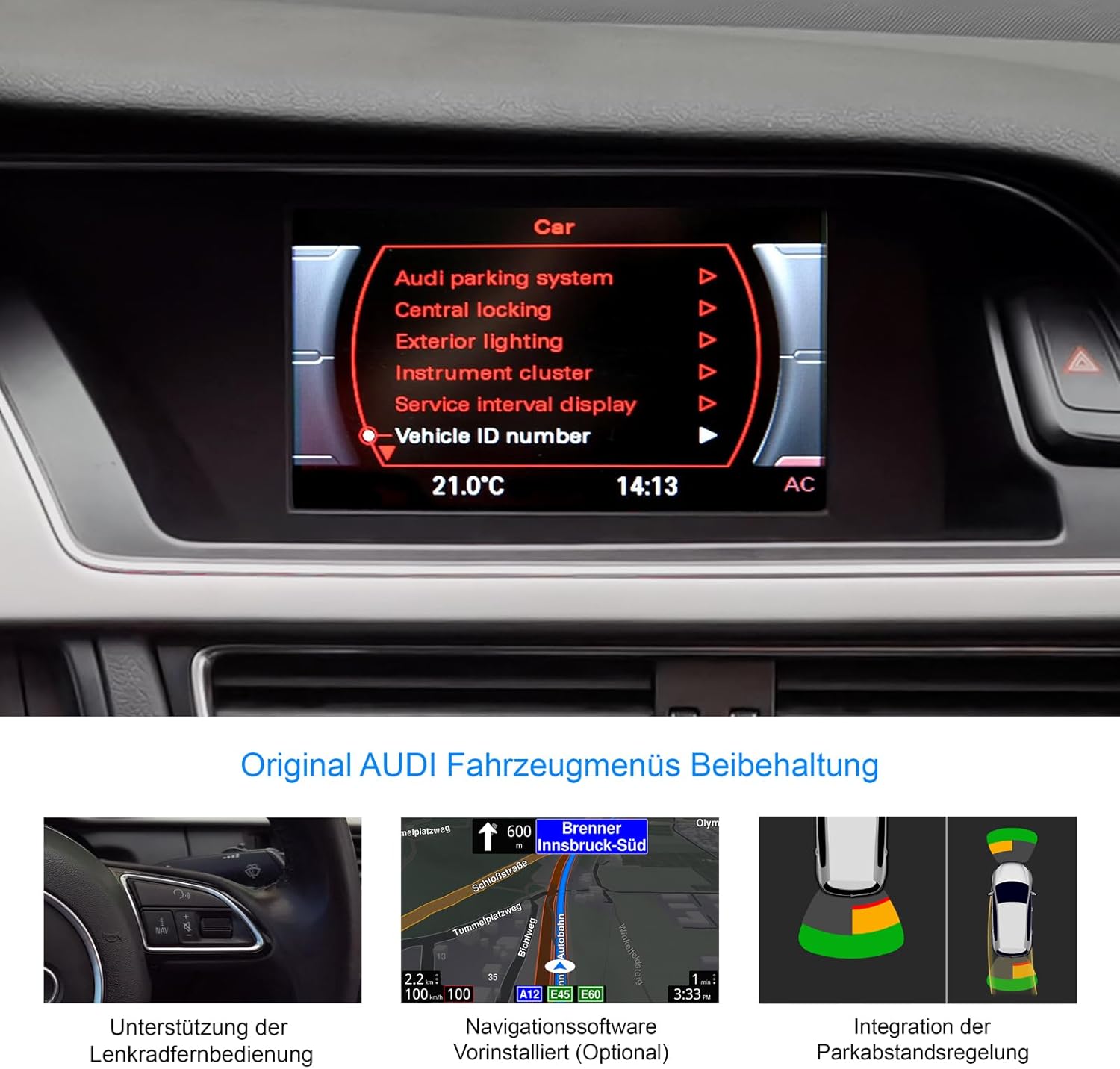
Figure 8: Retention of original Audi vehicle menus and integrated features.
CarPlay жана Android Auto:
Connect your smartphone wirelessly to access CarPlay (for iOS devices) or Android Auto (for Android devices). A 31-day trial is included, after which an activation code must be purchased.
- Зымсыз туташуу: Pair your phone via Bluetooth and follow the on-screen prompts to establish a wireless CarPlay or Android Auto connection.
- Колдонмого мүмкүндүк алуу: Use compatible apps for navigation (Apple Maps, Google Maps), music streaming (Spotify, Apple Music), messaging, and calls directly from the unit's display.
Башын көтөрүүчү дисплей (HUD):
The included HUD 150 projects key information onto your windshield, allowing you to keep your eyes on the road.
- Көрсөтүлгөн маалымат: Navigation directions (from Dynaway, Apple Maps, Google Maps), vehicle speed, and Blitzer.de speed camera information.
- Жайгашкан жери: Position the HUD unit to ensure clear visibility without obstructing your driving view.

Figure 9: Head-up Display in action, showing navigation and time.
Техникалык тейлөө
To ensure the longevity and optimal performance of your DYNAVIN D9-DMI Ultra Flex, follow these maintenance guidelines:
- Экранды тазалоо: Электрондук экрандар үчүн атайын иштелип чыккан жумшак, мамыксыз чүпүрөктү колдонуңуз. Абразивдүү тазалоочу каражаттарды же эриткичтерди колдонбоңуз. Чаңды жана манжа издерин кетирүү үчүн экранды акырын сүртүңүз.
- Программалык камсыздоо жаңыртуулары: Periodically check for software updates from DYNAVIN to ensure the system runs efficiently and has the latest features and bug fixes. Updates can typically be performed via Wi-Fi or USB.
- Жалпы кам көрүү: Аппаратты экстремалдык температурага, түз күн нуруна узак убакытка же ашыкча нымдуулукка дуушар кылуудан алыс болуңуз.
- Кабелдик байланыштар: Ensure all cables remain securely connected. Avoid pulling on cables forcefully.
Проблемаларды чечүү
This section addresses common issues you might encounter with your DYNAVIN D9-DMI Ultra Flex. For more complex problems, contact customer support.
| Көйгөй | Мүмкүн себеп | Чечим |
|---|---|---|
| Түзмөк күйбөйт. | Бошоң электр туташуу, күйгөн сактагыч, унаанын аккумуляторунун көйгөйү. | Бардык электр кабелдерин жана туташууларын текшериңиз. Унаанын сактагычтарын текшериңиз. Унаанын аккумулятору заряддалганын текшериңиз. |
| Аудио чыгышы жок. | Volume too low, mute activated, incorrect audio source selected, wiring issue. | Increase volume. Check if mute is active. Select correct audio source. Verify speaker wiring connections. |
| CarPlay/Android Auto туташпай жатат. | Bluetooth not paired, Wi-Fi disabled, trial period expired, activation code not entered. | Ensure Bluetooth and Wi-Fi are enabled on both devices. Re-pair the phone. Check trial status and enter activation code if necessary. |
| GPS сигналы жоголду же так эмес. | GPS антеннасы тосулуп же ажыратылган, спутниктин кабыл алынышы начар. | GPS антеннасынын туура орнотулганын жана так болушун текшериңиз view асмандын. Антеннанын туташуусун текшериңиз. Ачык жерге жылыңыз. |
| Рулдун башкаруулары иштебейт. | CAN-BUS connection issue, incorrect vehicle configuration. | Verify CAN-BUS wiring. Check unit settings for correct vehicle model configuration. |
Техникалык шарттар
| Өзгөчөлүк | Деталь |
|---|---|
| Бренд | ДЫНАВИН |
| Модел | D9-DMI Ultra Flex |
| Шайкеш унаалар | Audi A4 (2007-2015), A5 (2007-2016), Q5 (2008-2017), S4 (2009-2016), S5 (2009-2016) with Concert/Symphony radio |
| Screen Size | 6.5 дюйм |
| Дисплей түрү | ЖК, жаркыроого каршы |
| Резолюция | 1024 x 600 пиксель |
| Операция системасы | Android 11 |
| CPU | Төрт ядролуу |
| RAM | 4 ГБ |
| Байланыш | Wireless CarPlay, Android Auto, Bluetooth, USB |
| Аудио чыгаруу режими | Стерео (2.0 каналдуу) |
| Радио тюнер | FM-RDS with 15 presets |
| Өзгөчөлүктөр | Integrated GPS Navigation, Head-up Display (HUD), CAN-BUS Integration (steering wheel, climate, parking sensors), Digital Dual Microphone |
| Пакеттин өлчөмдөрү | 28 x 23 x 10 см |
| Элемент Салмагы | 2 кг |
| ASIN | B0CS67GQKN |
Кепилдик жана колдоо
For warranty information, please refer to the documentation provided with your purchase or contact DYNAVIN customer service directly. DYNAVIN offers customer support for product inquiries, technical assistance, and troubleshooting.
For the Dynapp package, CarPlay, and Android Auto features, a 31-day trial phase is included. An activation code must be purchased online to continue using these features after the trial period.
Please visit the official DYNAVIN website or contact your retailer for the most up-to-date support information and contact details.


