1. Киришүү
Thank you for choosing the WORKPRO 7.2V Cordless Rotary Tool. This manual provides essential information for the safe and effective operation, maintenance, and troubleshooting of your tool. Please read it thoroughly before use and retain it for future reference.
The WORKPRO 7.2V Cordless Rotary Tool is a versatile and compact device designed for various DIY and craft projects. Its lightweight design and variable speed settings make it suitable for tasks such as sanding, engraving, cutting, drilling, grinding, and polishing.

Figure 1: WORKPRO 7.2V Cordless Rotary Tool with included accessories and storage bag.
2. Коопсуздук маалыматы
Электр шаймандарын иштетүүдө өрт, электр шок жана жеке жаракат алуу коркунучун азайтуу үчүн ар дайым негизги коопсуздук чараларын сактаңыз.
- Бардык нускамаларды окуңуз: Куралдын иштеши жана коопсуздук эрежелери менен таанышыңыз.
- Көздү коргоону кийүү: Ар дайым коргоочу көз айнек же каптал калканчтары бар коргоочу көз айнек тагыныңыз.
- Коопсуз жумуш бөлүгү: Ар дайым clamp же башка жол менен иштөө учурунда кыймылга жол бербөө үчүн даярдалган бөлүгүн бекитиңиз.
- Таза иш аянтын сактоо: Башаламан жерлер кырсыкка чакырат.
- Кооптуу чөйрөдөн алыс болуңуз: г-да электр куралдарын колдонбоңузamp же нымдуу жерлерде, же аларды жамгырга дуушар кылуу. Жумуш аймагын жакшы жарыктандырыңыз.
- Балдарды алыс кармаңыз: Бардык зыяратчылар жумуш аймагынан коопсуз аралыкта кармалышы керек.
- Туура кийинүү: Do not wear loose clothing or jewelry. They can be caught in moving parts. Non-skid footwear is recommended. Wear protective hair covering to contain long hair.
- Туура куралды колдонуңуз: Куралды же тиркемени ал иштелип чыкпаган ишти аткарууга мажбурлабаңыз.
- Кубатты өчүрүү: Disconnect the tool from its power source before making adjustments, changing accessories, or storing it.
- Ашыкча жетпе: Ар дайым туура бутту жана тең салмактуулукту сактаңыз.
- Куралдарды этияттык менен сактоо: Жакшыраак жана коопсуз иштөө үчүн куралдарды курч жана таза кармаңыз. Майлоо жана аксессуарларды алмаштыруу боюнча нускамаларды аткарыңыз.
- Бузулган тетиктерди текшерүү: Аспапты андан ары колдонуудан мурун, анын туура иштешин жана өз милдетин аткарарын аныктоо үчүн бузулган коргоочу же башка бөлүгү кылдаттык менен текшерилиши керек.
- Do Not Operate While Charging: For safety reasons, do not use the tool while it is being charged.
3. Продукт бүтүп калдыview
The WORKPRO 7.2V Cordless Rotary Tool is designed for precision work. Understanding its components is key to effective operation.
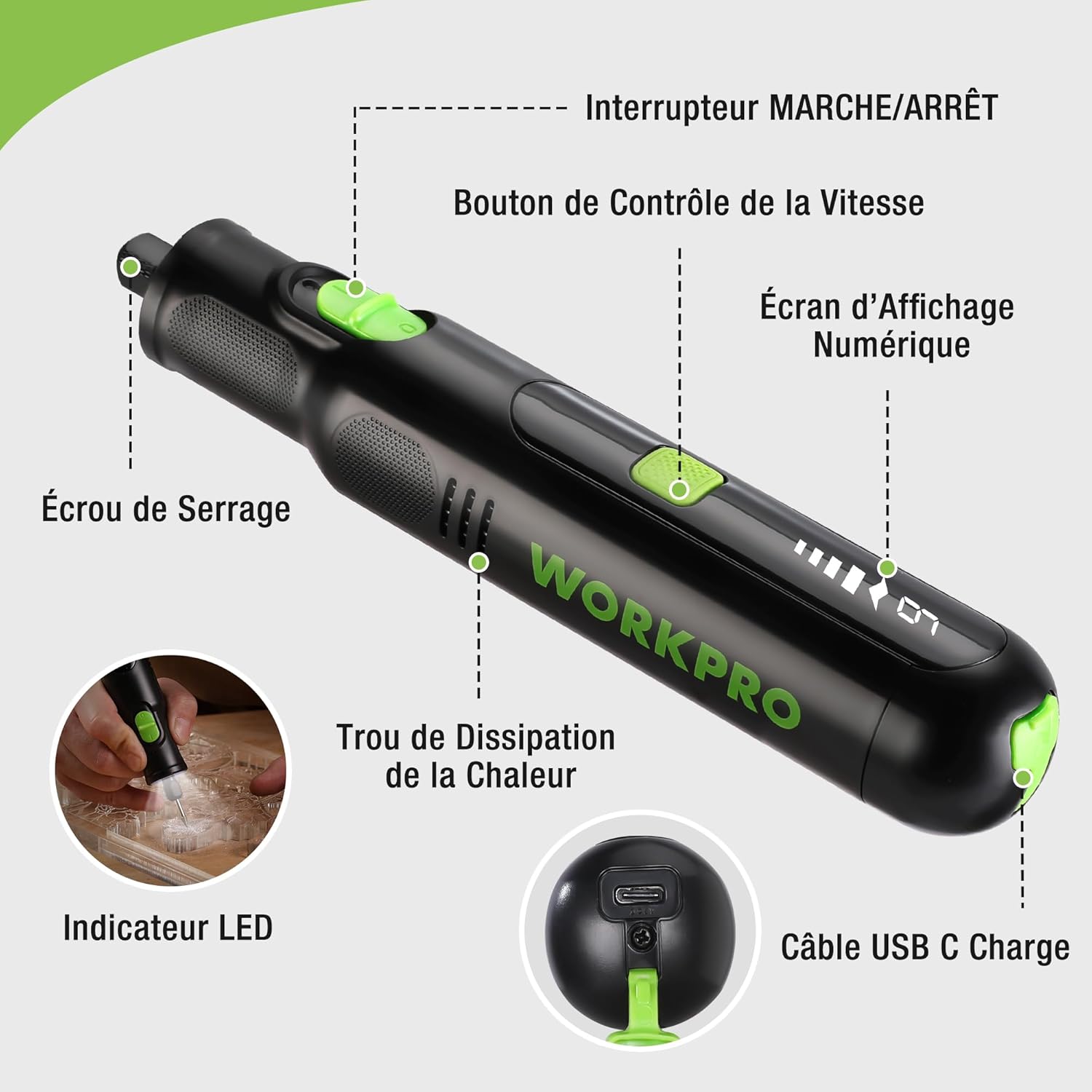
Figure 2: Key components of the rotary tool.
Компоненттери:
- ON/OFF которуу: Куралды иштетет жана өчүрөт.
- Ылдамдыкты көзөмөлдөө баскычы: Adjusts the rotational speed of the tool.
- Санарип дисплей экраны: Учурдагы ылдамдык жөндөөлөрүн көрсөтөт.
- Гайка гайкасы: Secures the accessory bits in place.
- Жылуулук таркатуучу тешик: Ensures proper cooling of the motor during operation.
- LED көрсөткүчү: Provides illumination for the work area.
- USB-C заряддоо порту: Ички батареяны кайра заряддоо үчүн.
Камтылган аксессуарлар:
Your WORKPRO rotary tool comes with 117 diverse accessories, enabling a wide range of applications. These include:

Figure 3: ашыкview камтылган 117 аксессуардын ичинен.
- Майдалоо/курчоо: Grinding stones and wheels for material shaping and sharpening.
- Оймо: Diamond bits for detailed carving and engraving.
- Жылтыратуу: Wool felt wheels, felt wheels, screw mandrels, and metal brushes for achieving smooth, shiny finishes.
- Фрезерлөө: Milling bits for precise material removal.
- Кесүү: Cutting discs and saw blades for various cutting tasks, along with a cutting disc holder.
- Тегиш: Sandpaper, rubber sanding drums, and sanding bands for surface preparation and finishing.
- Collets: 2.35mm and 3.2mm collets to accommodate different shank sizes.
- Бургулоо: 2.35mm and 3.2mm drill bits for small-scale drilling.
- ачкыч: For securing and loosening collet nuts.
4. Орнотуу
4.1 Куралды заряддоо
The tool is equipped with a 7.2V 1100mAh Lithium-ion rechargeable battery. Before first use, fully charge the tool.
- Connect the provided USB-C charging cable to the tool's USB-C charging port.
- Connect the other end of the USB cable to a compatible USB power source (e.g., computer, USB wall adapter).
- The digital display will indicate charging status. A full charge typically takes approximately 2 hours.
- Толук заряддалгандан кийин, заряддоо кабелин ажыратыңыз.
Note: For optimal battery life, it is recommended to store the tool with the battery charged between 50% and 75%. Recharge the tool at least once every 3 to 6 months if not used regularly.

Figure 4: Charging the rotary tool via USB-C.
4.2 Аксессуарларды орнотуу
The WORKPRO rotary tool features an automatic spindle lock design for easy and secure accessory changes.
- Куралдын ӨЧҮРҮЛГӨНүн текшериңиз.
- Unscrew the collet nut at the front of the tool.
- Select the appropriate collet size for your desired accessory (2.35mm or 3.2mm). Insert the collet into the tool if not already present.
- Insert the shank of the accessory bit into the center of the collet nut. Ensure the bit is fully seated.
- Hand-tighten the collet nut. For a secure fit, use the included wrench to tighten the collet nut firmly. Do not overtighten.

Figure 5: Two-step accessory replacement process.

Figure 6: Detailed installation steps for various accessories.
Note: The automatic spindle lock engages when the tool is off, allowing for accessory changes without needing to press a separate button. A slight clicking sound when the tool stops is normal due to this mechanism.
5. Иштөө нускамалары
5.1 Күйгүзүү/өчүрүү
To turn the tool ON, slide the ON/OFF switch to the 'ON' position. To turn it OFF, slide the switch to the 'OFF' position.
5.2 Ылдамдыкты жөндөө
The tool features 6 variable speed settings, ranging from 5000 RPM to 30000 RPM. Press the Speed Control Button to cycle through the speeds. The current speed setting will be displayed on the digital screen.
- Speed I: 5000 RPM
- Speed II: 10000 RPM
- Speed III: 15000 RPM
- Speed IV: 20000 RPM
- Speed V: 25000 RPM
- Speed VI: 30000 RPM
Choose the appropriate speed for your task and material. Lower speeds are generally suitable for polishing, delicate work, and softer materials, while higher speeds are for cutting, grinding, and harder materials.

Figure 7: Variable speed settings and powerful motor.
5.3 Интеграцияланган LED жарык
The tool includes an integrated LED light that illuminates the work area, improving visibility in dimly lit spaces and for detailed tasks.

Figure 8: Using the LED light for precision engraving.
5.4 Тиркемелер
The WORKPRO rotary tool is highly versatile and can be used for:
- Кесүү: Use appropriate cutting discs for various materials.
- Оюу/Гравюра: Utilize diamond bits for intricate designs on wood, plastic, or soft metals.
- Жылтыратуу: Apply felt wheels and polishing compounds to restore shine to surfaces.
- Тегиш: Use sanding bands and drums for smoothing rough edges or preparing surfaces.
- Бургулоо: Employ small drill bits for precision holes.

9-сүрөт: Мисamples of versatile applications.
6. Техникалык тейлөө
6.1 Тазалоо
- Тазалоодон мурун шайманды ар дайым электр булагынан ажыратыңыз.
- жумшак колдонуу, damp куралдын сыртын сүртүү үчүн чүпүрөк. Катуу химиялык заттарды же абразивдүү тазалагычтарды колдонбоңуз.
- Use a small brush or compressed air to clear dust and debris from the heat dissipation holes and around the collet area.
6.2 Батареяга кам көрүү жана сактоо
- To prolong battery life, avoid completely discharging the battery regularly.
- For long-term storage, ensure the battery is charged to approximately 50-75%. Recharge the tool every 3 to 6 months to prevent deep discharge and maintain battery health.
- Куралды салкын, кургак жерде, түз күндүн нурунан жана экстремалдык температурадан алыс сактаңыз.
6.3 Аксессуарларды сактоо
Keep all accessories organized in the provided storage bag or a suitable container to prevent loss and damage.
7. Кыйынчылыктарды
This section addresses common issues you might encounter with your WORKPRO rotary tool.
| Көйгөй | Мүмкүн себеп | Чечим |
|---|---|---|
| Курал күйбөйт. | Батарея заряды түгөнгөн. | Charge the tool fully using the USB-C cable. |
| Колдонуу учурунда курал күтүүсүздөн токтоп калат. | Батарея аз же аспап ашыкча жүктөлгөн. | Recharge the battery. Reduce pressure on the tool or use a lower speed setting for the task. |
| Clicking sound when turning off. | Normal operation of the automatic spindle lock. | This is a normal function and does not indicate a fault. |
| Accessory bit is loose or wobbles. | Collet nut not tightened sufficiently or incorrect collet size. | Ensure the correct collet size is used for the accessory. Tighten the collet nut firmly with the included wrench. |
| Reduced performance or short runtime. | Battery degradation or improper charging/storage. | Ensure proper charging and storage practices are followed (refer to Section 6.2). If the issue persists, the battery may need replacement. |
8. Техникалык шарттар
Below are the technical specifications for the WORKPRO 7.2V Cordless Rotary Tool (Model W123024A).
| Өзгөчөлүк | Спецификация |
|---|---|
| Бренд | WORKPRO |
| Модель номери | W123024A |
| Тtage | 7.2 вольт |
| Батарея түрү | Литий-ион (1 камтылган) |
| Батарея сыйымдуулугу | 1100 мАч |
| Макс айлануу ылдамдыгы | 30000 RPM |
| Өзгөрмө ылдамдыктар | 6 (5000-30000 RPM) |
| Заряддоо убактысы | Болжол менен 2 саат |
| Runtime (Max Speed) | Болжол менен 45 мүнөт |
| Салмагы | 227 грамм |
| Өлчөмдөрү (L x W x Y) | 25.2 x 16.8 x 5.5 см |
| Өзгөчө өзгөчөлүк | Cordless, Integrated LED Light, Automatic Spindle Lock |
| Камтылган компоненттер | 117 Аксессуарлар |
| Өндүрүүчү | Hang Zhou Great Star Industrial Co.,LTD |
9. Кепилдик жана колдоо
For warranty information, please refer to the documentation provided at the time of purchase or contact your retailer. WORKPRO is committed to providing quality products and customer satisfaction.
If you encounter any issues or have questions regarding your WORKPRO 7.2V Cordless Rotary Tool, please contact the seller or WORKPRO customer support through their official website or contact channels. Please have your model number (W123024A) and purchase details ready when seeking support.


