Introduction
The MUNBYN Portable Wireless Printer ITP04 is designed for convenience and efficiency, offering inkless thermal printing for various document types. Its compact size and wireless capabilities make it an ideal solution for printing on the go, whether for personal or professional use. This manual will guide you through the setup, operation, and maintenance of your new printer.
Негизги өзгөчөлүктөрү:
- Портативдик жана компакт: Weighing only 750g and measuring 28.3cm in length, it's highly portable with a built-in 2600mAh battery for all-day use.
- Inkless басып чыгаруу технологиясы: Utilizes thermal printing, eliminating the need for ink, toner, or ribbons. Supports thermal paper in various sizes.
- Device Adaptability: Supports Bluetooth connectivity for iOS and Android smartphones, and USB connection for Windows and Mac computers.
- More Printing Options: Features a built-in stopper to adjust paper slot width for 216mm/210mm/107mm/77mm/57mm (US letter/A4/4"/3"/2") thermal paper, supporting both rolls and fanfold paper.
- Ишенимдүү бренд: MUNBYN provides video tutorials, printing tips, telephone, and 24/7 online computer remote help.
Кутуда эмне бар
- 1 MUNBYN ITP04 Portable Printer
- 1 түрмөк термикалык кагаз
- 1 USB-Type C Cable
- 1 A-C Adapter
- 1 Колдонуучунун колдонмосу
Жайгашуу
1. Physical Setup & Paper Loading
The MUNBYN ITP04 printer supports various thermal paper sizes, including US Letter, A4, and smaller widths. It can accommodate both roll paper and fanfold paper.
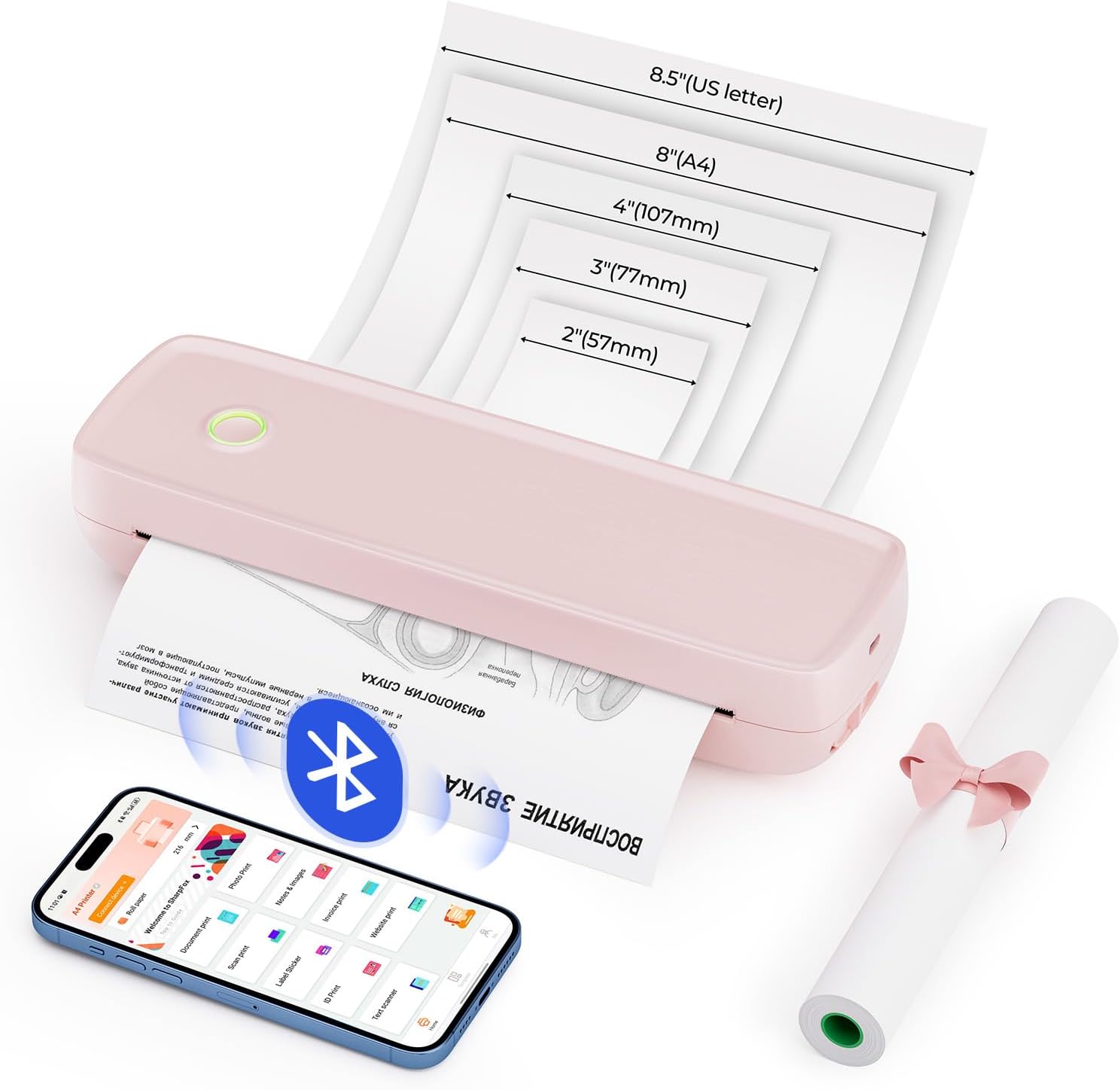
Image Description: A pink MUNBYN ITP04 printer is shown with different paper sizes (US Letter, A4, 4", 3", 2") fanning out from its output slot, illustrating its versatility in paper compatibility. A smartphone with the printer app and a roll of thermal paper are also visible.

Image Description: Two images demonstrate paper loading. The top image shows fanfold paper being inserted into the printer's rear slot. The bottom image shows a roll of thermal paper being placed inside the printer's compartment after opening the top cover.
2. Программалык камсыздоону орнотуу
Mobile Device Connection (Android & iOS)
For mobile printing, download the "SharpFox" app from your device's app store. The app facilitates seamless Bluetooth connection and allows you to print various file formats directly from your smartphone or tablet.

Image Description: A pink MUNBYN ITP04 printer is shown on a desk alongside an iPad and two smartphones (Android and iOS), indicating Bluetooth connectivity. The SharpFox app icon is prominently displayed with App Store and Google Play badges, instructing users to download the app.
Desktop Connection (Windows & Mac)
For printing from your computer, connect the printer using the provided USB cable. A USB-Type C adapter is required for Mac connections. Drivers must be installed for proper functionality.
Image Description: A pink MUNBYN ITP04 printer is connected via a USB cable to a MacBook Pro, illustrating the wired connection method for desktop computers. The image also indicates compatibility with both Mac OS and Windows.
Mac OS драйверин орнотуу
Video Description: This official MUNBYN video provides a step-by-step guide on how to download and install the printer driver for Mac OS, and how to initiate printing from a Mac computer.
Windows OS Driver Installation
Video Description: This official MUNBYN video demonstrates the process of downloading and installing the printer driver for Windows OS, and guides users through the steps to print from a Windows computer.
Иштөө нускамалары
Printing from Mobile Devices
Once the SharpFox app is installed and your printer is connected via Bluetooth, you can easily print documents, photos, or even scan and print directly from the app. The app supports various file formats including Word, Excel, PPT, TXT, and JPG.

Image Description: A three-step guide shows how to print using the SharpFox app: 1. Download the app. 2. Connect the portable printer via the app. 3. Select the file or image and print. The app interface displays options for document print, photo print, scan print, and more.
Printing from Desktop Computers
After installing the necessary drivers and connecting your printer via USB, you can print documents directly from your Windows or Mac computer. Ensure the printer is selected as the output device in your application's print dialogue.

Image Description: Two construction workers are shown reviewing blueprints on a table, with a pink MUNBYN ITP04 printer actively printing a document. A tablet is also on the table, suggesting wireless connectivity for on-site printing needs.
Video Description: This official MUNBYN video highlights the portability and convenience of the ITP04 printer, showcasing its ability to print documents anytime and anywhere, emphasizing its wireless capabilities.
Техникалык тейлөө
Күнүмдүк тейлөө
Regular maintenance ensures optimal performance and longevity of your MUNBYN ITP04 printer. The primary maintenance task involves cleaning the print head.
Video Description: This official MUNBYN video demonstrates the daily maintenance routine for the ITP04 printer, focusing on how to clean the print head to ensure consistent print quality.
Проблемаларды чечүү
If you encounter any issues with your MUNBYN ITP04 printer, please refer to the troubleshooting section in the included User Manual. Common issues often relate to connectivity, paper loading, or driver installation. Ensure your device is properly connected, the paper is loaded correctly, and the latest drivers are installed.
Техникалык шарттар
| Өзгөчөлүк | Деталь |
|---|---|
| Бренд | МУНБЫН |
| Модель аты | B8 (ITP04-PK) |
| Басма технологиясы | Термикалык |
| Байланыш технологиясы | Bluetooth, Wire (USB Type C) |
| Принтердин чыгышы | Монохромдуу |
| Макс басып чыгаруу ылдамдыгы монохромдуу | 5 промилле |
| Максималдуу басып чыгаруу чечими | 203 Dots Per Inch |
| Максималдуу медиа өлчөмү | 8.5 x 14 дюйм |
| Барактын өлчөмүн колдоо | A4/US Letter/Legal/4"/3"/2" дюйм |
| Элемент Салмагы | 0.353 унция (болжол менен 750 г) |
| Продукциянын өлчөмдөрү | 2.11 x 10.59 x 3.21 дюйм |
| Батарея | 2600mAh (кошулган) |
Кепилдик жана колдоо
MUNBYN offers a lifetime warranty for the ITP04 Portable Wireless Printer. For any questions or assistance, please utilize our 24/7 online support, including video tutorials, printing tips, and remote help.
Сиз ошондой эле расмий кайрылууга болот Колдонуучунун колдонмосу (PDF) деталдуу көрсөтмөлөр үчүн.


