1. Киришүү
Thank you for choosing the Klarstein Aqualine 6L Reverse Osmosis Water Filtration System. This advanced system is designed to provide clean, purified, and hydrogen-enriched drinking water for your home. It features a 5-stage filtration process, 3 integrated filters, and a hydrogen ionizer for enhanced hydration. The intuitive HD touchscreen allows for easy control over 6 temperature settings and provides essential information such as filter change alerts and TDS levels.
This manual contains important information regarding the installation, operation, maintenance, and troubleshooting of your new water filtration system. Please read it thoroughly before use and keep it for future reference.

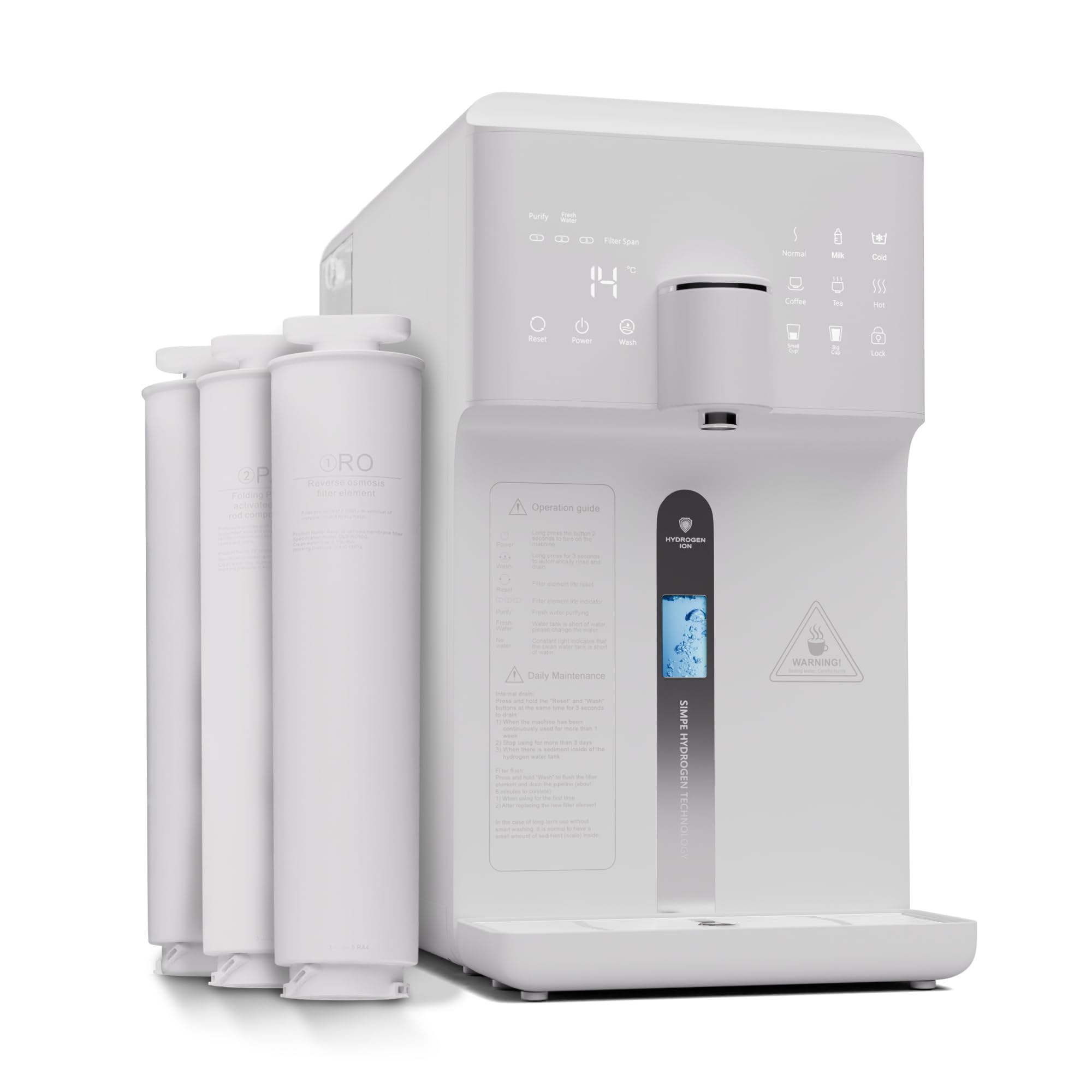
Figure 1: Klarstein Aqualine 6L Water Filtration System Overview
2. Коопсуздук маалыматы
- Шайманды иштетүүдөн мурун бардык көрсөтмөлөрдү окуп чыгыңыз.
- Ensure the power supply matches the specifications indicated on the appliance.
- Шайманды, электр шнурун же сууга же башка суюктуктарды розеткага салбаңыз.
- Шайманды балдар жетпеген жерде сактаңыз.
- Эгерде электр шнуру же сайгычы бузулган болсо, шайманды иштетпеңиз. Жардам алуу үчүн кардарларды колдоо кызматына кайрылыңыз.
- Түзмөктү туруктуу, тегиз жана кургак бетке коюңуз.
- Желдетүүчү тешиктерди жаппаңыз.
- Only use original Klarstein replacement filters.
- Тазалоодон же оңдоодон мурун шайманды розеткадан ажыратыңыз.
3. Продукциянын компоненттери
The Klarstein Aqualine 6L system includes the following main components:
- Main Filtration Unit
- PAC (Pre-Activated Carbon) Filter
- RO (тескери осмос) мембраналык чыпкасы
- CF (Carbon Block) Post-Filter
- 6-Liter Pure Water Tank (removable)
- 2-Liter Wastewater Tank (removable)
- Электр кабели
- Колдонуучунун Колдонмосу (бул документ)

2-сүрөт: Жогорку view showing the three filter cartridges

3-сүрөт: 5-Stage Фильтрация процесси
The filtration system consists of three main filters:
- PAC (Pre-Activated Carbon) Filter: A 2-in-1 pre-filter that removes larger particles like sand and rust, as well as chlorine and odors.
- RO (Reverse Osmosis) Membrane Filter: Contains ultra-fine pores to retain the smallest contaminants in the water.
- CF (Carbon Block) Post-Filter: A 2-in-1 post-filter that refines the water with valuable minerals (calcium, magnesium, sodium, potassium) and balances the pH value for a fresh taste.
4. Орнотуу жана алгачкы колдонуу
4.1 Пакеттен чыгаруу
- Бардык компоненттерди таңгактан кылдаттык менен алып салыңыз.
- Транзит учурунда кандайдыр бир бузулууларды текшериңиз. Эгерде бузулган болсо, колдонбоңуз жана кардарларды колдоо менен байланышыңыз.
- Бардык коргоочу пленкаларды жана таңгактоочу материалдарды алып салыңыз.
4.2 Чыпканы орнотуу
The filters are typically pre-installed but may require activation or removal of protective caps. Refer to the labels on the filter slots for correct placement (CF, RO, PAC).
- Шаймандын розеткадан ажыратылганын текшериңиз.
- Align each filter with its corresponding slot.
- Insert the filter and rotate it clockwise until it clicks into place and is securely fastened.
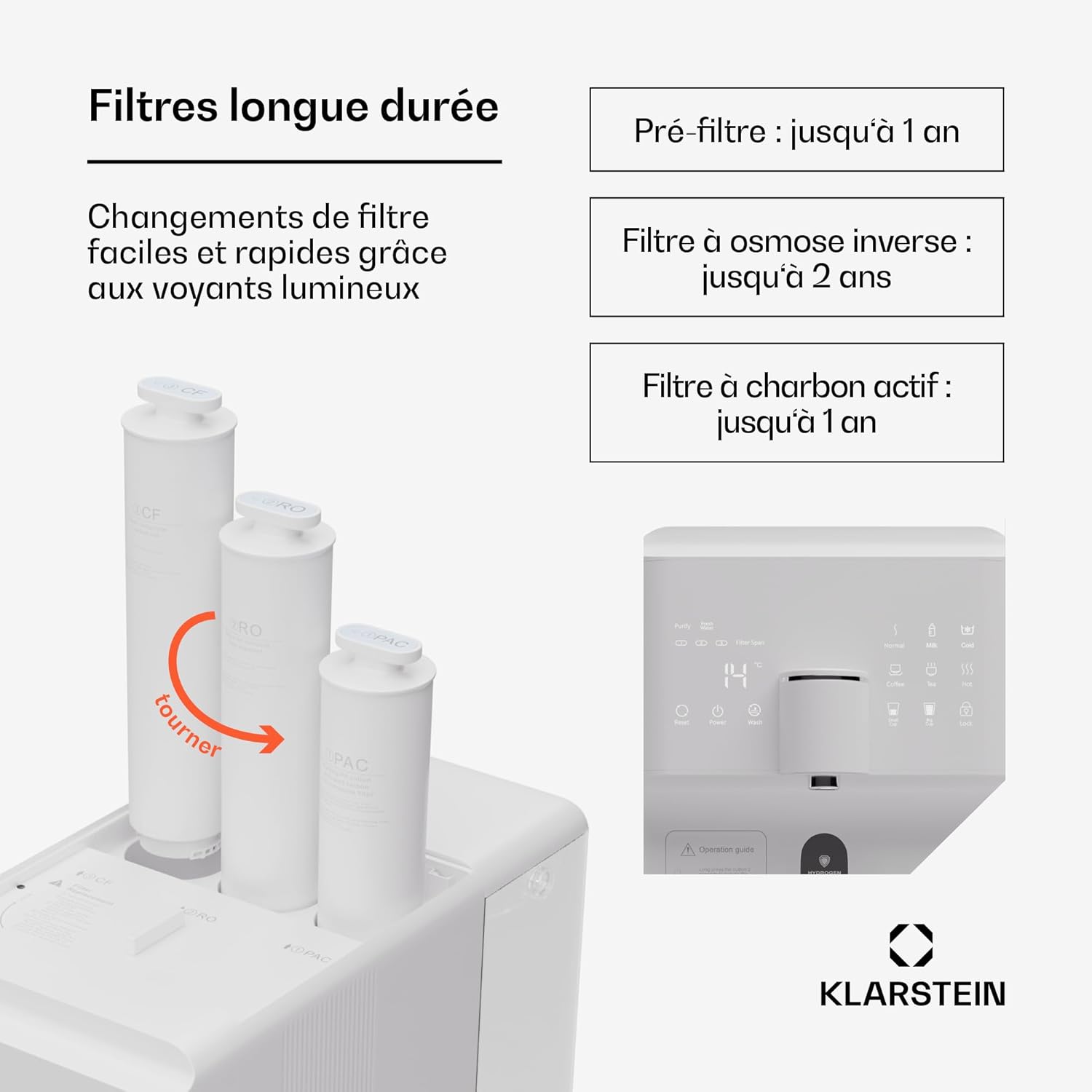
Figure 4: Filter Installation/Replacement
4.3 Суу резервуарларын толтуруу
The system features a 6-liter pure water tank and a separate 2-liter wastewater tank.

Figure 5: Water Tank Capacity
- Remove the 6-liter pure water tank from the appliance.
- Fill the tank with tap water. Do not exceed the maximum fill line.
- Place the filled tank back into the appliance, ensuring it is properly seated.
4.4 Initial Flushing
Before first use, the system must be flushed to remove any manufacturing residues and prepare the filters.
- Шайманды розеткага кошуңуз.
- Turn on the appliance using the power button on the touchscreen.
- Follow the on-screen instructions for initial flushing. This process typically involves dispensing several full tanks of water to waste.
- Empty the wastewater tank as needed during the flushing process.
- Once flushing is complete, the system is ready for use.
5. Иштөө нускамалары
5.1 Сенсордук экран функциялары
The HD touchscreen provides access to all system functions and information.

Figure 6: HD Touchscreen Interface
- Күйгүзүү/өчүрүү: Touch the power icon to turn the appliance on or off.
- Filter Change Alerts: Indicators will light up when a filter needs replacement.
- TDS Check: Displays the Total Dissolved Solids level of the water.
- Температураны тандоо: Choose from 6 preset temperatures.
- Суу бөлүштүрүү: Dispense predefined quantities (e.g., 150ml/300ml) or continuous flow.
5.2 Температура орнотуулары
The system offers the following temperature options:
- Chilled Water: For refreshing cold drinks.
- Бөлмө температурасы Суу: For general drinking.
- 45°C (Жылуу): Балдардын формуласы үчүн идеалдуу.
- 80°C: Suitable for green tea.
- 90°C: Suitable for coffee.
- 100°C (Boiling): For black tea or instant noodles.
Select your desired temperature by touching the corresponding icon on the display.
5.3 Water Dispensing
- Place a cup or container under the dispenser spout.
- Каалаган температураны тандаңыз.
- Choose a predefined volume (e.g., 150ml, 300ml) or press the dispense button for continuous flow. Press again to stop.
5.4 Hydrogen Ionizer Function
The integrated hydrogen ionizer enriches the water with hydrogen gas. This hydrogen-rich water is believed to improve hydration and provide antioxidant benefits. Activate this function via the touchscreen if available, or it may be an automatic part of the filtration process.
6. Техникалык тейлөө
6.1 Фильтрди алмаштыруу
Regular filter replacement is crucial for maintaining water quality and system performance. The touchscreen will indicate when a filter needs changing.

Figure 7: Recommended Filter Lifespan
| Чыпка түрү | Сунушталган иштөө мөөнөтү |
|---|---|
| PAC (Pre-Activated Carbon) Filter | 1 жылга чейин |
| RO (тескери осмос) мембраналык чыпкасы | 2 жылга чейин |
| CF (Carbon Block) Post-Filter | 1 жылга чейин |
Чыпканы алмаштыруу үчүн:
- Шайманды розеткадан ажыратыңыз.
- Rotate the old filter counter-clockwise to unlock and remove it.
- Insert the new filter into the correct slot and rotate clockwise until it locks into place.
- After replacing filters, perform a short flush cycle as indicated in the operating instructions or on the touchscreen.
6.2 Таза суу резервуарлары
The pure water and wastewater tanks are removable for easy cleaning.
- Шайманды розеткадан ажыратыңыз.
- Remove both the pure water tank and the wastewater tank.
- Wash the tanks with mild soap and warm water. Rinse thoroughly to remove all soap residue.
- Dry the tanks completely before reinserting them into the appliance.
6.3 Тышкы тазалоо
Шаймандын сыртын жумшак менен сүртүңүз, damp кездеме. Абразивдүү тазалагычтарды же эриткичтерди колдонбоңуз.
7. Кыйынчылыктарды
| Көйгөй | Мүмкүн себеп | Чечим |
|---|---|---|
| Суу берилбейт | Pure water tank empty; wastewater tank full; power off; filters clogged. | Refill pure water tank; empty wastewater tank; check power connection; replace filters. |
| Poor water taste/odor | Filters need replacement; initial flushing not completed. | Replace PAC or CF filter; perform initial flushing cycle. |
| Төмөн суунун агымы | Filters clogged; air in system. | Replace filters; run a flush cycle to remove air. |
| Ката билдирүү дисплейде | System malfunction; sensor error. | Refer to the specific error code in the full manual (if available) or contact customer support. Try restarting the appliance. |
| Суунун агып чыгышы | Filters not properly installed; tank not seated correctly. | Ensure filters are securely locked; re-seat water tanks. |
If the problem persists after attempting these solutions, please contact Klarstein customer support.
8. Техникалык шарттар
Сүрөт 8: Продукциянын өлчөмдөрү
| Өзгөчөлүк | Деталь |
|---|---|
| Модель номери | WFT2-AquaFina6LWhite |
| Бренд | Кларштейн |
| Өлчөмдөрү (L x W x Y) | 43 x 24 x 47 см |
| Салмагы | 14.3 кг |
| Таза суу резервуарынын сыйымдуулугу | 6 литр |
| Wastewater Tank Capacity | 2 литр |
| Чыпкалоо С.tages | 5 Сtages (3 Filters: PAC, RO, CF) |
| Тазалоо ыкмасы | Тескери осмос |
| Өзгөчө өзгөчөлүк | Hydrogen Ionizer |
| Материал | Plastic, RO membrane, PAC and CF filters |
| Power Source | Электр кабели |
| Орнотуу түрү | Under Sink (Note: Product description states 'Sous évier' but images and other descriptions suggest countertop. User should verify.) |
| Суунун агымынын ылдамдыгы | 30 литр/саат |
| Drain Ratio (Wastewater:Pure Water) | 1.2:1 |
9. Кепилдик жана колдоо
Klarstein products are manufactured with care and undergo strict quality control. In the unlikely event of a defect, please refer to your purchase documentation for warranty terms and conditions. For technical support, replacement parts, or any questions regarding your Klarstein Aqualine 6L system, please contact Klarstein customer service through their official webсайтка же продуктуну сатып алган сатуучуга.
Please have your model number (WFT2-AquaFina6LWhite) and purchase date ready when contacting support.


