1. Киришүү
The XIAOMI Redmi Note 13 Pro 5G is a feature-rich smartphone designed for global use, offering advanced camera capabilities, a vibrant display, and robust performance. This manual provides essential information to help you set up, operate, and maintain your device effectively.
Key features include a flagship-level 200MP OIS anti-shake main camera, a 1.5K 120Hz AMOLED display, and support for 5G and 4G LTE global bands. The device is powered by the Snapdragon 7s Gen 2 Mobile Platform, ensuring smooth and efficient operation for various tasks.

Figure 1: Xiaomi Redmi Note 13 Pro 5G in various color options, showcasing its front display.
2. Кутуда эмне бар
Upon unboxing your XIAOMI Redmi Note 13 Pro 5G, you should find the following items:
- XIAOMI Redmi Note 13 Pro 5G Smartphone
- Тез унаа заряддагыч
- SIM лоток чыгаруучу
- USB кабели
- Дубал адаптери
3. Физикалык бүтүрүүview
The Redmi Note 13 Pro 5G features a sleek design with a comfortable grip. Its dimensions are approximately 3.58 x 7.32 x 2.36 inches, and it weighs about 1.19 pounds (0.54 kilograms).
3.1 Дисплей
The device is equipped with a 6.67-inch AMOLED display, offering a refresh rate of up to 120Hz and a peak brightness of 1800 nits. The resolution is 2712x1220 pixels (446PPI), providing sharp and vibrant visuals. It features 12-bit color depth, a 5,000,000:1 contrast ratio, and 100% DCI-P3 color gamut. The screen is protected by Corning Gorilla Glass Victus and supports Dolby Vision.
3.2 камера модулу
The rear camera system includes a triple camera setup:
- 200MP Негизги камера: Features OIS (Optical Image Stabilization), f/1.65 aperture, 1/1.4” sensor size, and 7P lens for high-resolution photos and improved low-light performance.
- 8MP Ultra кең камера: With f/2.2 aperture for capturing broader scenes.
- 2MP макро камера: With f/2.4 aperture for detailed close-up shots.
The front camera is designed for selfies and video calls.
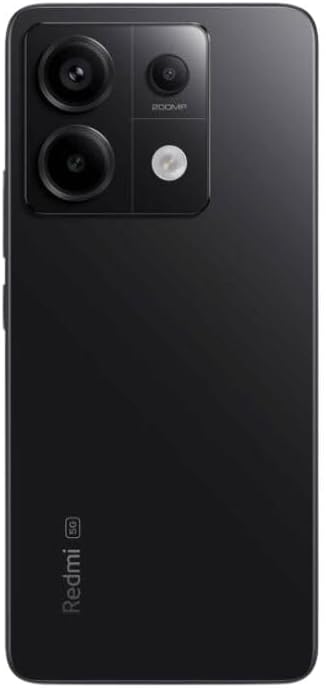
2-сүрөт: Арткы view of the Xiaomi Redmi Note 13 Pro 5G, showing the 200MP triple camera setup.
3.3 Ports and Sensors
The device includes a USB-C port for charging and data transfer, and a 3.5mm headphone jack. Integrated sensors include an in-screen fingerprint sensor, AI Face Unlock, ambient light sensor, accelerometer, electronic compass, IR blaster, and gyroscope.
4. Орнотуу
4.1 SIM картаны орнотуу
- Түзмөгүңүздүн капталындагы SIM карта салгычын табыңыз.
- SIM лоток чыгаруучу куралды лотоктун жанындагы кичинекей тешикке киргизип, лоток чыгып кеткенче бекем басыңыз.
- Place your nano-SIM card(s) into the designated slots on the tray. Ensure the gold contacts are facing down. The device supports Dual SIM (nano SIM + nano SIM or nano SIM + eSIM).
- SIM лотокту кылдаттык менен телефонго кайра кыстарыңыз.
4.2 Баштапкы күйгүзүү жана орнотуу устасы
- Xiaomi логотиби пайда болгонго чейин Кубат баскычын (адатта оң жагында) басып туруңуз.
- Follow the on-screen instructions to select your language, region, and agree to the terms and conditions.
- Орнотуу процессин аяктоо жана керектүү жаңыртууларды жүктөп алуу үчүн Wi-Fi тармагына туташыңыз.
- Sign in with your Google account and/or Xiaomi account to access services and restore backups.
- Set up your preferred security methods, such as PIN, pattern, password, fingerprint, or AI Face Unlock.
5. Аппаратты иштетүү
5.1 Дисплей навигациясы
Navigate your device using intuitive touch gestures. Swipe, tap, pinch, and zoom to interact with apps and content. The 120Hz refresh rate ensures a smooth and fluid user experience. Unlock your device quickly and securely using the in-screen fingerprint sensor or AI Face Unlock.
5.2 Камераны колдонуу
Open the Camera app to capture photos and videos. Utilize the 200MP main camera for highly detailed images, the ultra-wide lens for expansive landscapes, and the macro lens for close-up photography. The camera supports 4K video recording at 30fps, 1080p at 30/60fps, and 720p at 30fps. Slow motion video is available at 1080p (120fps) and 720p (120/240fps).
5.3 Аткаруу
The Redmi Note 13 Pro 5G is powered by the Snapdragon 7s Gen 2 Mobile Platform, built on 4nm process technology with an octa-core CPU up to 2.4GHz and Adreno GPU. This configuration, combined with 8GB of RAM and 256GB of internal storage, provides strong performance for multitasking, gaming, and demanding applications.
5.4 аудио
Enjoy immersive audio with dual speakers and Dolby Atmos support. The device also retains a 3.5mm headphone jack for wired audio connections.
6. Техникалык тейлөө
6.1 Программалык камсыздоо жаңыртуулары
Түзмөгүңүздө эң акыркы функциялар, коопсуздук жаңыртуулары жана иштеши жакшыртылганын текшерүү үчүн программалык камсыздоо жаңыртууларын дайыма текшерип, орнотуп алыңыз. барыңыз Орнотуулар > Телефон жөнүндө > MIUI версиясы жаңыртууларды текшерүү үчүн.
6.2 Батареяга кам көрүү
The 5000 mAh battery provides extended usage. To prolong battery life, avoid extreme temperatures, use the provided 67W fast charger, and manage background app usage. Avoid fully discharging the battery frequently.
6.3 Тазалоо
Use a soft, lint-free cloth to clean your device. Avoid harsh chemicals or abrasive materials that could damage the screen or finish. Do not expose the device to excessive moisture.
6.4 Сактагычты башкаруу
256 ГБ ички сактагыч менен сизде бар ample space for apps and media. Regularly review сенин files and uninstall unused applications to optimize performance and free up space.
7. Кыйынчылыктарды
Эгерде сиз түзмөгүңүздө көйгөйлөргө туш болсоңуз, төмөнкү негизги көйгөйлөрдү чечүү кадамдарын колдонуп көрүңүз:
- Түзмөк жооп бербейт: Кайра күйгүзүүгө мажбурлоо үчүн кубат баскычын 10-15 секунд басып туруңуз.
- Тармакка туташуу маселелери: Check if your SIM card is properly inserted. Toggle Airplane Mode on and off. Restart your device. Verify Wi-Fi settings and router connection.
- Колдонмонун бузулушу/тоңушу: Close the app and reopen it. Clear the app's cache and data (Settings > Apps > Manage apps > [App Name] > Clear data). Update the app to its latest version.
- Батареяны төгүү: Кубатты көп сарптаган колдонмолорду аныктоо үчүн Жөндөөлөрдөн батареянын колдонулушун текшериңиз. Колдонулбай турганда экрандын жарыктыгын азайтыңыз, GPS же Bluetooth сыяктуу керексиз функцияларды өчүрүңүз.
- Жай аткаруу: Clear cache, uninstall unused apps, and ensure sufficient free storage space.
- Заводдун баштапкы абалга келтирүү: Акыркы чара катары, көйгөйлөр чечилбесе, заводдук жөндөөлөргө кайтарсаңыз болот. Эскертүү: Бул түзмөгүңүздөгү бардык дайындарды жок кылат. Улантуудан мурун маанилүү маалыматтардын камдык көчүрмөсүн сактаңыз. барыңыз Орнотуулар > Телефон жөнүндө > Заводдук абалга кайтаруу.
8. Техникалык шарттар
| Өзгөчөлүк | Спецификация |
|---|---|
| Модель аты | Redmi Note 13 Pro 5G |
| Элемент моделинин номери | 2312DRA50G |
| Бренд | XIAOMI |
| Операция системасы | Android 13.0 |
| CPU модели | Snapdragon 7s Gen 2 Mobile Platform |
| CPU ылдамдыгы | 2.4 ГГц чейин |
| RAM эстутум орнотулган өлчөмү | 8 ГБ |
| Эстутум сактоо сыйымдуулугу | 256 ГБ |
| Туруктуу экран дисплей өлчөмү | 6.67 дюйм AMOLED |
| Резолюция | 2712x1220 (446PPI) |
| Жаңыртуу ылдамдыгы | 120 Гц чейин |
| Жогорку жарыктык | 1800 нит |
| Башкы камера | 200MP OIS |
| Ультра кең камера | 8MP |
| Макро камера | 2MP |
| Батарея кубаттуулугунун рейтинги | 5000 миллионamp Саат |
| Заряддоо | 67W тез заряддоо |
| Аудио Jack | 3.5 мм |
| Зымсыз оператор | Unlocked (USA Market: T-Mobile, Mint, Tello or any under T-Mobile network) |
| Продукциянын өлчөмдөрү | 3.58 x 7.32 x 2.36 дюйм |
| Элемент Салмагы | 1.19 фунт (0.54 килограмм) |
9. Кепилдик жана колдоо
Your XIAOMI Redmi Note 13 Pro 5G is covered by a manufacturer's warranty. For detailed information regarding warranty terms, conditions, and duration, please refer to the warranty card included in your product packaging or visit the official XIAOMI support webсайт.
For technical support, service requests, or further assistance, please visit the official XIAOMI webсайтына кириңиз же алардын кардарларды тейлөө кызматына кайрылыңыз. Кепилдик боюнча дооматтар үчүн сатып алганыңызды тастыктаган документти жаныңызда сактаңыз.


