1. Киришүү
This manual provides detailed instructions for the safe and efficient operation of your Xprinter XP-P323B Portable Thermal Printer. Please read this manual thoroughly before using the device to ensure proper functionality and to prevent damage. The XP-P323B is designed for printing receipts and labels, offering portability and high-speed capabilities for various business needs.
2. Коопсуздук маалыматы
- Do not expose the printer to water or excessive moisture.
- Avoid dropping the printer or subjecting it to strong impacts.
- Белгиленген кубат адаптерин жана аксессуарларды гана колдонуңуз.
- Keep the printer away from heat sources and direct sunlight.
- Принтерди өз алдынча бөлүктөргө бөлүүгө же оңдоого аракет кылбаңыз. Квалификациялуу тейлөө кызматкерлерине кайрылыңыз.
- Иш учурунда туура желдетүүнү камсыз кылыңыз.
3. Пакеттин мазмуну
Пакетте бардык буюмдар бар экенин текшериңиз:
- Xprinter XP-P323B Portable Thermal Printer
- Power Adapter (not explicitly listed but standard)
- USB Cable (not explicitly listed but standard)
- Sample Thermal Paper Roll (not explicitly listed but standard)
- Колдонуучунун Колдонмосу (бул документ)
4. Продукт бүтүп калдыview
The Xprinter XP-P323B is a compact and efficient thermal printer designed for various printing tasks. It supports NV logo download and picture printing (BMP format), along with concentration adjustment for print quality.
4.1. Printer Components

1-сүрөт: Фронт view of the Xprinter XP-P323B Portable Thermal Printer, showing the power button, display, and a sample label being printed.
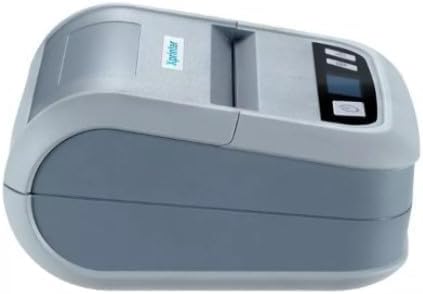
2-сүрөт: Side view of the Xprinter XP-P323B, highlighting its compact design and the Xprinter logo.
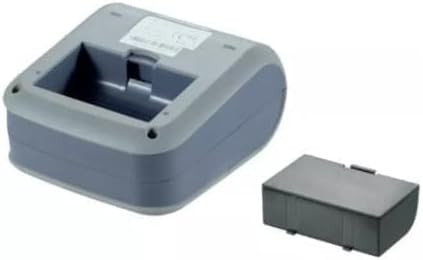
3-сүрөт: Асты view of the Xprinter XP-P323B, showing the base and the removable battery compartment.
5. Орнотуу
5.1. Батареяны заряддоо
- Connect the power adapter to the printer's charging port.
- Кубат адаптерин розеткага сайыңыз.
- The charging indicator light will illuminate. Allow the printer to charge fully before first use.
5.2. Loading Thermal Paper/Labels
- Open the paper compartment cover by gently pushing the release latch.
- Insert the thermal paper roll with the printing surface facing the print head. Ensure the roll is seated correctly.
- Pull a small amount of paper out past the print head.
- Кагаз бөлүкчөсүнүн капкагын чыкылдагыча бекем жабыңыз.
5.3. Түзмөккө туташуу
The XP-P323B supports USB and Bluetooth connectivity.
5.3.1. USB туташуу
- Берилген USB кабелин колдонуп принтерди компьютериңизге туташтырыңыз.
- Install the necessary printer drivers (available from the Xprinter website or included software).
5.3.2. Bluetooth Connection (for Smartphones/iOS)
- Принтер күйгүзүлгөнүн текшериңиз.
- On your smartphone or iOS device, go to Bluetooth settings and enable Bluetooth.
- Издөө available devices and select 'XP-P323B' (or similar name).
- Enter the pairing PIN if prompted (refer to printer documentation for default PIN, often '0000' or '1234').
- Once paired, you can use a compatible printing application to send print jobs.
6. Принтерди иштетүү
6.1. Негизги басып чыгаруу
- Принтер түзмөгүңүзгө туташып турганын жана кагаз жүктөлгөндүгүн текшериңиз.
- Open the document or image you wish to print on your connected device.
- Select the print option within your application.
- Choose 'XP-P323B' as the printer.
- Adjust print settings as needed (e.g., paper size, print quality).
- Басып чыгаруу ишин баштаңыз.
6.2. NV Logo and Picture Printing
The printer supports downloading and printing NV (Non-Volatile) logos and BMP format pictures. This functionality typically requires specific software or commands. Refer to the advanced programming guide or software documentation for detailed instructions on how to upload and print custom logos or images.
6.3. Adjusting Print Concentration
Print concentration can be adjusted to optimize print quality. This setting is usually accessible through the printer driver software on a computer or within the settings of a compatible mobile printing application. Consult your software's help section for specific steps.
7. Техникалык тейлөө
7.1. Принтерди тазалоо
- Сырткы: Принтердин сыртын жумшак менен сүртүңүз, damp кездеме. Катуу химиялык заттарды же абразивдүү тазалагычтарды колдонбоңуз.
- Басма башчысы: The thermal print head should be cleaned periodically to ensure optimal print quality. Use a cotton swab lightly dampИзопропил спирти менен эритилген. Басып чыгаруучу баштын бетин акырын сүртүңүз. Капкакты жаап, иштөөнү улантуудан мурун, аны толугу менен кургатыңыз.
- Кагаз жолу: Жумшак щетка же кысылган аба аркылуу кагаз жолундагы бардык кагаз чаңын же калдыктарын алып салыңыз.
7.2. Сактоо
When not in use for extended periods, store the printer in a cool, dry place, away from direct sunlight and extreme temperatures. Remove the paper roll if storing for a very long time to prevent dust accumulation.
8. Кыйынчылыктарды
| Көйгөй | Мүмкүн себеп | Чечим |
|---|---|---|
| Принтер күйбөйт | Low battery; Power adapter not connected; Faulty power adapter | Charge the battery; Ensure power adapter is securely connected; Try a different power outlet or adapter |
| Басып чыгаруу жок | No paper; Paper loaded incorrectly; Printer not connected; Driver issue | Load paper correctly; Re-establish connection; Reinstall printer drivers |
| Басып чыгаруу сапаты начар | Dirty print head; Low print concentration; Low battery | Clean the print head; Adjust print concentration in software; Charge the battery |
| Bluetooth байланышы ишке ашпай калды | Bluetooth off on device; Incorrect pairing PIN; Printer out of range | Enable Bluetooth; Re-enter correct PIN; Move device closer to printer |
9. Техникалык шарттар
| Бренд | Xprinter |
| Модель номери | XP-P323B |
| Элементтин өлчөмдөрү (D x W x Y) | 15D x 7W x 10H сантиметр |
| Байланыш технологиясы | USB |
| Принтер технологиясы | Термикалык |
| Өзгөчөлүктөр | Portable |
| Түс | Боз |
| Шайкеш түзмөктөр | Смартфондор |
| Controller Type | iOS |
| Максималдуу медиа өлчөмү | 4 x 6 дюйм |
| Басма маалымат каражаттары | Энбелгилер |
| Кагаз өлчөмү | 4 x 6 дюйм |
| Принтердин чыгышы | Монохромдуу |
| Maximum Print Speed (Black and White) | 40 mm/s (estimated from context) |
| Элемент Салмагы | 300 грамм |
10. Кепилдик жана колдоо
For warranty information and technical support, please refer to the warranty card included with your product or visit the official Xprinter webсайт. Сатып алуу квитанциясын кепилдик дооматтары үчүн сатып алуунун далили катары сактаңыз.


