Introduction
Thank you for choosing the RESTMO Sprinkler Timer with Brass Inlet. This programmable water timer is designed to simplify your garden watering tasks, providing automatic control for garden hoses, outdoor faucets, drip irrigation systems, and lawn watering. Please read this manual carefully before use to ensure proper installation, operation, and maintenance.
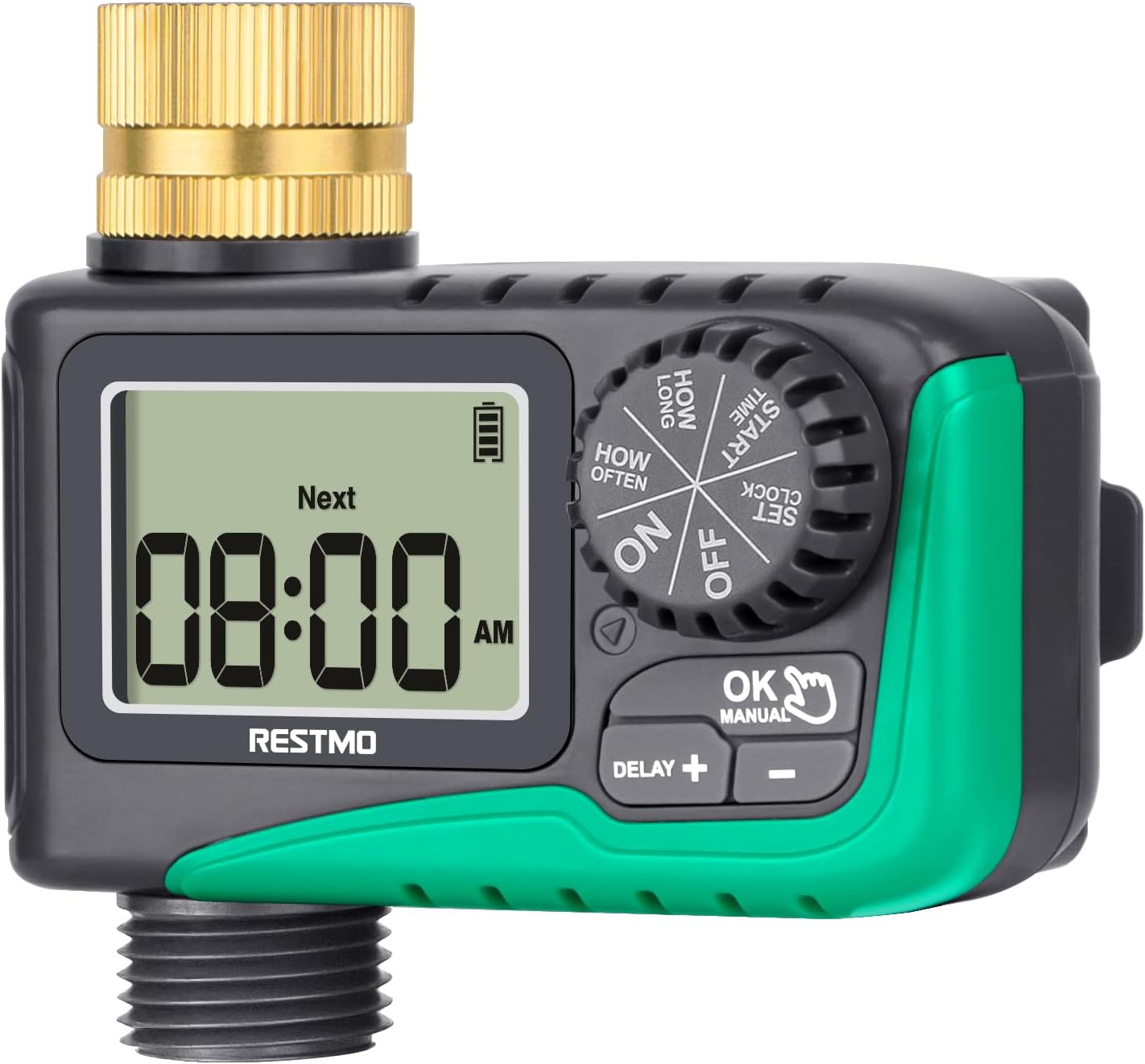
Сүрөт: алдыңкы view of the RESTMO Sprinkler Timer, showing the digital display and control dial.
Коопсуздук маалыматы
- Do not immerse the timer in water. It is IP54 waterproof, meaning it is protected against dust and splashing water, but not full immersion.
- Use only 2 x AAA 1.5V alkaline batteries (not included). Do not mix old and new batteries or different types of batteries.
- Remove batteries if the timer will not be used for an extended period to prevent leakage.
- Protect the timer from freezing temperatures. Disconnect and store indoors during winter.
- Ensure all connections are tight to prevent leaks. Teflon tape is recommended for a secure seal.
Продукт бүттүview
The RESTMO Sprinkler Timer features a user-friendly design with a large LCD screen and intuitive controls.
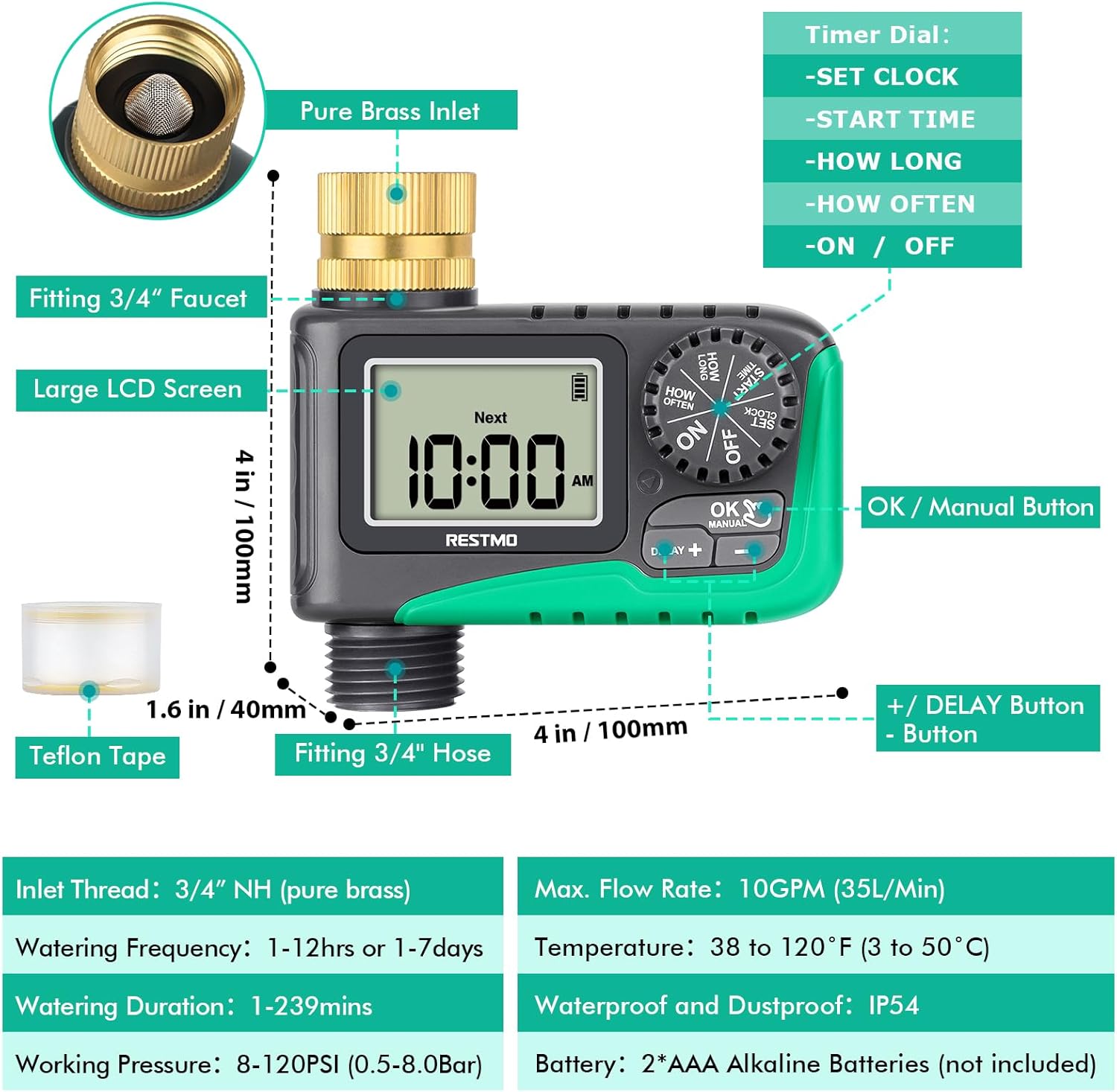
Image: Diagram illustrating the various components of the sprinkler timer, including the brass inlet, LCD screen, control dial, and buttons.
Негизги компоненттер:
- Pure Brass Inlet Thread: 360-degree rotatable for easy installation, with a built-in metal filter washer to prevent debris.
- Чоң LCD экран: Displays current time, next watering time, and battery status.
- Таймерди терүү: Used to select different settings (SET CLOCK, START TIME, HOW LONG, HOW OFTEN, ON, OFF).
- OK/Кол баскычы: Confirms settings and activates manual watering.
- +/- баскычтары: Adjust values and activate rain delay.
- Waterproof Battery Compartment: Houses 2 x AAA batteries.

Сүрөт: Жакын план view of the 360-degree swivel pure brass inlet, highlighting its design and durability.
Орнотуу жана орнотуу
Follow these steps to install your RESTMO Sprinkler Timer:
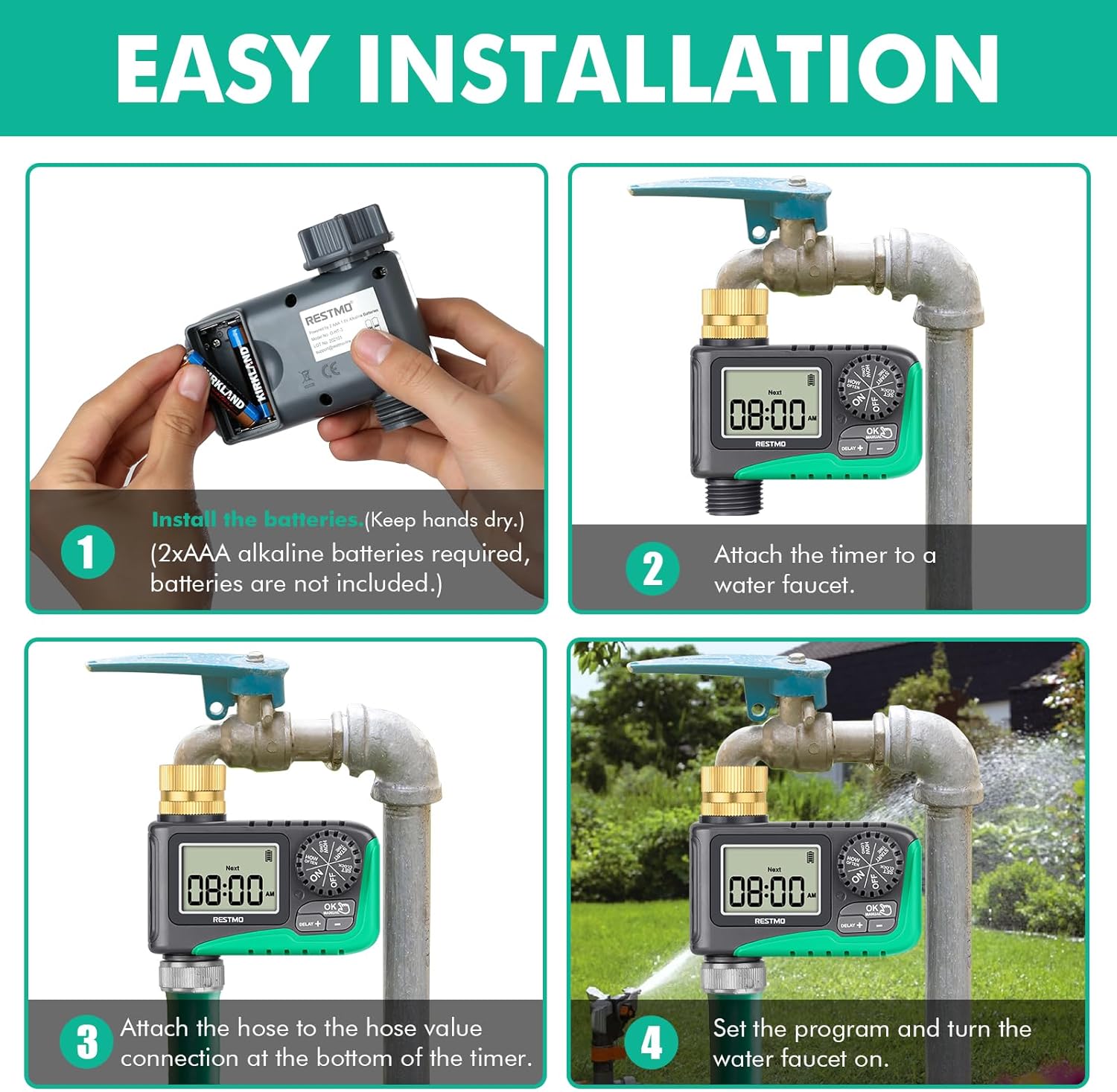
Image: Four-panel diagram showing the installation process: installing batteries, attaching to faucet, attaching hose, and setting the program.
- Батареяны орнотуу: Open the waterproof battery compartment. Insert 2 x AAA 1.5V alkaline batteries (not included), ensuring correct polarity. Close the compartment securely. Keep your hands dry during this process.
- Кранга бекитүү: Screw the timer's brass inlet onto your 3/4" outdoor faucet. Hand-tighten firmly. For a leak-proof connection, wrap Teflon tape around the faucet threads before attaching the timer.
- Шлангды бекитүү: Connect your garden hose to the 3/4" hose connection at the bottom of the timer. Ensure it is tightly secured.
- Turn on Faucet: Open your faucet fully. The timer is designed to operate under water pressure.
Иштөө нускамалары
1. Саатты коюу
This step sets the current time on the timer.
- Тергичти буруңуз СААТТЫ КОЮ.
- басыңыз +/- Учурдагы саатты жана мүнөттү орнотуу үчүн баскычтарды басыңыз.
- басыңыз OK button to switch between hour and minute setup.
- Turn the dial to any other position to save changes.
2. Баштоо убактысын коюңуз
This sets when your automatic watering program will begin.
- Тергичти буруңуз БАШТАЛГАН УБАКЫТ.
- басыңыз +/- баскычтарды басып, каалаган убакытты коюңуз.
- басыңыз OK button to switch between hour and minute setup.
- Turn the dial to any other position to save changes.
3. Set Watering Duration (How Long)
This sets how long the watering will last for each cycle.
- Тергичти буруңуз КАНЧА УБАКЫТ.
- басыңыз +/- buttons to set the watering duration from 1 minute to 239 minutes.
- басыңыз OK button to switch between hour and minute setup.
- Turn the dial to any other position to save changes.
4. Set Watering Frequency (How Often)
This sets how often the watering cycles will repeat.
- Тергичти буруңуз КАЧАН.
- басыңыз +/- buttons to set the watering frequency: from 1 hour to 12 hours, or from 1 day to 7 days.
- басыңыз OK button to switch between hour and day/hour setup.
- Turn the dial to any other position to save changes.
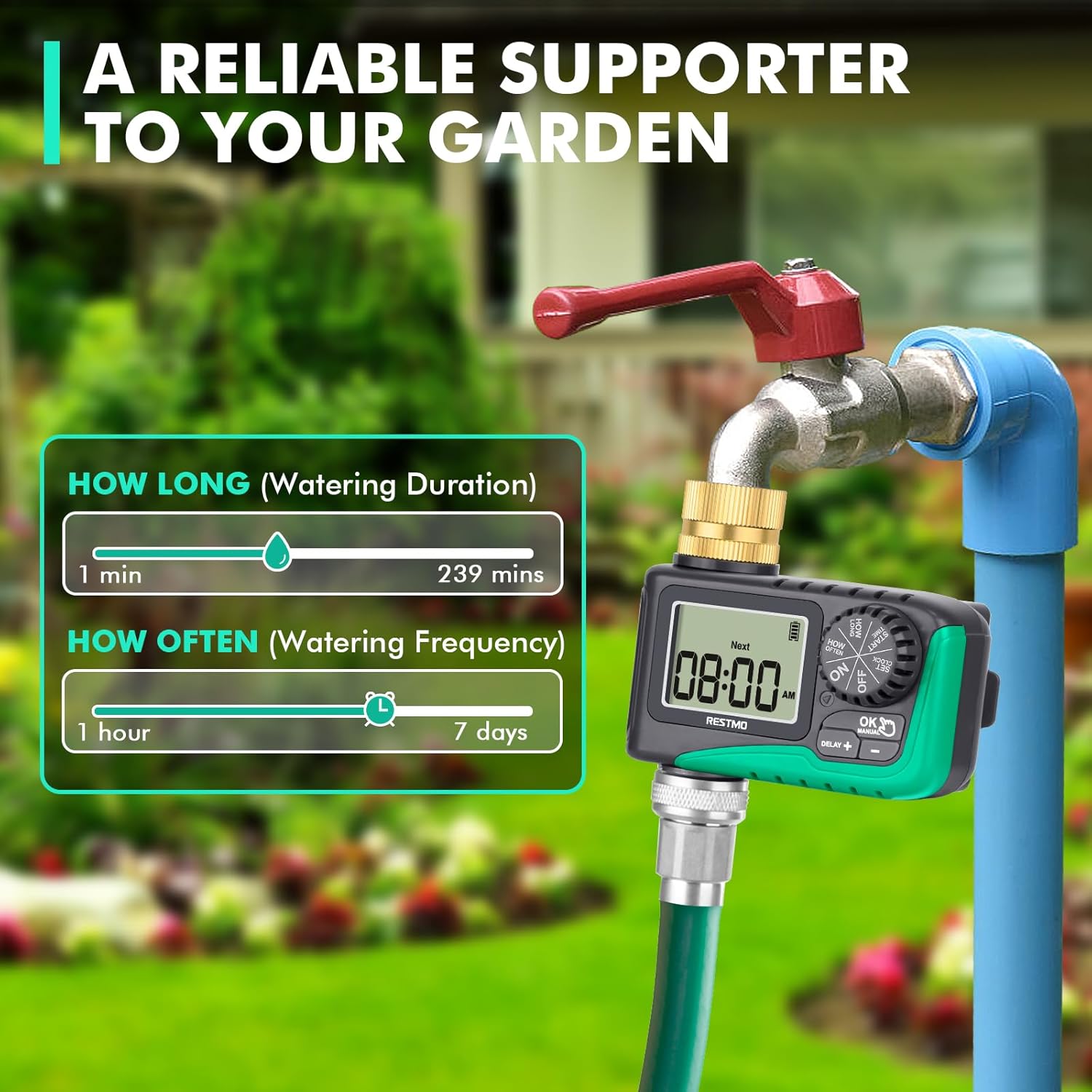
Image: Visual guide showing the range for 'How Long' (1-239 mins) and 'How Often' (1hr-7 days) settings.
5. Automatic Watering
Once programmed, turn the dial to ON to activate the automatic watering schedule. The LCD screen will display the remaining time of the current watering program when watering is active. When watering is off, the screen will flash between the next watering start time and the current time.

Image: Depicts the timer set to 'ON' for automatic watering, with a visual representation of the watering duration and frequency settings.
6. Кол менен сугаруу
Программаланган графигиңизге таасир этпестен кол менен сугаруу үчүн:
- With the dial at ON, long press the ОК/КОЛ баскычын 3 секунда басыңыз.
- басыңыз +/- buttons to select the desired manual watering duration (1 to 239 minutes).
- Басыңыз OK to switch between hour and minute. The setup flashes 3 times and manual watering will automatically start.
- To cancel manual watering, turn the dial to ӨЧҮРҮҮ анан кайра ON.

Image: Shows how to activate manual watering and adjust its duration, with a visual of water flowing from the hose.
7. Жамгыр кечигүү
To temporarily pause your watering schedule due to rain or other reasons:
- With the dial at ON, long press the КЕЧИКТИРҮҮ + баскычын 3 секунда басыңыз.
- басыңыз +/- buttons to select a delay of 12, 24, 48, or 72 hours.
- Басыңыз OK or wait for 3 seconds to start the rain delay.
- To cancel rain delay, turn the dial to ӨЧҮРҮҮ анан кайра ON.

Image: Illustrates the rain delay function with options for 12, 24, 48, and 72-hour delays.
8. Stop Watering
Бардык сугаруу программаларын толугу менен токтотуу үчүн:
- Тергичти буруңуз ӨЧҮРҮҮ. The timer will keep off until the dial is turned to ON кайра.

Image: Shows the timer dial set to 'OFF', indicating that watering has stopped.
Техникалык тейлөө
- Тазалоо: Periodically check the brass inlet filter washer for debris and clean it to ensure optimal water flow.
- Батареяны алмаштыруу: When the battery indicator on the LCD screen shows low power, replace the batteries promptly to avoid interruption of watering schedules.
- Кыштоо: Before the first frost, disconnect the timer from the faucet and hose. Remove the batteries and store the timer indoors in a dry, protected area to prevent damage from freezing.
Проблемаларды чечүү
Бул жерде кээ бир жалпы маселелер жана алардын чечимдери болуп саналат:
| Көйгөй | Мүмкүн себеп | Чечим |
|---|---|---|
| Timer not turning on/LCD blank | Өлүк же туура эмес орнотулган батарейкалар. | Replace batteries with new 2 x AAA alkaline batteries, ensuring correct polarity. |
| Water not flowing/Timer not watering | Faucet is off; low water pressure; clogged filter; incorrect program settings; valve stuck. | Ensure faucet is fully open. Check water pressure (10-120 psi required). Clean the inlet filter. Verify program settings (start time, duration, frequency). Reset the valves (see video below). |
| Байланыштардан суу агып жатат | Loose connections; missing/damaged washer; insufficient Teflon tape. | Tighten all connections. Check for and replace any missing or damaged rubber washers. Apply more Teflon tape to faucet threads. |
| Timer not following schedule | Incorrect clock setting; program not activated (dial not on ON); rain delay active. | Re-set the current time. Ensure the dial is set to ON. Check if rain delay is active and cancel if necessary. |
How to Reset the Valves:
If the timer's internal valves are not functioning correctly, you may need to reset them. This process involves cycling water through the timer manually to clear any obstructions or reset the mechanism.
Video: A step-by-step guide on how to reset the internal valves of the RESTMO Sprinkler Timer to ensure proper water flow.
Техникалык шарттар
- Модел: O-HT
- Материал: Жез, металл
- Киргизүү жиби: 3/4" NH (Pure Brass)
- Hose Fitting: 3/4"
- Сугаруу узактыгы: 1-239 мүнөт
- Сугаруу жыштыгы: 1-12 hours or 1-7 days
- Жаан-чачындын кечигүүсүнүн параметрлери: 12/24/48/72 саат
- Макс. Flow Rate: 10 GPM (35 L/Min)
- Иш басымы: 10-120 PSI (0.5-8.0 Бар)
- Температура диапазону: 38…120°F (3…50°C)
- Суу өткөрбөйт рейтинги: IP54
- Кубат булагы: 2 x AAA щелочтуу батарейкалар (киргизилген эмес)
- Продукциянын өлчөмдөрү: 3.94"D x 3.94"W x 1.57"H
- Элемент Салмагы: 5 унция
Кепилдик жана колдоо
RESTMO products are designed for durability and performance. For warranty information or technical support, please refer to the contact details provided with your product packaging or visit the official Restmo website. Our customer service team is available to assist you with any questions or concerns.


