1. Киришүү
This manual provides detailed instructions for the NEEWER PA043 15 Pro Cage (2nd Generation). This product is designed to enhance mobile filmmaking and photography by providing a stable platform and versatile mounting options for various accessories. Please read this manual thoroughly before using the product to ensure proper operation and longevity.
2. Продукт бүтүп калдыview
The NEEWER PA043 15 Pro Cage is a robust and versatile phone video rig specifically designed for the iPhone 15 Pro. It features a quick-release mechanism for easy phone installation and removal, multiple mounting points for accessories, and integrated lens and filter adapters.
Негизги өзгөчөлүктөрү:
- 2nd Generation Design: Upgraded with dedicated slots for PA045 Quick Release & Quick Snap On Side Handles (sold separately).
- MagSafe шайкештиги: Hollow back design supports MagSafe wireless charging.
- Оңой орнотуу: One-click side button mechanism for quick and secure phone insertion and removal.
- Туруктуу курулуш: Sturdy aluminum alloy frame with shock-absorbing rubber cushions for comprehensive phone protection.
- 67mm Filter Adapter: Integrated adapter for attaching 67mm UV, CPL, ND, black diffusion, and other effect filters.
- 17mm Threaded Lens Backplate: Compatible with NEEWER phone attachment lenses featuring 17mm threads (e.g., macro, fisheye, telephoto, wide angle).
- T Mount Lens Adapter: Supports Moment T Series mobile lenses (e.g., anamorphic, macro 10x, tele 58mm, wide 18mm, fisheye 14mm).
- Versatile Mounting Points: Multiple 1/4" threaded holes and cold shoe mounts for attaching LED video lights, microphones, and desktop tripods.
3. Пакеттин мазмуну
Пакетиңизде бардык буюмдар бар экенин текшериңиз:
- 1 x NEEWER 15 Pro Phone Cage (2nd Gen)
- 1 x 67mm Filter Adapter
- 1 x 17mm Threaded Lens Backplate
- 1 x T Mount Lens Backplate

Сүрөт 1: Пакеттин мазмуну жана спецификациялар бүттүview.
4. Орнотуу
4.1 Installing Your iPhone 15 Pro
- Locate the side latch on the NEEWER 15 Pro Cage.
- Press the side button to open the cage. The cage will pivot open, allowing access to the phone slot.
- Carefully insert your iPhone 15 Pro into the cage, ensuring it aligns correctly with the camera cutout and rubber cushions.
- Close the cage by pressing the pivoting side back into place until it locks securely with an audible click.
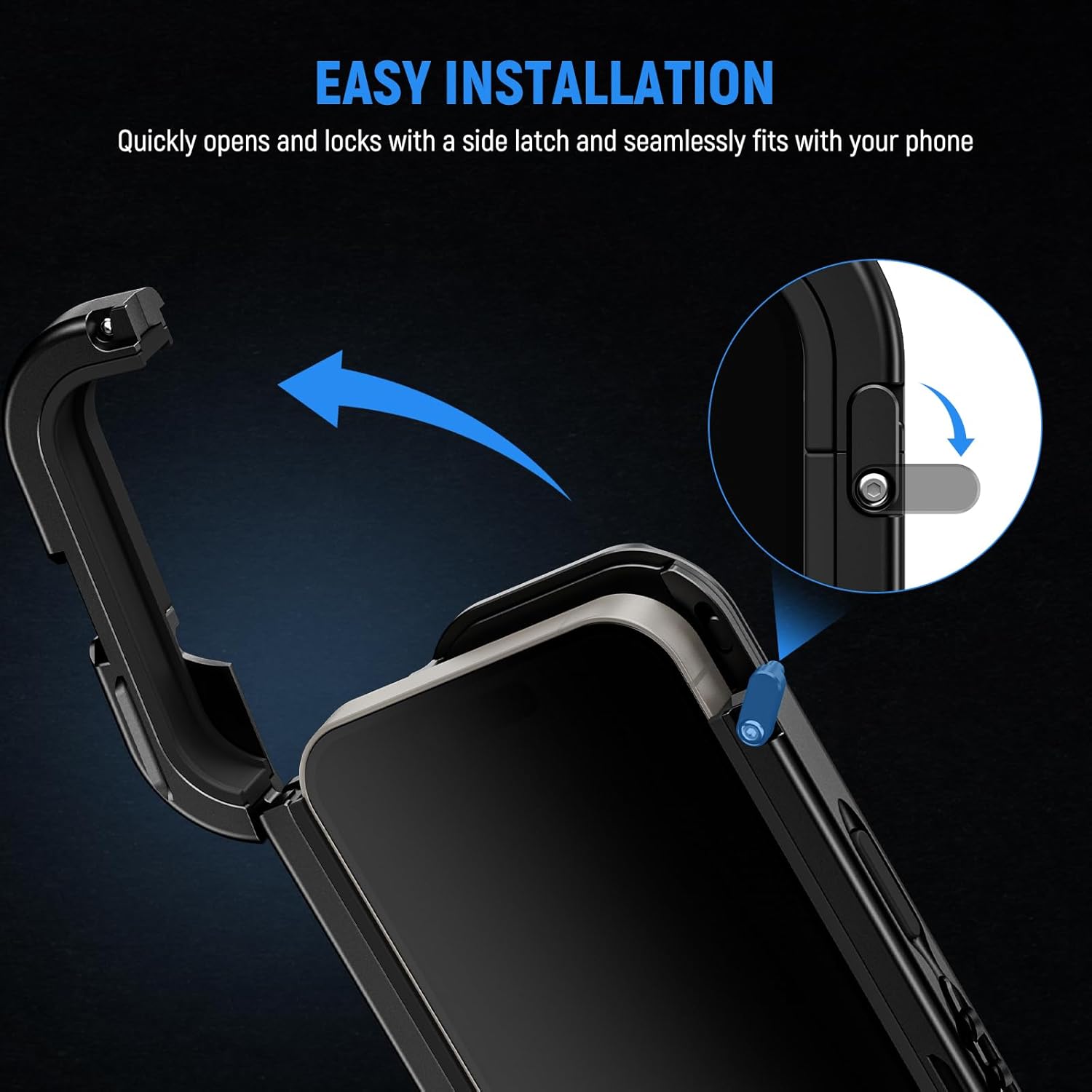
Figure 2: Illustrates the easy installation process of the iPhone 15 Pro into the cage using the side latch.
4.2 Чыпкаларды бекитүү
- Identify the 67mm filter adapter included with your cage.
- Align the filter adapter with the camera module opening on the cage.
- Gently snap the filter adapter into place. It should fit snugly around the camera lenses.
- Screw your desired 67mm filter (e.g., UV, CPL, ND) onto the adapter.

Figure 3: Demonstrates how to attach the 67mm filter adapter to the phone cage.
4.3 Attaching Lenses (17mm Threaded or T Mount)
- Determine if your external lens uses a 17mm thread or a T mount.
- Select the corresponding backplate (17mm threaded or T mount) from the package.
- Align the chosen backplate with the camera module opening on the cage and snap it into place.
- Screw or attach your external lens onto the installed backplate.

Figure 4: Shows the installation of both 17mm threaded and T mount lens backplates.
5. Иштөө нускамалары
5.1 Using Quick Release Side Handles
- The cage features quick-release mounting slots on all four sides.
- To attach a compatible PA045 Quick Release Side Handle (sold separately), align the handle's connector with a quick-release slot.
- Push the handle into the slot until it clicks and locks securely.
- To remove, press the release button on the handle and slide it out.

Figure 5: Details the quick-release mounting slots for attaching side handles.
5.2 Attaching Accessories via 1/4" Threads and Cold Shoes
- The cage is equipped with multiple 1/4" threaded holes and cold shoe mounts.
- For accessories with a 1/4" screw (e.g., tripods, mini ball heads), screw them into any available 1/4" threaded hole.
- For accessories with a cold shoe foot (e.g., LED video lights, microphones), slide them into a cold shoe mount and tighten the locking mechanism if present.

Figure 6: Illustrates the various 1/4" threaded holes and cold shoe mounts for accessory attachment.
5.3 General Usage Scenarios
The NEEWER PA043 cage is suitable for a wide range of applications, including:
- Video recording and mobile photography.
- YouTube/TikTok vlogging and live streaming.
- Filming and filmmaking projects.
- Zoom calls and video conferencing with enhanced stability.

7-сүрөт: Мисamples of the NEEWER PA043 cage in various usage scenarios.
6. Техникалык тейлөө
- Тазалоо: Чаңды жана манжа издерин кетирүү үчүн капасты жумшак, кургак чүпүрөк менен сүртүңүз. Өжөр кирлер үчүн бир аз сүртүңүз.amp кездеме жана жумшак самын, андан кийин кылдат кургатуу.
- Сактагыч: Store the cage in a cool, dry place away from direct sunlight and extreme temperatures.
- Текшерүү: Бардык бурамалар жана туташуулар бекем жана коопсуз экенин текшерүү үчүн мезгил-мезгили менен текшерип туруңуз.
- Катуу химиялык заттардан алыс болуңуз: Do not use abrasive cleaners or solvents, as these can damage the finish and rubber components.
7. Кыйынчылыктарды
- Phone Not Fitting Securely: Ensure the iPhone 15 Pro is correctly aligned within the cage and the side latch is fully engaged. Verify that no debris is obstructing the fit.
- Accessories Not Attaching: Check that the accessory's mounting screw or cold shoe foot is compatible with the cage's 1/4" threads or cold shoe mounts. Ensure screws are tightened appropriately.
- MagSafe Not Working: Confirm that the phone is properly seated in the cage and that the MagSafe accessory is correctly aligned with the hollow back of the cage.
- Lens/Filter Vignetting: Ensure the correct lens backplate or filter adapter is used for your specific lens/filter and that it is securely attached. Some third-party lenses may cause slight vignetting depending on their design.
8. Техникалык шарттар
| Өзгөчөлүк | Деталь |
|---|---|
| Модел | PA043 |
| Материал | Aluminum alloy, rubber |
| Өлчөмдөр | 6.6" x 3.7" x 0.8" (168x93x21мм) |
| Салмагы | 4.4 унция / 125 г |
| монтаждык Points | 1/4" Threads, cold shoes |
| Шайкеш түзмөктөр | iPhone 15 Pro |
| Түс | Кара |
9. Кепилдик жана колдоо
This NEEWER product comes with a 1 жылдык Өндүрүүчүнүн Кепилдиги. For warranty claims, technical support, or any inquiries regarding your PA043 15 Pro Cage, please contact NEEWER customer service directly or visit the official NEEWER store online. Keep your purchase receipt as proof of purchase.
Расмий NEEWER дүкөнү: Visit the NEEWER Store


