1. Киришүү
This manual provides essential information for the safe and efficient operation of your TELLUR Obia PRO 60W Bluetooth Speaker. Please read this manual thoroughly before using the product and retain it for future reference.
2. Коопсуздук маалыматы
- Динамикти экстремалдык температурага же түз күн нуруна узак убакытка калтырбаңыз.
- Спикерди түшүрүүдөн же катуу таасирлерге дуушар кылуудан качыңыз.
- Динамикти ажыратууга же өзгөртүүгө аракет кылбаңыз. Бул кепилдикти жокко чыгарат.
- Динамикти медициналык шаймандардан алыс кармаңыз.
- Ensure the charging port cover is securely closed when near water to maintain IPX6 water resistance.
- Белгиленген кубаттоо кабелин жана кубат адаптерин гана колдонуңуз.
3. Пакеттин мазмуну
Пакетте бардык буюмдар бар экенин текшериңиз:
- TELLUR Obia PRO 60W Bluetooth Speaker
- USB заряддоо кабели
- 3.5 мм AUX аудио кабели
- Колдонуучунун Колдонмосу (бул документ)
4. Продукт бүтүп калдыview жана Controls
Familiarize yourself with the speaker's components and control buttons.

4.1-сүрөт: Фронт view of the TELLUR Obia PRO speaker, showcasing the main grille, control panel, and integrated LED lights on the handle and side woofers.
4.1 Башкаруу панели

4.2-сүрөт: Деталдаштырылган view of the control buttons located on the top panel of the speaker.
- Volume Down (-) / Previous Track: Үндү азайтуу үчүн кыска басыңыз. Мурунку трекке өтүү үчүн басып кармап туруңуз.
- Volume Up (+) / Next Track: Press briefly to increase volume. Press and hold to go to the next track.
- LED Light Mode Button: Press to cycle through different LED light modes.
- Кубат баскычы: Press and hold to power on/off. Briefly press to play/pause music.
- TWS (True Wireless Stereo) Button: Press to activate TWS pairing mode.
- Режим баскычы (M): Press to switch between Bluetooth, USB, and AUX input modes.
4.2 Киргизүү/чыгыш порттору
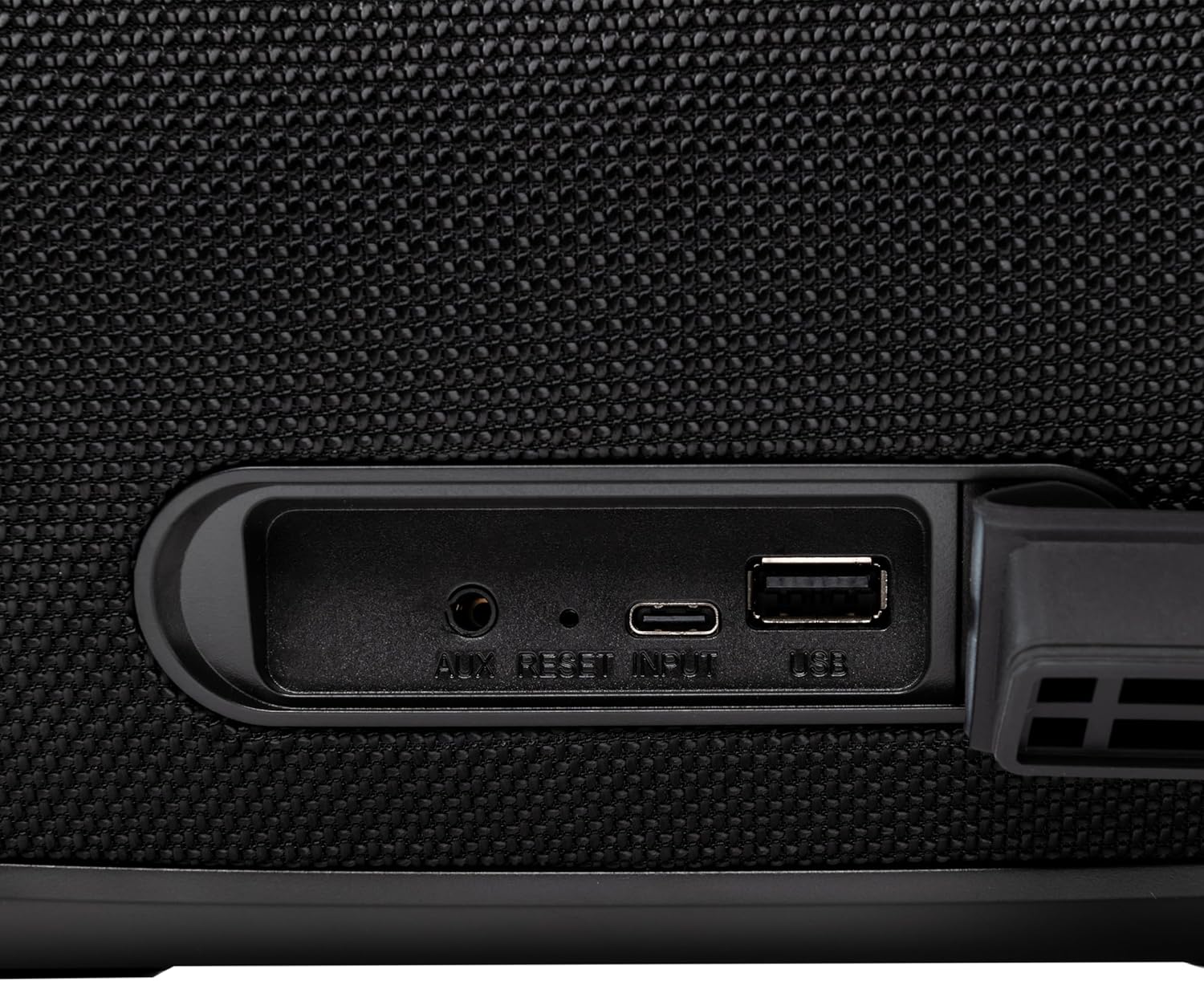
4.3-сүрөт: Close-up of the protected input/output ports on the rear of the speaker.
- AUX-IN порту: 3.5 мм аудио кабели аркылуу тышкы аудио түзмөктөрдү туташтыруу үчүн.
- Калыбына келтирүү баскычы: Use a thin object to press and reset the speaker if necessary.
- USB-C киргизүү: Динамикти заряддоо үчүн.
- USB-A порту: MP3 аудиону ойнотуу үчүн files from a USB drive or for power bank functionality.
5. Орнотуу
5.1 Динамикти заряддоо
Before initial use, fully charge the speaker. The speaker also functions as a power bank to charge other devices via its USB-A port.
- Connect the USB charging cable to the USB-C input port on the speaker.
- Кабелдин экинчи учун туура келген USB кубат адаптерине туташтырыңыз (кошумча эмес).
- The charging indicator light will illuminate. It will turn off once charging is complete.
- The battery level can be displayed on your connected phone when paired via Bluetooth.
5.2 Күйгүзүү/өчүрүү
- Күйгүзүү үчүн: басып, кармап туруңуз Кубат баскычы for approximately 3 seconds until you hear an audible prompt and the LED lights activate.
- Өчүрүү үчүн: басып, кармап туруңуз Кубат баскычы for approximately 3 seconds until you hear an audible prompt and the LED lights turn off.
6. Иштөө нускамалары
6.1 Bluetooth жупташтыруу
The speaker uses Bluetooth v5.3 for stable wireless connection up to 10 meters.
- Ensure the speaker is powered on and in Bluetooth mode (indicated by a flashing blue LED). If not, press the Режим баскычы (M) Bluetooth режимине өтүү үчүн.
- Мобилдик түзмөгүңүздө Bluetooth'ду иштетиңиз (смартфон, планшет ж.б.).
- Издөө available Bluetooth devices and select "TELLUR Obia PRO" тизмеден.
- Once paired, the speaker will emit an audible confirmation, and the blue LED will stop flashing.
- Динамик, эгер бар болсо, күйгүзүлгөндө акыркы жупташтырылган түзмөккө автоматтык түрдө кайра туташат.

6.1-сүрөт: The TELLUR Obia PRO speaker wirelessly connected to a smartphone, ready for audio playback.
6.2 Чыныгы зымсыз стерео (TWS) функциясы
TWS allows you to pair two Obia PRO speakers for a stereo sound experience.
- Ensure both Obia PRO speakers are powered on and in Bluetooth mode, but not yet paired with any device.
- Бир динамикте (бул негизги динамик болот) баскычын басыңыз TWS баскычы. The speaker will enter TWS pairing mode, indicated by a flashing light.
- The two speakers will automatically connect to each other. Once connected, you will hear an audible confirmation, and the TWS indicator light on both speakers will become solid.
- Now, connect your mobile device to the primary speaker via Bluetooth as described in Section 6.1. The audio will play in stereo across both speakers.
6.3 Multiple Link Technology
This technology allows connecting an unlimited number of Obia PRO speakers wirelessly for a synchronized audio experience. Refer to the manufacturer's website or specific instructions for detailed setup of Multiple Link.
6.4 USB Playback (MP3)
MP3 аудиону ойнотуу files directly from a USB flash drive (up to 128GB).
- MP3 камтыган USB флэш-дискти салыңыз files USB-A портуна туташтырыңыз.
- басыңыз Режим баскычы (M) to switch to USB mode. The speaker will automatically begin playing music from the USB drive.
- колдонуу Үнүн жогорулатуу/төмөндөтүү жана Кубат баскычы (for play/pause) to control playback.
6.5 AUX-IN Connection
Connect non-Bluetooth devices using the 3.5mm AUX audio cable.
- Connect one end of the 3.5mm AUX audio cable to the AUX-IN port on the speaker.
- Экинчи учун тышкы түзмөгүңүздүн (мисалы, MP3 ойноткуч, ноутбук) аудио чыгаруу уячасына туташтырыңыз.
- басыңыз Режим баскычы (M) AUX режимине өтүү үчүн.
- Тышкы түзмөгүңүздөн ойнотууну жана үнүн башкарыңыз.
6.6 Колу бош чалуу
When connected to a smartphone via Bluetooth, the speaker's built-in microphone allows for hands-free calls.
- Чалууга жооп берүү/аяктоо: баскычын кыскача басыңыз Кубат баскычы.
- Чакырууну четке кагуу: басып, кармап туруңуз Кубат баскычы 2 секундга.
6.7 LED жарык режимдери
The speaker features integrated LED lights with multiple display modes.
- басыңыз LED жарык режиминин баскычы to cycle through available light patterns and colors.
- басып, кармап туруңуз LED жарык режиминин баскычы to turn the lights off or on.

6.2-сүрөт: A user interacting with the LED light mode button to change the speaker's lighting effects.
6.8 Equalizer Settings (Indoor/Outdoor)
The speaker allows for equalizer customization for different environments. Specific controls for this are not detailed in the provided data, but typically involve a dedicated button or a combination of existing buttons. Refer to the product's quick start guide or manufacturer's website for precise instructions on adjusting the equalizer.
7. Техникалык тейлөө
7.1 Тазалоо
- Динамикти жумшак, кургак чүпүрөк менен сүртүңүз.
- Абразивдүү тазалагычтарды, спиртти же химиялык эриткичтерди колдонбоңуз.
7.2 Сууга туруктуулук (IPX6)
The Obia PRO speaker is rated IPX6, meaning it is protected against high-pressure water jets from any direction. This makes it suitable for outdoor use and environments where it might be exposed to splashes or rain.
- Ensure the rubber cover for the charging and AUX ports is securely closed before exposing the speaker to water.
- Динамикти сууга батырбаңыз.
- Суу тийгенден кийин, заряддоодон мурун динамикти кургатып сүртүңүз.
7.3 Батареяга кам көрүү
- Батареянын иштөө мөөнөтүн узартуу үчүн, бат-баттан батарейканы толук зарядсыздандырбаңыз.
- Батареянын иштөө мөөнөтүн сактоо үчүн, колдонулбаса дагы, динамикти үзгүлтүксүз кубаттап туруңуз.
- Динамикти узак убакытка колдонбогондо салкын, кургак жерде сактаңыз.
8. Кыйынчылыктарды
| Көйгөй | Мүмкүн себеп | Чечим |
|---|---|---|
| Динамик күйбөйт. | Батарея аз. | Динамикти толук заряддаңыз. |
| Bluetooth аркылуу жупташтыруу мүмкүн эмес. | Динамик жупташтыруу режиминде эмес; түзмөк Bluetooth өчүк; спикерден өтө алыс. | Ensure speaker is in Bluetooth mode (flashing LED). Turn on Bluetooth on your device. Move device closer to speaker (within 10m). |
| Үн жок. | Үнү өтө төмөн; туура эмес режим тандалды; түзмөк ойнотулбай жатат. | Increase speaker and device volume. Press Режим баскычы (M) to select correct input. Ensure audio is playing on the connected device. |
| TWS жупташтыруу ишке ашпай калды. | Speakers already paired to a device; not both Obia PRO models. | Disconnect both speakers from any Bluetooth devices. Ensure both speakers are Obia PRO models. Try TWS pairing again. |
| USB ойнотуу иштебей жатат. | USB диск туура эмес форматталган; колдоого алынбайт file type; drive capacity too large. | Ensure USB drive is formatted to FAT32. Only MP3 files are supported. Max capacity 128GB. |
9. Техникалык шарттар
| Модель аты | Obia PRO |
| Бренд | TELLUR |
| Чыгуу күчү | 60W (2x 20W RMS subwoofers, 2x 10W RMS tweeters) |
| Bluetooth версиясы | v5.3 |
| Зымсыз диапазон | 10 метрге чейин |
| Frequency Response | 80 МГц (Note: This value is unusual for speaker frequency response and may be a typo in source data. Typically measured in Hz-kHz.) |
| Импеданс | 4 Ом |
| Аудио режимдери | Bluetooth, USB (MP3), AUX-IN |
| USB колдоо | USB 2.0/3.0, up to 128GB (MP3 format) |
| Суу каршылык | IPX6 |
| Батарея сыйымдуулугу | 5400 мАч |
| Ойнотуу убактысы | 12 саатка чейин (орточо көлөмдө) |
| Power Bank функциясы | Yes, via USB-A port |
| Өлчөмдөрү (L x W x Y) | 37.7 x 17 x 18 см |
| Салмагы | 3.48 кг |
| Материал | Пластик |
| Түс | Кара |
Эскертүү: Техникалык мүнөздөмөлөр алдын ала эскертүүсүз өзгөртүлүшү мүмкүн.
10. Кепилдик жана колдоо
TELLUR products are manufactured to the highest quality standards. For information regarding warranty terms, technical support, or service, please refer to the warranty card included with your product or visit the official TELLUR webсайт.
Байланыш маалыматы: Сураныч, келиңиз www.tellur.com акыркы колдоо маалымат үчүн.


