1. Киришүү
Thank you for choosing the Chuboor PJ01 Air Purifier. This device is designed to improve indoor air quality by filtering out various airborne particles and odors. It features a 3-in-1 filtration system, real-time PM2.5 display, multiple operating modes, and smart control options. Please read this manual thoroughly before use to ensure proper operation and maintenance.
2. Коопсуздук нускамалары
Өрт, электр шок же жаракат алуу коркунучун азайтуу үчүн, төмөнкү коопсуздук чараларын сактаңыз:
- Көчүрүү, тазалоо же тейлөө иштерин жүргүзүү алдында аба тазалагычты дайыма электр розеткасынан ажыратыңыз.
- Шайманды шнур же сайгыч бузулуп иштетпеңиз.
- Электр шнурын ысытылган беттерден алыс кармаңыз.
- Аба тазалагычты нымдуу жерде колдонбоңуз же damp чөйрөлөр, мисалы, жуунучу бөлмөлөр.
- Манжаларды же бөтөн нерселерди аба кирүүчү же чыгуучу тешиктерине киргизбеңиз.
- Аба кирүүчү жана чыгуучу тешиктердин бүтөлүп калбагандыгын текшериңиз.
- Бул шайман физикалык, сенсордук же акыл-эс жөндөмү начар же тажрыйбасы жана билими жок адамдар (анын ичинде балдар) тарабынан колдонууга арналбайт, эгерде алардын коопсуздугуна жооптуу адам тарабынан шайманды колдонуу боюнча көрсөтмө болбосо .
- Балдар шайман менен ойнобошу үчүн аларды көзөмөлгө алуу керек.
- Use only original Chuboor replacement filters.
3. Пакеттин мазмуну
Сураныч, төмөнкү нерселер үчүн кутучаны белгилеңиз:
- Chuboor PJ01 Air Purifier (with 3-in-1 filter pre-installed)
- Кубаттуу адаптер
- User Manual
4. Продукт бүтүп калдыview жана компоненттер
Familiarize yourself with the main parts of your Chuboor PJ01 Air Purifier.

1-сүрөт: Фронт view of the Chuboor PJ01 Air Purifier, showing the main unit, air intake vents, and top control panel with air outlet. Green leaves illustrate air purification.

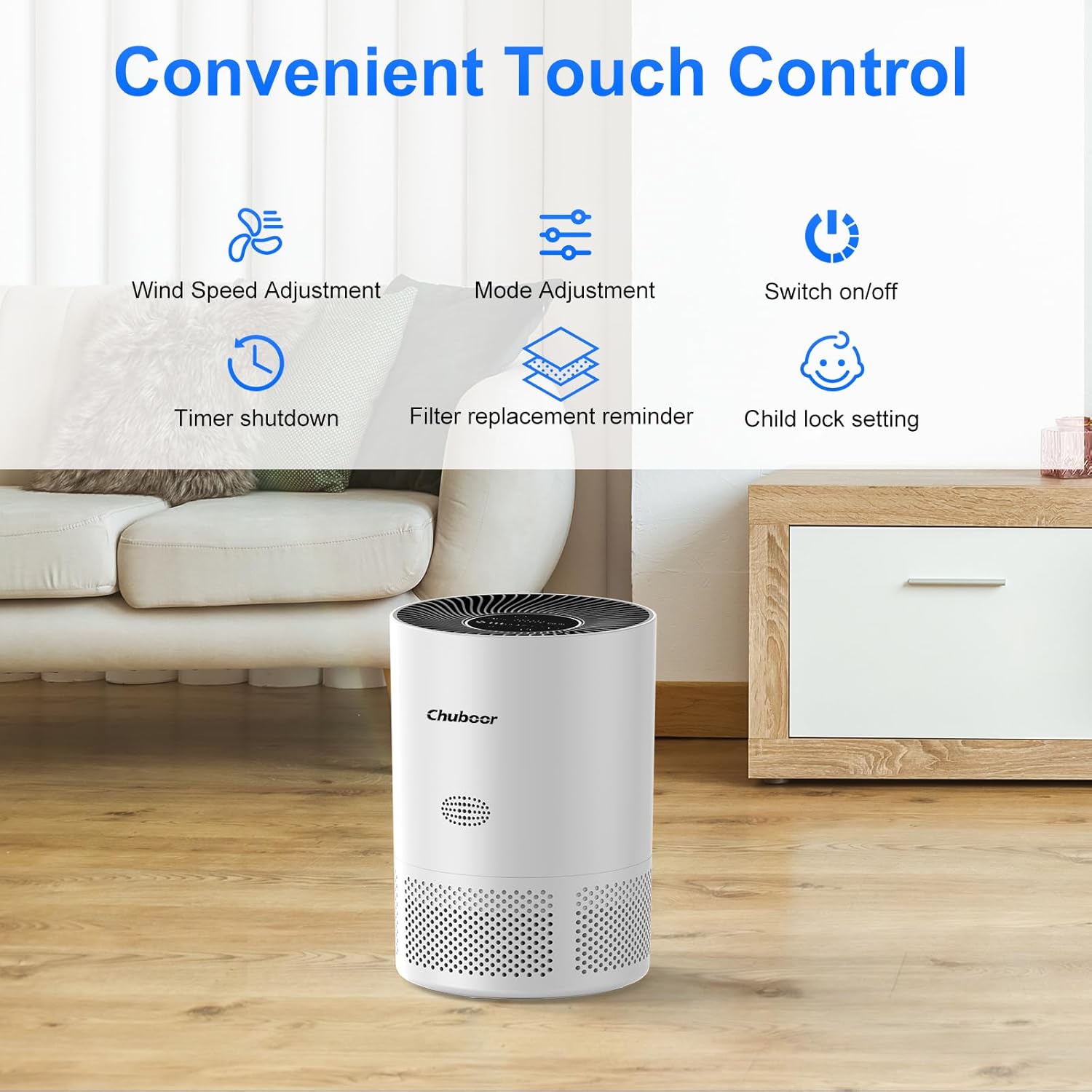
2-сүрөт: Close-up of the intuitive touch control panel on the Chuboor PJ01 Air Purifier, displaying icons for wind speed adjustment, mode adjustment, power on/off, timer shutdown, filter replacement reminder, and child lock setting.
3-сүрөт: Деталдаштырылган view of the real-time PM2.5 air quality indicator on the control panel. It shows numerical PM2.5 values and a color-coded ring (green for good, yellow for general, red for poor air quality).
5. Орнотуу
- Аба тазалагычты таңгактан чыгарыңыз: Аба тазалагычты таңгагынан кылдаттык менен чыгарып алыңыз.
- Фильтр таңгагын алып салуу: Before first use, the 3-in-1 filter inside the unit is typically sealed in plastic.
- Аба тазалагычты тескери буруңуз.
- Кулпусун ачып, алып салуу үчүн, негизги капкакты саат жебесине каршы бураңыз.
- Take out the filter and remove all plastic packaging.
- Фильтрдин туура орнотулганын текшерип, аны кайра блокко салыңыз.
- Негизги капкакты кайра ордуна коюп, бекем бекитүү үчүн саат жебеси боюнча бураңыз.

4-сүрөт: Diagram illustrating the three layers of the Chuboor PJ01 filter: Pre-Filter (for dust, fibers, lint, pet fur), High Efficiency Activated Carbon Filters (for smoke, fumes, VOCs, odors), and True H13 HEPA Filter (for smoke particles, pollen, pet dander, and particles >0.3 microns).
- Аба тазалагычты жайгаштырыңыз: Place the air purifier on a flat, stable surface, ensuring there is at least 15 cm (6 inches) of space around all sides for optimal air circulation.
- Туташуу кубаты: Plug the power adapter into the air purifier and then into a standard electrical outlet.
6. Иштөө нускамалары
6.1 Негизги операция
- Күйгүзүү/өчүрүү: тийиңиз Күч башкаруу панелиндеги баскычты басып, түзмөктү күйгүзүңүз же өчүрүңүз.
- Желдетүүчү ылдамдыкты жөндөө: тийиңиз Fan Speed button to cycle through fan speeds (Level 1, Level 2, Level 3).
- Уйку режими: тийиңиз Mode button to activate Sleep Mode. In this mode, the fan operates at its lowest speed (24 dB) and display lights dim for a quiet environment.

5-сүрөт: The Chuboor PJ01 Air Purifier operating in a bedroom, illustrating its quiet Sleep Mode (24dB) for undisturbed rest. The image highlights the 360° air intake.
- Таймер функциясы: тийиңиз Таймер button to set the operating time for 2, 4, or 8 hours. The unit will automatically turn off after the set time.
- Балдар кулпусу: тийип, кармап туруңуз Child Lock button for a few seconds to activate or deactivate the child lock. When active, the control panel buttons will not respond to touches.
6.2 Automatic Mode and Air Quality Display
The air purifier features an intelligent automatic mode that adjusts fan speed based on real-time air quality.
- PM2.5 дисплейи: The display shows the current PM2.5 concentration in µg/m³.
- Түс көрсөткүчү: A color ring around the display indicates air quality:
- Жашыл: Абанын сапаты жакшы
- Сары: General air quality
- Кызыл: Абанын сапаты начар
- Авто режим: When in Auto Mode, the fan speed will automatically adjust to maintain optimal air quality.

6-сүрөт: Diagram illustrating the Auto Mode functionality. The air purifier automatically adjusts fan speed (low, medium, high) based on detected air quality (good, moderate, poor).
6.3 Smart Control (WiFi & Voice Control)
The Chuboor PJ01 can be controlled remotely via the "pjrobot" app and integrated with voice assistants.
- WiFi туташуусу: Download the "pjrobot" app from your smartphone's app store. Follow the in-app instructions to connect your air purifier to your home WiFi network.
- Колдонмону башкаруу: Once connected, you can control all functions of the air purifier (power, fan speed, mode, timer, child lock) from anywhere using the app.
- Үн менен башкаруу: The device is compatible with Google Assistant and Amazon Alexa. Link your "pjrobot" account within the respective voice assistant app to enable voice commands for your air purifier.
7. Техникалык тейлөө
7.1 Фильтрди алмаштыруу
The air purifier features a filter replacement reminder. When the filter needs to be replaced, an indicator light will illuminate on the control panel.
- Электрди өчүрүү жана розеткадан ажыратыңыз: Чыпканы алмаштыруудан мурун, ар дайым аба тазалагычты өчүрүп, розеткадан сууруп алыңыз.
- Эски чыпканы алып салуу: Turn the unit upside down, twist the base cover counter-clockwise, and remove the used filter.
- Жаңы чыпканы орнотуу: Remove all packaging from the new Chuboor 3-in-1 replacement filter. Insert the new filter into the unit, ensuring proper orientation.
- Капкакты алмаштыруу: Secure the base cover by twisting it clockwise until locked.
- Чыпка мөөнөтүн баштапкы абалга келтирүү: After replacing the filter, plug in the unit and turn it on. Press and hold the Чыпканы алмаштыруу эстеткич button for 3-5 seconds until the indicator light turns off, resetting the filter life counter.
Эскертүү: The filter life depends on air quality and usage frequency. It is generally recommended to replace the filter every 6-8 months.
7.2 Аба тазалагычты тазалоо
- Сырткы: Wipe the exterior surface of the air purifier with a soft, dry cloth. Do not use abrasive cleaners or solvents.
- Аба кирүүчү/чыга турган жерлер: Аба кирүүчү жана чыгуучу тешиктерден чаңды акырын тазалоо үчүн жумшак щетканы же щетка тиркемеси бар чаң соргучту колдонуңуз.
- Фильтрди жуубаңыз. The filter is not washable and should be replaced when indicated.
8. Кыйынчылыктарды
| Көйгөй | Мүмкүн себеп | Чечим |
|---|---|---|
| Аба тазалагыч күйбөйт. |
|
|
| Weak airflow or poor purification. |
|
|
| Адаттан тышкаркы ызы -чуу. |
|
|
| WiFi туташуу маселелери. |
|
|
9. Техникалык шарттар
| Бренд | Чубор |
| Модель номери | PJ01 |
| Өлчөмдөрү (L x W x Y) | 24 x 30 x 24 см (9.45 x 11.81 x 9.45 дюйм) |
| Элемент Салмагы | 2.36 килограмм (5.2 фунт) |
| CADR (Таза аба жеткирүү баасы) | 185 м³/саат |
| Камтуу аймагы | 40 м² (430 чарчы фут) чейин |
| Чыпка түрү | 3-in-1 (Pre-filter, Activated Carbon, H13 HEPA) |
| Ызы-чуу деңгээли | 24-48 dB (24 dB in Sleep Mode) |
| Башкаруу ыкмасы | Touch Control, App Control (pjrobot), Voice Control (Google Assistant, Amazon Alexa) |
| Power Source | Электр зымдары |
| Максималдуу энергия керектөө | 24 Вт |
10. Кепилдик жана колдоо
For warranty information and customer support, please refer to the documentation provided with your purchase or contact Chuboor customer service.
You can typically find support contact details on the official Chuboor webсайт же сатуучу аркылуу.


