Introduction
Thank you for choosing the ErGear Whole Piece Standing Desk. This electric computer workstation is designed to enhance your home office experience with its seamless design, spacious work area, and ergonomic adjustability. This manual provides essential information for assembly, operation, maintenance, and troubleshooting to ensure optimal performance and longevity of your desk.

Figure 1: ErGear Whole Piece Standing Desk in a typical setup.
Маанилүү коопсуздук маалыматы
Колдонуудан мурун бардык көрсөтмөлөрдү кунт коюп окуп чыгыңыз. Бул көрсөтмөлөрдү аткарбоо жаракат алууга же продуктунун бузулушуна алып келиши мүмкүн.
- Do not place more than 176 lbs (79.8 kg) on the desk top to ensure stability and safety.
- Иш учурунда балдарды жана үй жаныбарларын столдон алыс кармаңыз.
- Бийиктикти тууралоодо чырмалышып калбоо үчүн бардык кабелдер туура башкарылгандыгын текшериңиз.
- Do not disassemble or modify the desk's electrical components. Contact qualified personnel for repairs.
- Коргоочу капкактарсыз суюктуктарды түздөн-түз столдун бетине коюудан алыс болуңуз.
Орнотуу жана чогултуу
The ErGear Whole Piece Standing Desk is designed for hassle-free assembly. A detailed instruction manual and labeled hardware are included in the packaging to guide you through the process.
For comprehensive assembly steps, please refer to the official Installation Manual (PDF): Орнотуу боюнча колдонмону жүктөп алыңыз
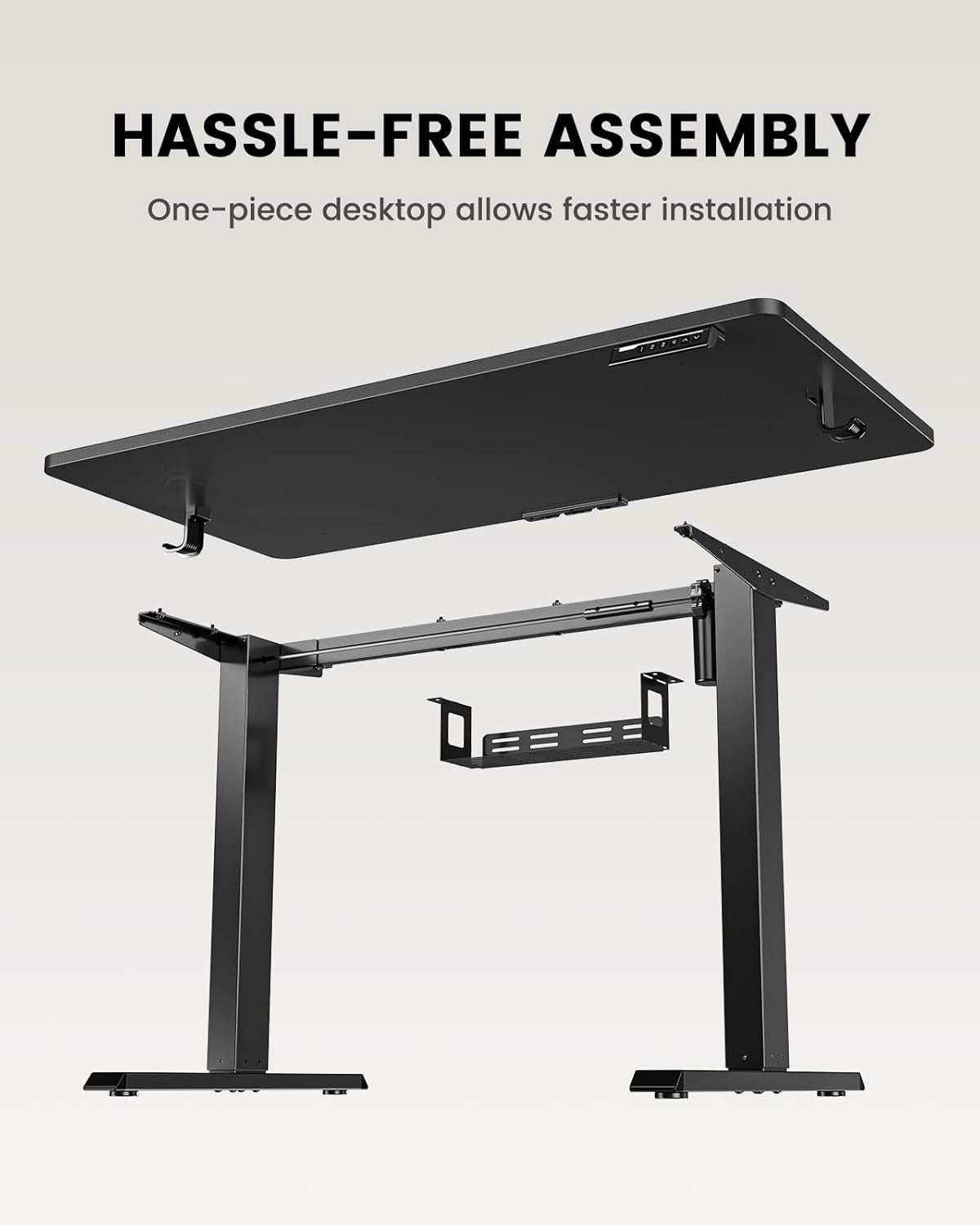
Figure 2: Components of the ErGear Standing Desk for assembly.
The one-piece desktop design simplifies installation compared to multi-piece desktops, allowing for quicker setup.
Иштөө нускамалары
The ErGear standing desk offers smooth and quiet electric height adjustment, allowing you to effortlessly switch between sitting and standing positions.
Бийиктигин тууралоо
The desk smoothly adjusts from a minimum height of 27.9 inches to a maximum height of 46.9 inches. Use the up and down arrow buttons on the control panel to achieve your desired height.
Memory Presets
The control panel features three memory preset buttons. To save a preferred height:
- Үстөлдү каалаган бийиктикке тууралаңыз.
- Press the 'M' button (or similar memory set button) followed by one of the numbered preset buttons (1, 2, or 3).
- The height is now saved. To recall a saved height, simply press the corresponding numbered button.
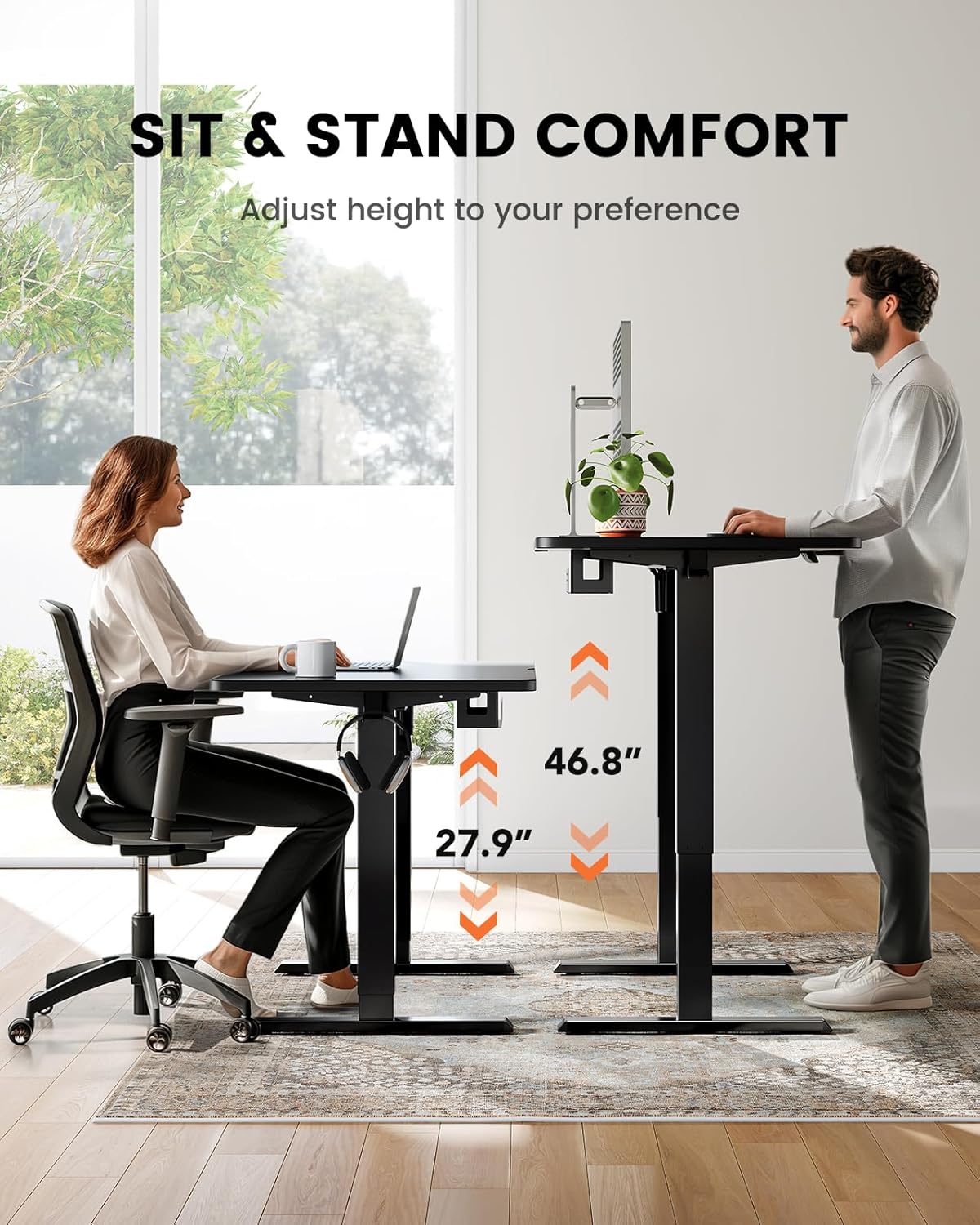
Figure 3: Sit and stand comfort with adjustable height.
Кабель башкаруу
A cable management tray is attached underneath the desktop to help keep your workspace organized and clutter-free. Utilize this tray to route and secure power cords and other cables.
Video: Official ErGear brand video demonstrating desk features and usage.
Техникалык тейлөө жана кам көрүү
ErGear турган столуңуздун узак мөөнөттүү жана оптималдуу иштешин камсыз кылуу үчүн, төмөнкү жөнөкөй тейлөө көрсөтмөлөрүн аткарыңыз:
- Тазалоо: Үстөлдүн бетин жумшак менен сүртүңүз, гamp кездеме. Финишке зыян келтире турган катаал химиялык заттардан же абразивдүү тазалагычтардан алыс болуңуз.
- Кабелдик башкаруу: Periodically check and reorganize cables in the management tray to prevent tangles and ensure smooth operation.
- Мотор багуу: The electric motor is designed for durability. Avoid overloading the desk beyond its maximum weight capacity (176 lbs / 79.8 kg) to prevent strain on the motor.
- Үзгүлтүксүз текшерүүлөр: Ensure all screws and connections remain tight. Re-tighten if necessary.
Проблемаларды чечүү
If you encounter any issues with your ErGear standing desk, please refer to the following common troubleshooting tips. For more complex problems, contact customer support.
- Үстөл кыймылдабайт: Check if the power cord is securely plugged into both the desk and a working power outlet. Ensure no obstructions are blocking the desk's movement.
- Тегиз эмес кыймыл: Verify that the desk is placed on a flat, level surface. Check for any loose connections in the frame or legs.
- Эстутум алдын ала орнотуулары иштебейт: Re-program the memory presets following the steps in the 'Operating Instructions' section.
- адаттан тыш үндөр: A slight hum during operation is normal. If you hear grinding or loud noises, stop operation immediately and contact customer support.
Продукт спецификациялары
| Өзгөчөлүк | Спецификация |
|---|---|
| Бренд | ErGear |
| Модель номери | EGESD64B |
| Продукциянын өлчөмдөрү | 24"D x 48"W x 28"H |
| Түс | Кара |
| Стиль | Заманбап |
| Негизги материал | Дат баспаган болот |
| Жогорку Материал түрү | Бамбук |
| Аяктоо түрү | боёлгон |
| Монтаж түрү | бурун |
| Камтылган компоненттер | Кабелди башкаруу науасы |
| Минималдуу бийиктик | 27.9 дюйм |
| Максималдуу бийиктик | 46.9 дюйм |
| Максималдуу салмак боюнча сунуш | 176 фунт (79.8 кг) |
| Керектүү Ассамблея | Ооба |
| Кепилдик түрү | Чектелген |
Кепилдик жана Кардарларды колдоо
The ErGear Whole Piece Standing Desk comes with a Limited Warranty. For specific terms and conditions, please refer to the warranty information provided with your purchase or contact ErGear customer service.
If you have any questions about assembly, product selection, or require technical assistance, please do not hesitate to contact our U.S.-based customer support team. We are here to help.
Кардарларды колдоо: Please refer to your product packaging or the official ErGear website for the most current contact information (phone, email, or live chat).


