1. Киришүү
The Mastfuyi FY12DMM is a versatile 2-in-1 device combining a high-resolution thermal imager with a comprehensive digital multimeter. This instrument is designed for professionals and enthusiasts requiring precise measurements and visual thermal analysis in various fields, including electrical, mechanical, construction, and automotive diagnostics. This manual provides essential information for safe and effective operation.
2. Коопсуздук маалыматы
Always adhere to the following safety precautions to prevent personal injury or damage to the device.
- Колдонуудан мурун бардык нускамаларды окуп, түшүнүңүз.
- Аппарат бузулуп же туура иштебей жатса, аны иштетпеңиз.
- Ensure proper test lead connection before taking any measurements.
- Эч кандай функция үчүн максималдуу киргизүү рейтингинен ашпаңыз.
- Use caution when working with live electrical circuits.
- Аппаратты кургак жана таза кармаңыз.
- Only use accessories and replacement parts specified by the manufacturer.
3. Пакеттин мазмуну
Пакетте бардык буюмдар бар экенин текшериңиз:
- 1 x Mastfuyi FY12DMM Thermal Imager Multimeter
- 1 x заряддоо кабели (USB Type-C)
- 1 x Ташуу кутусу
- 1 х Колдонуучунун колдонмосу (бул документ)
- Сыноочу (Кызыл жана Кара)
Эскертүү: The flexible AC current clamp is not included in the standard package.

4. Түзмөк бүттүview
The Mastfuyi FY12DMM integrates thermal imaging and digital multimeter functionalities into a single, portable unit. Its design focuses on ease of use and comprehensive diagnostic capabilities.

Негизги компоненттерге төмөнкүлөр кирет:
- 3.98-inch TFT LCD Touch Screen: A full-view display for clear visualization of thermal images, multimeter readings, and intuitive menu navigation.
- Thermal Imager Lens: The optical component responsible for capturing infrared radiation.
- Multimeter Input Jacks: Standard ports for connecting test leads for electrical measurements.
- Кубат баскычы: Controls the device's power state.
- Навигация дөңгөлөгү/баскычтары: Provides alternative control for menu selection and parameter adjustments.
- USB Type-C порту: Used for charging the internal battery and transferring data to a computer.

5. Орнотуу
5.1 Алгачкы заряддоо
Биринчи колдонуудан мурун, аппаратты толук заряддаңыз.
- Connect the supplied USB Type-C charging cable to the device's charging port.
- Кабелдин экинчи учун стандарттуу USB кубат адаптерине (кошумча эмес) же компьютердин USB портуна туташтырыңыз.
- Заряддоо индикатору күйөт. Индикатор толук зарядды көрсөткөнгө чейин аппаратты кубаттоого уруксат бериңиз.

5.2 Күйгүзүү/өчүрүү
- Күйгүзүү үчүн: Экран жарыктанганга чейин кубат баскычын басып, кармап туруңуз.
- To power off: Press and hold the power button until the shutdown prompt appears, then confirm.
6. Operating the Thermal Imager
6.1 Негизги термикалык сүрөт
Upon powering on, the device typically defaults to thermal imaging mode, displaying a real-time thermal image with temperature readings.
- Температура диапазону: -20℃ден 550℃ге чейинки (-4℉ден 1022℉ге чейинки) температураны өлчөйт.
- IR резолюциясы: Features a 320 x 320 pixel infrared resolution for clear and detailed thermal images.
- Жаңыртуу ылдамдыгы: Operates at 25Hz, providing a smooth, real-time thermal video feed.
- Жылуулук сезгичтиги (NETD): With a sensitivity of less than 60mk, the device can detect subtle temperature differences.
The device can perform microscopic detection at a component level, though a macro lens is not included as a standard accessory. If detailed close-up thermal imaging is required, a corresponding macro lens package would need to be acquired separately.

6.2 Жылуулук палитралары
The device offers 15 distinct thermal palettes to enhance the visualization of temperature differences. Selecting the appropriate palette can significantly improve the clarity of thermal patterns for specific applications.
- Access palette options via the touchscreen menu or navigation controls.
- Experiment with palettes like Iron Red, Rainbow, White Hot, and Black Hot to find the most suitable display for your inspection.
6.3 Эмиссивдүүлүктү жөндөө
Accurate temperature measurements depend on correct emissivity settings. The emissivity value (adjustable from 0.01 to 1.0) should match the material surface being measured.
- Locate the emissivity setting in the thermal imaging menu.
- Consult standard emissivity tables for common materials or adjust the value to achieve the most accurate readings for your specific target.
6.4 Жогорку жана төмөнкү температура сигналы
The intelligent alarm function allows you to set custom temperature thresholds. The device will trigger immediate audible and visual alerts if temperatures exceed or fall below these predefined safety ranges.
- Access the alarm settings through the thermal imaging interface.
- Configure the upper and lower temperature limits to suit your monitoring requirements.
7. Мультиметрди иштетүү
The FY12DMM includes a 20,000-count digital multimeter for precise electrical measurements.
7.1 Сыноо өткөргүчтөрүн туташтыруу
- Insert the red test lead into the "VΩmA" input jack.
- Кара сыноо өткөргүчтү "COM" (жалпы) киргизүү уячасына салыңыз.
- For AC current measurements with an optional clamp, refer to the clamp's instructions.
7.2 Өлчөө функциялары
Use the touchscreen or navigation to select the desired measurement function. The device supports auto-ranging for most functions.
- DC Voltage: 1000 В чейин.
- AC Voltage: 750 В чейин.
- Каршылык: 200MΩ чейин.
- Сыйымдуулугу: 99.999 мФ чейин.
- Диод сыноо: Диоддун иштешин текшерет.
- Үзгүлтүксүздүк тести: Үзгүлтүксүздүк үчүн угулган көрсөткүч.
- Flexible AC Current: Up to 2000A (requires optional clamp).
- Температура: -20℃ to 1300℃ (-4℉ to 2372℉) using a K-type thermocouple (not included).
Аппараттын өзгөчөлүктөрү а кармап туруңуз function to freeze the current reading and Диапазон measurement modes for manual range selection if desired.
8. Маалыматтарды башкаруу
8.1 Сүрөттү сактоо
The FY12DMM has a built-in memory card capable of storing up to 30,000 images in BMP format.
- To save a thermal image, press the designated capture button on the screen.
- Images are automatically saved to the internal memory.

8.2 Exporting Data
Stored images and recorded waveform data can be exported to a computer for further analysis.
- Connect the device to a computer using the USB Type-C cable.
- Түзмөк алынуучу сактагыч катары көрүнүшү керек.
- Copy the desired BMP image files or data logs to your computer.
9. Техникалык тейлөө
9.1 Тазалоо
- Түзмөктүн сыртын жумшак, d чүпүрөк менен сүртүңүзamp кездеме. Абразивдүү тазалагычтарды же эриткичтерди колдонбоңуз.
- Gently clean the thermal imager lens with a lens cleaning cloth.
- Тазалоодон мурун аппараттын өчүрүлгөнүн жана кандайдыр бир кубат булагынан ажыратылганын текшериңиз.
9.2 Батареяга кам көрүү
- Батареянын иштөө мөөнөтүн сактоо үчүн, түзмөк көп колдонулбаса дагы, аны үзгүлтүксүз кубаттап туруңуз.
- Avoid storing the device in extreme temperatures.
10. Кыйынчылыктарды
| Көйгөй | Мүмкүн себеп | Чечим |
|---|---|---|
| Түзмөк күйбөйт. | Батарея аз же түгөнүп калган. | Charge the device fully using the supplied USB Type-C cable. |
| Температураны туура эмес көрсөткүчтөр. | Incorrect emissivity setting; dirty lens. | Adjust emissivity for the target material; clean the thermal imager lens. |
| Multimeter readings are unstable or incorrect. | Poor test lead connection; incorrect function selected. | Ensure test leads are securely connected; verify the correct measurement function is selected. |
| Cannot transfer data to computer. | Faulty USB cable; incorrect connection mode. | Try a different USB Type-C cable; ensure the device is properly connected and recognized by the computer. |
11. Техникалык шарттар
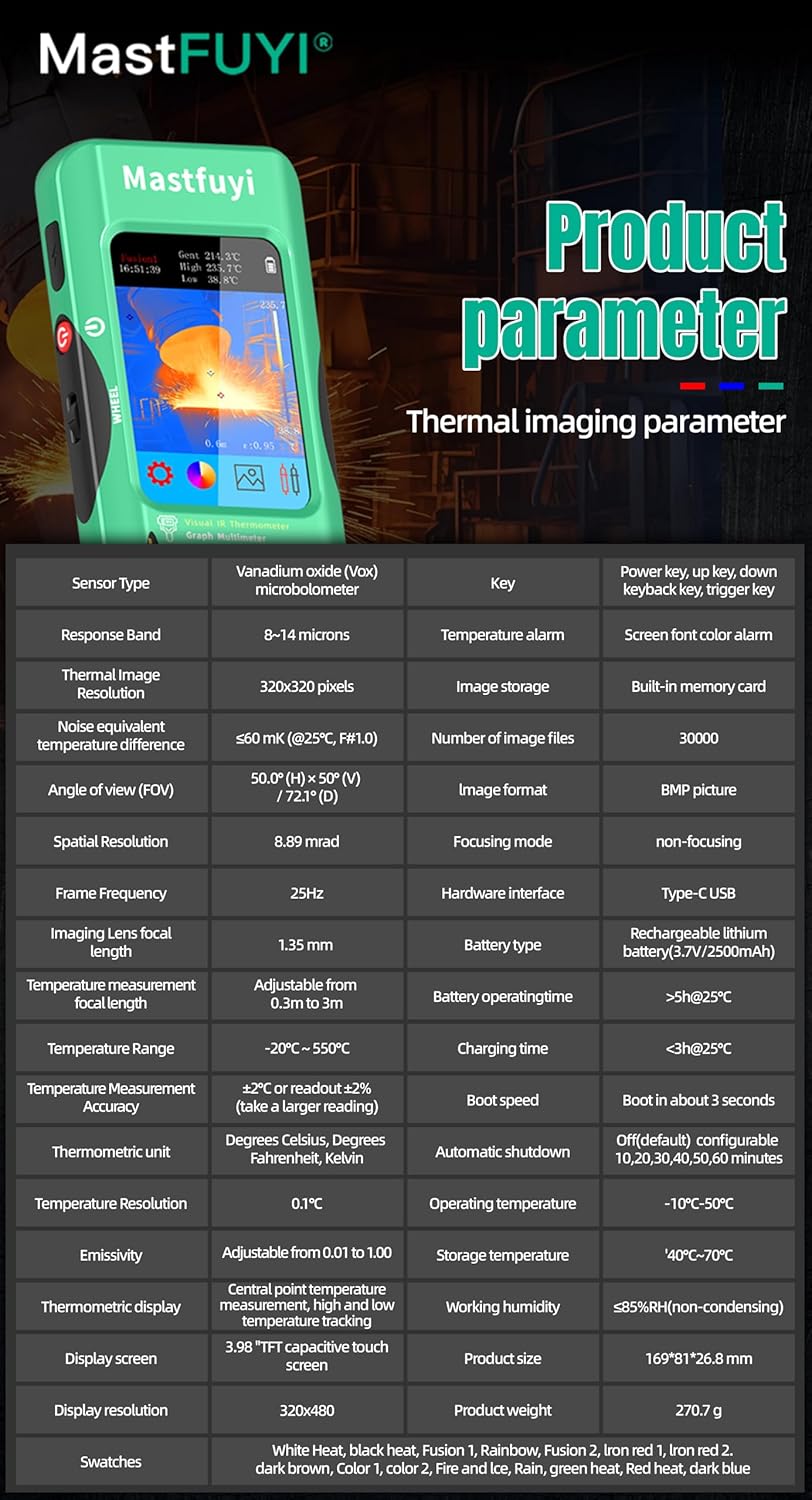
11.1 Infrared Camera Specifications
| Өзгөчөлүк | Спецификация |
|---|---|
| Дисплей өлчөмү | 3.98 дюймдук TFT LCD |
| IR токтому | 320 x 320 пиксель |
| Screen Resolution | 320 x 480 пиксель |
| Бурчу View (FOV) | 50.0°(H) x 50.0°(V) / 72.1°(D) |
| Мейкиндиктик резолюция (IFOV) | 8.89мрад |
| Температура диапазону | -20℃ден 550℃ге чейин (-4℉ден 1022℉ге чейин) |
| Жылуулук сезгичтиги/NETD | Less than 60mk |
| Жаңыртуу ылдамдыгы | 25Hz |
| Дистанттык орнотуулар | 0.3-3 метр |
| Чыгаруучу | 0.01 - 1.0 (adjustable) |
| Thermal Palettes | 15 |
| Number of Storage Images | 19,000 (internal memory) |
11.2 Санариптик мультиметрдин мүнөздөмөлөрү
| Өзгөчөлүк | Диапазон | Резолюция | Тактык |
|---|---|---|---|
| MAX дисплей | 20000 эсеп | ||
| DC Voltage | 20mV/200mV/2V/20V/200V/1000V | 0.001мВдан 0.1Вга чейин | ±(0.05%+3) – ±(0.5%+3) |
| AC Voltage | 20mV/200mV/2V/20V/200V/750V | 0.001мВдан 0.1Вга чейин | ±(0.1%+3) – ±(0.5%+3) |
| Flexible AC Current | 200A/2000A | 0.1A/1A | ±(1.0%+5) |
| Каршылык | 200Ω - 200MΩ | 0.01Ω - 0.01MΩ | ±(0.2%+3) – ±(5%+5) |
| Сыйымдуулук | 999.99нФтен 99.999мФке чейин | 0.01нФтен 0.001мФке чейин | ±(2%+5) – ±(5%+20) |
| Температура | -20℃~1300℃/-4℉-2372℉ | 1 ℃/1 ℉ | ±(2%+5) |
| Диод | Ооба | ||
| Үзгүлтүксүздүк | Ооба | ||

11.3 Жалпы спецификациялар
- Күч: 2500mAh rechargeable battery (built-in)
- Өлчөмү: 169 x 81 x 26.8 мм
- Салмагы: 270г
- Operating System Languages: English, Spanish, German, French, Italian, Japanese, Chinese (selectable)

12. Кепилдик жана колдоо
For warranty information and technical support, please refer to the warranty card included with your product or visit the official Mastfuyi webсайт.
Visit the Mastfuyi Store on Amazon көбүрөөк өнүмдөр жана колдоо ресурстары үчүн.


