1. Киришүү
Сатып алганыңыз үчүн рахматasing the Salange HY350 Smart Projector. This manual provides essential information for setting up, operating, and maintaining your projector. Please read it thoroughly before use to ensure optimal performance and safety.

1.1-сүрөт: Фронт view of the Salange HY350 Projector, showcasing анын компакттуу дизайны жана линзасы.
2. Пакеттин мазмуну
Пакетте бардык буюмдар бар экенин текшериңиз:
- Salange HY350 Projector (without built-in battery)
- HDMI кабели
- Кубат кабели (АКШ сайгычы)
- Bluetooth Үн алыстан башкаруу
- User Manual
3. Продукт бүтүп калдыview
3.1. Негизги өзгөчөлүктөрү
- Интеграцияланган Android 11.0 системасы: 2GB RAM + 32GB ROM for app downloads and streaming.
- Native 1080P Resolution with 4K Decoding Support: High brightness (15000LM) and 10000:1 contrast ratio for clear images.
- Dual-band WiFi 6 & Bluetooth 5.2: Supports 5G/2.4G WiFi for smooth streaming and Bluetooth for external audio devices.
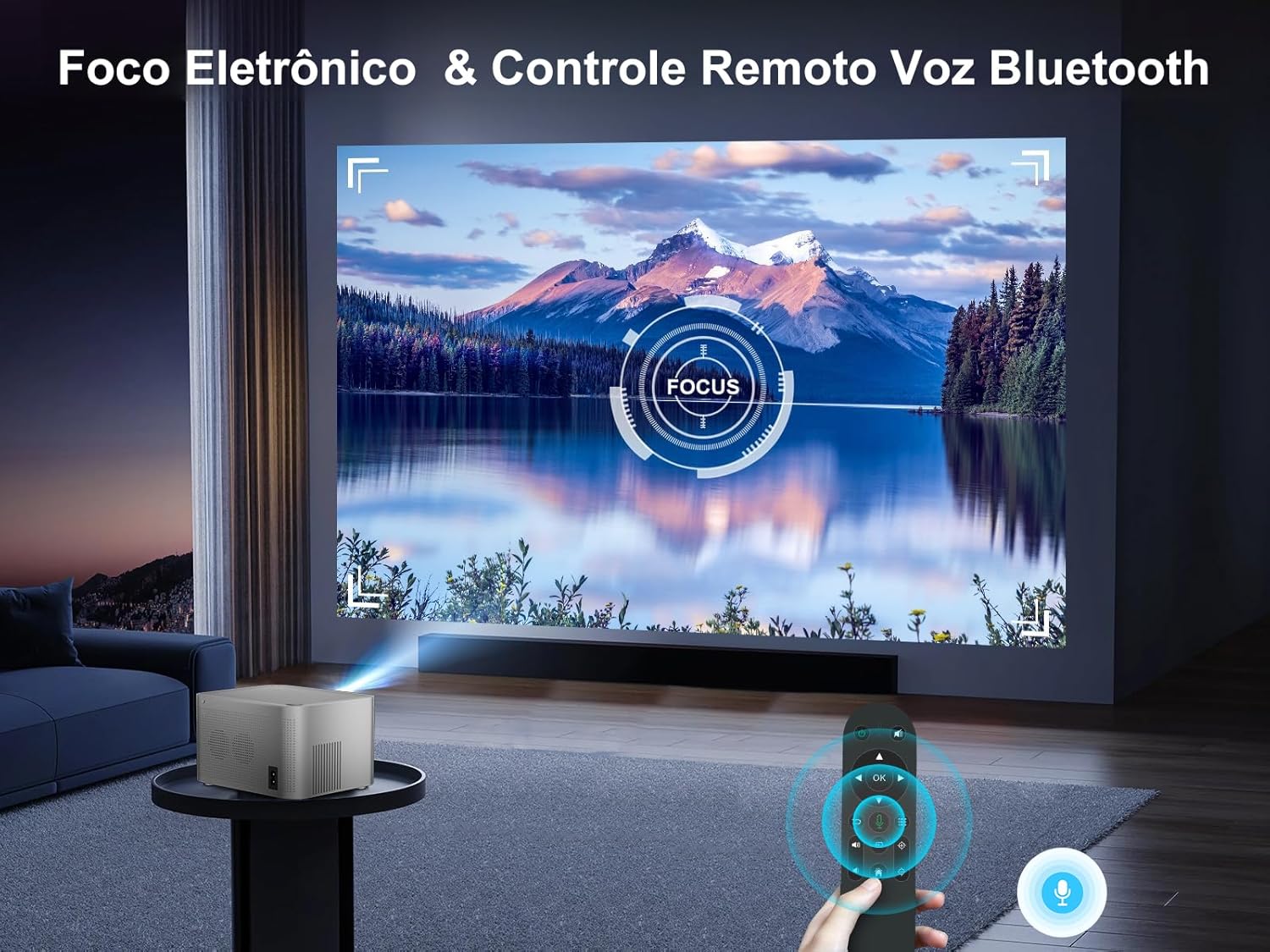
- Automatic Keystone Correction & Electronic Focus: Front projection auto-correction and 4-point keystone adjustment (±50°). Focus controlled via remote.
- Бир нече туташуу параметрлери: HDMI, USB, 3.5mm audio port for various devices.
- Built-in HI-FI Stereo Speakers: 5W speakers for immersive audio.
3.2. Interfaces and Controls
Familiarize yourself with the projector's ports and buttons.

3.1-сүрөт: Арткы жана каптал view of the Salange HY350 Projector, showing HDMI, USB, and audio ports.
- HDMI порту: Connect to laptops, gaming consoles, TV sticks.
- USB порт: Connect USB flash drives for media playback or office documents.
- 3.5 мм аудио уячасы: Тышкы кулакчындарды же динамиктерди туташтырыңыз.
- Кубат киргизүү: Электр кабелин туташтырыңыз.
4. Орнотуу колдонмосу
4.1. Жайгаштыруу
Choose a suitable location for your projector. The HY350 supports various mounting options:
- Tripod орнотуу
- Дубалга орнотуу
- Floor Mount
- Шыпка орнотуу
- Столдун үстүнө жайгаштыруу
For optimal image quality, ensure the projector is placed on a stable, flat surface or securely mounted.

4.1-сүрөт: Illustration of different projection sizes (50", 100", 250") achievable with the Salange HY350 Projector, demonstrating its versatility in various room sizes.
4.2. Power Connection
- Электр кабелин проектордун кубат киргизүү портуна туташтырыңыз.
- Электр кабелинин экинчи учун розеткага сайыңыз.
- Аны күйгүзүү үчүн проектордун же пульттун кубат баскычын басыңыз.
4.3. Баштапкы орнотуу
Upon first power-on, the projector will guide you through initial setup steps, including language selection and network connection.
4.2-сүрөт: The Android TV interface of the Salange HY350 Projector, showing various streaming app icons like Netflix, YouTube, Disney+, and Prime Video, indicating its smart capabilities.
- Тармак туташуусу: Navigate to Settings > Network & Internet to connect to your Wi-Fi network (supports 5G/2.4G WiFi 6).
- Bluetooth жупташууда: To connect the Bluetooth voice remote control or external Bluetooth speakers/headphones, go to Settings > Connected Devices > Pair new device.
5. Иштөө нускамалары
5.1. Сүрөттү тууралоо
The HY350 features automatic keystone correction and electronic focus for a clear image.

5.1-сүрөт: A hand holding the remote control, adjusting the electronic focus on the Salange HY350 Projector, with a clear image projected onto a screen.
- Автоматтык негизги ташты оңдоо: For front projection, the image will automatically correct its shape.
- Manual Keystone Adjustment (4-point): If needed, you can fine-tune the image corners by navigating to Settings > Projection Settings > Keystone Correction. This allows individual adjustment of the four corners up to ±50°.
- Электрондук Фокус: Use the remote control to adjust the focus for a sharp image.

5.2-сүрөт: Visual representation of the Salange HY350 Projector's automatic keystone correction, showing how distorted images are automatically squared and corrected for optimal viewing.
5.2. Тышкы түзмөктөрдү туташтыруу
Проектор ар кандай киргизүү булактарын колдойт:
- HDMI: Connect your laptop, game console (e.g., Switch), or TV stick to the HDMI port. Select the HDMI input source from the main menu.
- USB: Insert a USB flash drive into the USB port to play videos, view photos, or present office documents (Word, PPT, PDF, Excel).
- Зымсыз экранды чагылдыруу: Supports iOS and Android wireless display. Navigate to the screen mirroring app on the projector and follow the on-screen instructions to connect your smartphone or tablet.

5.3-сүрөт: An illustration highlighting the advanced WiFi 6 and Bluetooth 5.2 technology of the Salange HY350 Projector, showing seamless connectivity for gaming and audio.
5.3. Using Smart Features (Android 11.0)
The integrated Android 11.0 system allows you to access a wide range of applications.
- App Store: Download over 8,000 applications from the integrated APP Store.
- Агым кызматтары: Access popular streaming platforms like Prime Video, Netflix, YouTube, Disney+, etc.
- Үн менен башкаруу: Use the Bluetooth voice remote control for convenient navigation and search.

5.4-сүрөт: The Salange HY350 Projector's smart interface, showcasing a variety of pre-installed and downloadable streaming applications, emphasizing its entertainment capabilities.
6. Техникалык тейлөө
6.1. Тазалоо
- Объектив: Оптикалык линзалар үчүн атайын жасалган жумшак, түксүз кездемени колдонуңуз. Абразивдүү тазалагычтарды же эриткичтерди колдонбоңуз.
- Сырткы: Проектордун сыртын жумшак, кургак чүпүрөк менен сүртүңүз. өжөр белгилери үчүн, бир аз гamp кездеме, андан кийин кургак чүпүрөк колдонсо болот.
- Вентиляция порттору: Ensure ventilation ports are clear of dust and debris to prevent overheating. Use a soft brush or compressed air to gently clean them.
6.2. Сактоо
Проекторду узак убакыт бою колдонбогон учурда, аны салкын, кургак жерде, күндүн түз нурунан жана өтө жогорку температурадан алыс сактаңыз. Чаңдын топтолушун жана бузулушун алдын алуу үчүн түпнуска таңгакты же коргоочу капты колдонуңуз.
7. Кыйынчылыктарды
| Көйгөй | Мүмкүн себеп | Чечим |
|---|---|---|
| Сүрөт чагылдырылган жок | Power cable not connected; Projector not turned on; Incorrect input source selected. | Check power connection; Press power button; Select correct HDMI/USB input. |
| бүдөмүк сүрөт | Focus not adjusted; Projector too close/far from screen; Keystone not corrected. | Adjust electronic focus via remote; Adjust projection distance; Use auto or manual keystone correction. |
| Үн жок | Volume too low; Muted; External audio device not connected properly; Bluetooth not paired. | Increase volume; Unmute; Check external audio connections; Re-pair Bluetooth device. |
| Wi-Fi туташуу маселелери | Incorrect password; Router too far; Network interference. | Verify password; Move projector closer to router; Try connecting to 2.4Ghz band if 5Ghz is unstable. |
| Пульт иштебей жатат | Batteries low/dead; Not paired (for Bluetooth remote); Obstruction between remote and projector. | Replace batteries; Re-pair Bluetooth remote; Ensure clear line of sight. |
8. Техникалык шарттар
| Өзгөчөлүк | Спецификация |
|---|---|
| Модел | HY350-US |
| Операция системасы | Android 11.0 |
| RAM + ROM | 2 ГБ RAM + 32 ГБ ROM |
| Native Resolution | 1920 x 1080P |
| Колдоого алынган резолюция | 4K декоддоого чейин |
| Жарыктык | 15000 Lumens |
| Контраст катышы | 10000:1 |
| Аспект катышы | 16:9 |
| Wi-Fi | Dual-band 5G / 2.4G WiFi 6 |
| Bluetooth | BT 5.2 (bidirectional) |
| Keystone Correction | Automatic (front projection), 4-point (±50°) |
| Фокус | Electronic Focus (via remote) |
| Баяндамачы | 5W HI-FI Stereo |
| Interfaces | HDMI, USB, 3.5mm Audio |
| Продукциянын өлчөмдөрү | 16 x 12 x 19 см |
| Продукт Салмагы | 1.32 кг |
| Энергияны керектөө | 5 watts (speaker power) |
| Жаңыртуу ылдамдыгы | 60 Гц |
9. Кепилдик жана колдоо
Salange provides comprehensive support for your HY350 Projector:
- Кепилдик: Өндүрүүчүнүн 2 жылдык кепилдиги.
- Тейлөө: 3 years of maintenance support.
- Техникалык колдоо: Өмүр бою техникалык колдоо.
- Байланыш: For any issues or inquiries, please feel free to contact Salange customer service.


9.1-сүрөт: Salange customer support commitments, including 24-hour response, 7-day return, 24-month warranty, and lifetime technical support.


