Introduction
Welcome to the Kuephom Portable CD Player Boombox. This versatile device offers multiple audio playback options including CD, MP3, FM radio, Bluetooth, USB, and TF card support. Designed for both home and portable use, it features stereo speakers and a rechargeable battery for extended listening enjoyment. Please read this manual thoroughly to ensure proper operation and care of your new device.
Маанилүү коопсуздук маалыматы
- Эскертүү: Бул шайманды жамгырга же нымга тийгизбеңиз.
- Абайлаңыз: To prevent electric shock, do not open the casinг. Бардык тейлөөлөрдү квалификациялуу кызматкерлерге тапшырыңыз.
- Аппаратты радиаторлор, жылуулук регистрлери, мештер же жылуулук чыгарган башка аппараттар сыяктуу жылуулук булактарынын жанына коюудан алыс болуңуз.
- Өндүрүүчү белгилеген тиркемелерди/аксессуарларды гана колдонуңуз.
- Электр зымын басып же кысылып калуудан, айрыкча, сайгычтардан, ыңгайлуу идиштерден жана шаймандан чыккан жеринен сактаңыз.
- Чагылган бороондо же узак убакыт бою колдонбогондо бул шайманды розеткадан ажыратыңыз.
- Эч кандай желдетүүчү тешиктерди жаап албаңыз. Өндүрүүчүнүн көрсөтмөлөрүнө ылайык орнотуу.
- Түзмөктү иштетип жатканда жакшы желдетүүнү камсыз кылыңыз.
- Аппараттын ичине бөтөн нерселерди киргизбеңиз.
- Агрегатты күчтүү магнит талаасынан алыс кармаңыз.
- Батареяларды жергиликтүү эрежелерге ылайык туура жок кылыңыз.
Пакеттин мазмуну
Сураныч, бардык элементтер бар экенин текшериңиз:
- Kuephom Portable CD Player Boombox (Model W15)
- USB заряддоо кабели
- Кубаттуу адаптер
- User Manual
Продукт бүттүview
Familiarize yourself with the main components and controls of your CD player boombox.

Сүрөт 1: Алдыңкы View - This image displays the main unit with its top-loading CD compartment open, revealing a CD. The front panel features control buttons for playback (play/pause, skip), a mode button, an LCD screen showing track time, and a large rotary volume knob. Two speaker grilles are visible at the bottom.

2-сүрөт: Арткы View - The rear of the boombox is shown, highlighting the extendable FM antenna. Below the antenna, from left to right, are the USB port, TF (Micro SD) card slot, DC 5V IN power input, and a headphone jack. The speaker grilles are also visible from this angle.
Башкаруу каражаттары жана порттор:
- Ойнотуу/Тындыруу баскычы (►▮▮): Аудио ойнотууну ойнотуу же тындыруу үчүн басыңыз.
- Previous/Rewind Button (◀◀): Press to go to the previous track or rewind the current track.
- Next/Fast Forward Button (►►): Press to go to the next track or fast forward the current track.
- Режим баскычы (M): Press to switch between CD, FM Radio, Bluetooth, USB, and TF card modes.
- Repeat/Random Button (↺): Press to cycle through repeat modes (repeat one, repeat all) or enable random playback (shuffle).
- Volume Knob (MIN-MAX): Rotate to adjust the volume level. Also serves as the power on/off switch.
- LCD дисплей: Учурдагы режимди, тректин номерин, убакытты жана FM жыштыгын көрсөтөт.
- CD бөлүмү: Top-loading tray for inserting audio CDs.
- FM антеннасы: FM радиосун жакшыраак кабыл алуу үчүн кеңейтилүүчү антенна.
- USB порт: MP3/WMA ойнотуу үчүн fileUSB флэш-дискинен (32 ГБ чейин).
- TF карта уячасы: MP3/WMA ойнотуу үчүн files from a TF (Micro SD) card (up to 32GB).
- DC 5V кирүү порту: Power input for charging the internal battery or operating the unit via the included power adapter.
- Headphone Jack (🎧): For private listening with wired headphones.
Жайгашуу
1. Агрегатты кубаттоо
Your Kuephom CD player boombox comes with a built-in rechargeable Lithium Ion battery. Before first use, it is recommended to fully charge the battery.
- Connect the provided USB charging cable to the DC 5V IN port on the back of the unit.
- Connect the other end of the USB cable to the power adapter, and plug the adapter into a standard wall outlet.
- The LCD display will indicate charging status. Charging typically takes 3-4 hours for a full charge.
- Alternatively, the unit can be powered directly from the wall adapter without battery charge.

3-сүрөт: Заряддоо параметрлери - This image illustrates the versatility of charging the boombox. It can be charged using a standard wall charger, a car charger (via a USB car adapter, not included), or a portable power bank, making it convenient for both indoor and outdoor use.
2. Күйгүзүү/өчүрүү
To turn the unit on, rotate the Volume Knob clockwise from the MIN position. To turn off, rotate the Volume Knob counter-clockwise to the MIN position until it clicks.
Иштөө режимдери
басыңыз Режим (M) button repeatedly to cycle through the available playback modes: CD, FM Radio, Bluetooth, USB, and TF Card.

Figure 4: 5 Play Modes - This graphic highlights the five primary playback modes of the Kuephom boombox: CD Player, Bluetooth, FM Radio, TF Card, and USB Input, emphasizing its multi-functional capabilities.
1. CD ойнотуу
- CD бөлүктүн капкагын акырын көтөрүү менен ачыңыз.
- Place an audio CD or MP3 CD onto the spindle, label side up.
- CD бөлүктүн капкагын бекем жабыңыз.
- басыңыз Режим (M) button until "CD" appears on the LCD display.
- CD автоматтык түрдө ойной баштайт. Эгер ойнотулбаса, баскычын басыңыз Ойнотуу/Тындыруу (►▮▮) баскычы.
- колдонуу Мурунку (◀◀) жана Next (►►) тректерди өткөрүп жиберүү үчүн баскычтар.
- басып, кармап туруңуз Мурунку (◀◀) or Next (►►) buttons to fast forward or rewind.
- басыңыз Repeat/Random (↺) button to cycle through repeat modes (Repeat One, Repeat All) or enable random (shuffle) playback.
2. Bluetooth ойнотуу
- басыңыз Режим (M) button until "BT" appears on the LCD display. The unit will enter Bluetooth pairing mode, indicated by a flashing "BT".
- Bluetooth иштетилген түзмөгүңүздө (мисалы, смартфон, планшет) Bluetooth'ду күйгүзүп, жеткиликтүү түзмөктөрдү издеңиз.
- Select "Kuephom W15" from the list of devices.
- Once paired, "BT" will stop flashing and remain solid. You can now play audio from your device through the boombox.
- Use the playback controls on your connected device or the boombox's Ойнотуу/Тындыруу (►▮▮), Мурунку (◀◀), жана Next (►►) ойнотууну башкаруу үчүн баскычтар.

Figure 5: CD Player & Bluetooth Speaker Functionality - This image demonstrates the dual functionality of the device, showing it first as a standalone CD player and then as a Bluetooth speaker, with a smartphone successfully paired to it. This highlights its versatility for different audio sources.
3. FM радиосунун иштеши
- Extend the FM antenna on the back of the unit for optimal reception.
- басыңыз Режим (M) button until "FM" appears on the LCD display.
- Станцияларды автоматтык түрдө сканерлөө жана сактоо үчүн: баскычын басып кармап туруңуз Ойнотуу/Тындыруу (►▮▮) button. The unit will automatically scan for available FM stations and save them as presets (up to 30 stations).
- To tune to a saved preset station: Use the Мурунку (◀◀) жана Next (►►) buttons to navigate through the saved presets.
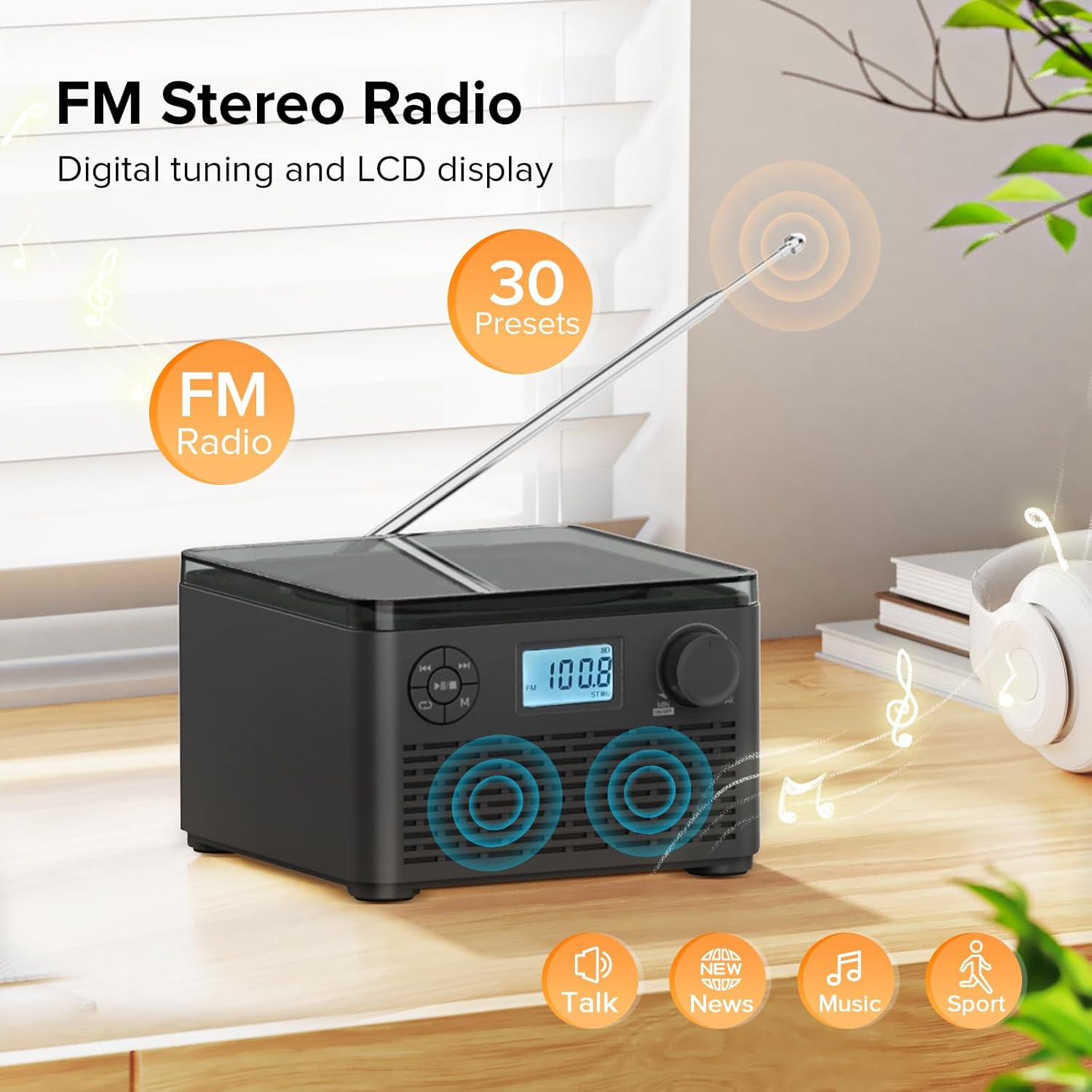
Figure 6: FM Stereo Radio - This image focuses on the FM radio feature, showing the digital display tuned to a frequency and indicating the availability of 30 presets. The extendable antenna is also visible, emphasizing its radio capabilities.
4. USB/TF картасын ойнотуу
The unit supports MP3 and WMA audio formats from USB flash drives and TF (Micro SD) cards up to 32GB.
- Insert a USB flash drive into the USB port or a TF card into the TF card slot on the back of the unit. Ensure the antenna is moved out of the way if necessary.
- басыңыз Режим (M) button until "USB" or "TF" appears on the LCD display.
- түзмөк аудиону автоматтык түрдө аныктап, ойнотууну баштайт fileкыстарылган сактагыч түзмөгүнөн.
- колдонуу Ойнотуу/Тындыруу (►▮▮), Мурунку (◀◀), жана Next (►►) ойнотууну башкаруу үчүн баскычтар.
- басыңыз Repeat/Random (↺) button to cycle through repeat modes or enable random playback.
5. Кулакчынды колдонуу
For private listening, connect standard 3.5mm headphones to the headphone jack on the back of the unit. The internal speakers will automatically mute when headphones are connected.
Техникалык тейлөө жана кам көрүү
- Тазалоо: Түзмөктүн сыртын тазалоо үчүн жумшак, кургак чүпүрөктү колдонуңуз. Абразивдүү тазалоочу каражаттарды же эриткичтерди колдонбоңуз.
- CD Care: Handle CDs by their edges. Keep them clean and free of scratches. Use a soft, lint-free cloth to wipe CDs from the center outwards.
- Сактагыч: Эгерде аппарат көпкө колдонулбаса, аны салкын, кургак жерде, күн нуру түз тийген жерден жана өтө жогорку температурадан алыс сактаңыз.
- Батареяга кам көрүү: Батареянын иштөө мөөнөтүн узартуу үчүн, батареяны тез-тез толук зарядсыздандырбаңыз. Түзмөктү үзгүлтүксүз колдонбосоңуз да, аны үзгүлтүксүз заряддап туруңуз.
Проблемаларды чечүү
| Көйгөй | Мүмкүн себеп | Чечим |
|---|---|---|
| Түзмөк күйбөйт. | Батарея түгөндү же кубат адаптери туура эмес туташтырылган. | Ensure the volume knob is rotated clockwise to turn on. Connect the power adapter and charge the unit. |
| CD is skipping or not playing. | CD кир, чийилген же туура эмес салынган. | Clean the CD with a soft cloth. Ensure the CD is placed correctly in the compartment. Try a different CD. |
| FM радиосун кабыл алуу начар. | Антенна узартылган эмес же сигнал начар. | FM антеннасын толугу менен узартыңыз. Сигналдын жакшыраак болушу үчүн аппараттын ордун өзгөртүп көрүңүз. |
| Bluetooth түзмөгү жупташа албайт. | Unit is not in pairing mode or device is too far. | Ensure the unit is in "BT" mode and flashing. Move your Bluetooth device closer to the boombox. Disconnect other Bluetooth devices. |
| USB/TF картасы таанылган жок. | Колдоого алынбайт file format or card capacity. | камсыз кылуу files are MP3 or WMA format. Check that the card capacity is 32GB or less. Reinsert the card/drive. |
Техникалык шарттар
- Модел: W15
- Бренд: Kuephom
- Продукциянын өлчөмдөрү (L x W x Y): 6.3 x 6.3 x 4.2 дюйм
- Элемент Салмагы: 1.9 фунт
- Кубат киргизүү: DC 5V
- Батарея: 1 литий-иондук батарейка (кошулган)
- Батарея ойнотуу убактысы: 6-10 hours (approx., varies with usage)
- Колдоого алынган диск форматтары: CD, CD-R, CD-RW, MP3 CD
- Supported USB/TF Card Formats: MP3, WMA (up to 32GB)
- FM Radio Frequency Range: 87.5 - 108 МГц
- Динамик түрү: Камтылган Стерео динамиктер
- Гарнитура уячасы: 3.5мм
Кепилдик жана колдоо
Kuephom products are designed and manufactured to the highest quality standards. For any questions, technical support, or warranty claims, please contact Kuephom customer service through the retailer where you purchased the product or visit the official Kuephom webкөбүрөөк маалымат алуу үчүн сайт.
Сураныч, кепилдик максаттары үчүн сатып алганыңыздын далилин сактап коюңуз.


