1. Киришүү
The SABLUTE Large Print Keyboard is designed to enhance typing comfort and visibility. Featuring large, easy-to-read characters and an ergonomic design with an integrated wrist rest, this wired keyboard is suitable for various users, including the elderly, students, and office professionals. It also includes a convenient phone/tablet holder for improved multitasking.
2. Орнотуу
The SABLUTE Large Print Keyboard offers a straightforward plug-and-play setup, requiring no additional drivers or software installation.
- Баскычтопту таңгактан чыгаруу: Баскычтопту таңгагынан кылдаттык менен чыгарып алыңыз.
- Компьютерге туташуу: Locate an available USB-A port on your computer (desktop, laptop, etc.). Insert the USB-A cable from the keyboard firmly into the USB-A port.
- Системаны таануу: Your operating system (Windows, macOS, Chrome OS, Vista) should automatically detect and configure the keyboard. A notification may appear indicating that the device is ready for use.
- Терүүнү баштоо: The keyboard is now ready for immediate use.

Figure 2.1: The keyboard features a USB-A connection for plug-and-play compatibility with various operating systems.
3. Иштөө нускамалары
3.1 Терүүнүн негизги ыкмалары жана эргономика
The keyboard features large, high-contrast yellow keycaps with black characters for enhanced visibility. The ergonomic design includes a built-in wrist rest and bottom support to reduce wrist fatigue during extended use.

Figure 3.1: The ergonomic design with an integrated wrist rest promotes comfortable typing posture.
3.2 Integrated Phone/Tablet Holder
A dedicated slot is integrated into the keyboard's design to securely hold your smartphone or tablet, allowing for convenient viewing during computer use. This holder does not provide charging functionality.

Figure 3.2: The integrated slot provides a stable resting place for mobile devices.
3.3 Мультимедиа жана кыска жол баскычтары
The keyboard includes several one-touch multimedia and shortcut keys located above the function row for quick access to common functions. These include navigation (forward, backward), refresh, search, stop loading, and calculator. Note that multimedia keys may have limited compatibility with macOS systems.
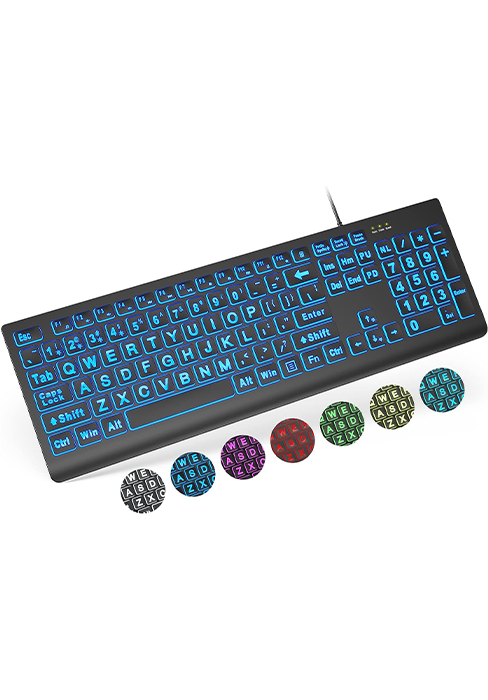
Figure 3.3: ашыкview of the dedicated shortcut keys for enhanced productivity.
4. Техникалык тейлөө
To ensure the longevity and cleanliness of your SABLUTE Large Print Keyboard, regular maintenance is recommended.
- Cleaning the Keys: Бир аз жумшак, түксүз кездемени колдонуңуз dampened with water or a mild, non-abrasive cleaning solution to wipe down the keycaps. Avoid excessive moisture.
- Билекти тазалоо: The hard plastic wrist rest can be easily cleaned with a damp cloth. Avoid harsh chemicals that may damage the surface.
- Чаңды тазалоо: Periodically use compressed air to remove dust and debris from between the keys.
5. Кыйынчылыктарды
If you encounter issues with your SABLUTE Large Print Keyboard, consider the following troubleshooting steps:
- Баскычтоп жооп бербейт:
- Ensure the USB-A cable is securely connected to both the keyboard and the computer's USB port.
- Баскычтопту компьютериңиздин башка USB портуна туташтырууга аракет кылыңыз.
- USB туташууларын жаңылоо үчүн компьютериңизди өчүрүп күйгүзүңүз.
- Катталбаган ачкычтар:
- Жабыркаган ачкычтардын астында кандайдыр бир физикалык тоскоолдуктар же таштандылар бар-жогун текшериңиз.
- Gently press the key multiple times to dislodge any stuck particles.
- Multimedia Keys Not Working (macOS):
- Some multimedia keys may have limited or no functionality on macOS systems due to operating system design. This is expected behavior and not a defect.
6. Техникалык шарттар
| Өзгөчөлүк | Деталь |
|---|---|
| Бренд | SABLUTE |
| Модел | B0CT2R9TN9 |
| Байланыш технологиясы | USB-A (Зымдуу) |
| Шайкеш түзмөктөр | Laptop, PC (Windows, macOS, Chrome OS, Vista) |
| Keyboard Description | ийкемдүү |
| Өзгөчөлүктөр | Ergonomic, Large Print, Phone Holder, Wired, Wrist Rest |
| Түс | Сары |
| Ачкычтардын саны | 111 |
| Продукциянын өлчөмдөрү | 17.32"L x 9.49"W x 1.81"H (43.99 x 24.10 x 4.60 см) |
| Элемент Салмагы | 1.98 фунт (0.90 кг) |
7. Кепилдик жана колдоо
SABLUTE is committed to customer satisfaction. For any inquiries or support needs, please refer to the following information:
- Өндүрүүчүнүн Кепилдиги: The product is covered by a 360-day manufacturer warranty.
- Алмаштыруу саясаты: A 90-day replacement policy is available for eligible issues.
- Кардарларды тейлөө: Expect a reply to your inquiries within 24 hours.
- Байланыш номери (АКШ): 1-213-296-1273 (Mon-Fri 9am-1pm, 2pm-6pm PST)
- Брендге кам көрүү: SABLUTE provides dedicated brand care for its products.

Figure 7.1: SABLUTE customer support details.


