1. Киришүү
The ATTACK SHARK X3PRO is a high-performance lightweight wireless gaming mouse designed for precision and responsiveness. Featuring tri-mode connectivity, a flagship optical sensor, and durable switches, it offers an exceptional gaming experience for PC and Mac users.

Figure 1: ATTACK SHARK X3PRO Wireless Gaming Mouse (Red)
2. Продукциянын өзгөчөлүктөрү
- 4K/8K Wireless Gaming Mouse: Equipped with wireless 4K polling and wired 8K polling, the X3PRO sends signals to the computer 4 to 8 times faster than standard gaming mice, ensuring best-in-class precision and responsiveness.
- Pixart PAW3395 Flagship Sensor: Utilizes a Pixart 3395 optical sensor, offering 6 adjustable DPI levels (800/1600/2400/3200/5000/26000), 650 IPS tracking speed, 4000/8000Hz response speed, and 50G acceleration limit for precise positioning.
- Үч режимдик туташуу: Supports USB-C wired mode, 2.4G wireless mode, and Bluetooth 5.2 mode for versatile use across different scenarios and up to 4 devices simultaneously.
- Kailh GM8.0 Switch & TTC Encoder: Features high-end Kailh Black Mamba GM8.0 Micro switches for crisp clicks, fast rebound, and quick trigger, with an 80 million click lifespan. The TTC scroll wheel encoder provides precise positioning.
- 60g Ultralight & Ergonomic Design: Weighing only 49g, the X3PRO's ergonomic design ensures a natural grip, reducing fatigue during extended gaming sessions and providing agility.
- 5 Программалануучу баскычтар: Total of 5 programmable buttons allow customization of DPI, polling rate, LOD, shortcuts, and macros via the dedicated driver software.
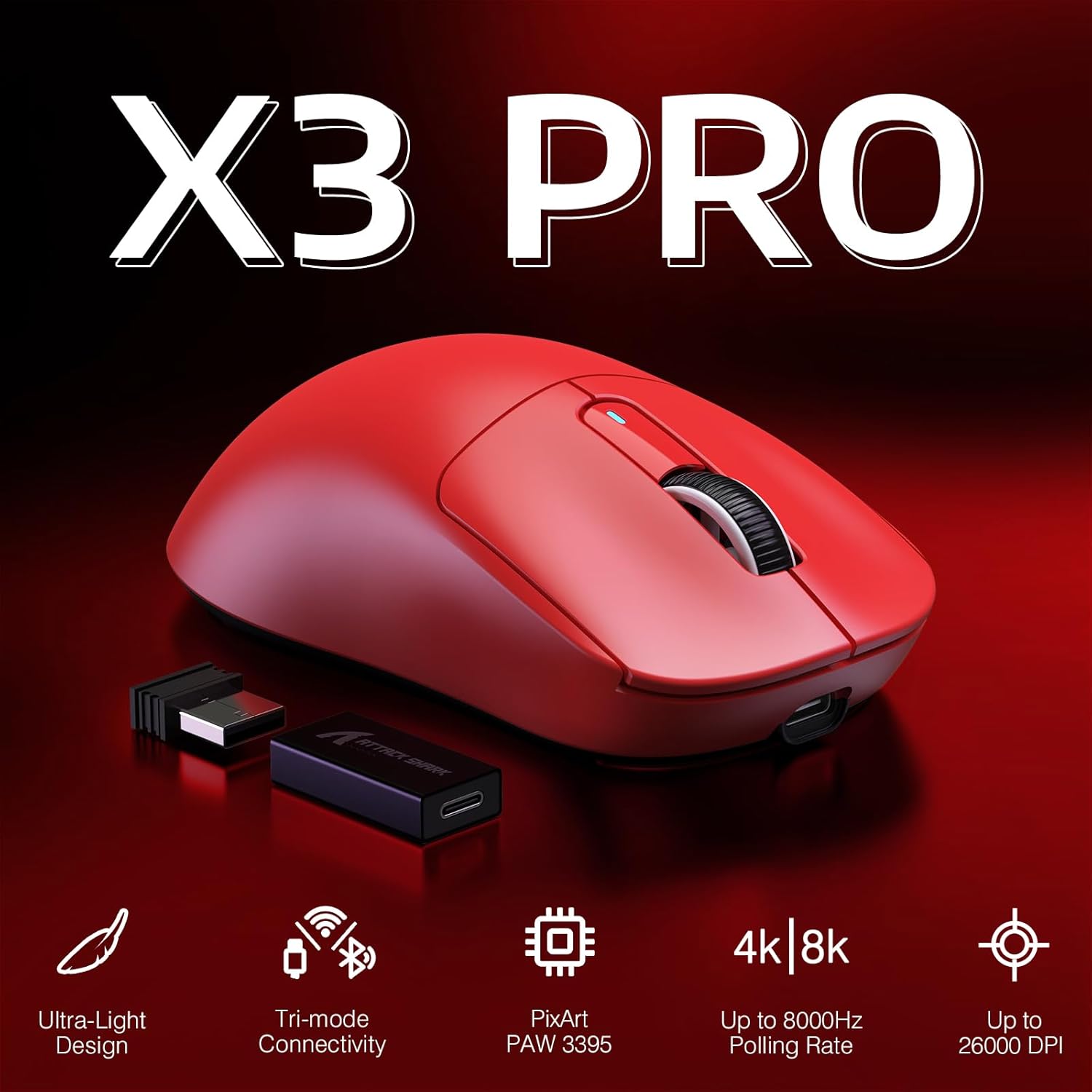
Figure 2: Key Features of the X3PRO Mouse

Figure 3: Ultra-Light Design for Effortless Action
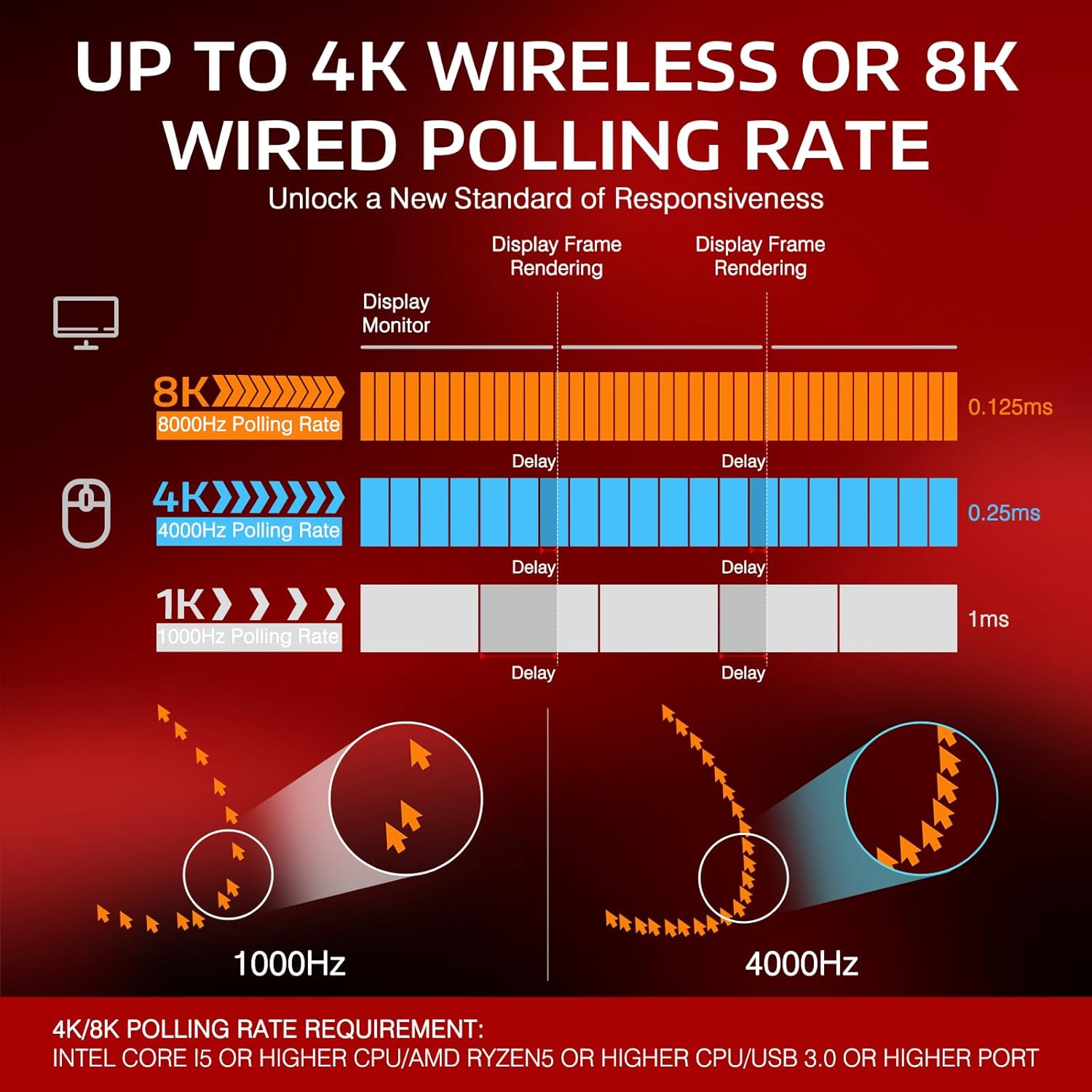
Figure 4: Polling Rate Comparison (1K, 4K, 8K)

Figure 5: Pixart PAW3395 Flagship Sensor

Figure 6: Kailh GM8.0 Switches & TTC Encoder
Продукт бүттүview Video
Бул видеодо толук маалымат берилетview of the ATTACK SHARK X3PRO 4K/8K Lightweight Wireless Gaming Mouse, highlighting its key features and benefits.
3. Пакеттин мазмуну
Пакетте бардык буюмдар бар экенин текшериңиз:
- ATTACK SHARK X3PRO Wireless Gaming Mouse
- USB Receiver (located at the bottom of the mouse)
- USB-C Charging Cable (Flexible Paracord Cable)
- Type-C to USB A Adapter

Figure 7: Product Parameters and Components
4. Орнотуу
4.1. Чычканды туташтыруу
The X3PRO mouse offers three connection modes:
- 2.4G зымсыз режими:
- Locate the USB receiver on the bottom of the mouse. Open the cover and take out the receiver.
- Plug the USB receiver into an available USB port on your computer. For optimal performance, use a USB 3.0 or higher port.
- Switch the mode selector on the bottom of the mouse to '2.4G'. The mouse will automatically connect.
- Bluetooth 5.2 режими:
- Switch the mode selector on the bottom of the mouse to 'BT'.
- Компьютериңизден Bluetooth жөндөөлөрүнө өтүп, жаңы түзмөктөрдү издеңиз.
- Select 'ATTACK SHARK X3PRO' from the list of available devices to pair.
- USB-C зымдуу режими:
- Connect the provided USB-C cable to the front port of the mouse.
- Connect the other end of the USB-C cable (or use the Type-C to USB A adapter if needed) to an available USB port on your computer.
- Switch the mode selector on the bottom of the mouse to 'OFF' or leave it in '2.4G'/'BT' mode; the mouse will function as a wired device and charge simultaneously.

Figure 8: Flashspeed Connectivity Modes
4.2. Driver/Software Installation
To unlock the full potential of your X3PRO mouse, including programmable buttons, DPI settings, polling rate adjustments, and macro functions, please download and install the official ATTACK SHARK driver software from the manufacturer's website. The software is compatible with Windows XP / VISTA / 7 / 8 / 10 / MAC.
5. Иштөө нускамалары
5.1. DPI тууралоо
The mouse features 6 adjustable DPI levels. You can cycle through these levels using the dedicated DPI button on the bottom of the mouse or customize them via the driver software. The default DPI levels are 800/1600/2400/3200/5000/26000.
5.2. Добуш берүү көрсөткүчүн тууралоо
The polling rate can be adjusted to 4000Hz (wireless) or 8000Hz (wired) for maximum responsiveness. This setting is typically adjusted within the driver software.
5.3. Баскычты ыңгайлаштыруу
The X3PRO has 5 programmable buttons. Use the ATTACK SHARK driver software to assign custom functions, macros, or shortcuts to these buttons according to your preferences and gaming needs.
5.4. Чычканды заряддоо
The mouse is equipped with a long-lasting lithium battery. To charge, connect the USB-C charging cable to the mouse and a USB power source (e.g., computer USB port, wall adapter). The mouse can be used while charging in wired mode.

9-сүрөт: Батареянын иштөө мөөнөтү узартылган
6. Техникалык тейлөө
To ensure the longevity and optimal performance of your ATTACK SHARK X3PRO mouse, follow these maintenance guidelines:
- Тазалоо: Regularly wipe the mouse surface with a soft, dry cloth. For stubborn dirt, slightly dampчүпүрөктү суу менен. Катуу химиялык заттарды же абразивдүү материалдарды колдонуудан алыс болуңуз.
- Сенсорго кам көрүү: Чычкандын түбүндөгү оптикалык сенсорду таза жана чаңдан же таштандылардан таза кармаңыз. Зарыл болсо, пахта таякчасын же кысылган абаны колдонуңуз.
- PTFE буттары: The mouse features 100% virgin grade PTFE feet for consistent glide. Avoid scratching or damaging them. Replacement feet may be available from the manufacturer if worn.
- Сактагыч: Узак мөөнөткө колдонулбаганда, чычканды күн нурунан жана экстремалдык температурадан алыс салкын, кургак жерде сактаңыз.

Figure 10: 100% Virgin Grade PTFE Feet
7. Кыйынчылыктарды
If you encounter issues with your ATTACK SHARK X3PRO mouse, please refer to the following common troubleshooting steps:
- Чычкан жооп бербейт:
- Ensure the mouse is charged. Connect it via USB-C cable to charge and test in wired mode.
- Check the mode switch on the bottom of the mouse (2.4G, BT, OFF) and ensure it's set to the desired connection type.
- For 2.4G wireless, ensure the USB receiver is securely plugged into a working USB port. Try a different USB port.
- For Bluetooth, ensure Bluetooth is enabled on your computer and the mouse is paired correctly. Try unpairing and re-pairing the device.
- Компьютериңизди өчүрүп күйгүзүңүз.
- Intermittent Disconnections (2.4G/Bluetooth):
- Ensure the mouse is within range of the receiver/Bluetooth adapter and there are no significant obstructions.
- Башка зымсыз түзмөктөрдөн келген күчтүү электромагниттик тоскоолдуктардан алыс болуңуз.
- Чычкандын батареясынын заряды өтө төмөн эмес экенин текшериңиз.
- Update your computer's USB or Bluetooth drivers.
- If using 2.4G, try connecting the USB receiver to a different USB port, preferably a USB 3.0 or higher port.
- DPI/Polling Rate Issues:
- Ensure the ATTACK SHARK driver software is installed and up to date.
- Verify settings within the software.
- Баскычтар иштебейт:
- Check button assignments in the driver software.
- Ensure no other software is conflicting with mouse button functions.
If the issue persists after trying these steps, please contact ATTACK SHARK customer support for further assistance.
8. Техникалык шарттар
| Өзгөчөлүк | Спецификация |
|---|---|
| Бренд | ATTACK SHARK |
| Модел | X3PRO |
| Байланыш технологиясы | Bluetooth, USB (Wired, 2.4G Wireless, BT 5.2) |
| Кыймылды аныктоо технологиясы | Оптикалык (PAW3395 сенсор) |
| DPI деңгээли | 800/1600/2400/3200/5000/26000 (Adjustable) |
| Добуш берүү көрсөткүчү | Up to 4000Hz (Wireless), Up to 8000Hz (Wired) |
| Которгучтар | Kailh GM8.0 Micro Switches (80 Million Clicks) |
| Кодер | TTC Scroll Wheel Encoder |
| Программалануучу баскычтар | 5 |
| Элемент Салмагы | 1.73 унция (болжол менен 49 г) |
| Пакеттин өлчөмдөрү | 6.5 x 4.53 x 1.77 дюйм |
| Шайкештик | Windows XP / VISTA / 7 / 8 / 10 / MAC |
9. Кепилдик жана колдоо
For warranty information and technical support regarding your ATTACK SHARK X3PRO gaming mouse, please refer to the official ATTACK SHARK webсайтка же түздөн-түз кардарларды тейлөөгө кайрылыңыз. Сатып алуу квитанциясын кепилдик дооматтары үчүн сатып алуунун далили катары сактаңыз.
ATTACK SHARK US Store: Дүкөнгө кириңиз


