Introduction
This manual provides comprehensive instructions for the PowerA Enhanced Wireless Controller, designed for use with Nintendo Switch, Nintendo Switch Lite, Nintendo Switch – OLED Model, and Nintendo Switch 2. Please read this manual thoroughly before use to ensure proper setup and operation.
Пакеттин мазмуну
- PowerA Enhanced Wireless Controller (Pikachu Vibrant)
- 10 фут (3 м) USB-C заряддоо кабели
- Колдонуучунун Колдонмосу (бул документ)
Контроллердин өзгөчөлүктөрү
The PowerA Enhanced Wireless Controller offers a range of features for an optimized gaming experience:
- Зымсыз туташуу: Utilizes Bluetooth 5.0 technology for seamless connection.
- Кайра заряддалуучу батарея: Internal lithium-ion battery provides up to 30 hours of gameplay per charge.
- Өркүндөтүлгөн оюн баскычтары: Two mappable buttons for custom control configurations.
- Кыймылды башкаруу каражаттары: Integrated motion sensors for intuitive gameplay.
- Эргономикалык дизайн: Superior ergonomics for extended comfortable gaming sessions.
- Smooth Thumbsticks: Embedded anti-friction rings ensure precise thumbstick control.
Эскертүү: This controller does not support HD rumble, IR camera, or Amiibo NFC functionality.
Controller Layout
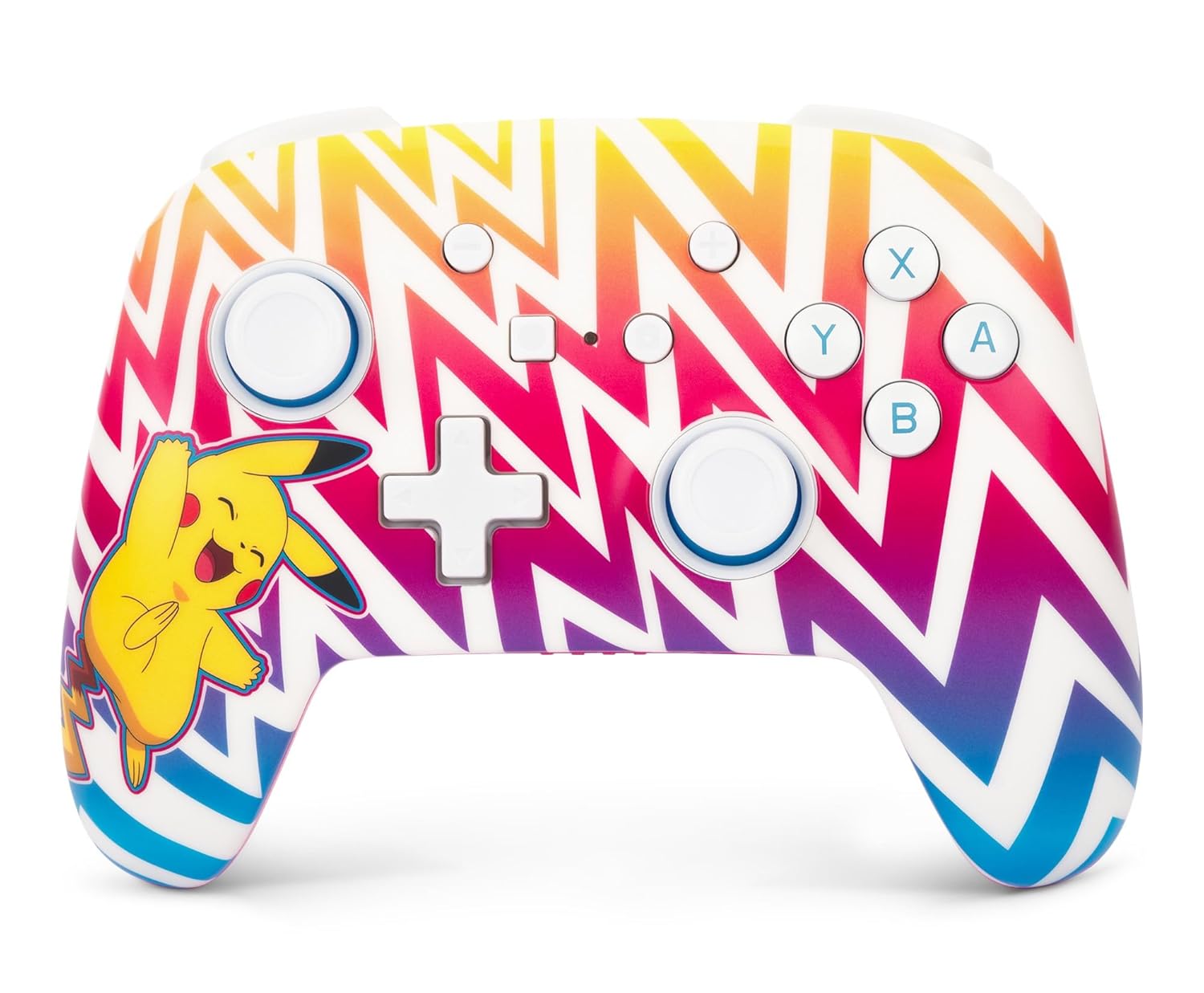
Сүрөт 1: Фронт view of the PowerA Enhanced Wireless Controller, featuring a vibrant Pikachu design on a zigzag pattern. Shows the left and right analog sticks, D-pad, A/B/X/Y buttons, Home button, Capture button, Plus and Minus buttons, and indicator lights.

Сүрөт 2: Артка view of the PowerA Enhanced Wireless Controller. This image highlights the two mappable Advanced Gaming Buttons (AGB) located on the grips, and the program button in the center.

Сүрөт 3: Жогорку view of the PowerA Enhanced Wireless Controller. This perspective shows the L, R, ZL, and ZR shoulder buttons, along with the USB-C charging port located between the ZL and ZR buttons.
Жайгашуу
Контроллерди заряддоо
- Connect the small end of the included USB-C cable to the USB-C port on the top of the controller.
- Connect the large end of the USB-C cable to a USB power source (e.g., Nintendo Switch dock, USB wall adapter, computer USB port).
- The LED indicator lights on the front of the controller will illuminate to show charging status. All four LEDs will be solid when fully charged.
- A full charge provides up to 30 hours of gameplay. Actual battery life may vary based on usage.

Сүрөт 4: Side view of the controller with the USB-C charging cable connected to the port on the top edge.
Nintendo Switch менен жупташтыруу
Follow these steps to pair your PowerA Enhanced Wireless Controller with your Nintendo Switch console:
- Nintendo Switch консолуңуз күйгүзүлүп, системанын эң акыркы программалык камсыздоосуна жаңыртылганын текшериңиз.
- HOME Менюсунан тандаңыз "Контроллерлер", анда "Тартипти/Тартипти өзгөртүү".
- On the PowerA controller, press and hold the SYNC баскычы (small button next to the USB-C port) for at least three seconds. The LED indicator lights will begin to flash.
- Once the controller is successfully paired, the player LED(s) corresponding to the controller number will remain solid.
- басыңыз Башкы бет баскычы on the controller to return to the HOME Menu and begin playing.
The controller can be used whether the Nintendo Switch is docked or in handheld mode.
Иштөө нускамалары
Programming Advanced Gaming Buttons (AGB)
The controller features two mappable Advanced Gaming Buttons (AGB) on the back. These can be programmed on-the-fly:
- басыңыз Программа баскычы (small white button on the back, between the AGBs). The Program LED will flash, indicating the controller is in programming mode.
- Press the button you wish to map (e.g., A, B, X, Y, L, R, ZL, ZR, D-pad directions, Left Stick Click, Right Stick Click).
- басыңыз Өркүндөтүлгөн оюн баскычы (AGB L or AGB R) you want to assign the function to. The Program LED will stop flashing, indicating the AGB has been successfully programmed.
- To clear an AGB assignment, repeat steps 1-2, but instead of pressing a button to map, press the Program Button again to exit programming mode without assigning a new function.
Motion Controls
This controller supports motion controls in compatible Nintendo Switch games. No special setup is required; motion controls will function automatically when supported by the game.
Техникалык тейлөө
- Тазалоо: Контроллерди тазалоо үчүн жумшак, кургак чүпүрөктү колдонуңуз. Катуу химиялык заттарды же абразивдүү материалдарды колдонуудан алыс болуңуз.
- Сактагыч: Контроллерди түз күн нурунан жана экстремалдык температурадан алыс салкын, кургак жерде сактаңыз.
- Батареяга кам көрүү: Батареянын иштөө мөөнөтүн узартуу үчүн, контроллерди тез-тез толук зарядсыздандырбаңыз. Аны үзгүлтүксүз колдонбосоңуз да, үзгүлтүксүз кубаттап туруңуз.
Проблемаларды чечүү
- Контроллер туташпай жатат:
- Контроллердин толук заряддалганын текшериңиз.
- Verify the Nintendo Switch console is powered on and within range.
- Repeat the pairing process as described in the "Pairing with Nintendo Switch" section.
- If issues persist, try restarting both the controller and the Nintendo Switch console.
- Баскычтар же джойстиктер жооп бербей жатат:
- Check if the controller is properly connected to the console.
- Баскычтарды же джойстиктерди эч кандай таштандылар тосуп калбаганын текшериңиз.
- Test the controller in another game or on the Switch's controller test menu to isolate the issue.
- Батарейканын кыска мөөнөтү:
- Колдонуудан мурун контроллердин толук заряддалганын текшериңиз.
- Battery life can be affected by game intensity and environmental factors.
- If battery life significantly degrades over time, contact customer support.
Техникалык шарттар
| Модель номери | NSGP0262-01 |
| Байланыш | Bluetooth 5.0 |
| Батарея түрү | Заряддалуучу литий-ион |
| Батареянын иштөө мөөнөтү | Up to 30 hours per charge (approximate) |
| Өлчөмдөр | 6.02 x 4.41 x 2.48 дюйм |
| Салмагы | 8 унция (болжол менен 227 грамм) |
| Шайкештик | Nintendo Switch, Switch Lite, Switch – OLED Model, Switch 2 |
| Камтылган кабель | 10 фут (3 м) USB-C заряддоо кабели |
Кепилдик маалымат
PowerA backs all products with a 2 жылдык чектелген кепилдик. For detailed warranty terms and conditions, please refer to the official PowerA webсайтка же кардарларды колдоо менен байланышыңыз.
Колдоо
For further assistance, technical support, or warranty claims, please visit the official PowerA support webсайтына кириңиз же алардын кардарларды тейлөө бөлүмүнө кайрылыңыз. Байланыш маалыматын адатта PowerA сайтынан тапса болот webсайт же продукт таңгак.
Онлайн ресурстар: www.powera.com/support


