1. Киришүү
Бул колдонмодо ATOMSTACK A12 Pro лазердик гравировка машинаңызды коопсуз жана натыйжалуу иштетүү боюнча кеңири көрсөтмөлөр берилген. Туура орнотуу, иштетүү жана техникалык тейлөө үчүн колдонуудан мурун бул колдонмону кылдат окуп чыгыңыз. Бул колдонмону келечекте колдонуу үчүн сактап коюңуз.
Коопсуздук эскертүүлөрү:
- Лазердик гравёр менен иштегенде ар дайым ультрафиолет фильтрлөөчү көз коргоочу каражаттарды тагыныңыз.
- Гравировка/кесүү учурунда пайда болгон түтүндү жана түтүндү жок кылуу үчүн жакшы желдетүүнү камсыз кылыңыз.
- Иш учурунда машинаны кароосуз калтырбаңыз.
- Тез күйүүчү материалдарды жумушчу аймактан алыс кармаңыз.
- Авариялык токтотуу баскычынын жайгашкан жери менен таанышып алыңыз.
2. Пакеттин мазмуну
Төмөндө тизмеленген нерселердин баары пакетиңизге камтылганын текшериңиз:
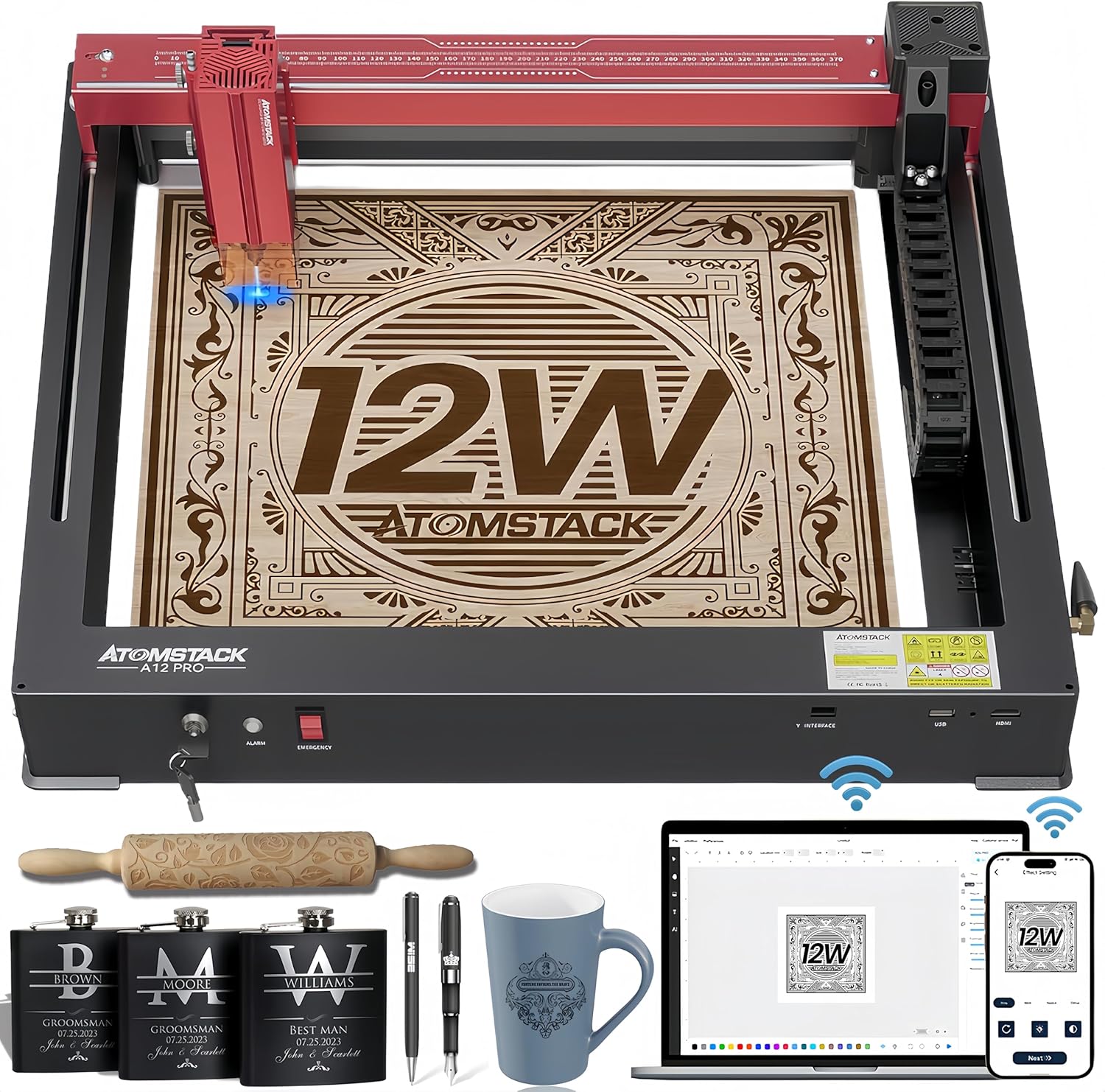
2.1-сүрөт: ATOMSTACK A12 Pro лазердик гравировкалоочу машина жана ага тиркелген аксессуарлар.
- ATOMSTACK A12 Pro лазердик гравюра машинасы (Unibody Frame)
- Лазердик баш
- Кубат адаптери (24V, 5A)
- Электр кабели
- USB кабели (Type-C)
- Көз айнектер (ультрафиолет нурларынан коргоочу көз айнектер)
- Бекитилген фокустук линза
- User Manual
- Куралдар (H3 алты бурчтуу L формасындагы ачкыч, M4 баш бармактуу бурамалары)
- Flash Drive
- WiFi антеннасы
- Силикон шланг (аба түтүгү)
- Зым анкер
- Кабель Clamp
- 100*30 түксүз кездеме
- Слайдер
- Switch Key
3. Орнотуу колдонмосу
ATOMSTACK A12 Pro минималдуу чогултуу үчүн бир корпустуу дизайнга ээ. Баштоо үчүн төмөнкү кадамдарды аткарыңыз:
- Кутудан чыгаруу: Машинаны жана бардык аксессуарларды таңгактан этияттык менен алып чыгыңыз. Машина алдын ала калибрленген жана бир бүтүн катары жөнөтүлөт.

3.1-сүрөт: ATOMSTACK A12 Pro өзүнүн бир корпустуу дизайны менен кутудан чыккандан кийин колдонууга даяр.
- Слайдерди орнотуу: Жылдырма компонентин машинадагы белгиленген рельске бекитиңиз. Аны берилген бурамалар менен бекитиңиз.
- Лазер башын орнотуу: Лазердин башын жылдыргычка орнотуңуз. Анын бекем бекитилгенин текшериңиз.
- WiFi антеннасын орнотуу: WiFi антеннасын машинанын капталындагы портуна бурап киргизиңиз.
- Түтүктөрдү жана X огу боюнча байланыш линияларын орнотуу: Кабелди туура башкарууну жана иштетүүнү камсыз кылуу үчүн түтүктөрдү жана X огу боюнча байланыш линияларын диаграммада көрсөтүлгөндөй туташтырыңыз.
- Кубат жана USB туташтыруу: Кубат адаптерин аппаратка жана розеткага сайыңыз. USB кабелин аппараттан компьютериңизге туташтырыңыз.
- Күйгүзүү: Коммутатор баскычын салып, аны ON абалына буруңуз. Эми машина программалык камсыздоону орнотууга даяр.
Видео 3.1: ATOMSTACK лазердик гравёрун кантип орнотуу жана жөндөө боюнча кеңири көрсөтмө.
4. Иштөө нускамалары
4.1 Программалык камсыздоону башкаруу
ATOMSTACK A12 Pro бир нече башкаруу ыкмаларын колдойт:
- ATOMSTACK компьютердик программасы: Жөнөкөйлөштүрүлгөн иштөө үчүн эксклюзивдүү программалык камсыздоо, жаңыдан баштагандар үчүн идеалдуу.
- LightBurn жана LaserGRBL: Тажрыйбалуу колдонуучулар үчүн салттуу компьютердик программалык камсыздоо.
- ATOMSTACK мобилдик тиркемеси: Смартфон аркылуу WiFi башкаруу үчүн Android жана Apple App Store дүкөндөрүндө жеткиликтүү.

Figure 4.1: ашыкview лазердик гравёр үчүн ар кандай программалык камсыздоонун жана колдонмону башкаруу параметрлеринин.
4.2 Гравировкалоо процесси
- Материалды жайгаштыруу: Материалыңызды гравюра төшөгүнө тегиз коюңуз.
- Фокусту тууралоо: Болжол менен 10 секунданын ичинде тез жана так фокустоо үчүн туруктуу фокустук дизайнын колдонуңуз.
- Кайчылаш позициялоо: Лазердин жайгашкан жерин так көрүү үчүн жаңы кошулган кайчылаш лазердик позициялоо функциясын колдонуңуз, бул гравировка үчүн идеалдуу тегиздөөнү жана горизонталдык жөнгө салууну оңой камсыздайт.
- Программалык камсыздоонун жөндөөлөрү: Тандалган программалык камсыздооңуздагы гравюра параметрлерин (ылдамдык, кубаттуулук, өткөрүүлөр) материалга жараша тууралаңыз.
- Гравюра баштоо: Программалык камсыздоодон гравюралоо процессин баштаңыз.

4.2-сүрөт: Кайчылаш позициялоо системасы объектилерди тегиздөөгө жана четтерине бекитүүгө жардам берет, бул так горизонталдык оюу үчүн колдонулат.
5. Өзгөчөлүктөрү жана мүмкүнчүлүктөрү
- Unibody Дизайн: Бышык толугу менен алюминийден жасалган бир корпустуу конструкция, орнотууну талап кылбайт жана алдын ала калибрленген.
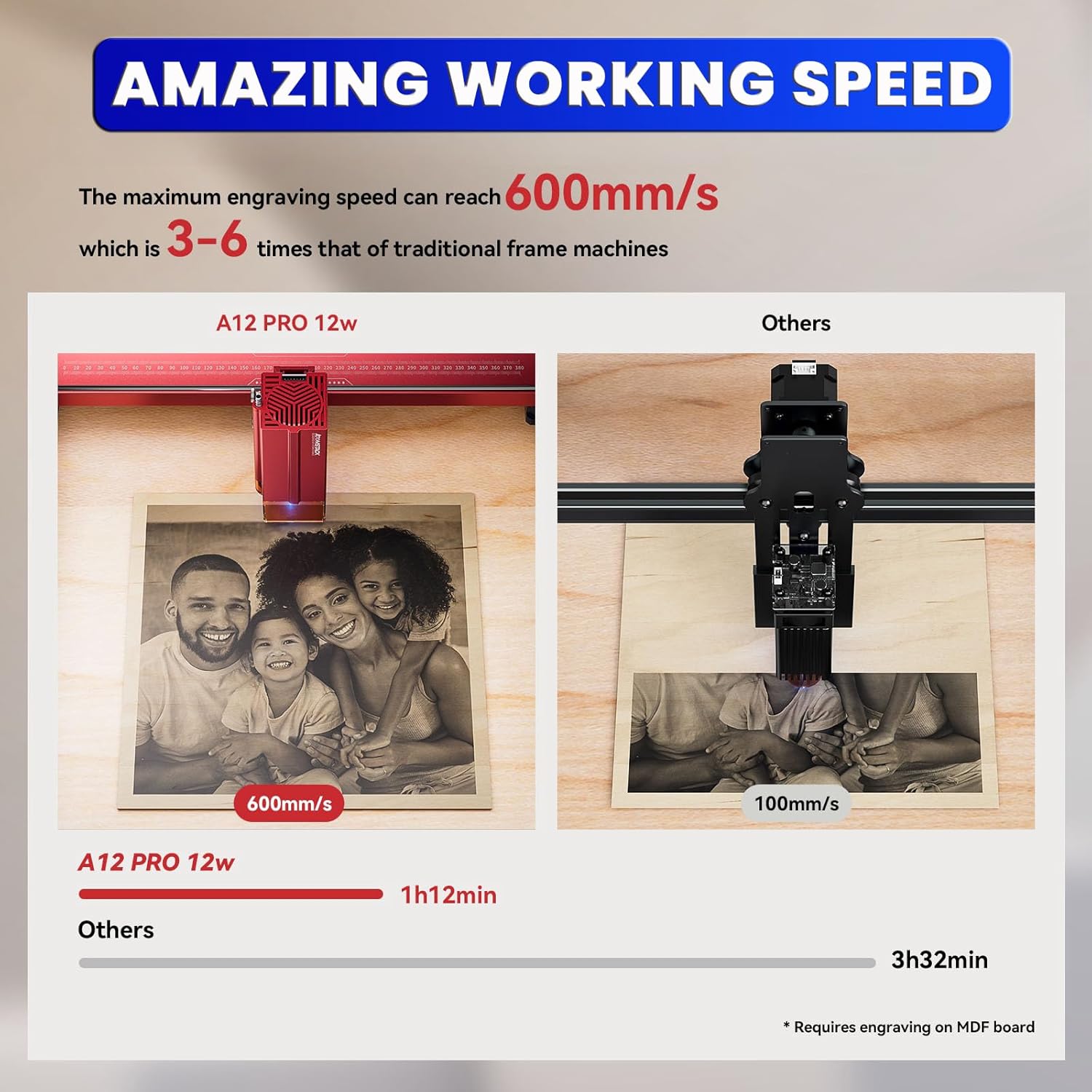
- Жогорку ылдамдык жана тактык: Жаңы кош огу бар сызыктуу багыттагыч рельс түзүлүшү жана жогорку ылдамдыктагы энелик плата гравюра жасоо ылдамдыгын 600 мм/с чейин, салттуу рамалык машиналарга караганда 3-6 эсе тезирээк кылууга мүмкүндүк берет. Тактыгы 0.004 дюймдун ичинде.
- Күчтүү лазер: 50 Вт кубаттуулуктагы жана 0.05*0.06 мм ультра майда лазердик так фокуска ээ 12000 мВт диоддук лазер (4-класстагы лазер).
- Калыңыраак кесилген жерлер: Бир эле өтүүдө 8 мм жыгачты, 5 мм кара акрилди жана 0.02 мм дат баспас болотту кесип өтө алат.
- Ар кандай материалдар менен шайкештик: Жыгач, акрил, металл, айнек, керамика, булгаары, кагаз, картон жана башка көптөгөн материалдарды гравюралап жана кесет.
- Электр энергиясынын өчүрүлүшүн автоматтык түрдө калыбына келтирүү: Гравюранын абалын жаттап алат жана токтоп калган жерден тез арада улантат, бул үзгүлтүксүз өндүрүштү жана материалдарды үнөмдөөнү камсыз кылат.
- Өркүндөтүлгөн коопсуздук: 4 тараптуу чектөөчү өчүргүчтөр, ультрафиолет нурларынан коргоочу көз коргоочу каражат, 15 градустук сигнализациясы бар эңкейиш детектору жана авариялык токтотуу баскычы менен жабдылган.

5.1-сүрөт: A12 Pro'нун гравировка ылдамдыгынын бир топ жогорулагандыгын көрсөткөн салыштыруу.
5.2-сүрөт: A12 Pro менен ар кандай материалдар үчүн максималдуу кесүү калыңдыгын көрсөтөт.

5.3-сүрөт: Мисampмашина менен гравировкалоого же кесүүгө боло турган ар кандай материалдардын түрлөрү.
6. Техникалык тейлөө
- Линзаны тазалоо: Оптималдуу иштөөсүн камсыз кылуу жана калдыктардын топтолушун алдын алуу үчүн лазер линзасын берилген түксүз чүпүрөк менен үзгүлтүксүз тазалап туруңуз.
- Рельс майлоо: Лазер башынын жылмакай кыймылын камсыз кылуу үчүн, мезгил-мезгили менен жетектөөчү рельстерге бир аз өлчөмдө майлоочу май сүйкөп туруңуз.
- Таштандыларды алып салуу: Гравюра төшөгүн жана анын айланасын таштандылардан жана чаңдан таза кармаңыз. Майда бөлүкчөлөрдү тазалоо үчүн аба компрессорун же щетканы колдонуңуз.
- Программалык камсыздоонун жаңыртуулары: Расмий ATOMSTACKты текшериңиз webКомпьютериңизде эң акыркы функциялар жана каталарды оңдоо бар экенине ынануу үчүн, мезгил-мезгили менен сайттын микропрограммалык камсыздоосун жаңыртып туруңуз.
7. Кыйынчылыктарды
| Көйгөй | Мүмкүн себеп | Чечим |
|---|---|---|
| Машина иштебей жатат | Электр кабели бошоп калган; Авариялык токтотуучу жай иштеп калган; Ачкыч бурулган эмес. | Электр туташууларын текшериңиз; Авариялык токтотуучуну сууруп алыңыз; Ачкычты КҮЙГҮЗҮҮ абалына коюңуз. |
| Лазер иштебей жатат/начар чыгаруу | Линза кир; Туура эмес фокус; Программалык камсыздоодо кубаттуулуктун төмөн жөндөөсү. | Лазер линзасын тазалоо; Фокусту тууралоо; Кубаттуулук жөндөөсүн жогорулатуу. |
| Гравюра бурмаланган/так эмес | Бош курлар/рейкалар; Материалдын жылышы; Туура эмес программалык камсыздоо жөндөөлөрү. | Курларды/рейкаларды текшерип, бекемдеңиз; Материалды бекитиңиз; Программалык камсыздоонун жөндөөлөрүн текшериңиз. |
| Программалык камсыздоо машинага туташпай жатат | USB кабелиндеги көйгөй; Драйвер орнотулган эмес; Туура эмес COM порту. | Башка USB портун/кабелин колдонуп көрүңүз; Драйверлерди орнотуңуз; Программалык камсыздоодон туура COM портун тандаңыз. |
8. Техникалык шарттар
- Продукциянын өлчөмдөрү: 23.22 x 23.22 x 7.08 дюйм
- Элемент Салмагы: 18.74 фунт
- Лазердик чыгаруу күчү: 12000мВт (12Вт)
- Машина күчү: 50 Вт
- Лазердик Spot өлчөмү: 0.05*0.06мм
- Гравюра ылдамдыгы: 600мм/сек чейин
- Тактыгы: 0.004 дюймдун ичинде
- Байланыш: USB, WiFi (мобилдик тиркеме аркылуу)
- Колдоого алынган программалык камсыздоо: ATOMSTACK компьютердик программасы, LightBurn, LaserGRBL
- Өндүрүүчү: Shenzhen AtomStack Technologies Co., Ltd.
- Келип чыккан өлкө: Кытай
9. Кепилдик жана колдоо
Сиздин ATOMSTACK A12 Pro лазердик гравюра машинаңыз стандарттуу өндүрүүчүнүн кепилдиги менен келет. Кепилдик жөнүндө толук маалымат, техникалык колдоо же тейлөө боюнча суроолор үчүн, таңгагыңызга кирген кепилдик картасын караңыз же расмий ATOMSTACK веб-сайтына кириңиз. webсайт.
Биздин кесипкөй техникалык жана колдоо топторубуз сизде пайда болгон ар кандай суроолорго же көйгөйлөргө жооп берүү үчүн күнү-түнү жеткиликтүү.


