1. Киришүү
This manual provides essential information for the safe and efficient operation of your Metz MUD8500Z 43-inch 4K UHD Google Smart TV. Please read these instructions thoroughly before using the television and retain them for future reference. This television features a 43-inch Direct LED display with UHD 4K HDR resolution, integrated Google TV operating system, and a built-in soundbar with Wonder Audio technology.
2. Кутуда эмне бар
Телевизоруңузду кылдаттык менен таңгактан чыгарып, төмөнкү нерселердин бардыгы камтылганын текшериңиз:
- Metz MUD8500Z 43-inch Smart TV
- Кубаттуу адаптер
- Алыстан башкаруу
- Колдонуучунун Колдонмосу (бул документ)
- Сыналгы стендинин компоненттери (эгер бар болсо)
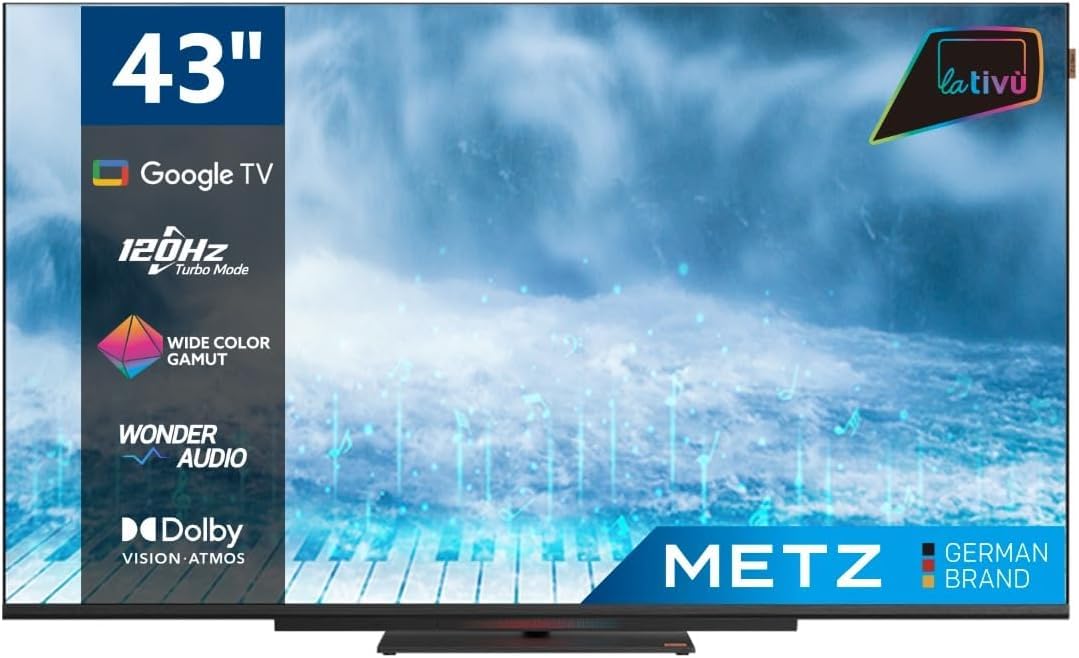
Сүрөт: алдыңкы view of the Metz MUD8500Z 43-inch Smart TV.
3. Орнотуу
3.1. Пакеттен чыгаруу жана жайгаштыруу
Телевизорду таңгагынан чыгарыңыз. Телевизорду туруктуу, тегиз жерге коюңуз же шайкеш келген VESA бекиткичин (өзүнчө сатылат) колдонуп дубалга орнотуңуз. Телевизордун айланасында жетиштүү желдетүүнү камсыз кылыңыз.

Image: Diagram showing the dimensions of the Metz MUD8500Z TV (96.6cm width, 57cm height, 11cm depth).
3.2. Кубатты туташтыруу
Connect the power adapter to the TV's power input, then plug the adapter into a wall outlet. The TV will enter standby mode.
3.3. Баштапкы орнотуу (Google TV)
Биринчи жолу күйгүзүлгөндө, сыналгы сизди баштапкы орнотуу процессине жетектейт. Буга төмөнкүлөр кирет:
- Тил тандоо: Өзүңүзгө жаккан тилди тандаңыз.
- Тармак туташуусу: Connect the TV to your home Wi-Fi network or via an Ethernet cable.
- Google аккаунтуна кирүү: Google TV функцияларына, колдонмолоруна жана жекелештирилген сунуштарына кирүү үчүн Google аккаунтуңуз менен кириңиз.
- Каналды сканерлөө: Жеткиликтүү телеканалдарды (антенна/кабель) издөө.
4. Иштөө нускамалары
4.1. Телевизордун негизги функциялары
- Күйгүзүү/өчүрүү: Пульттун же сыналгыдагы кубат баскычын басыңыз.
- Үндү көзөмөлдөө: Пульттагы үндү жогорулатуу/төмөндөө баскычтарын колдонуңуз.
- Канал тандоо: Channel Up/Down баскычтарын же сандык тактаны колдонуңуз.
- Киргизүү булагы: Press the 'Input' button to select HDMI, AV, or other connected devices.
4.2. Google TV Navigation
The Google TV interface provides access to streaming services, apps, and live TV. Use the directional pad and 'OK' button on your remote to navigate menus and select items.

Image: Remote control for the Metz Smart TV, highlighting dedicated buttons for popular streaming services and Google Assistant.
4.3. Google Жардамчысы
Your TV has an integrated Google Assistant. Press the Google Assistant button on your remote or use the built-in microphone for voice commands to search for content, control smart home devices, and more.
4.4. App Access
Access a wide range of applications from the Google Play Store directly on your TV. Navigate to the 'Apps' section on the Google TV home screen to browse, download, and manage your applications.

Image: Screenshot of the Google TV interface displaying various streaming applications.
5. Өзгөчөлүктөрү
5.1. UHD 4K Resolution and HDR
Experience stunning visuals with a resolution of 3840x2160 pixels, providing exceptional clarity and detail. The 4K HDR (High Dynamic Range) support enhances contrast and color accuracy for a more lifelike picture.
5.2. Wide Color Gamut
The Wide Color Gamut technology allows the TV to display a broader spectrum of colors, resulting in more vibrant and realistic images.

Image: A visual comparison demonstrating the enhanced color range with Wide Color Gamut versus normal display.
5.3. Wonder Audio Soundbar
The integrated soundbar with Wonder Audio technology delivers an immersive and clear audio experience. This advanced sound processing algorithm improves treble and bass, offering a more realistic virtual surround sound.

Image: Diagram illustrating the internal structure of the Surging Soundbar, showing increased diaphragm area and net sound cavity volume.
5.4. Google TV Operating System
Powered by Google TV, this television provides a personalized experience with easy access to your favorite movies, shows, live TV, and apps from across your subscriptions. It also offers smart recommendations based on your viewадаттар.
5.5. 120Hz Turbo Mode
The 120Hz Turbo Mode enhances motion clarity, making fast-paced scenes and gaming content appear smoother and more fluid.

Image: Visual representation of the 120Hz Turbo Mode, illustrating enhanced smoothness for dynamic content.
5.6. Dolby Vision and Dolby Atmos
Enjoy cinematic picture quality with Dolby Vision, offering incredible brightness, contrast, and color. Dolby Atmos provides immersive, multi-dimensional audio that flows around you.
6. Байланыштар
Your Metz MUD8500Z TV offers various ports for connecting external devices:
- HDMI (x3): Connect Blu-ray players, game consoles, set-top boxes, etc.
- USB 2.0 (x2): Медиа ойнотуу үчүн USB сактагыч түзмөктөрдү туташтырыңыз.
- LAN (Ethernet): Зымдуу интернет байланышы үчүн.
- AV IN: Композиттик видео жана стерео аудио чыгуулары менен эски түзмөктөрдү туташтырыңыз.
- RF Input (Antenna/Satellite): Жер үстүндөгү же спутниктик антеннаңызды туташтырыңыз.
- Оптикалык чыгуу: For digital audio output to a sound system or soundbar.
- CI Slot: Common Interface модулдары үчүн (мисалы, акы төлөнүүчү телекөрсөтүү кызматтары үчүн).

Сүрөт: деталдуу view of the rear panel connections, including CI, AV IN, RF Input, USB 2.0, HDMI, Optical Out, and LAN ports.
7. Техникалык шарттар
| Параметр | Нарк |
|---|---|
| Модель номери | MUD8500Z (S9147779) |
| Screen Size | 43 дюйм (108 см) |
| Дисплей технологиясы | LED |
| Резолюция | 4K UHD (3840x2160) |
| Жаңыртуу ылдамдыгы | 60 Hz (with 120Hz Turbo Mode) |
| Аспект катышы | 16:9 |
| Байланыш | Ethernet, HDMI (x3), USB (x2), Wi-Fi |
| Өзгөчөлүктөр | Flat Screen, Google TV, Google Assistant, Wonder Audio Soundbar, HDR, Wide Color Gamut |
| Продукциянын өлчөмдөрү (WxDxH) | 96.6 x 10.9 x 56.9 см |
| Салмагы | 8.2 кг |
| Энергия эффективдүүлүгү классы (SDR) | F |
| Энергияны керектөө (SDR) | 50.0 Вт |
| Энергия эффективдүүлүгү классы (HDR) | G |
| Энергияны керектөө (HDR) | 90.0 Вт |
| Күтүү режиминде күтүү | 0.4 Вт |
For detailed energy information, please refer to the official EU energy label: https://eprel.ec.europa.eu/qr/1530402
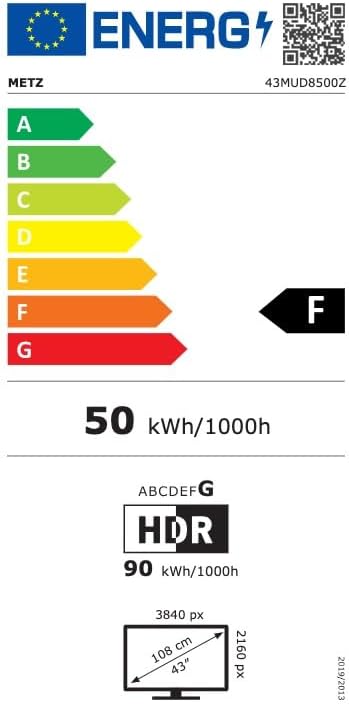
Image: EU Energy Label for the Metz MUD8500Z television, showing energy efficiency class F.
8. Кыйынчылыктарды
Эгерде сиз телевизоруңузда көйгөйлөргө туш болсоңуз, төмөнкү кеңири таралган көйгөйлөрдү жана чечимдерди карап чыгыңыз:
- Кубат жок:
- Ensure the power cable is securely connected to both the TV and the wall outlet.
- Check if the wall outlet is functioning by plugging in another device.
- Press the power button on the remote or TV. - Сүрөт/үн жок:
- Verify the correct input source is selected (e.g., HDMI 1, AV).
- Check all cable connections between the TV and external devices.
- For no sound, ensure volume is not muted or too low. - Алыстан башкаруу иштебейт:
- Алыстан башкаруу пультундагы батареяларды алмаштырыңыз.
- Пульт менен телевизордун инфракызыл сенсорунун ортосунда эч кандай тоскоолдуктар жок экенин текшериңиз.
- Point the remote directly at the TV. - Тармакка туташуу маселелери:
- Restart your Wi-Fi router.
- Check Wi-Fi password and ensure it is entered correctly.
- Try connecting via an Ethernet cable if Wi-Fi issues persist. - Сүрөттүн сапатындагы көйгөйлөр (мисалы, бүдөмүк, бурмаланган):
- Check the resolution settings of the input source.
- Ensure the signal source (antenna, cable box, streaming) is stable.
- Adjust picture settings in the TV menu (brightness, contrast, sharpness).
Бул чечимдерди колдонуп көргөндөн кийин көйгөй чечилбесе, кардарларды колдоо менен байланышыңыз.
9. Техникалык тейлөө
9.1. Экранды тазалоо
Экранды жумшак, түксүз чүпүрөк менен акырын сүртүңүз. өжөр белгилери үчүн, жеңил гampen the cloth with water or a specialized screen cleaner. Do not use harsh chemicals or abrasive materials.
9.2. Кабинетти тазалоо
Wipe the TV cabinet with a soft, dry cloth. Avoid using liquid cleaners directly on the TV.
9.3. Вентиляция
Ensure that the ventilation openings on the back of the TV are not blocked. Proper airflow prevents overheating and prolongs the life of the TV.
10. Кепилдик жана колдоо
The Metz MUD8500Z television comes with a standard manufacturer's warranty. According to specifications, the minimum general warranty duration provided by the supplier is 2 years.
For warranty claims, technical assistance, or further support, please refer to the contact information provided with your purchase documentation or visit the official METZ CONNECT webсайт.


