Introduction
Welcome to the magical world of music with your new eKids Disney Princess Karaoke Microphone! This Bluetooth-enabled microphone is designed for young performers, allowing them to sing along to their favorite tunes with built-in music or by streaming audio wirelessly. Featuring vibrant Disney Princess graphics, exciting light shows, and fun echo effects, this microphone provides hours of entertainment. Please read this manual carefully to ensure proper setup and operation.

Figure 1: eKids Disney Princess Karaoke Microphone
Өзгөчөлүктөрү
- Караоке микрофону: Connect any compatible Bluetooth device (including smartphones, tablets, and laptops) and wirelessly stream your favorite music, then ampырдап жатканда үнүңүздү көтөрүңүз!
- Disney Princess Design: Featuring cool and colorful graphics inspired by your favorite Disney Princess characters. Designed for kids aged 5 and up.
- Камтылган музыка: This toy microphone includes an extended clip of the song ‘Starting Now’. Press the Echo Button to add cool vocal effects, too!
- Жарык шоу: Lights flash along with the music, so you can put on an amazing karaoke performance for friends and family.

2-сүрөт: Негизги өзгөчөлүктөр бүттүview
Жайгашуу
1. Батареяны орнотуу
The microphone requires 3 AA batteries (included).
- Микрофондун арткы бетиндеги батарея бөлүмүн табыңыз.
- Using a Phillips screwdriver, open the battery compartment cover.
- Insert 3 "AA" (LR6) batteries with the correct polarity (+ and -) as indicated inside the compartment.
- Replace the compartment door and tighten the screw with a Phillips screwdriver.
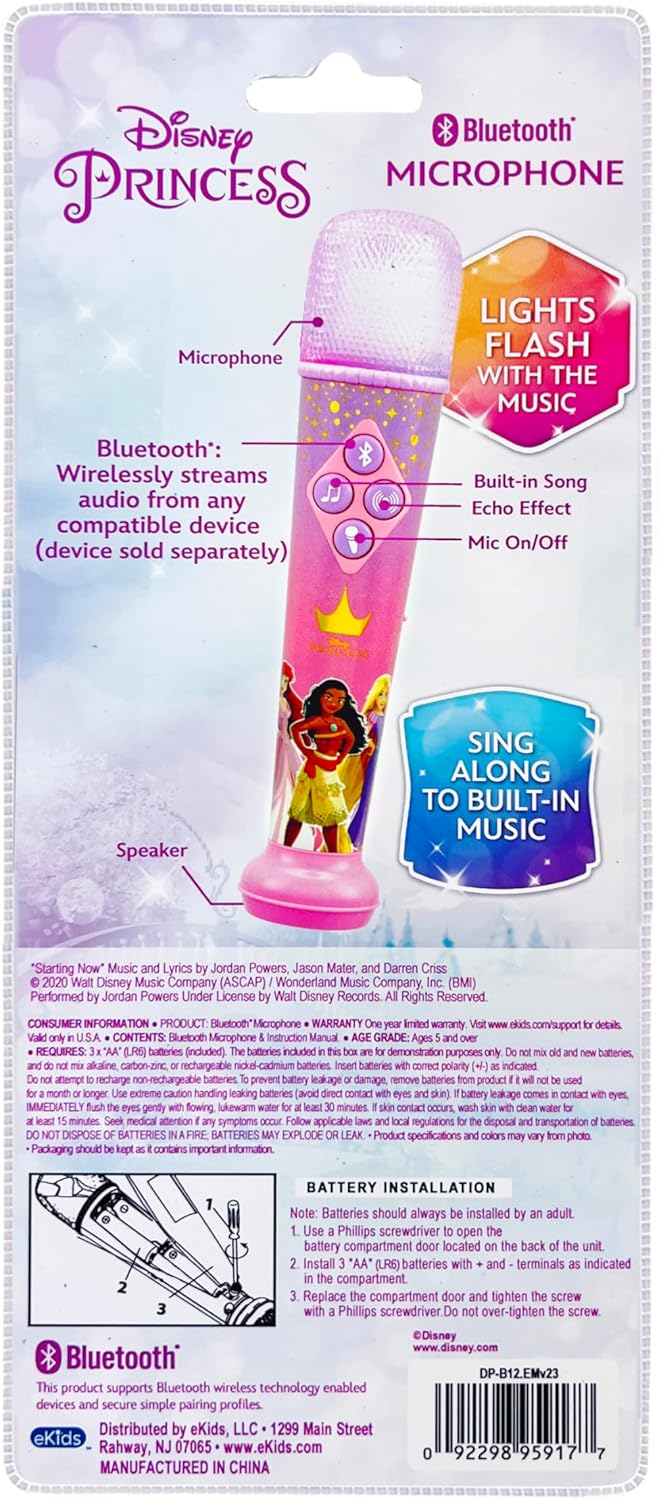
Figure 3: Battery Installation Diagram (from packaging)
2. Күйгүзүү / Өчүрүү
Locate the ON/OFF switch on the side of the microphone. Slide the switch to the "ON" position to power on the device. Slide it to "OFF" to power it down.
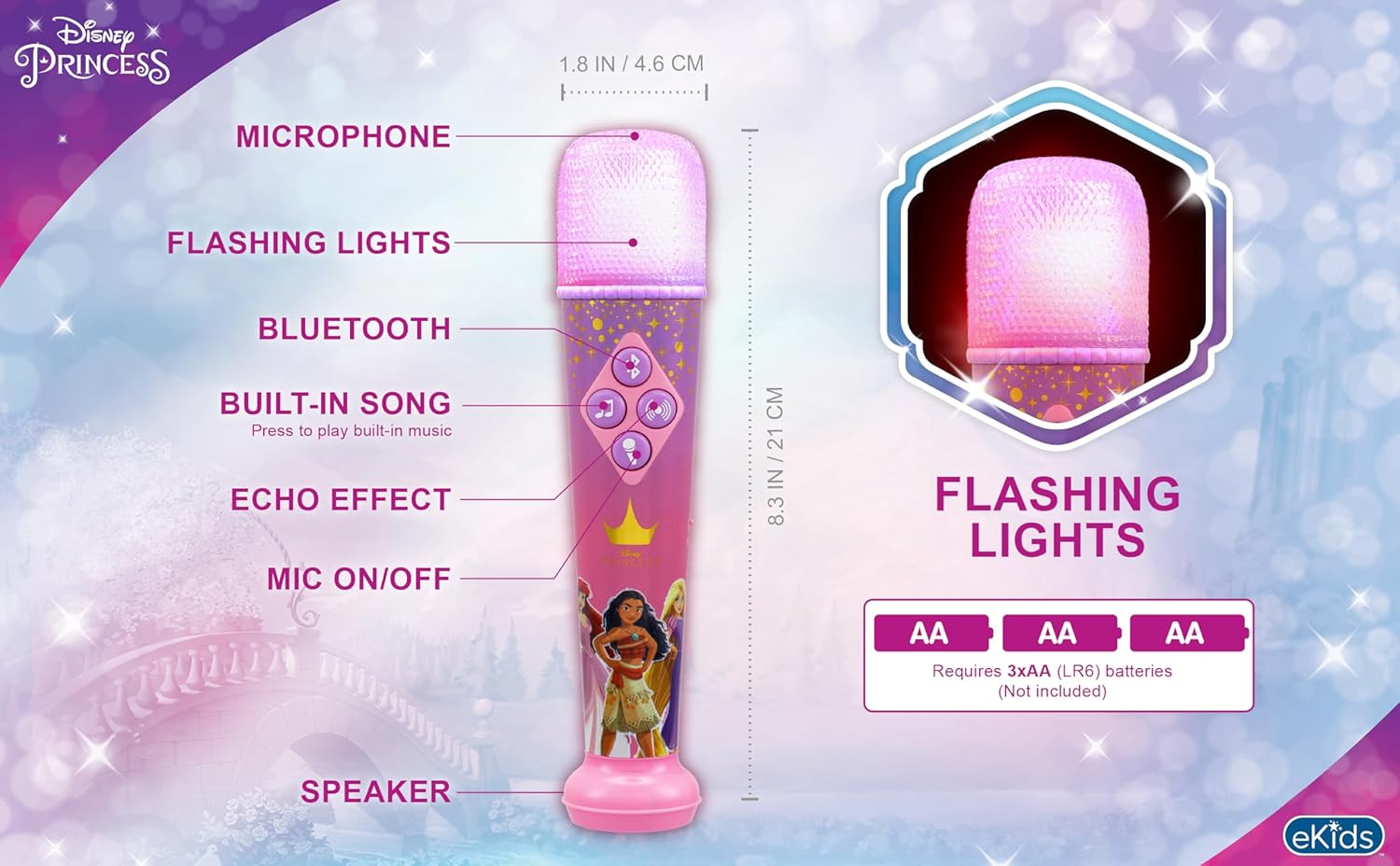
Figure 4: Microphone Controls and Features
Иштөө нускамалары
1. Bluetooth Жупташтыруу
Смартфонуңуздан, планшетиңизден же ноутбукуңуздан аудиону зымсыз агылтуу үчүн:
- Микрофон күйгүзүлгөнүн текшериңиз.
- Activate Bluetooth on your external device.
- Издөө "eKids DP-B12" or a similar name in your device's Bluetooth settings.
- Select the microphone to pair. A confirmation sound will indicate successful pairing.
- Once paired, you can play music from your device, and it will stream through the microphone's speaker.
Video 1: Official eKids Disney Princess Bluetooth Karaoke Microphone overview, demonstrating Bluetooth streaming, built-in music, echo effects, and light show features.
2. Using Built-in Music
The microphone comes with a built-in song. To play it, press the music note button (♫) башкаруу панелинде.
3. Microphone Usage and Echo Effect
үчүн amplify your voice, press and hold the microphone button (🎤) while speaking or singing. To add an echo effect to your vocals, press the echo button (concentric circles icon) on the control panel.

Figure 5: Child enjoying the microphone
4. Жарык шоу
The microphone features a dynamic light show that flashes along with the music, enhancing your performance. The lights are integrated into the microphone head and activate automatically when music is playing.

Figure 6: Microphone light show in action
Техникалык тейлөө
- Микрофонду таза, жумшак, кургак чүпүрөк менен сүртүңүз.
- Абразивдүү тазалагычтарды же эриткичтерди колдонбоңуз.
- Avoid exposing the microphone to extreme temperatures, direct sunlight, or moisture.
- Агып кетпеш үчүн аппарат узак убакыт бою колдонулбаса, батареяларды алып салыңыз.
Проблемаларды чечүү
| Көйгөй | Чечим |
|---|---|
| No power / Device not turning on |
|
| Bluetooth туташпай жатат |
|
| No sound from microphone (when speaking/singing) |
|
| Built-in music not playing |
|
Техникалык шарттар
| Атрибут | Деталь |
|---|---|
| Модель номери | DP-B12 |
| Бренд | eKids |
| Элемент Салмагы | 8.5 унция |
| Продукциянын өлчөмдөрү | 1.8 x 1.79 x 8.28 дюйм |
| Батареялар | 3 AA батарейка талап кылынат (кошулган) |
| Материалдын түрү | Пластик |
| Спикер саны | 1 |
| Power Source | Батарея менен иштейт |
| Тtage | 1.5 вольт (ток) |
| Өзгөчө өзгөчөлүк | Үндү көзөмөлдөө |
| Камтылган компоненттер | Микрофон |
| Сунушталган Колдонуулар | Ырдоо, караоке |
Кепилдик жана колдоо
For product support, warranty information, or to explore more eKids products, please visit the official eKids brand store or contact their customer service.
eKids Brand Store: https://www.amazon.com/stores/eKids/page/314B1B40-5DF3-4830-97AC-E7BF609BCCA1
Сураныч, кепилдик дооматтар үчүн сатып алуу далилиңизди сактап коюңуз.


