1. Киришүү
Thank you for choosing the VirtuFit VF11007 Vibration Plate Fitness machine. This manual provides essential information for the safe and effective use of your new fitness equipment. Please read it thoroughly before operation and retain it for future reference.

1-сүрөт: The VirtuFit VF11007 Vibration Plate, including the remote control and resistance bands.
2. Коопсуздук маалыматы
Before using the vibration plate, please observe the following safety precautions:
- Кандайдыр бир жаңы көнүгүү программасын баштаардан мурун, айрыкча, сизде мурдатан болгон медициналык шарттарыңыз болсо, дарыгер менен кеңешиңиз.
- Вибрациялык плита туруктуу, тегиз бетке коюлганын текшериңиз.
- Эгерде сизде кош бойлуу болсоңуз, кардиостимулятор бар болсо же катуу остеопороз, эпилепсия же курч тромбоз менен жабыркасаңыз, аппаратты колдонбоңуз.
- Иш учурунда балдарды жана үй жаныбарларын машинадан алыс кармаңыз.
- Ар дайым ылайыктуу спорттук бут кийим кийиңиз.
- Башыңыз айланып, көңүлүңүз айланып, же кандайдыр бир оору сезилсе, көнүгүүлөрдү дароо токтотуңуз.
- Колдонулбай турганда жана тазалоодон мурун машинаны розеткадан сууруп коюңуз.
3. Орнотуу
The VirtuFit VF11007 Vibration Plate requires minimal setup. Follow these steps:
- Пакеттен чыгаруу: Carefully remove all components from the packaging. Verify that all parts are present: the vibration plate, remote control, power cable, and resistance bands.
- Жайгашкан жери: Position the vibration plate on a flat, stable, and non-slip surface. Ensure there is enough clear space around the unit for safe operation.
- Кубат туташуу: Plug the power cable into the vibration plate's power input, then into a suitable electrical outlet.
- Каршылык тилкелери (кошумча): Кааласаңыз, каршылык тилкелерин титирөө пластинасынын капталдарындагы белгиленген бекитүү чекиттерине бекитиңиз.
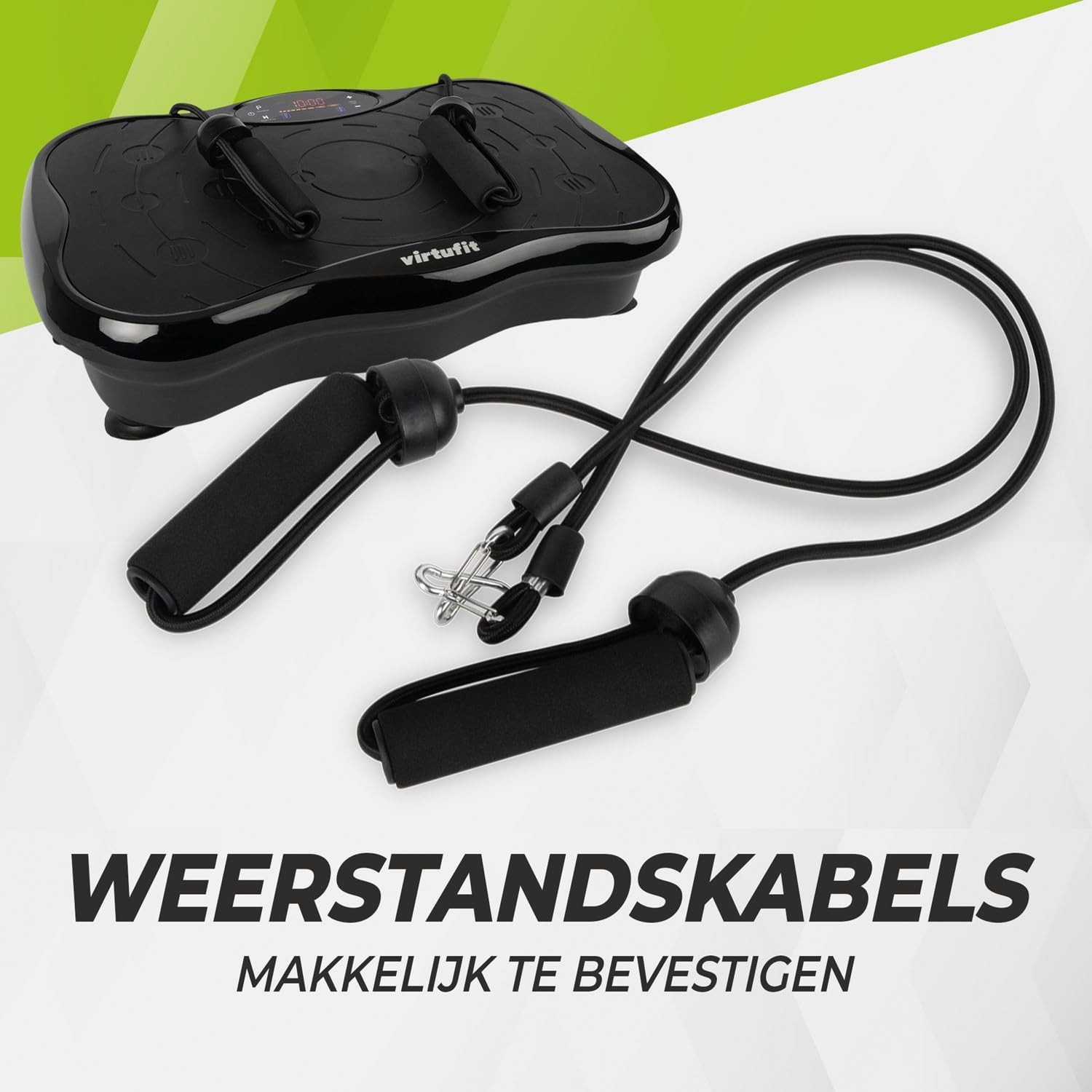
2-сүрөт: Resistance bands ready for attachment to the vibration plate.
4. Иштөө нускамалары
The VirtuFit VF11007 features an intuitive display and a convenient remote control for easy operation.
4.1. Башкаруу панели жана дисплей
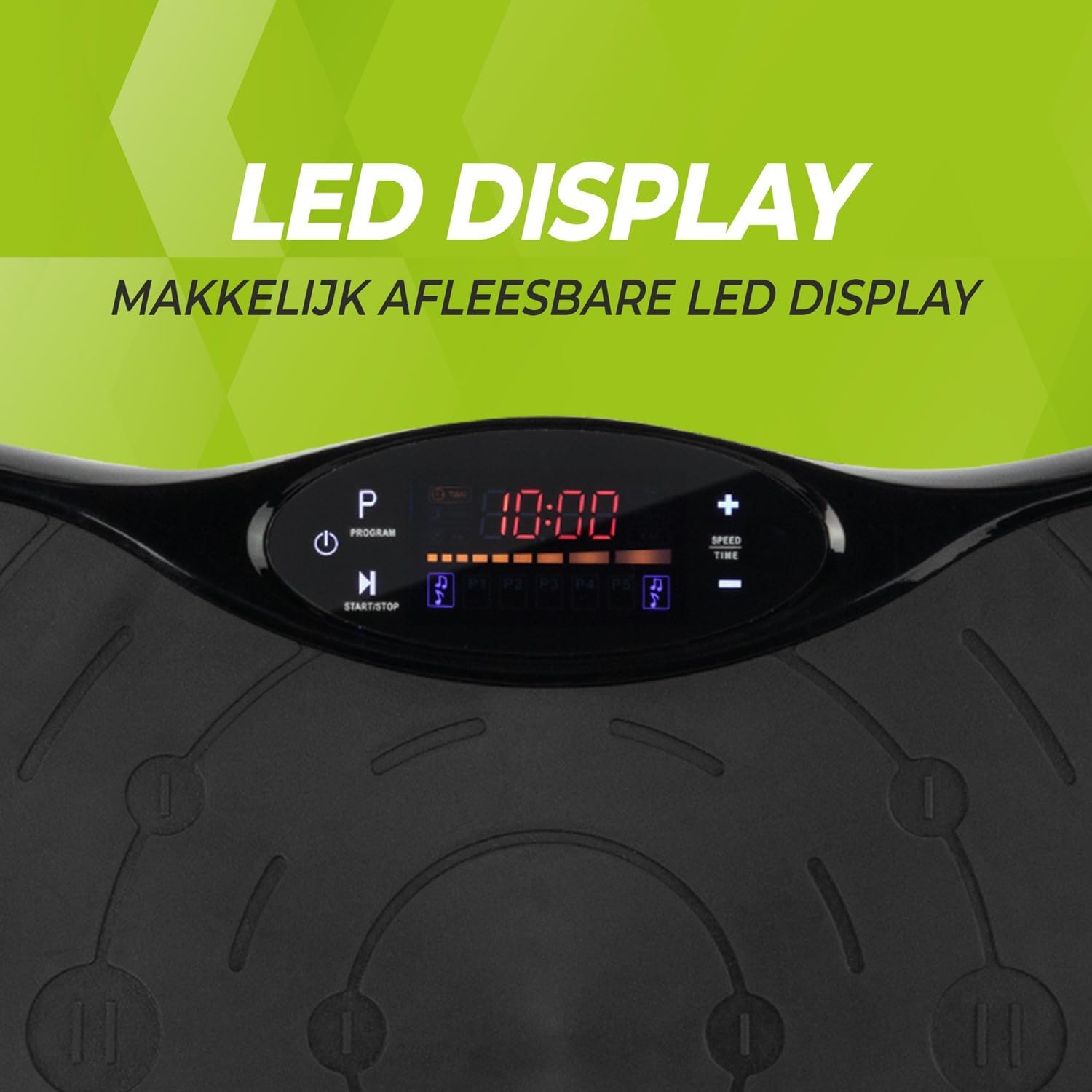
3-сүрөт: Деталдаштырылган view of the LED display, showing time, program, and speed settings.
The integrated computer features an LED display showing time, speed, and program information. Buttons on the panel allow for basic control.
- Кубат баскычы: Аппаратты күйгүзөт/өчүрөт.
- Баштоо/токтотуу баскычы: Initiates or pauses manual operation.
- Программа баскычы (P): Cycles through the pre-set programs.
- Ылдамдык +/- баскычтары: Adjusts the vibration speed in manual mode.
- Убакыт +/- баскычтары: Adjusts the exercise duration in manual mode.
4.2. Алыстан башкаруу
The remote control provides full functionality, allowing you to adjust settings without interrupting your workout.

4-сүрөт: The remote control for convenient adjustment of settings.
- Кубат баскычы: Аппаратты күйгүзөт/өчүрөт.
- Баштоо/токтотуу баскычы: Initiates or pauses manual operation.
- Программа баскычы (P): Selects one of the 5 automatic programs or the manual program.
- Ылдамдык +/- баскычтары: Increases or decreases the vibration speed (99 levels).
- Убакыт +/- баскычтары: Көнүгүүнүн узактыгын тууралайт.
- Музыкалык башкаруу элементтери: Play/Pause, Next/Previous track, Volume +/- for Bluetooth audio.
4.3. Exercise Programs
The vibration plate offers 10 training programs, including 5 automatic programs (P1-P5) and a manual program.
- Automatic Programs (P1-P5): These programs automatically vary the speed over a 10-minute duration. Select the desired program using the 'P' button on the control panel or remote.
- Кол менен иштөө программасы: Allows you to set your preferred speed (1-99) and duration. Use the Speed +/- and Time +/- buttons to customize your workout.
Program Speed Examples (for a 10-minute duration):
| Программа | Speed Progression (Exampле) |
|---|---|
| P1 | 10 - 30 - 40 - 50 |
| P2 | 15 - 25 - 20 - 30 |
| P3 | 20 - 40 - 60 - 80 |
| P4 | 25 - 45 - 50 - 85 |
| P5 | 30 - 50 - 70 - 90 |
Note: These are example speed progressions. Actual speeds may vary slightly.
4.4. Bluetooth Speaker and USB Port
The vibration plate includes an integrated Bluetooth speaker and a USB charging port.

5-сүрөт: Location of the integrated Bluetooth speaker.
- Bluetooth байланыш: Turn on the vibration plate. Activate Bluetooth on your smartphone or tablet and search for "VirtuFit" or a similar device name. Pair your device.
- Музыка ойнотуу: Once connected, you can play music through the integrated speakers. Use your device or the remote control to manage playback and volume.
- USB заряддоо: Connect your phone or tablet to the USB port to charge it during your workout.
5. Техникалык тейлөө
Regular maintenance ensures the longevity and optimal performance of your VirtuFit Vibration Plate.
- Тазалоо: Термелүү пластинкасынын бетин жумшак, г менен сүртүңүзamp ар бир колдонуудан кийин кездеме. Абразивдүү тазалагычтарды же эриткичтерди колдонбоңуз.
- Сактагыч: Машинаны салкын, кургак жерде, тике күн нурунан жана нымдан алыс жерде сактаңыз.
- Текшерүү: Periodically check the power cord for any damage. Ensure all connections are secure.
- Тайга каршы бети: The anti-slip rubber surface is designed for durability. Keep it clean to maintain its grip.

6-сүрөт: The durable anti-slip rubber surface for secure footing.
6. Кыйынчылыктарды
If you encounter any issues with your VirtuFit Vibration Plate, refer to the following common problems and solutions:
| Көйгөй | Мүмкүн себеп | Чечим |
|---|---|---|
| Машина иштебейт. | Электр шнуру туура эмес туташтырылган; розетка иштебейт. | Ensure the power cord is securely plugged into both the machine and the wall outlet. Test the outlet with another device. |
| Вибрация жок. | Machine is paused; Speed setting is too low; Program not started. | Press the Start button. Increase the speed setting. Ensure a program is selected and running. |
| Пульт иштебей жатат. | Batteries are dead or incorrectly inserted; Obstruction between remote and sensor. | Replace batteries with new ones, ensuring correct polarity. Remove any obstructions. Point the remote directly at the display sensor. |
| Bluetooth туташпай жатат. | Bluetooth on device is off; Incorrect pairing. | Ensure Bluetooth is enabled on your device. Forget the device on your phone/tablet and re-pair. Ensure the vibration plate is powered on. |
Эгер көйгөй чечилбесе, кардарларды колдоо менен байланышыңыз.
7. Техникалык шарттар
Key technical specifications for the VirtuFit VF11007 Vibration Plate:
- Модель номери: VF11007
- Бренд: VirtuFit
- Өлчөмдөрү (L x W x Y): 54 x 12.5 x 32 см
- Салмагы: 7.5 кг
- Материал: ABS rubber
- Башкаруу түрү: Алыстан башкаруу
- Дисплей түрү: Graphic display (LED)
- Maximum Speed Levels: 99
- Программалардын саны: 10
- Иштөө режими: Автоматтык / Кол менен
- Кубат булагы: Электр кабели
- Интегралдык өзгөчөлүктөрү: Bluetooth speaker, USB charging port
8. Кепилдик маалыматы
VirtuFit products are manufactured to high-quality standards. This product is covered by the standard legal warranty applicable in your region. Please retain your proof of purchase for any warranty claims.
For specific warranty terms and conditions, please refer to the VirtuFit official webсайтка же сатуучуга кайрылыңыз.
9. Кардарларды колдоо кызматы
Should you require assistance, have questions, or need to report an issue, please contact VirtuFit customer support or your authorized retailer.
Көбүрөөк маалымат алуу үчүн расмий VirtuFitке баш багыңыз webсайт: VirtuFit Brand Store


