Introduction
Сатып алганыңыз үчүн рахматasing the SHARP XL-B530 Micro Component System. This system is designed to provide high-quality audio playback from various sources, including Bluetooth wireless streaming, CD, USB, AM/FM radio, and auxiliary input. This manual provides detailed instructions for setting up, operating, and maintaining your new audio system to ensure optimal performance and longevity.
Маанилүү коопсуздук маалыматы
- Колдонуудан мурун бардык нускамаларды кунт коюп окуп чыгыңыз.
- Бул колдонмону келечекте маалымат алуу үчүн сактаңыз.
- Агрегатты жамгырга же нымдуулукка дуушар кылбаңыз.
- Агрегаттын айланасын туура желдетүүнү камсыз кылыңыз. Вентиляция тешиктерин жаап албаңыз.
- Аппаратты радиаторлор, жылуулук регистрлери, мештер же башка аппараттар (анын ичинде) сыяктуу жылуулук булактарынын жанына койбоңуз. ampкөтөргүчтөр) жылуулукту пайда кылуучу.
- Электр шнурын басуудан же кысып калуудан сактаңыз.
- Өндүрүүчү тарабынан көрсөтүлгөн тиркемелерди/аксессуарларды гана колдонуңуз.
- Бул аппаратты чагылгандуу бороондордо же узак убакыт бою колдонбогондо электр розеткасынан ажыратыңыз.
- Бардык тейлөөлөрдү квалификациялуу тейлөө кызматкерлерине тапшырыңыз.
Пакеттин мазмуну
Төмөнкү нерселердин баары пакетиңизге камтылганын текшериңиз:
- Main Unit (Micro Component System)
- Динамик блоктору (x2)
- Алыстан башкаруу
- Электр кабели
- FM антеннасы
- AM цикл антеннасы
- Колдонуучунун Колдонмосу (бул документ)
Продукт бүттүview
Familiarize yourself with the components and controls of your SHARP XL-B530 system.
Main Unit and Speakers

Жалпысынан view of the SHARP XL-B530 Micro Component System, including the main unit, two speakers, and the remote control.
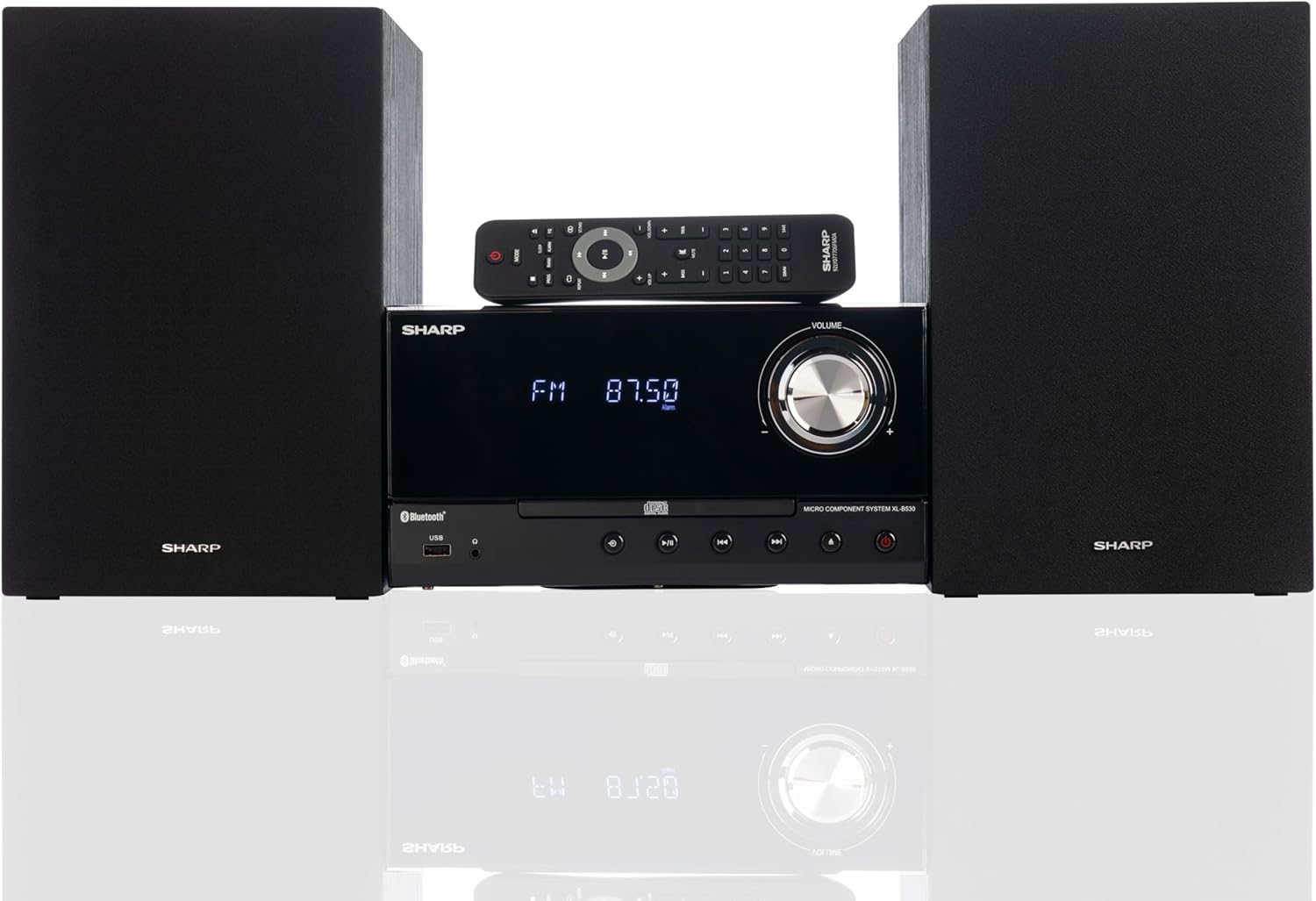
Front panel of the main unit, showing the LCD display, volume knob, CD tray, and control buttons.
Арткы панелдик байланыштар

The rear panel of the main unit, featuring speaker terminals, FM antenna input, AM antenna input, and auxiliary input ports.
Алыстан башкаруу
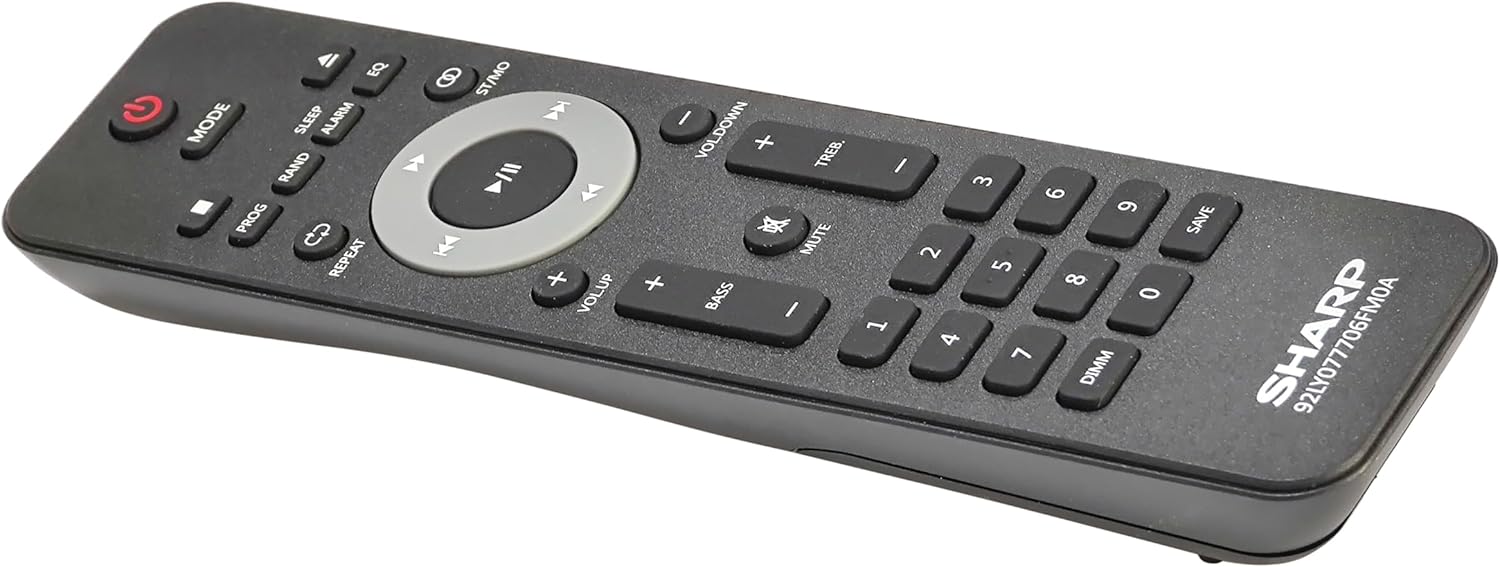
Деталдаштырылган view of the remote control, showing various function buttons for power, mode, playback, volume, and sound adjustments.
Жайгашуу
Follow these steps to set up your micro component system.
1. Speaker Connection
- Identify the left and right speaker cables.
- Connect the red (+) wire from each speaker to the red (+) terminal on the main unit's rear panel.
- Connect the black (-) wire from each speaker to the black (-) terminal on the main unit's rear panel.
- Ensure a secure connection for both speakers.
2. Антенна туташтыруу
- FM антеннасы: Connect the supplied FM wire antenna to the FM antenna jack on the rear panel. Extend the wire fully for best reception.
- AM антенна: Assemble the AM loop antenna and connect its wires to the AM antenna terminals on the rear panel. Rotate the antenna for optimal AM reception.
3. Power Connection
- Ensure all other connections are made.
- Кубат шнурун негизги блоктун арткы жагындагы AC IN уячасына сайыңыз.
- Электр шнурунун экинчи учун розеткага сайыңыз.
Иштөө нускамалары
This section details how to use the various functions of your SHARP XL-B530 system.
Күйгүзүү/өчүрүү
- басыңыз КҮЧ системаны күйгүзүү же өчүрүү үчүн негизги блоктун же пульттун баскычын басыңыз.
Булак тандоо
- басыңыз РЕЖИМ button on the main unit or remote control repeatedly to cycle through available sources: CD, Bluetooth, USB, FM, AM, AUX.
CD ойнотуу
- басыңыз РЕЖИМ button to select 'CD' mode.
- басыңыз АЧУУ/ЖАБУУ баскычын басыңыз.
- Place a CD (CD/MP3/WMA/CD-R/CD-RW) with the label side up into the tray.
- басыңыз АЧУУ/ЖАБУУ Лотокту жабуу үчүн баскычты кайра басыңыз. Ойнотуу автоматтык түрдө башталат.
- Колдонуу ОЙНОО/ТЫНЫТТЫРУ, ТОКТОТ, ӨТКӨРҮҮ (forward/backward), and ИЗДӨӨ башкаруу үчүн баскычтар.
Bluetooth Жупташтыруу
- басыңыз РЕЖИМ button to select 'Bluetooth' mode. The display will show 'BT' and flash, indicating it's ready for pairing.
- Bluetooth түзмөгүңүздө (смартфон, планшет ж.б.) Bluetooth иштетиңиз жана жеткиликтүү түзмөктөрдү издеңиз.
- Select 'SHARP XL-B530' from the list.
- Once paired, the display will stop flashing and show 'BT CONNECTED'. You can now stream audio from your device.
USB ойнотуу
- USB флэш-дискти алдыңкы панелдеги USB портуна салыңыз.
- басыңыз РЕЖИМ button to select 'USB' mode.
- Система туура келген аудиону автоматтык түрдө таап, ойнотуп баштайт fileс (MP3/WMA).
- Use playback controls similar to CD mode.
AM/FM радиосу

The SHARP XL-B530 system displaying an FM radio frequency, highlighting its digital tuner capabilities.
- басыңыз РЕЖИМ button to select 'FM' or 'AM' mode.
- Авто сканерлөө: басып, кармап туруңуз ОЙНОО/ТЫНЫТТЫРУ button to automatically scan and save available stations.
- Кол менен жөндөө: колдонуу ӨТКӨРҮҮ каалаган жыштыктарга кол менен жөндөө үчүн баскычтар.
- Алдын ала коюлган станциялар: Use the number buttons on the remote to directly select saved preset stations.
Volume and Sound Adjustment

A close-up of one of the SHARP XL-B530 speakers, illustrating the adjustable bass and treble sound output.
- Көлөмү: айлантыңыз VOLUME негизги блоктун баскычын басыңыз же колдонуңуз VOL + / VOL- алыстан башкаруудагы баскычтар.
- Бас/жогорку: колдонуу BASS+ / BASS- жана TREB+ / TREB- buttons on the remote control to adjust sound characteristics.
- Үн: басыңыз ЖОГОРУ button on the remote to enhance bass and treble at low volumes.
- EQ: басыңыз EQ Алдын ала коюлган эквалайзер режимдерин алмаштыруу үчүн алыстан башкаруу пультундагы баскычты басыңыз.
Техникалык тейлөө
Proper care will ensure the longevity of your system.
- Тазалоо: Use a soft, dry cloth to clean the exterior of the unit. For stubborn stains, dampкездемени суу менен акырын сүртүңүз. Абразивдүү тазалоочу каражаттарды же эриткичтерди колдонбоңуз.
- CD Care: CDлерди четинен кармаңыз. Кир компакт-дисктерди ортосунан сыртка карай сүртүп, жумшак, түксүз чүпүрөк менен тазалаңыз.
- Вентиляция: Желдетүү тешиктери чаң же таштанды менен жабылбагандыгын текшериңиз.
- Сактагыч: Эгерде аппаратты узак убакытка сактасаңыз, аны розеткадан сууруп, салкын, кургак жерде сактаңыз.
Проблемаларды чечүү
Эгерде сиз системаңызда көйгөйлөргө туш болсоңуз, төмөнкү кеңири таралган көйгөйлөрдү жана чечимдерди караңыз.
| Көйгөй | Мүмкүн себеп | Чечим |
|---|---|---|
| Күч жок | Электр шнуру туташтырылган эмес; Розетка иштебейт | Ensure power cord is securely plugged in; Try a different outlet |
| Үн жок | Volume too low; Speakers not connected; Incorrect source selected | Increase volume; Check speaker connections; Select correct input source |
| CD ойнобой жатат | CD inserted incorrectly; CD is dirty or scratched; Incorrect mode | Insert CD correctly (label side up); Clean or replace CD; Select CD mode |
| Bluetooth жупташкан жок | Bluetooth mode not selected; Device too far; Device already paired to another unit | Select Bluetooth mode; Move device closer; Disconnect from other devices and try again |
| Радио кабыл алуу начар | Antenna not connected or positioned poorly; Interference | Connect and adjust antenna position; Move unit away from other electronic devices |
| Пульт иштебей жатат | Batteries are dead or inserted incorrectly; Obstruction between remote and unit | Replace batteries, check polarity; Remove any obstructions; Ensure remote is pointed at the unit's sensor |
Техникалык шарттар
| Өзгөчөлүк | Спецификация |
|---|---|
| Модель номери | XL-B530(BK) |
| Чыгуу күчү | 200 Вт макс (100 Вт RMS) |
| Байланыш | Bluetooth, USB, Aux Input |
| Диск шайкештиги | CD, CD-R/RW, MP3, WMA |
| тюнер | AM/FM Stereo Digital Tuner (50 station presets) |
| Динамик түрү | Стерео |
| Продукциянын өлчөмдөрү (L x W x Y) | 25 x 11 x 9.6 дюйм |
| Элемент Салмагы | 18 фунт |
| Түс | Black Oak |
Кепилдик жана колдоо
For warranty information and technical support, please refer to the warranty card included with your product or visit the official SHARP webсайт. Сатып алуу квитанциясын кепилдик дооматтары үчүн сатып алуунун далили катары сактаңыз.
For further assistance, you may contact SHARP customer service through their official channels.


