1. Киришүү
The VTech VG131-11 DECT 6.0 Cordless Phone offers reliable and clear communication with advanced features. Enjoy hands-free conversations with Bluetooth connectivity, superior range with DECT 6.0 technology, and enhanced visibility with its backlit display and large buttons. This manual provides comprehensive instructions for setting up, operating, and maintaining your new cordless phone.

Image: The VTech VG131-11 DECT 6.0 Cordless Phone handset resting in its black base unit. The handset features a blue-white display and large, green-backlit buttons.
2. Кутуда эмне бар
Пакетиңизде бардык буюмдар бар экенин текшериңиз:
- Негизги бирдиги
- Зымсыз телефон
- AC адаптер
- Батарея топтому
- Телефон линиясы
3. Орнотуу
3.1. Алгачкы орнотуу
- AC адаптерин негизги блокко туташтырыңыз жана аны розеткага сайыңыз.
- Connect the telephone line cord to the base unit and plug the other end into a telephone wall jack.
3.2. Батареяны орнотуу
- Телефондун артындагы батарея бөлүкчөсүнүн капкагын ачыңыз.
- Батарея топтомунун сайгычын бөлүмдүн ичиндеги домкратка бекем туташтырыңыз.
- Place the battery pack with the label UP and tuck the wires neatly inside the compartment.
- Батарея уясынын капкагын жабыңыз.
3.3. Телефонду заряддоо
Place the handset face forward in the base unit. The CHARGE light on the base unit will illuminate, indicating proper charging. Allow the handset to charge for at least 16 hours before initial use for optimal battery performance.
4. Иштөө нускамалары
4.1. Чалууларды кабыл алуу жана кабыл алуу
- Чалуу үчүн: баскычын басыңыз СҮЙЛӨШҮҮ, андан кийин телефон номерин териңиз.
- Чалууну кабыл алуу үчүн: баскычын басыңыз СҮЙЛӨШҮҮ же каалаган терүү баскычын (0-9, #, *) басыңыз.
- Чакырууну бүтүрүү үчүн: басыңыз ӨЧҮРҮҮ.
4.2. Динамикти колдонуу
The phone features a full-duplex speakerphone, allowing both parties to speak and be heard simultaneously for more natural conversations.
- Чалуу учурунда, басыңыз СПИКЕР динамикти иштетүү үчүн баскыч.
- басыңыз СПИКЕР телефон режимине кайтуу үчүн баскычты кайра басыңыз.
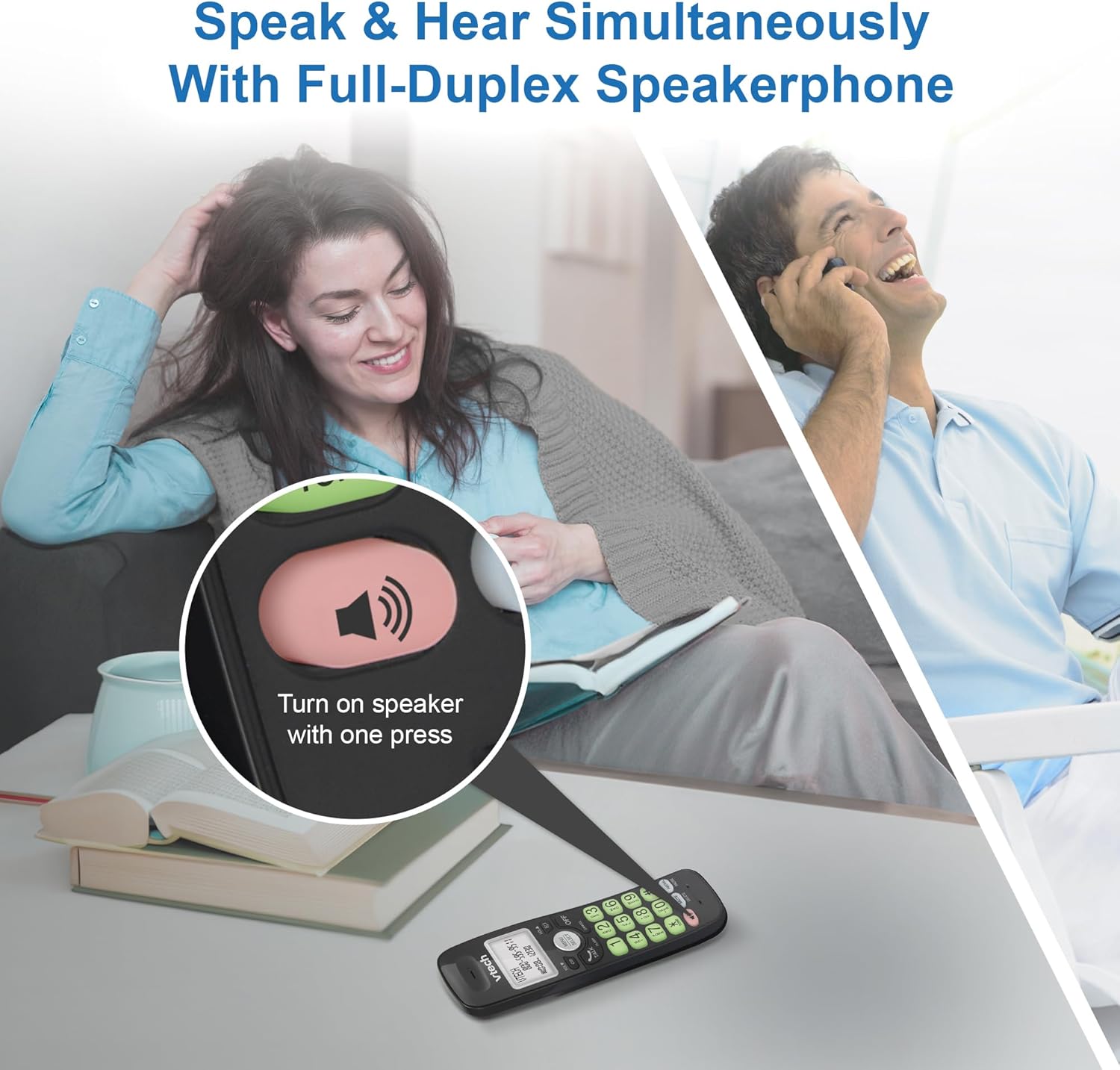
Image: A close-up of the VTech cordless phone handset showing the speakerphone button highlighted, with a person talking on the phone in the background, demonstrating the full-duplex speakerphone feature.
4.3. Үндү көзөмөлдөө жана үнсүз
- To adjust earpiece or speakerphone volume during a call, press ТОМ ▼ or ТОМ ▲.
- To mute the microphone during a call, press БАСУУ. The other party cannot hear you, but you can still hear them. Press БАСУУ кайра ачуу үчүн.

Сүрөт: деталдуу view of the VTech cordless phone handset, highlighting the 'MUTE' button, indicating its function for silencing the microphone during a call.
4.4. Caller ID and Phonebook
The handset displays the name, number, time, and date of incoming calls. The phone also includes a 30-name and number phonebook directory.
- Кайраview Caller ID history, press CID.
- To access the phonebook, press МЕНЮ/ТАНДОО, андан кийин Телефон китепчеси опциясына өтүңүз.

Image: A person smiling while holding the VTech cordless phone, with an overlay showing a digital phonebook display with contact names and icons, illustrating the Caller ID and phonebook features.
5. Өзгөчөлүктөрү
5.1. Bluetooth туташуусу
By pairing a Bluetooth headset, earbuds, or conference speakerphone to the system, you can enjoy a wireless calling experience. This feature is perfect for multitasking around your home or office.

Image: A woman in a kitchen pouring a drink while wearing wireless earbuds, with the VTech cordless phone and its base unit visible on the counter, demonstrating hands-free calling via Bluetooth connection.
Bluetooth түзмөгүн жупташтыруу:
- Ensure your Bluetooth headset/earbuds are in pairing mode (refer to your device's manual).
- On the VTech phone, navigate to the Bluetooth menu (usually via МЕНЮ/ТАНДОО).
- Select 'Pair Device' or similar option.
- The phone will search for available Bluetooth devices. Select your device from the list.
- Жупташтыруу процессин аяктоо үчүн экрандагы көрсөтмөлөрдү аткарыңыз.
5.2. DECT 6.0 технологиясы
Trusted by families worldwide for decades, VTech's cordless telephone transmits secure signals via the DECT 6.0 channel. This ensures crystal clear sounds, interference-free communication, and a stable operation range of up to 1000 ft outdoors, allowing you to move freely while on a call.

Image: A woman working on a laptop at a table, with the VTech cordless phone and its base unit nearby, and a graphic indicating DECT 6.0 digital technology, highlighting its superior range and clarity.
5.3. Backlit Display and Big Buttons
The phone features a blue-white backlit display and green backlit keypad for easier viewing and dialing in dim light conditions. The large buttons enhance usability, especially for those with visual impairments.

Сүрөт: жакын план view of the VTech cordless phone handset, emphasizing its backlit LCD screen and large, clearly visible buttons, designed for better visibility and ease of use.
5.4. Easy Wall Mount
The base unit is designed for easy wall mounting, fitting all standard wall mount plates without the need for additional brackets. Simply slide the base unit into the mounting plate using the built-in mounting holes for convenient placement.

Image: The VTech cordless phone base unit shown mounted on a wall, highlighting its built-in mounting holes on the back of the base for easy installation.
5.5. Hearing Aid Compatible
This phone is designed to be compatible with hearing aids, providing a clearer audio experience for users with hearing devices.

Image: A woman with a hearing aid talking on the VTech cordless phone, illustrating the phone's hearing aid compatibility feature.
5.6. Продукт бүтүп калдыview Video
Видео: Кыскача продуктview of the VTech VG131-11 DECT 6.0 Cordless Phone, showcasing анын негизги өзгөчөлүктөрү жана колдонуунун оңойлугу.
6. Техникалык тейлөө
To ensure the longevity and optimal performance of your VTech cordless phone, follow these maintenance guidelines:
- Тазалоо: Телефонду жана негизги блокту жумшак менен сүртүңүз, damp кездеме. Тазалоочу спрейлерди же катуу химиялык заттарды колдонбоңуз.
- Батареяга кам көрүү: Avoid exposing the battery to extreme temperatures. If the phone will not be used for an extended period, remove the battery from the handset.
- Жайгашкан жери: Телефонду жылуулук булактарынан, түз күн нурунан жана нымдуулуктан алыс кармаңыз.
7. Кыйынчылыктарды
If you experience any issues with your VTech cordless phone, please refer to the following common problems and solutions:
| Көйгөй | Чечим |
|---|---|
| Терүү үнү жок. | Ensure the telephone line cord is securely plugged into both the base unit and the wall jack. Check if the AC adapter is properly connected to the base unit and a working power outlet. |
| Телефон заряддалбайт. | Make sure the handset is correctly placed in the base unit. Clean the charging contacts on both the handset and the base unit with a dry cloth. Verify the AC adapter is plugged in. |
| Үн сапаты начар же статикалык. | Move closer to the base unit. Other electronic devices (Wi-Fi routers, microwaves) may cause interference; try relocating the base unit. Ensure the handset battery is fully charged. |
| Cannot connect to Bluetooth headset. | Ensure both the phone and the Bluetooth headset are in pairing mode. Make sure the headset is within range of the phone's base unit. Try restarting both devices and attempting the pairing process again. Confirm the headset is compatible with the phone's Bluetooth version. |
| Дисплей бош же окулбайт. | Ensure the handset battery is charged. If the display is dim, check if the backlight setting is enabled or adjust the contrast if available. |
8. Техникалык шарттар
| Өзгөчөлүк | Деталь |
|---|---|
| Модель номери | VG131-11 |
| Продукциянын өлчөмдөрү | 3.8 x 4.09 x 7.17 дюйм |
| Элемент Салмагы | 14.9 унция (0.42 килограмм) |
| Батареялар | 1 Продукттун өзгөчө батареясы (кошулган) |
| Телефон түрү | Зымсыз |
| Материал | Пластик |
| Power Source | Электр зымдары |
| DECT технологиясы | DECT 6.0 |
| Bluetooth | Ооба |
| Caller ID / Call Waiting | Ооба |
| Толук дуплекстүү динамик | Ооба |
| Backlit Display & Keypad | Yes (Blue-white display, green keypad) |
| Дубалга орнотулган | Ооба |
| Телефон китепчесинин сыйымдуулугу | 30 ысымдар жана сандар |
| Диапазон | Up to 1000 ft outdoor |
9. Кепилдик жана колдоо
For warranty information, technical support, or to purchase accessories, please visit the official VTech webсайтка же кардарларды тейлөө бөлүмүнө кайрылыңыз. Сатып алуу квитанциясын кепилдик дооматтары үчүн сатып алуунун далили катары сактаңыз.
VTech Customer Service: www.vtechphones.com/support


