1. Киришүү
This manual provides detailed instructions for the installation, setup, operation, and maintenance of your Intelbras MFR 7000 Smart Embedded Deadbolt with Handleset. Please read this manual thoroughly before installation and use to ensure proper function and safety. Keep this manual for future reference.
2. Коопсуздук маалыматы
- Орнотуудан мурун, бардык компоненттердин бар экенин жана бузулбаганын текшериңиз.
- Кулпуну ажыратууга же өзгөртүүгө аракет кылбаңыз. Бул кепилдикти жокко чыгарып, коопсуздукту бузушу мүмкүн.
- Көрсөтүлгөн AA щелочтуу батареяларын гана колдонуңуз. Эски жана жаңы батареяларды же ар кандай типтеги батареяларды аралаштырбаңыз.
- Физикалык ачкычтарды мүлктүн сыртында коопсуз жерде сактаңыз.
- Protect your passwords and biometric data. Do not share them with unauthorized individuals.
- This lock is designed for indoor use or protected outdoor environments. Avoid direct exposure to extreme weather conditions.
3. Пакеттин мазмуну
Төмөнкү нерселердин баары пакетиңизге камтылганын текшериңиз:
- 1 x Digital Lock (MFR 7000 unit)
- 4 x AA батарейкалар
- 1 x Орнотуу шаблону
- 1 x Fixing Kit (screws and mounting hardware)
- 1 х Колдонуучунун колдонмосу (бул документ)
- 2 x Физикалык ачкычтар
- 3 x Чаптама Tags
- 3 x Proximity Tags
- 1 x Installation Manual (separate guide for physical installation)
4. Продукт бүтүп калдыview
The Intelbras MFR 7000 is a smart embedded deadbolt with a handleset, offering multiple access methods for enhanced security and convenience. It integrates with the Intelbras Mibo ecosystem for smart home functionalities when paired with a compatible automation hub.
Негизги өзгөчөлүктөрү:
- Multiple Access Methods: Biometrics (up to 100), Proximity Tags (up to 100), Passwords (up to 15), and Physical Keys.
- Smart Home Integration: Remote access and management via the Mibo app (requires MCA 1001 Automation Hub, sold separately).
- Auto-Lock Function: Automatically locks the door after closing.
- Non-Disturb Function: Prevents external access for privacy.
- Reversible Lever: Adaptable for left or right-handed doors.
- Standard Mortise: Compatible with ABNT 14913 standard mortise for easy replacement.
Продукт компоненттери:
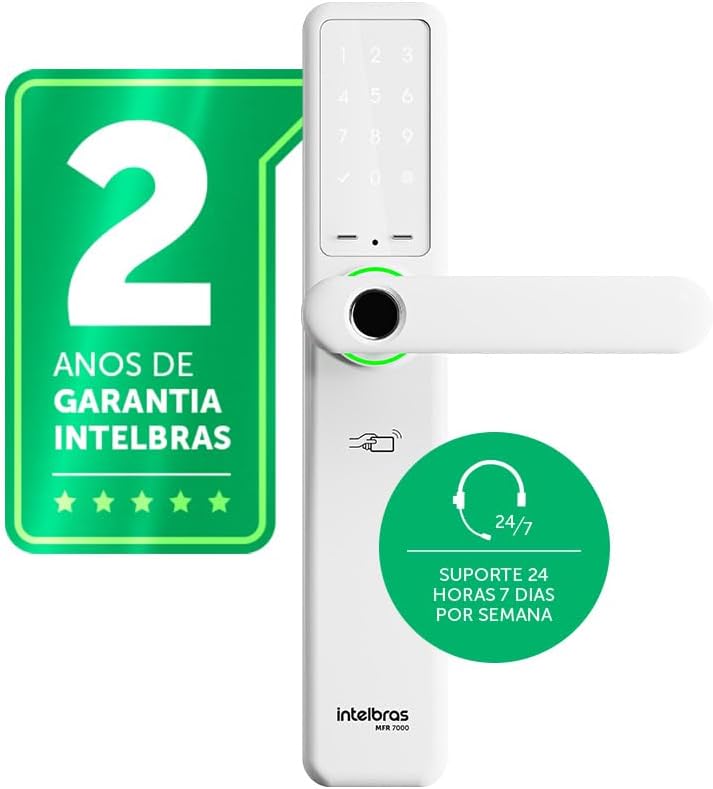
4.1-сүрөт: Фронт view of the Intelbras MFR 7000 Smart Embedded Deadbolt, showing the keypad, fingerprint reader, and handleset.

4.2-сүрөт: Side view of the MFR 7000, illustrating its slim profile.

4.3-сүрөт: Артка view of the MFR 7000, showing the interior handleset and battery compartment.
5. Орнотуу
The MFR 7000 is designed for straightforward installation, compatible with doors from 30mm to 60mm thick and utilizing the ABNT 14913 standard mortise. For detailed physical installation steps, refer to the separate Installation Manual included in your package. Professional installation is recommended.
Жалпы орнотуу кадамдары:
- эшикти даярдоо: If replacing an existing lock, remove the old lock mechanism. Ensure the door meets the thickness requirements and mortise standard.
- Мортизди орнотуу: Insert the MFR 7000 mortise mechanism into the door edge.
- Mount the Handleset: Attach the exterior and interior handleset components, ensuring proper alignment and cable connections.
- Кулпуну камсыз кылуу: Use the provided fixing kit to secure all components firmly.
- Сыноо функциясы: After installation, test the mechanical operation of the handleset and deadbolt before proceeding with electronic setup.

5.1-сүрөт: Diagram illustrating the easy installation process with the ABNT 14913 standard mechanism. This image shows the steps: remove old lock, insert MFR 7000 mechanism, and finalize installation.

5.2-сүрөт: The MFR 7000 Smart Deadbolt handleset installed on a door, demonstrating its integrated appearance.
6. Орнотуу жана колдонуучуларды башкаруу
After physical installation, proceed with the electronic setup and user registration.
6.1 Initial Power-Up and Master Code Setup
- Insert the 4 AA batteries into the battery compartment on the interior unit.
- The lock will power on and prompt for initial setup. Follow the voice prompts or display instructions to set a master password. This master password is crucial for managing other users and settings.
6.2 Registering Users
The MFR 7000 supports up to 100 biometrics, 100 proximity tags, and 15 passwords.
- Biometric Registration: Access the user management menu using your master password. Select the option to add a new biometric user. Follow the on-screen prompts to scan the fingerprint multiple times for accurate registration.
- Жакындык Tag Каттоо: In the user management menu, select to add a new tag. Present the sticker tag or proximity tag to the designated reader area on the lock.
- Сырсөздү каттоо: From the user management menu, choose to add a new password. Enter a 6-10 digit password and confirm it.
Маанилүү: For remote access, user management, and smart home integration features, you must purchase and connect the MCA 1001 Automation Hub (sold separately) and use the Intelbras Mibo app.
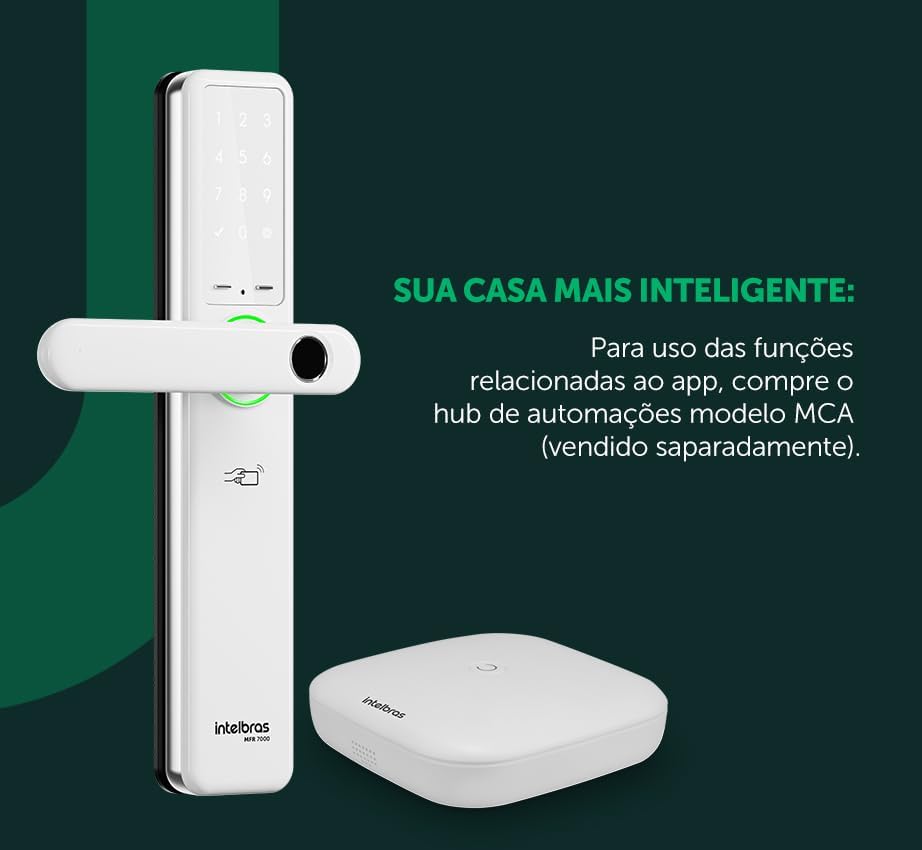
6.1-сүрөт: The MFR 7000 Smart Deadbolt shown alongside the Mibo Automation Hub, which is required for app-related smart functions.
7. Иштөө нускамалары
7.1 Эшиктин кулпусун ачуу
- Using Biometrics: Катталган манжаңызды манжа изин окугучка коюңуз. Манжа изи таанылса, кулпу ачылат.
- Using Proximity Tags: Present a registered proximity tag -га tag reader area on the lock. The lock will unlock.
- Сырсөздү колдонуу: Enter your registered password on the keypad, then press the '#' or 'Enter' key. The lock will unlock.
- Using Physical Keys: In case of battery depletion or electronic malfunction, insert the physical key into the keyhole and turn to unlock.
- Remote Unlocking (with Mibo Hub): Open the Intelbras Mibo app on your smartphone and select the MFR 7000 lock to remotely unlock it.
7.2 Эшикти кулпулоо
- Автоматтык кулпу: The MFR 7000 features an auto-lock function that engages the deadbolt automatically a few seconds after the door is closed.
- Кол менен кулпулоо: From the exterior, press the '#' key on the keypad. From the interior, turn the thumb-turn or lift the handleset (if applicable for manual deadbolt engagement).
- Remote Locking (with Mibo Hub): Use the Intelbras Mibo app to remotely lock the door.
7.3 Non-Disturb Function
Activate the non-disturb function from the interior unit to prevent external access, even with valid credentials. This provides enhanced privacy and security when inside.
8. Техникалык тейлөө
8.1 Батареяны алмаштыруу
- The lock is powered by 4 AA alkaline batteries, providing an average duration of 10 months (based on 10 daily accesses).
- The lock will provide a low battery warning when replacement is needed.
- To replace, open the battery compartment on the interior unit, remove old batteries, and insert new ones, ensuring correct polarity.
8.2 Тазалоо
- Clean the lock's exterior surfaces with a soft, dry cloth.
- Do not use abrasive cleaners, solvents, or chemical sprays, as these can damage the finish and electronic components.
- Keep the fingerprint sensor and keypad clean for optimal performance.
9. Кыйынчылыктарды
| Көйгөй | Мүмкүн себеп | Чечим |
|---|---|---|
| Кулпу жооп бербей жатат / Кубат жок. | Өлүк же туура эмес орнотулган батарейкалар. | Туура полярдуулукту камсыз кылып, бардык 4 AA батарейкасын алмаштырыңыз. |
| Манжа изи таанылган жок. | Finger is wet, dirty, or improperly placed; fingerprint not registered; sensor is dirty. | Ensure finger is clean and dry. Place the entire pad of the registered finger firmly on the sensor. Clean the sensor. Re-register fingerprint if issues persist. |
| Сырсөз кабыл алынган жок. | Incorrect password entered; password not registered. | Verify the password and re-enter. Ensure the password has been correctly registered. |
| Жакындык tag иштебейт. | Tag not registered; tag бузулган. | камсыз кылуу tag is registered. Try another registered tag. If still not working, the tag бузулушу мүмкүн. |
| Автоматтык кулпу иштебейт. | Door not fully closed; auto-lock feature disabled. | Ensure the door is completely closed. Check lock settings to confirm auto-lock is enabled. |
| Remote functions not working. | MCA 1001 Automation Hub not connected or configured; network issues. | Ensure the MCA 1001 Hub is properly installed and connected to your network. Verify the Mibo app is updated and connected to the hub. |
10. Техникалык шарттар
| Өзгөчөлүк | Деталь |
|---|---|
| Модел | MFR 7000 |
| Бренд | Intelbras |
| Кирүү ыкмалары | Biometrics (up to 100), Proximity Tags (up to 100), Passwords (up to 15), Physical Keys |
| Power Source | 4 х AA щелочтук батарейкалар |
| Батареянын иштөө мөөнөтү | Approx. 10 months (based on 10 daily accesses) |
| Эшиктин калыңдыгынын шайкештиги | 30 ммден 60 ммге чейин |
| Mortise Standard | ABNT 14913 |
| Өлчөмдөр (Продукт) | 8 x 5 x 27 см |
| Салмагы (пункт) | 2.89 килограмм |
| Түс | Ак |
| Өзгөчөлүктөр | MCA 1001 Automation Hub Required (Sold Separately) for smart functions, Reversible Lever |
11. Кепилдик жана колдоо
- Кепилдик: The Intelbras MFR 7000 Smart Embedded Deadbolt comes with a 2-year Intelbras warranty. Кепилдик дооматтары үчүн сатып алганыңыздын далилин сактап коюңуз.
- Техникалык колдоо: Intelbras offers 24/7 техникалык колдоо for its products. For assistance, please refer to the contact information provided on the Intelbras official website or your regional support channels.
- Онлайн ресурстар: Visit the official Intelbras website for updated manuals, FAQs, and additional support resources.


