1. Киришүү
Thank you for choosing the SGIN 17-inch Laptop Computer. This manual provides essential information for setting up, operating, maintaining, and troubleshooting your new device. Please read this manual carefully before using the laptop to ensure optimal performance and longevity.

Figure 1.1: SGIN 17-inch Laptop Computer, front view with screen displaying a desktop interface.
2. Продукциянын өзгөчөлүктөрү
The SGIN 17-inch Laptop Computer is designed for everyday productivity and entertainment, offering a large display and reliable performance.
- Дисплей: 17.3-inch Full HD (1920x1080) IPS display for clear and vivid visuals.
- Процессор: Intel Core i3-5005U Processor, providing efficient performance for daily tasks.
- Эстутум: Көп тапшырмалуулукту камсыз кылуу үчүн 4 ГБ DDR4 оперативдүү эс тутуму.
- Сактагыч: 128GB SSD for fast boot times and quick application loading.
- Байланыш: Dual-band 2.4G/5G WiFi and Bluetooth 4.2 for reliable wireless connections.
- Батарея: Long-lasting 38 Watt Hours battery, offering up to 8 hours of video playback.
- Порттор: Equipped with USB 3.2, USB 3.0, Type-C, Mini HDMI, Micro SD card slot, and a Headphone Jack for versatile connectivity.
- Баскычтоп: Full-size keyboard with a numeric keypad for comfortable typing.
- Муздатуу: Noiseless heat dissipation design with a heat dissipation hole and dust filter.
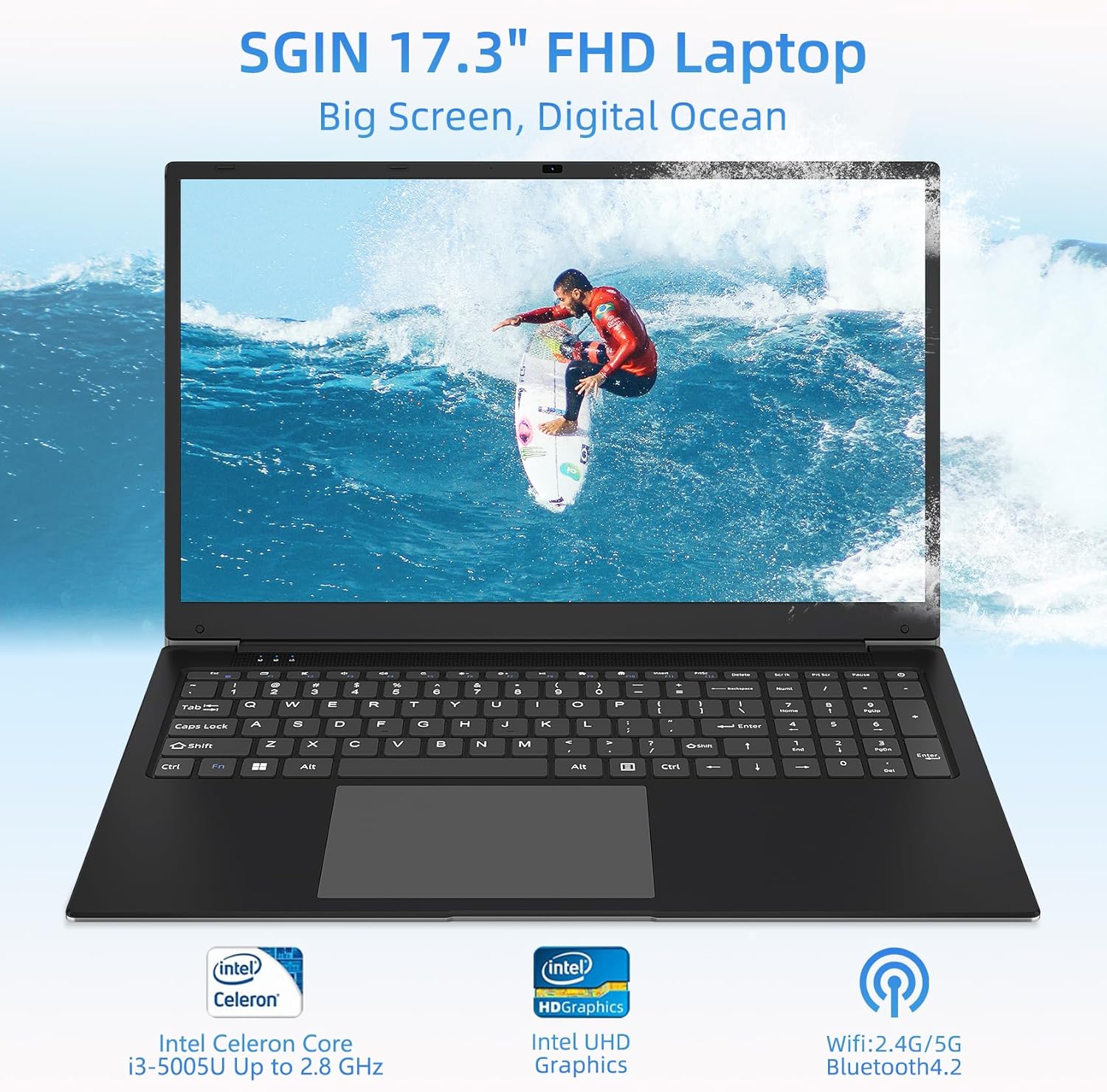
Figure 2.1: ашыкview of the SGIN 17.3-inch FHD Laptop highlighting key components like the processor, graphics, and wireless capabilities.

Figure 2.2: Illustration of the laptop's internal components, emphasizing the Intel Core i3-5005U processor, 4GB DDR4 RAM, and 128GB storage.

Сүрөт 2.3: Жакын пландан view of the 17.3-inch Full HD IPS display, showcasing its thin bezels and wide viewбурчтар.

2.4-сүрөт: Детальдуу view of the full-size keyboard and integrated numeric keypad, designed for a comfortable typing experience.

Figure 2.5: Visual representation of the laptop's battery, indicating its 7.6V 8000mAh capacity and up to 8 hours of video playback.
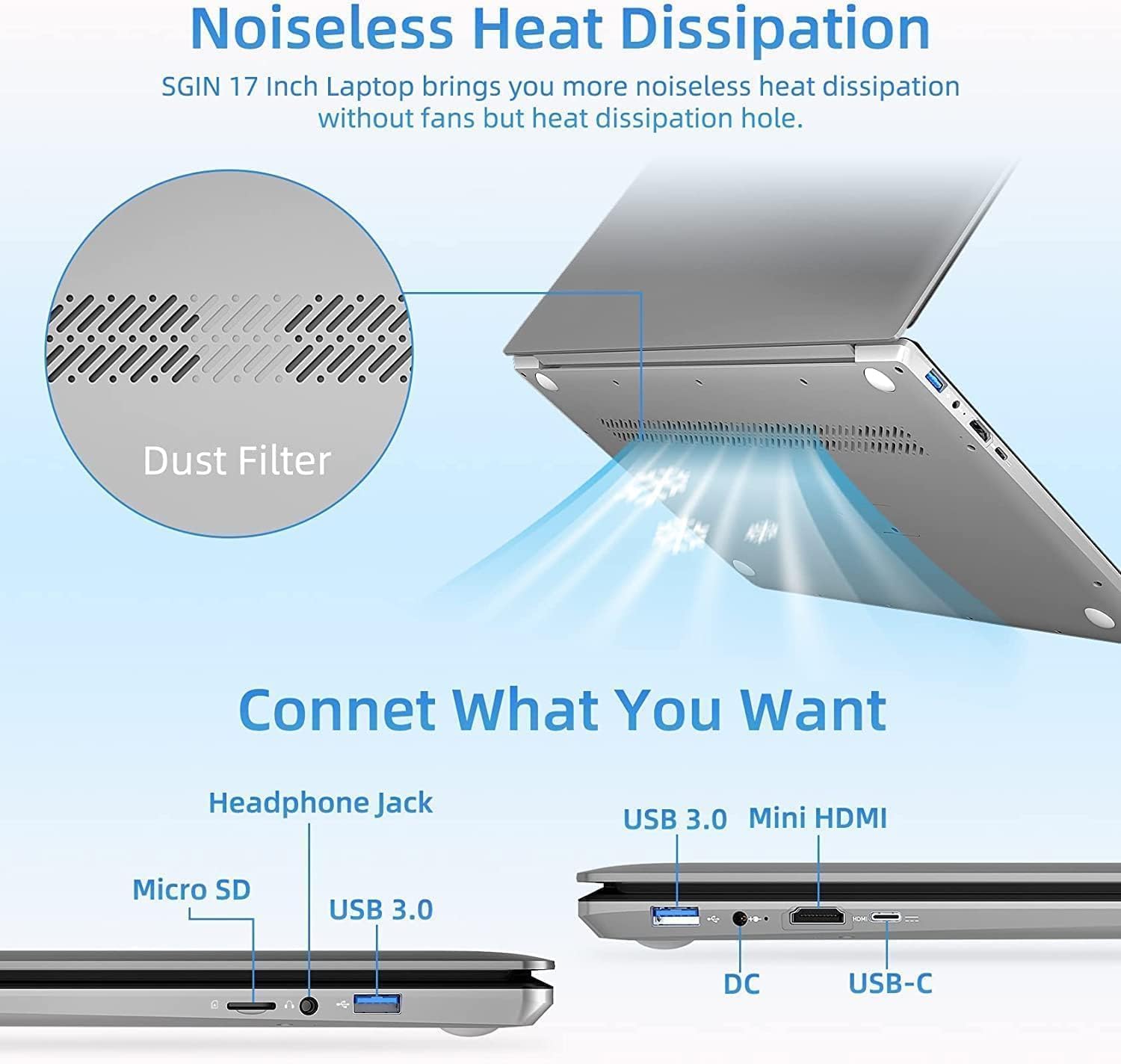
Figure 2.6: Diagram showing the various ports available on the laptop, including USB, HDMI, and Type-C, along with the noiseless heat dissipation design.
3. Орнотуу
3.1 Пакеттен чыгаруу
Carefully remove the laptop and all accessories from the packaging. Ensure all components listed below are present:
- SGIN 17-inch Laptop Computer
- Кубаттуу адаптер
- Колдонуучунун Колдонмосу (бул документ)
3.2 Баштапкы төлөм
Before first use, fully charge the laptop. Connect the power adapter to the DC-in port on the laptop and then plug it into a power outlet. The charging indicator light will illuminate.
3.3 Күйгүзүү жана баштапкы орнотуу
Press and hold the power button for a few seconds until the screen turns on. Follow the on-screen instructions to complete the initial Windows setup, including language selection, network connection, and user account creation.
4. Иштөө
4.1 Негизги операциялар
- Күйгүзүү/өчүрүү: Күйгүзүү үчүн кубат баскычын басыңыз. Өчүрүү үчүн, "Баштоо" баскычын, андан кийин "Кубат" > "Өчүрүү" баскычтарын чыкылдатыңыз.
- Уйку режими: Капкагын жабыңыз же "Баштоо" баскычын, андан кийин "Күчүн жана Уйку режимин" чыкылдатыңыз.
- Кайра баштоо: Баштоо баскычын чыкылдатып, андан кийин Кубат > Кайра иштетүү.
4.2 Перифериялык түзүлүштөрдү туташтыруу
Utilize the various ports to connect external devices:
- USB порттору: Чычкандар, клавиатуралар же тышкы сактагычтар сыяктуу USB түзмөктөрүн туташтырыңыз.
- Мини HDMI: Connect to an external monitor or TV using a Mini HDMI cable for extended display.
- Гарнитура уячасы: Аудио чыгаруу үчүн кулакчындарды же тышкы динамиктерди сайыңыз.
- Микро SD карта слоту: Кошумча сактоо же маалыматтарды өткөрүү үчүн Micro SD картаны салыңыз.
- Тип-C Port: For data transfer and potentially other compatible Type-C devices.
4.3 Зымсыз байланыш
- Wi-Fi: Click the Wi-Fi icon in the taskbar, select your network, and enter the password to connect to the internet.
- Bluetooth: Enable Bluetooth in Windows settings to pair with Bluetooth-enabled devices like headphones or speakers.
5. Техникалык тейлөө
5.1 Тазалоо
- Экран: Бир аз жумшак, түксүз кездемени колдонуңуз dampсуу же экран тазалоочу менен бүттү. Суюктукту экранга түз чачпаңыз.
- Баскычтоп жана Casing: Жумшак, кургак чүпүрөктү колдонуңуз. өжөр кир үчүн, бир аз гamp кездемени колдонсо болот, бул портторго суюктуктун кирбешин камсыз кылат.
- Вентиляция: Regularly check and clean the heat dissipation holes to prevent dust buildup, which can affect performance.
5.2 Программалык камсыздоо жаңыртуулары
Regularly update your operating system and drivers to ensure optimal performance, security, and compatibility. Go to Windows Settings > Windows Update to check for updates.
5.3 Батареяга кам көрүү
- Батареяны бат-баттан толук кубаттап калуудан алыс болуңуз.
- Ноутбукту узак убакыт бою колдонбосо, салкын, кургак жерде сактаңыз.
- Ноутбукту өтө жогорку температурага дуушар кылбаңыз.
6. Кыйынчылыктарды
This section addresses common issues you might encounter with your SGIN laptop.
| Көйгөй | Мүмкүн себеп | Чечим |
|---|---|---|
| Ноутбук күйбөйт. | Батареянын заряды аз; Кубат адаптериндеги көйгөй; Аппараттык камсыздоонун бузулушу. | Ensure power adapter is securely connected and plugged into a working outlet. Allow to charge for at least 30 minutes. Try a different outlet. If still no power, contact support. |
| Экран бош же кара. | Sleep mode; Display driver issue; Hardware malfunction. | Press any key or move the mouse to wake from sleep. Restart the laptop. If connected to an external display, disconnect it. Update display drivers. |
| Wi-Fi туташуу маселелери. | Роутер көйгөйү; Туура эмес сырсөз; Драйвер көйгөйү. | Restart your router and laptop. Double-check Wi-Fi password. Ensure Wi-Fi is enabled in Windows settings. Update network drivers. |
| Жай аткаруу. | Too many applications running; Low storage space; Malware. | Close unnecessary applications. Free up disk space. Run a virus scan. Ensure Windows is updated. |
7. Техникалык шарттар
Detailed technical specifications for the SGIN 17-inch Laptop Computer.
| Өзгөчөлүк | Спецификация |
|---|---|
| Бренд | SGIN |
| Модель номери | M17S |
| Экранды көрсөтүү өлчөмү | 17.3 дюйм |
| Screen Resolution | 1920 x 1080 пиксел (FHD) |
| RAM | 4 ГБ DDR4 SDRAM |
| Сактагыч | 128 ГБ SSD |
| Процессор бренди | Intel |
| Графикалык процессор | Intel UHD графикасы |
| Элемент Салмагы | 4.07 фунт (1.85 килограмм) |
| Продукциянын өлчөмдөрү | 17.3 x 10 x 0.6 дюйм |
| Зымсыз байланыш | Bluetooth 4.2, Wi-Fi (2.4G/5G) |
| Литий Батареясынын Энергия Мазмуну | 38 Ватт саат |
| Аудио чыгаруу түрү | Наушник |
8. Кепилдик жана колдоо
8.1 Кепилдик маалыматы
The SGIN 17-inch Laptop Computer comes with a 1 жылдык кепилдик from the date of purchase. This warranty covers manufacturing defects and issues arising from normal use. It does not cover damage caused by misuse, accidents, unauthorized repairs, or external factors.
8.2 Кардарларды колдоо
For technical assistance, warranty claims, or any questions regarding your SGIN laptop, please contact SGIN customer support. Refer to the contact information provided with your product packaging or visit the official SGIN webакыркы колдоо маалымат үчүн сайт.


