Introduction
This manual provides essential information for the safe and efficient operation of your Mistral 46-inch Blade-Free Fan with Air Purifier, Model MBFAP460. This appliance combines powerful airflow with advanced air purification technology, featuring a DC motor turbo system, HEPA13 filtration, and UV sterilization. Please read these instructions thoroughly before use and retain them for future reference.
Коопсуздук нускамалары
Өрт, электр шок же жаракат алуу коркунучун азайтуу үчүн ар дайым төмөнкү коопсуздук чараларын аткарыңыз:
- электр менен жабдууну камсыз кылуу voltage шаймандагы рейтинг белгисине дал келет.
- Шнуру же сайгычы бузулган абалда шайманды иштетпеңиз. Эгерде бузулган болсо, квалификациялуу тейлөө кызматына кайрылыңыз.
- Keep the appliance away from water or other liquids. Do not immerse any part of the appliance in water.
- Тазалоодон, техникалык тейлөөдөн мурун же колдонулбай турганда шайманды розеткадан сууруп алыңыз.
- Do not insert fingers or foreign objects into any openings of the appliance.
- Бул шайман үй ичинде гана колдонуу үчүн.
- Балдар шайман менен ойнобосун текшериңиз.
Пакеттин мазмуну
Пакетте бардык буюмдар бар экенин текшериңиз:
- Mistral Blade-Free Fan with Air Purifier Main Unit
- Алыстан башкаруу
- HEPA13 Filter (pre-installed or separate)
- Колдонуучунун Колдонмосу (бул документ)
Жайгашуу
The Mistral MBFAP460 requires minimal assembly. Follow these steps to prepare your unit for operation:
- Пакеттен чыгаруу: Бардык компоненттерди таңгактан кылдаттык менен алып салыңыз. Келечекте сактоо же ташуу үчүн таңгактарды сактаңыз.
- Base Attachment (if separate): If the base is separate, align it with the main unit and secure it according to the markings. Ensure it clicks into place or is fastened securely.
- Чыпканы орнотуу: If the HEPA13 filter is not pre-installed, locate the filter compartment (usually at the base or rear of the unit), remove the cover, insert the filter with the correct orientation, and replace the cover.
- Жайгашкан жери: Place the fan on a firm, level surface, ensuring adequate space around the unit for optimal airflow and purification.

Сүрөт 1: Алдыңкы view of the Mistral MBFAP460 Blade-Free Fan with Air Purifier.
Иштөө нускамалары
Your Mistral MBFAP460 can be operated using the control panel on the unit or the included remote control.
Башкаруу панелиview

Figure 2: Close-up of the control panel, showing the digital display and touch-sensitive buttons for various functions.
Негизги операция
- Күйгүзүү/өчүрүү: Кубат баскычын басыңыз (U) аппаратты күйгүзүү же өчүрүү үчүн башкаруу панелинде же пультта.
- Air Modes: Cycle through the 5 available air modes: Auto, Turbo, Sleep, Natural, and Normal. Each mode adjusts fan speed and purification settings for different environments.
- Термелүү: Activate or deactivate the automatic left-right oscillation feature. Select from 30, 60, 90, or 120-degree oscillation angles to distribute air across a wider area.
- UV стерилизациясы: The unit features UV sterilization to kill up to 99.99% of most viruses, airborne bacteria, and mold. This function operates automatically with the air purification system.
- Чыпканы алмаштыруу көрсөткүчү: The control panel will display an indicator when the HEPA13 filter requires replacement. Refer to the Maintenance section for instructions.
Техникалык тейлөө
Regular maintenance ensures optimal performance and longevity of your Mistral MBFAP460.
Агрегатты тазалоо
- Тазалоодон мурун ар дайым розеткадан ажыратыңыз.
- Сырткы беттерин жумшак менен сүртүңүз, гamp кездеме. Абразивдүү тазалагычтарды же эриткичтерди колдонбоңуз.
- Ички компоненттерге суу кирбесин текшериңиз.
HEPA13 Filter Replacement
The HEPA13 filter removes up to 99.97% of allergens, pollutants, and dust as small as 0.3 microns. Replace the filter when the filter replacement indicator illuminates on the control panel.
- Шайманды розеткадан сууруп алыңыз.
- Locate the filter compartment, usually at the base of the unit.
- Чыпка бөлүмүнүн капкагын ачыңыз.
- Эски чыпканы алып салыңыз жана аны туура жок кылыңыз.
- Insert a new Mistral HEPA13 replacement filter, ensuring correct orientation.
- Фильтр бөлүктүн капкагын бекем жабыңыз.
- Plug in the unit and reset the filter indicator (refer to specific instructions in the full manual if a reset button is present).
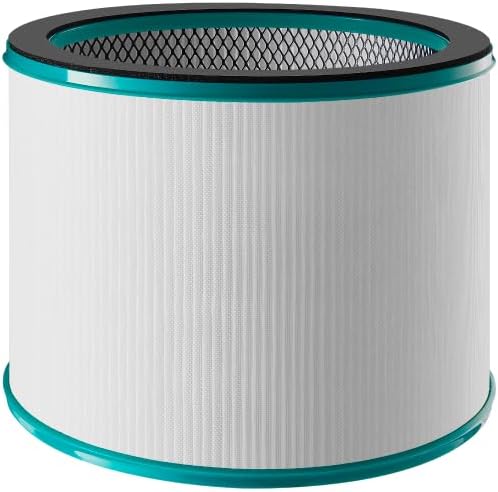
Figure 3: Mistral HEPA13 replacement filter, essential for maintaining air purification efficiency.
Проблемаларды чечүү
If you encounter issues with your Mistral MBFAP460, consult the following table for common problems and solutions.
| Көйгөй | Мүмкүн себеп | Чечим |
|---|---|---|
| Түзмөк күйбөйт. | Электр менен камсыздоо жок. Электр шнуру бекем сайылган эмес. | Check if the power cord is firmly plugged into a working outlet. Ensure the power switch (if any) is on. |
| Алсыз же аба агымы жок. | Air intake/outlet blocked. Filter is dirty or clogged. | Ensure no obstructions are blocking the air intake or outlet. Check and replace the HEPA13 filter if dirty. |
| Иш учурунда адаттан тыш ызы-чуу. | Unit not on a level surface. Foreign object inside. | Place the unit on a stable, level surface. Unplug and carefully inspect for any foreign objects. |
| Чыпканы алмаштыруу индикатору чыпка алмаштырылгандан кийин күйүп турат. | Filter indicator not reset. | Refer to the full manual for specific instructions on how to reset the filter replacement indicator. |
Бул чечимдерди колдонуу аракетинен кийин көйгөй чечилбесе, кардарларды колдоо кызматына кайрылыңыз.
Техникалык шарттар
| Өзгөчөлүк | Деталь |
|---|---|
| Модел | MBFAP460 |
| Бренд | MISTRAL |
| Продукциянын өлчөмдөрү | 38D x 35.8W x 116.2H сантиметр |
| Элемент Салмагы | 5.5 килограмм |
| Power Source | Электр зымдары |
| Башкаруу ыкмасы | Алыстан |
| Чыпка түрү | HEPA13 |
| Бөлүкчөлөрдү кармоо өлчөмү | 0.3 микрон |
| Полдун аянты | 700 чарчы фут |
| Өзгөчөлүктөр | DC Motor Turbo System, UV Sterilisation, 5 Air Modes, Auto Oscillation |
| Ассамблея талап кылынат | Ооба |
| Energy Star сертификацияланган | Ооба |
Кепилдик жана колдоо
This product comes with a manufacturer's warranty. Please refer to the warranty card included in your package for specific terms and conditions. For technical support, replacement parts, or service inquiries, please contact Mistral customer service through their official webсайтты же кепилдик документтериңизде көрсөтүлгөн байланыш маалыматын.


