1. Коопсуздук маалыматы
Сураныч, бул аспапты колдонуудан мурун бардык коопсуздук маалыматын жана колдонуу нускамаларын окуп, түшүнүңүз. Бул көрсөтмөлөрдү аткарбоо электр шокуна, өрткө же олуттуу жаракатка алып келиши мүмкүн.
- Жалпы коопсуздук: Always use the correct function and range for measurements. Do not exceed the maximum input values specified for each range.
- Жеке коргонуу каражаттары: Электр чынжырлар менен иштегенде ар дайым коопсуздук көз айнеги жана изоляцияланган кол кап сыяктуу тиешелүү жеке коргонуу каражаттарын (ЖКК) кийиңиз.
- Жандуу схемалар: Never touch live circuits with bare hands or uninsulated tools. Assume all circuits are live until proven otherwise.
- Зонд туташуу: Connect the common (COM) test lead first, then the live test lead. Disconnect the live test lead first, then the common test lead.
- Батареяны текшерүү: Батареянын заряды аз калганын көрсөткөн индикатор пайда болгондо, так көрсөткүчтөрдү жана туура иштөөнү камсыз кылуу үчүн батареяларды дароо алмаштырыңыз.
- Экологиялык шарттар: Do not use the device in wet environments or in the presence of explosive gases or dust.
- Зыянды текшерүү: Before each use, inspect the device and test leads for any damage. Do not use if damaged.
- Байланышсыз томtagе сыноочу: The NCV function is for indication only. Always verify voltage presence or absence with a contact method before working on circuits.
2. Продукт бүтүп калдыview
The KAIWEETS HT118A Digital Multimeter and HT100s Non-Contact Voltage Tester are versatile tools designed for electrical measurements and safety checks. The HT118A multimeter offers a wide range of functions for professional and home use, while the HT100s provides a convenient and safe way to detect AC voltagд түз байланышсыз.

2.1-сүрөт: KAIWEETS HT118A Digital Multimeter and HT100s Non-Contact Voltage Tester. This image displays both the digital multimeter on the left and the non-contact voltage tester on the right, showcasing their overall design and key features.
2.1. KAIWEETS HT118A Digital Multimeter Features
- True RMS (TRMS): Синусоидалуу эмес толкундар үчүн так окууну камсыз кылат.
- 6000 саны дисплей: High-resolution display for precise measurements.
- Автоматтык диапазон: Автоматтык түрдө туура өлчөө диапазонун тандап, операцияны жеңилдетет.
- Кеңири өлчөө мүмкүнчүлүктөрү: Чаралар AC/DC Voltage (up to 600V), AC/DC Current (up to 10A), Resistance (up to 60 MOhms), Capacitance, Frequency, Duty Cycle, Temperature, Diode, and Continuity.
- LED Lightning Jacks: Flashing LED lights on the input jacks guide correct test lead placement.
- Арткы жарыктуу чоң LCD дисплей: 2.9-inch HTN backlit screen for easy readability in various lighting conditions.
- Дайындарды кармоо (ТОКТОО): Көрсөтүлгөн окууну токтотот.
- Максималдуу/Минималдуу (МАКСИМАЛДУУ/МИНУМ): Records the highest and lowest readings.

2.2-сүрөт: KAIWEETS HT118A Multimeter Functions and Battery Compartment. This image highlights the various measurement functions available on the multimeter's rotary dial and shows the rear battery compartment.
2.2. KAIWEETS HT100s Non-Contact Voltage Tester Features
- Контактсыз AC Voltage Detection (NCV): AC томун аныктайтtagд физикалык байланышсыз.
- Кош диапазондун сезгичтиги: Detects standard (70-1000V AC) and low voltage (12-1000V AC) for diverse applications.
- Түз/Нөлдүк зымдарды аныктоо: Automatically identifies live or neutral wires.
- Visual and Audible Alarms: Provides sound and light indications for voltage presence and intensity.
- Breakpoint Test: Useful for identifying breaks in insulated wires.
- Интеграцияланган LED фонарь: Assists in working in dimly lit areas.
3. Орнотуу
3.1. Батареяны орнотуу
Both the HT118A Multimeter and HT100s Voltage Tester require batteries for operation.
- Аппараттын өчүрүлгөнүн текшериңиз.
- Аппараттын артындагы батарея бөлүкчөсүнүн капкагын табыңыз.
- Батарея бөлүмүн ачуу үчүн бурагычты (зарыл болсо) колдонуңуз.
- Керектүү батареяларды туура полярдуулукту (+/-) сактап, салыңыз.
- Батарея бөлүгүнүн капкагын бекем жабыңыз.
3.2. Test Lead Connection (HT118A Multimeter)
Көпчүлүк өлчөөлөр үчүн сыноо өткөргүчтөрүн төмөнкүдөй туташтырыңыз:
- Кара сыноо өткөргүчтү "COM" (Жалпы) уячасына салыңыз.
- Кызыл сыноо өткөргүчтү том үчүн "VΩmA" уячасына салыңызtagд, каршылык, жана кичинекей ток өлчөө.
- 10А чейинки токту өлчөө үчүн кызыл сыноочу зымын "10А" розеткасына киргизиңиз.

3.1-сүрөт: KAIWEETS HT118A Multimeter LED Lightning Jacks. This image shows the multimeter's input jacks with LED lights, which illuminate to guide the user to the correct probe connection point for the selected function.
4. Иштөө нускамалары
4.1. KAIWEETS HT118A Digital Multimeter Operation
Turn the rotary dial to select the desired measurement function. The multimeter features auto-ranging, which automatically selects the appropriate measurement range.

4.1-сүрөт: KAIWEETS HT118A Multimeter 2.9-inch Backlit Screen. This image displays the multimeter's large, backlit LCD screen showing a measurement, emphasizing its readability and dual reading capability.
4.1.1. Томtage Өлчөө (AC/DC)
- Set the rotary dial to the "V~" (AC Voltagд) же "V-" (ТК көлөмүtagд) кызмат орду.
- Кара сыноочу зымын "COM" уячасына, ал эми кызыл сыноочу зымын "VΩmA" уячасына туташтырыңыз.
- Сыноо зонддорун vol болгон чынжыр чекиттерине этияттык менен тийгизиңизtage is to be measured (in parallel with the load).
- Томду окуңузtage мааниси дисплейде.
4.1.2. Учурдагы өлчөө (AC/DC)
Абайлаңыз: Always connect the multimeter in series with the circuit when measuring current. Never connect it in parallel with a voltage булагы.
- Set the rotary dial to the "A~" (AC Current) or "A-" (DC Current) position. For small currents, use the "mA" or "μA" range.
- Connect the black test lead to the "COM" jack. Connect the red test lead to the "10A" jack for currents up to 10A, or to the "VΩmA" jack for mA/μA measurements.
- Ток өлчөнө турган чынжырды ачып, сыноо зонддорун катар менен туташтырыңыз.
- Дисплейдеги учурдагы маанини окуңуз.
4.1.3. Каршылык Өлчөө
Абайлаңыз: Ensure the circuit is de-energized before measuring resistance. Disconnect power to the component being tested.
- Set the rotary dial to the "Ω" (Resistance) position.
- Кара сыноо өткөргүчтү "COM"га, кызылды "VΩmA"га туташтырыңыз.
- Өлчөнө турган компонент боюнча сыноо зонддоруна тийиңиз.
- Дисплейдеги каршылык маанисин окуп чыгыңыз.
4.1.4. Үзгүлтүксүздүк тести
- Set the rotary dial to the "Continuity" position (often shared with Diode/Resistance).
- Кара сыноо өткөргүчтү "COM"га, кызылды "VΩmA"га туташтырыңыз.
- Touch the test probes to the two points of the circuit or component.
- If continuity exists (low resistance), the multimeter will emit an audible beep.
4.1.5. Диод сыноо
- Set the rotary dial to the "Diode" position (often shared with Continuity/Resistance).
- Кара сыноо өткөргүчтү "COM"га, кызылды "VΩmA"га туташтырыңыз.
- Кызыл зондту анодка, кара зондду диоддун катодуна тийгизиңиз.
- Дисплей алдыга томду көрсөтөтtagд тамчы. Зонддорду тескери которуу; ачык схема (OL) окуу жакшы диодду көрсөтөт.
4.1.6. Capacitance Measurement
Абайлаңыз: Мультиметрге зыян келтирбөө үчүн сыноодон мурун конденсаторлорду бошотуңуз.
- Set the rotary dial to the "Capacitance" position.
- Кара сыноо өткөргүчтү "COM"га, кызылды "VΩmA"га туташтырыңыз.
- Конденсатордун терминалдарынан тестирлөөчү зонддорго тийиңиз.
- Дисплейдеги сыйымдуулуктун маанисин окуңуз.
4.1.7. Жыштык жана милдет циклин өлчөө
- Set the rotary dial to the "Hz%" (Frequency/Duty Cycle) position.
- Кара сыноо өткөргүчтү "COM"га, кызылды "VΩmA"га туташтырыңыз.
- Сыноо зонддорун сигнал булагына туташтырыңыз.
- Read the frequency (Hz) or duty cycle (%) on the display. Use the "FUNC" button to switch between modes if necessary.
4.1.8. Температураны өлчөө
The HT118A supports temperature measurement using a K-Type thermocouple.
- Set the rotary dial to the "°C/°F" (Temperature) position.
- Connect the K-Type thermocouple to the appropriate input jacks (usually marked for temperature).
- Термопаранын учун температурасы өлчөнүүчү объекттин үстүнө же жанына коюңуз.
- Дисплейдеги температуранын маанисин окуңуз.

4.2-сүрөт: KAIWEETS HT118A Multimeter Temperature Measurement. This image illustrates the multimeter measuring the temperature of a liquid using the included K-Type thermocouple.
4.2. KAIWEETS HT100s Non-Contact Voltage Tester операциясы
The HT100s allows for quick and safe detection of AC voltagд түз байланышсыз.
4.2.1. Basic NCV Detection
- Press the power button to turn on the HT100s.
- Place the tip of the tester near a terminal strip, outlet, or insulated wire.
- Эгерде AC voltage is detected, the tip will glow red, and the tester will emit an audible beep. The frequency of the beep and the percentage value on the screen will increase with stronger voltage сигналдары.

4.3-сүрөт: KAIWEETS HT100s NCV Tester in use on an outlet. This image shows the non-contact voltagтом аныктоо үчүн колдонулуп жаткан e тестерtage in an electrical outlet, with the tip glowing red.
4.2.2. Sensitivity Adjustment (Dual Range)
The HT100s offers two sensitivity modes:
- High Sensitivity Mode (12-1000V AC): Suitable for detecting lower voltages, such as those in doorbells, thermostats, or irrigation wiring.
- Low Sensitivity Mode (70-1000V AC): Standard mode for detecting higher voltages in typical household wiring.
Press the "S" button to switch between high and low sensitivity modes. The display will indicate the current mode.
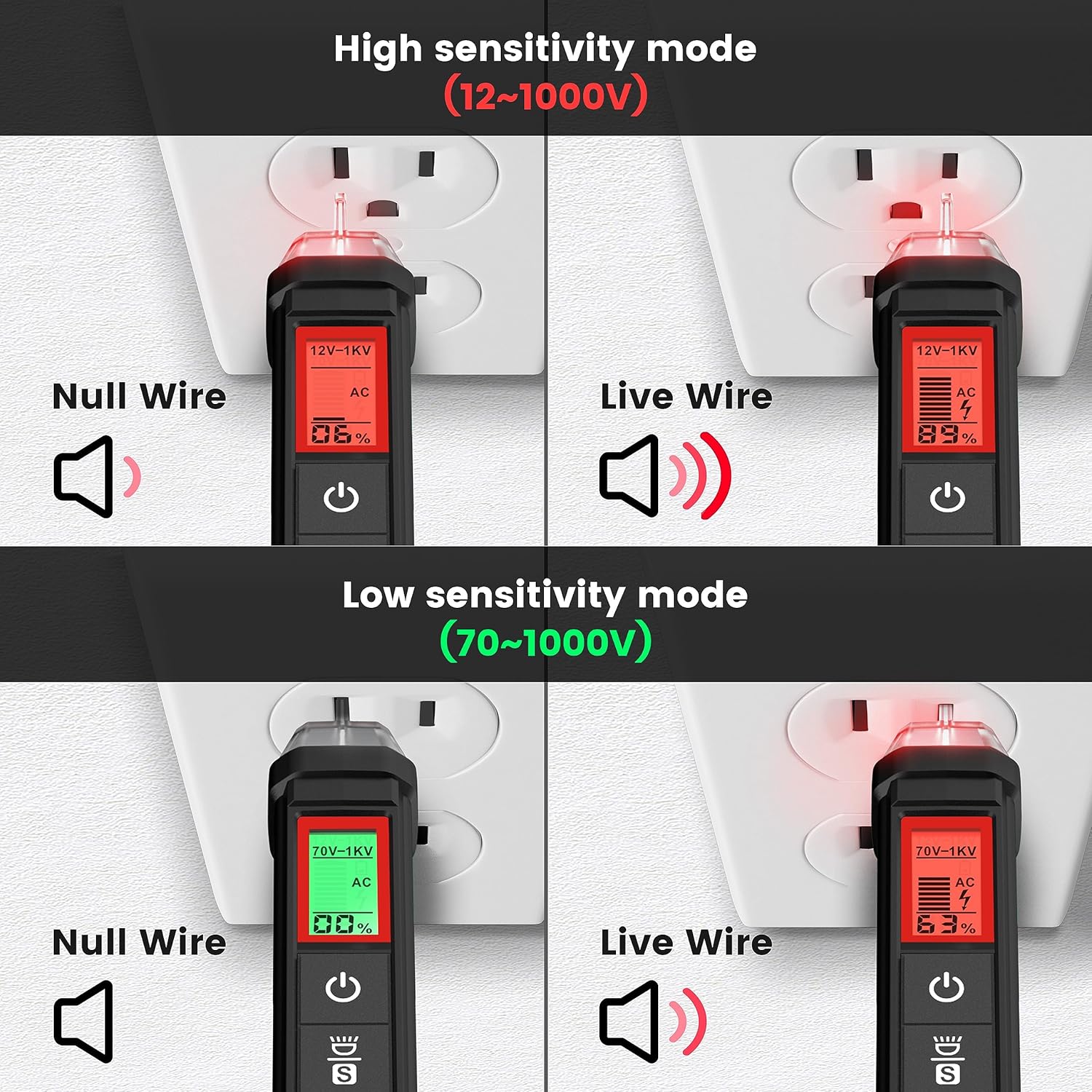
4.4-сүрөт: KAIWEETS HT100s NCV Tester High and Low Sensitivity Modes. This image demonstrates the difference in detection for null and live wires under both high (12-1000V) and low (70-1000V) sensitivity settings.
4.2.3. Live/Null Wire Detection
Томду аныктоодоtage, the screen will display red for a live wire (high voltage) and green for a null (neutral) wire (low voltage). This provides a quick visual indication of wire status.
4.2.4. Breakpoint Test
To perform a breakpoint test, run the NCV tester along an insulated wire. The tester will indicate voltage up to the point of a break in the wire, where the signal will cease.

4.5-сүрөт: KAIWEETS HT100s NCV Tester Breakpoint Test. This image shows the NCV tester being used to identify a break in an insulated electrical cable by detecting the presence or absence of voltage along its length.
4.2.5. Жарык диод
Press the flashlight button to activate the integrated LED flashlight, useful for illuminating work areas in low-light conditions.

4.6-сүрөт: KAIWEETS HT100s NCV Tester with LED Flashlight. This image shows the NCV tester's tip illuminating a dark electrical panel with its built-in LED flashlight.
5. Техникалык тейлөө
5.1. Тазалоо
Жарнак менен түзмөктү тазалаңызamp кездеме жана жумшак жуугуч. Абразивдүү тазалагычтарды же эриткичтерди колдонбоңуз. Сактоодон же кийинки колдонуудан мурун аппарат толугу менен кургатылганын текшериңиз.
5.2. Батареяны алмаштыруу
When the low battery indicator appears on the display, replace the batteries immediately to maintain measurement accuracy. Refer to Section 3.1 for battery installation instructions.
5.3. Сактоо
Эгерде түзмөк көпкө чейин колдонулбаса, агып кетпеши үчүн батареяларды алып салыңыз. Түзмөктү салкын, кургак жерде, күн нуру түз тийбеген жана өтө жогорку температурадан алыс сактаңыз.
6. Кыйынчылыктарды
- Түзмөк күйбөйт: Батареянын орнотулушун текшерип, батарейкалары түгөнүп калбагандыгын текшериңиз. Керек болсо алмаштырыңыз.
- Туура эмес окуулар: Ensure test leads are properly connected. Check battery level. Verify the correct function and range are selected.
- NCV аныктоо жок: Ensure the device is powered on. Check sensitivity settings (high/low). Ensure the tip is close enough to the voltage булагы.
- Үзгүлтүксүздүк тести сигнал бербей жатат: Ensure the circuit is de-energized. Check for actual continuity in the component.
7. Техникалык шарттар
| Өзгөчөлүк | Спецификация |
|---|---|
| Бренд | KAIWEETS |
| Модел | HT118A (Multimeter), HT100s (Voltage Tester) |
| Дисплей | 6000 Counts, 2.9" HTN Backlit LCD |
| AC/DC Voltage | 600 В чейин |
| AC / DC ток | 10А чейин |
| Каршылык | 60 MΩ чейин |
| Сыйымдуулук | Ооба |
| Frequency / Duty Cycle | Ооба |
| Температура | Yes (K-Type Thermocouple) |
| Үзгүлтүксүздүк тести | Ооба (үндүү сигнал менен) |
| Диод сыноо | Ооба |
| NCV Detection Range | 12-1000V AC / 70-1000V AC (Dual Range) |
| Power Source | Батарея менен иштейт |
| Коопсуздук рейтинги | CAT III 600V (HT118A) |
8. Кепилдик жана колдоо
KAIWEETS products are designed for reliability and performance. For warranty information, technical support, or service inquiries, please refer to the official KAIWEETS webсайтка же түздөн-түз кардарларды тейлөөгө кайрылыңыз. Сатып алуу квитанциясын кепилдик дооматтары үчүн сатып алуунун далили катары сактаңыз.
Кошумча жардам алуу үчүн төмөнкү дарекке кайрылыңыз: www.kaiweets.com