Маанилүү коопсуздук нускамалары
Сураныч, шайманды колдонуудан мурун бардык нускамаларды кылдат окуп чыгыңыз. Бул колдонмону келечекте маалымат алуу үчүн сактаңыз.
- Шайманды, шнурду же розеткага сууга же башка суюктукка батырбаңыз.
- VoltagШайманда көрсөтүлгөн e жергиликтүү электр тармагына туура келетtagэ туташтыруудан мурун.
- Кандайдыр бир шайманды балдар же алардын жанында колдонуп жатканда, катуу көзөмөл керек.
- Эч кандай шайманды зымы же сайы бузулган, же шайман иштебей калгандан кийин же кандайдыр бир түрдө бузулгандан кийин иштетпеңиз.
- Колдонбогондо жана тазалоодон мурун розеткадан ажыратыңыз. Бөлүктөрүн кийүүдөн же чечүүдөн мурун муздатыңыз.
- Шайманды дубалга же башка шаймандарга каршы койбоңуз. Артында жана капталдарында кеминде 10 см бош орун жана шаймандын үстүндө 10 см бош орун калтырыңыз.
- Шаймандын үстүнө эч нерсе койбоңуз.
- Ысык абада кууруп жатканда ысык буу аба чыгаруучу тешиктер аркылуу чыгат. Колуңузду жана бетиңизди буудан жана аба чыгаруучу тешиктерден коопсуз аралыкта кармаңыз.
- Көмөч казанды шаймандан чыгарганда ысык буудан жана абадан этият болуңуз.
- Шаймандан кара түтүн чыгып жатканын көрсөңүз дароо шайманды өчүрүңүз. Кастрюльди шаймандан чыгарардан мурун түтүндүн чыгышын күтүңүз.
Продукт бүттүview
Familiarize yourself with the components of your LEHMANN Hot Air Fryer.

1-сүрөт: Фронт view of the LEHMANN 8L Hot Air Fryer, showcasing the digital display and the transparent window of the cooking basket filled with vegetables.

2-сүрөт: The LEHMANN 8L Hot Air Fryer with its removable non-stick cooking basket pulled out, showing the interior cavity.

3-сүрөт: Diagram illustrating the dimensions of the LEHMANN 8L Hot Air Fryer: 35.5 cm height, 38 cm depth, and 29.5 cm width.
Компоненттери:
- Негизги блок: Жылытуу элементи жана желдеткич бар.
- Digital LED сенсордук экран: Убакытты, температураны коюу жана программаларды тандоо үчүн.
- Cooking Basket (8L capacity): Removable, non-stick, with transparent viewтерезе.
- туткасы: For safe removal and insertion of the cooking basket.
- Аба кириш/чыгаруу: Иштөө учурунда абанын туура айланышы үчүн.
Орнотуу жана биринчи колдонуу
- Пакеттен чыгаруу: Бардык таңгактоочу материалдарды жана чаптамаларды кылдаттык менен алып салыңыз.
- Тазалоо: Clean the cooking basket and any removable parts with hot water, dish soap, and a non-abrasive sponge. Wipe the main unit with a damp кездеме. Колдонуудан мурун бардык бөлүктөрү толугу менен кургак экендигин текшериңиз.
- Жайгашкан жери: Place the appliance on a stable, horizontal, and level surface. Do not place the appliance on non-heat-resistant surfaces. Ensure adequate ventilation around the appliance.
- Кубат туташуу: Электр шнурын жерге туташтырылган розеткага сайыңыз.
- Баштапкы иштетүү (милдеттүү эмес, бирок сунушталат): For the first use, it is recommended to run the air fryer empty for about 10-15 minutes at 180°C to burn off any manufacturing residues. A slight odor may be present, which is normal.
Иштөө нускамалары
Digital Touch Screen Control:

4-сүрөт: The intuitive digital LED touch screen, showing temperature and time settings, along with various cooking program icons.

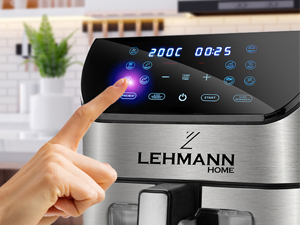
5-сүрөт: A hand interacting with the touch screen, demonstrating the ease of setting functions.
The LEHMANN Hot Air Fryer features a digital LED touch screen for easy operation. You can manually adjust temperature and time or select from 12 pre-set cooking programs.
Бышыруу программалары:
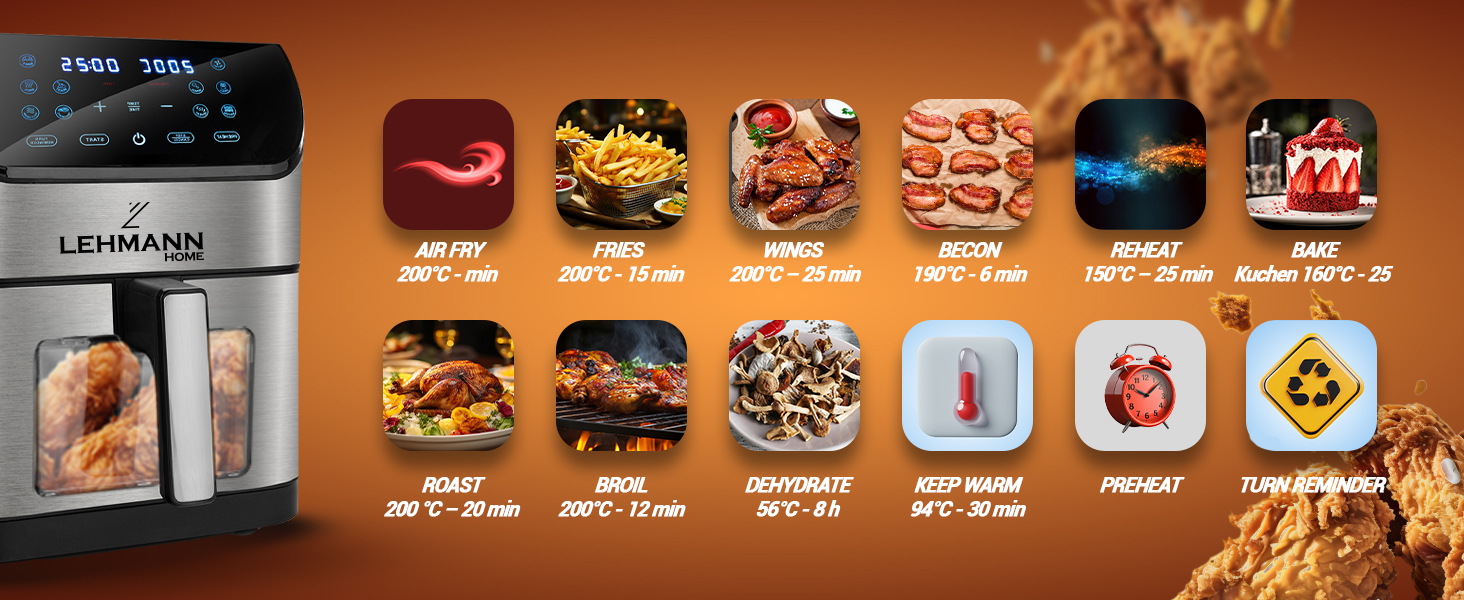
6-сүрөт: Visual representation of the 12 pre-set cooking functions, including Air Fry, Fries, Wings, Bacon, Reheat, Bake, Roast, Broil, Dehydrate, Keep Warm, Preheat, and Turn Reminder.
The appliance offers 12 versatile functions for various cooking needs:
- Air Fry: General air frying.
- Картоп: Кытырак фри үчүн оптималдаштырылган.
- Канаттар: Ideal for chicken wings.
- Бекон: For perfectly cooked bacon.
- Кайра жылытуу: Мурда бышырылган тамакты жылытуу үчүн.
- Бышыруу: For baking cakes, pastries, etc.
- Куурулган: Этти жана жашылчаларды кууруу үчүн.
- Бройл: For browning or crisping food.
- Суусуздандыруу: For drying fruits, vegetables, or jerky.
- Жылытуу: Бышкандан кийин тамактын температурасын сактайт.
- Алдын ала ысытуу: Heats the air fryer to the desired temperature before adding food.
- Бурулуш эстеткич: Prompts you to shake or turn food during cooking for even results.
Жалпы бышыруу кадамдары:
- Тамак даярдоо: Place your ingredients in the cooking basket. Do not overfill the basket to ensure proper air circulation.
- Себетти салуу: Бышыруу себети ордуна чыккыча кайра негизги блоктун ичине жылдырыңыз.
- Күйгүзүү: Сенсордук экрандагы кубат баскычын басыңыз.
- Select Program or Set Manually:
- Pre-set Program: Tap the icon for your desired cooking program. The appliance will automatically set the recommended temperature and time.
- Кол менен орнотуу: Use the temperature and time adjustment buttons (+/-) to set your desired cooking temperature (up to 200°C) and time.
- Даярдоону баштоо: Press the "Start" button. The appliance will begin the cooking process.
- Прогресс мониторинги: Ачык колдонуңуз viewing window and internal light to monitor cooking progress without opening the basket.
- Shake/Turn (if prompted): If the "Turn Reminder" function is active or recommended for your food, the appliance will beep. Carefully remove the basket, shake or turn the food, and reinsert the basket to resume cooking.
- Аяктоо: The appliance will beep when cooking is complete. Carefully pull out the basket using the handle.
- Кызмат кылуу: Transfer the cooked food to a plate. Be cautious of hot oil or food.
- Өчүрүү: Press the power button to turn off the appliance and unplug it from the wall outlet.
Тейлөө жана тазалоо
Үзгүлтүксүз тазалоо оптималдуу иштешин камсыздайт жана фритериңиздин иштөө мөөнөтүн узартат.
7-сүрөт: The non-stick cooking basket is dishwasher safe for convenient cleaning.
- Электр розеткасынан ажыратып, муздатуу: Тазалоодон мурун ар дайым аба куурткучту розеткадан сууруп, аны толугу менен муздатып туруңуз.
- Себетти тазалоо: The non-stick cooking basket is removable and dishwasher safe. For manual cleaning, wash with hot water, dish soap, and a non-abrasive sponge. For stubborn residue, soak the basket in hot water with dish soap for about 10 minutes.
- Интерьерди тазалоо: Жарнама менен шаймандын ичин сүртүңүзamp кездеме. Абразивдүү тазалагычтарды же тазалоочу жайларды колдонбоңуз.
- Тышкы тазалоо: Жарнак менен фриердин сыртын сүртүңүзamp кездеме.
- Жылытуу элементи: Жылытуу элементинен тамактын калдыктарын тазалоо үчүн тазалоочу щетканы колдонуңуз.
- Сактагыч: Шайманды салкын, кургак жерде сактоонун алдында бардык бөлүктөрү кургагандыгын текшериңиз.
Проблемаларды чечүү
| Көйгөй | Мүмкүн себеп | Чечим |
|---|---|---|
| Аба фритери иштебейт. | Шайман розеткага сайылган эмес. Электр розеткалары иштебей жатат. Себет туура эмес салынган. | Электр шнурын жерге туташтырылган розеткага сайыңыз. Check the power outlet by plugging in another appliance. Ensure the basket is fully pushed into the main unit until it clicks. |
| Тамак тегиз бышырылбайт. | Basket is overloaded. Food was not shaken/turned. | Тамак-ашты кичинекей порцияларда бышырыңыз. Бышыруу убактысынын жарымында тамакты чайкаңыз же оодарыңыз. |
| Шаймандан ак түтүн чыгып жатат. | Майлуу ингредиенттер бышырып жатат. Oil residue from previous use. | This is normal for greasy foods. Ensure proper ventilation. Clean the basket and interior thoroughly after each use. |
| Dark smoke coming from the appliance. | Тамак күйүп жатат. Жылытуу элементинин бузулушу. | Immediately unplug the appliance. Remove the basket and discard burnt food. If smoke persists after cleaning and with no food, contact customer support. |
| Тамак кытырак эмес. | Not enough oil used (for some foods). Temperature too low or cooking time too short. | Кытырак натыйжа үчүн тамак-ашты май менен чачыңыз же чачыңыз. Increase temperature or cooking time slightly. |
Техникалык шарттар
- Бренд: ЛЕНМАН
- Модель номери: LHODF-1880C
- Түсү: Кара
- Өлчөмдөрү (L x W x Y): 35.5 x 37.6 x 40.2 см (болжол менен 13.98 x 14.80 x 15.83 дюйм)
- Сыйымдуулугу: 8 литр
- Күч: 1800 Ватт
- Тtage: 230 вольт
- Материал: Пластик, металл
- Өзгөчөлүктөр: Automatic shut-off, Temperature control, Timer, Programmable, Digital LED Touch Screen, Viewing Window, Internal Light, Non-stick coating, Dishwasher safe basket.
- Элемент Салмагы: 6.1 килограмм (болжол менен 13.45 фунт)
Кепилдик жана колдоо
For warranty information and customer support, please refer to the warranty card included with your product or visit the official LEHMANN website. Please have your model number (LHODF-1880C) and purchase details ready when contacting support.
While specific warranty details are not provided here, LEHMANN is committed to providing high-quality home appliances and customer satisfaction.


