1. Маанилүү коопсуздук нускамалары
Сураныч, бул шайманды колдонуудан мурун бардык нускамаларды кылдаттык менен окуп чыгыңыз жана аларды келечекте маалымат үчүн сактап коюңуз. Бул нускамаларды аткарбоо электр шокуна, өрткө же олуттуу жаракатка алып келиши мүмкүн.
- VoltagРейтинг этикеткасында көрсөтүлгөн e сиздин электр кубатыңызга туура келетtage.
- Желдеткичти, сайгычты же шнурду сууга же башка суюктуктарга салбаңыз.
- Always unplug the fan from the power outlet before cleaning, assembling, or disassembling parts.
- Keep the fan out of reach of children and supervise children when the fan is in use.
- Do not operate the fan with a damaged cord or plug, or after the fan malfunctions or has been dropped or damaged in any manner.
- Avoid placing the fan near curtains or other objects that could be drawn into the fan.
- Вентилятор иштеп жатканда, торчого манжаларыңызды же башка буюмдарды киргизбеңиз.
- Use the fan only for its intended household purpose as described in this manual.
2. Продукт бүтүп калдыview
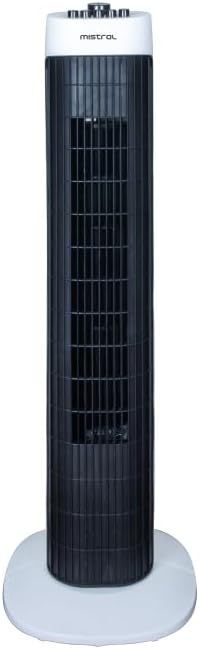
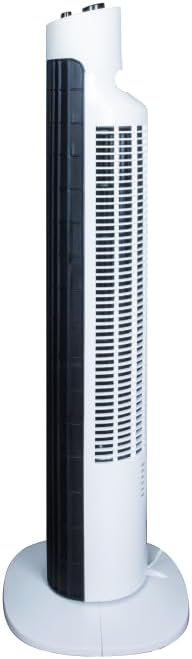
The Mistral MFD310 Tower Fan is designed to provide efficient cooling with convenient features for your home or office. Key features include multiple speed settings, a timer, and an oscillation function.
Продукт өзгөчөлүктөрү:
- 3 Speeds Setting: Choose between High, Medium, and Low for customized airflow.
- 2 сааттык таймер: Желдеткичти көрсөтүлгөн убакыттан кийин автоматтык түрдө өчүп калгыдай кылып коюңуз.
- Термелүү Функциясы: Distributes air across a wider area for improved circulation.
- Integral Carry Handle: Жөнөкөй көчүрүү үчүн.
- Алынуучу база: Simplifies assembly and storage.
Продукт Views:
3. Чогултуу жана орнотуу
The Mistral MFD310 Tower Fan requires minimal assembly, primarily involving the attachment of its detachable base.
Чогултуу кадамдары:
- Бардык компоненттерди таңгактан кылдаттык менен алып салыңыз.
- Place the fan body upright.
- Align the detachable base with the bottom of the fan body. Ensure the notches or guides on the base match those on the fan.
- Secure the base to the fan body. This typically involves twisting the base or using screws provided (check packaging for specific fasteners).
- Ensure the base is firmly attached and the fan is stable before proceeding.
Жайгашкан жери:
Place the assembled fan on a firm, level surface. Ensure there is adequate space around the fan for proper air circulation and oscillation.
Кубат туташуу:
Plug the power cord into a standard electrical outlet. Ensure the outlet matches the voltage requirements of the fan.
4. Иштөө нускамалары
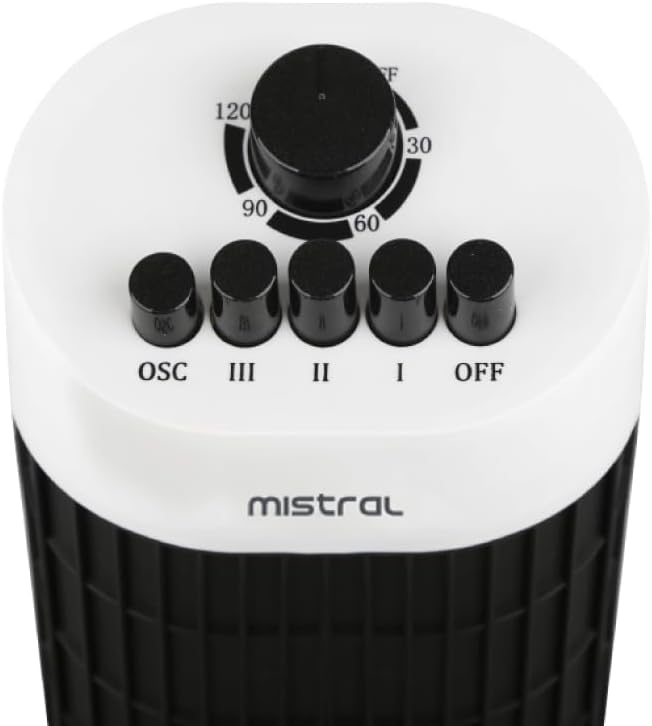
The control panel is located on the top of the fan (refer to Figure 3 for visual reference).
Power and Speed Settings:
- Вентиляторду айландыруу үчүн ON, press one of the speed buttons: Мен (төмөн), II (Орто), же III (Жогорку).
- To adjust the fan speed, press the desired speed button.
- Вентиляторду айландыруу үчүн ӨЧҮРҮҮ, басыңыз ӨЧҮРҮҮ баскычы.
Термелүү Функциясы:
- To activate the oscillation function, press the OSC button. The fan head will begin to rotate from side to side.
- To stop oscillation, press the OSC button again. The fan will stop oscillating and remain in its current direction.
Таймер функциясы:
- The fan features a 2-hour timer. To set the timer, rotate the timer dial clockwise to the desired duration (30, 60, 90, or 120 minutes).
- The fan will operate for the set duration and then automatically turn off.
- To cancel the timer, rotate the dial back to the 'OFF' position.
5. Техникалык тейлөө жана тазалоо
Regular cleaning and maintenance will help ensure the longevity and optimal performance of your tower fan.
Тазалоо көрсөтмөлөрү:
- Тазалоодон мурун ар дайым желдеткичти розеткадан сууруп алыңыз.
- жумшак колдонуу, damp желдеткичтин сырткы беттерин сүртүү үчүн чүпүрөк колдонуңуз. Абразивдүү тазалоочу каражаттарды, момдорду же жылтыраткычтарды колдонбоңуз, анткени алар капталга зыян келтириши мүмкүн.
- For dust accumulation on the air intake or output grilles, use a vacuum cleaner with a brush attachment or a soft brush to gently remove dust.
- Вентилятордун ички бөлүктөрүнө суу же суюктуктар кирбегенин текшериңиз.
- Вентиляторду кайра сайып, иштетүүдөн мурун, анын толугу менен кургашына мүмкүнчүлүк бериңиз.
Сактагыч:
Вентилятор көпкө чейин колдонулбаган учурда, аны чаңдан жана бузулуудан коргоо үчүн салкын, кургак жерде, мүмкүн болсо, баштапкы таңгагында сактаңыз.
6. Кыйынчылыктарды
If you encounter issues with your Mistral MFD310 Tower Fan, refer to the following troubleshooting guide:
| Көйгөй | Мүмкүн себеп | Чечим |
|---|---|---|
| Желдеткич күйбөйт. | Электр энергиясы жок. Fan not plugged in correctly. Timer is active and has expired. | Электр розеткасынын иштеп жатканын текшериңиз. Электр сайгычы розеткага толук сайылганын текшериңиз. Таймер жөндөөлөрүн текшерип, керек болсо баштапкы абалга келтириңиз. |
| Алсыз же аба агымы жок. | Air intake/output grilles are blocked. Желдетүүчү ылдамдык өтө төмөн коюлган. | Торчолордогу чаңды же тоскоолдуктарды тазалаңыз. Желдетүүчү ылдамдык жөндөөсүн жогорулатыңыз. |
| Желдетүүчү адаттан тыш үн чыгарат. | Вентилятор тегиз жерде эмес. Obstruction inside the fan. | Желдеткичти тегиз, туруктуу бетке коюңуз. Unplug the fan and carefully check for any foreign objects. Do not attempt to disassemble the fan. |
| Термелүү иштебейт. | Термелүү функциясы иштетилген жок. | Press the 'OSC' button to activate oscillation. |
Бул чечимдерди колдонуу аракетинен кийин көйгөй чечилбесе, кардарларды колдоо кызматына кайрылыңыз.
7. Техникалык шарттар
| Бренд | MISTRAL |
| Модел | MFD310 |
| Элемент Салмагы | 2.9 килограмм |
| Продукциянын өлчөмдөрү | 24.6D x 24.5W x 78.3H сантиметр |
| Power Source | Электр зымдары |
| Өзгөчөлүктөр | Timer, Oscillation |
| Бөлмө түрү | Bedroom, Dorm Room, Living Room |
| Монтаж түрү | Floor Mount |
| Камтылган компоненттер | Корд |
| Ассамблея талап кылынат | Ооба |
| Даана саны | 1 |
| Батареялар талап кылынат | Жок |
8. Кепилдик жана колдоо
For warranty information, please refer to the documentation included with your purchase or visit the official MISTRAL webсайт. Кепилдик дооматтар үчүн сатып алганыңыздын далилин сактаңыз.
If you require further assistance or have questions not covered in this manual, please contact MISTRAL customer support through their official channels.


