Introduction
This manual provides essential information for the proper installation, operation, and maintenance of your Trak Racer Universal Steering Wheel Deck (Model TRX-NWM6). This product is designed to integrate with the Alpine Racing TRX cockpit, offering a stable mounting solution for various direct drive and belt drive sim racing wheelbases. Please read this manual thoroughly before proceeding with installation to ensure correct setup and optimal performance.
Коопсуздук маалыматы
- Ensure all components are securely fastened before use. Loose parts can cause instability and potential damage.
- Do not overtighten screws, as this may strip threads or damage components.
- Майда тетиктерди жана шаймандарды балдар жетпеген жерде сактаңыз.
- If any part is damaged or missing, contact Trak Racer support immediately. Do not attempt to modify the product.
- Ар дайым чогултуу үчүн ылайыктуу шаймандарды колдонуңуз.
Пакеттин мазмуну
Төмөндө тизмеленген нерселердин баары пакетиңизде бар экенин текшериңиз:
- Universal Steering Wheel Deck (TRX-NWM6)
- Орнотуу кронштейндери (2x)
- Hardware Kit (various bolts, nuts, washers for assembly and wheelbase mounting)
- Көрсөтмө (бул документ)
Орнотуу жана орнотуу
Follow these steps to correctly install the Universal Steering Wheel Deck onto your Alpine Racing TRX cockpit.
Step 1: Prepare the Cockpit
Ensure your Alpine Racing TRX cockpit is assembled and stable. Identify the mounting points for the steering wheel deck.
2-кадам: Монтаждоо кронштейндерин бекитиңиз
- Position the two mounting brackets onto the side profiles of your Alpine Racing TRX cockpit.
- Secure the brackets using the provided bolts and nuts. Do not fully tighten at this stage, allow for minor adjustments.

Сүрөт 1: Side view of the Trak Racer Universal Steering Wheel Deck, illustrating the attachment points for the mounting brackets. The brackets connect the main deck plate to the cockpit's frame.
Step 3: Mount the Steering Wheel Deck
- Place the Universal Steering Wheel Deck onto the attached mounting brackets.
- Align the pre-drilled holes on the deck with the corresponding holes on the brackets.
- Insert the remaining bolts and nuts to secure the deck to the brackets.
- Once aligned, tighten all bolts securely, ensuring the deck is firm and level.
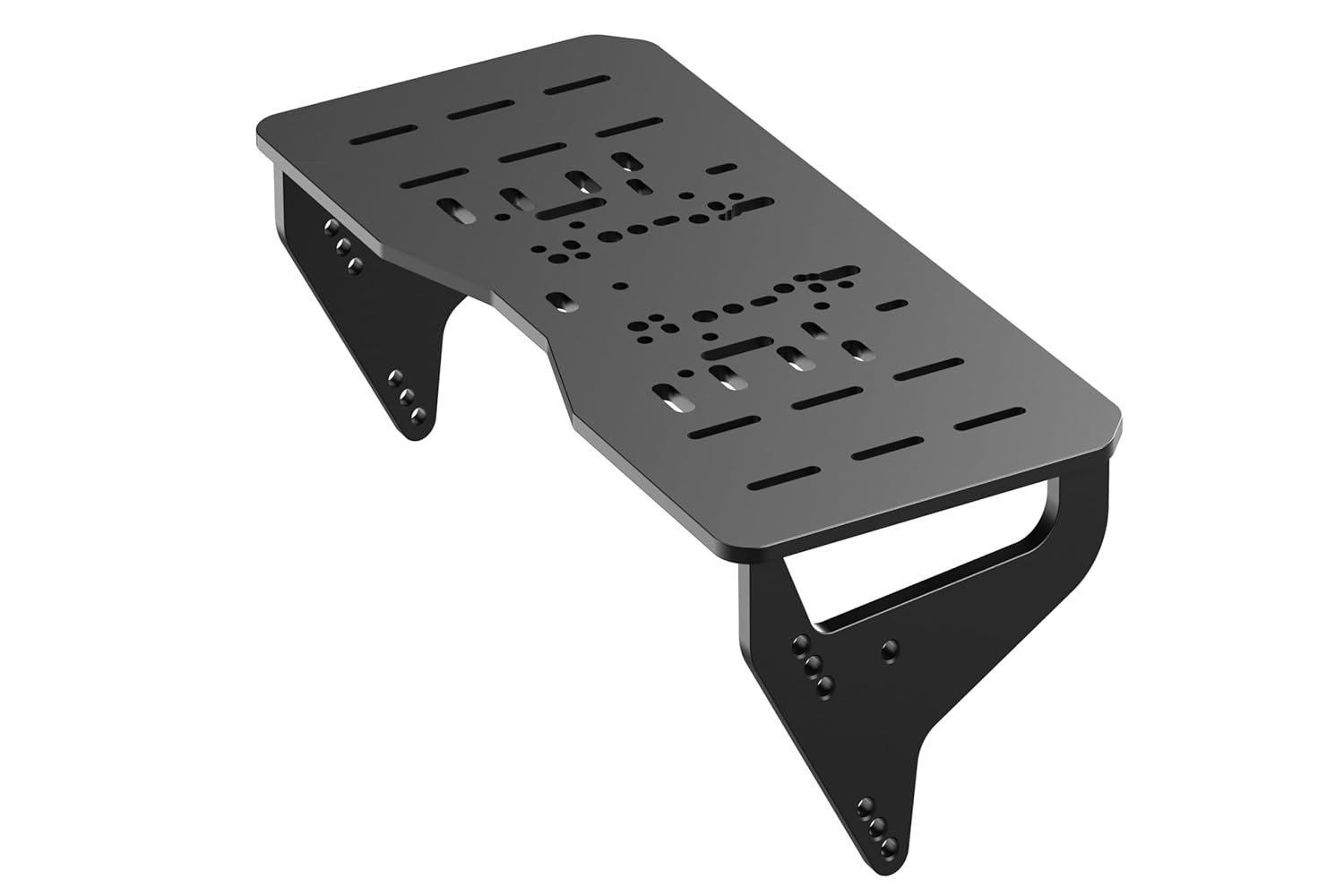
Сүрөт 2: Top-down perspective of the Trak Racer Universal Steering Wheel Deck, showcasing the various pre-drilled mounting patterns for different wheelbase types. This view highlights the deck's robust construction and compatibility features.
Step 4: Install Your Wheelbase
The deck features pre-drilled holes compatible with a wide range of wheelbases, including Fanatec, Moza, Simagic, Logitech, Thrustmaster, and Asetek.
- Refer to your wheelbase's instruction manual for specific mounting requirements.
- Align your wheelbase with the appropriate mounting pattern on the Universal Steering Wheel Deck.
- Secure the wheelbase using the hardware provided with your wheelbase or the general hardware kit included with the deck, if applicable.
- Adjust the height and position of the steering wheel deck as needed by loosening the bracket bolts, repositioning, and then re-tightening.

Сүрөт 3: Бурчтуу view of the Trak Racer Universal Steering Wheel Deck, emphasizing its sturdy carbon steel construction and the multiple mounting points for various sim racing wheelbases. This perspective shows the overall form factor of the deck.

Сүрөт 4: Detailed technical drawing of the Trak Racer Universal Steering Wheel Deck, providing precise dimensions in millimeters and inches, along with various pre-drilled mounting hole patterns. This diagram is crucial for compatibility verification and custom setups.
Иштөө нускамалары
The Trak Racer Universal Steering Wheel Deck is a static mounting component. Its primary function is to provide a stable platform for your sim racing wheelbase. Once installed and your wheelbase is mounted, ensure all connections to your wheelbase (power, USB, etc.) are made according to your wheelbase manufacturer's instructions.
Түзөтүүлөр: The deck allows for height and depth adjustments. To adjust, loosen the bolts securing the deck to the mounting brackets, reposition the deck to your desired ergonomic setting, and then re-tighten all bolts firmly. Ensure adjustments are made evenly on both sides to maintain stability.
Техникалык тейлөө
- Тазалоо: Wipe the carbon steel surface with a soft, damp кездеме. Порошок менен капталган каптамага зыян келтириши мүмкүн болгон абразивдүү тазалоочу каражаттардан же эриткичтерден алыс болуңуз.
- Текшерүү: Periodically check all bolts and connections to ensure they remain tight. Vibration from sim racing can sometimes loosen fasteners over time.
- Сактагыч: If disassembling for storage, keep all hardware organized to prevent loss. Store in a dry environment.
Проблемаларды чечүү
| Көйгөй | Мүмкүн себеп | Чечим |
|---|---|---|
| Steering wheel deck feels unstable or has flex. | Loose mounting bolts; incorrect installation. | Ensure all bolts securing the deck to the brackets and the brackets to the cockpit are fully tightened. Review орнотуу кадамдары. |
| Wheelbase does not align with pre-drilled holes. | Incorrect wheelbase model; misalignment during installation. | Verify your wheelbase model is listed as compatible. Re-align the wheelbase carefully. The deck supports a wide range of common wheelbases. |
| Difficulty adjusting height/position. | Bolts are too tight; obstruction. | Loosen the relevant bolts sufficiently to allow movement, make adjustments, then re-tighten. Check for any cables or other components obstructing movement. |
Техникалык шарттар
| Өзгөчөлүк | Деталь |
|---|---|
| Модель номери | TRX-NWM6 |
| Материал | Carbon Steel, Powder Coated |
| Шайкештик | Alpine Racing TRX Cockpit; Wheelbases: Fanatec, Moza, Simagic, Logitech, Thrustmaster, Asetek, and more. |
| Өлчөмдөр (Продукт) | 18.03 x 8.9 x 6.77 дюйм (45.8 x 22.6 x 17.2 см) |
| Салмагы | 2.2 фунт (1 кг) |
| Дизайн | Zero Flex Design |
Кепилдик жана колдоо
Trak Racer products are designed for durability and performance. For specific warranty details, please refer to the warranty information provided with your purchase or visit the official Trak Racer website. For technical support, assistance with parts, or any inquiries, please contact Trak Racer customer service through their official channels.
Онлайн ресурстар: Visit the Trak Racer Store on Amazon


