1. Киришүү
The Pronomic DX-50 USB MKII is a professional 4-channel DJ mixer designed for a wide range of applications, including discos, parties, restaurants, and presentations. Its user-friendly design ensures that both experienced and less experienced users can fully utilize its features. This manual provides detailed instructions for setting up, operating, and maintaining your mixer.
Key features include a recording function, integrated Bluetooth interface, USB player with transport controls, and multiple input channels.
2. Маанилүү коопсуздук нускамалары
- Көрсөтмөлөрдү окуу: Продукцияны колдонуудан мурун бардык коопсуздук жана колдонуу боюнча көрсөтмөлөрдү окуп чыгыңыз.
- Көрсөтмөлөрдү сактоо: Келечекте маалымат алуу үчүн коопсуздук жана иштетүү нускамаларын сактаңыз.
- Эскертүүлөргө кулак сал: Буюмдагы жана колдонуу нускамасындагы бардык эскертүүлөрдү сактаңыз.
- Инструкцияларды аткарыңыз: Бардык иштетүү жана колдонуу нускамаларын аткарыңыз.
- Суу жана ным: Do not use this apparatus near water (e.g., bathtub, washbowl, kitchen sink, laundry tub, wet basement, or swimming pool).
- Вентиляция: Эч кандай желдетүүчү тешиктерди жаап албаңыз. Өндүрүүчүнүн көрсөтмөлөрүнө ылайык орнотуу.
- Жылуулук: Радиаторлор, жылуулук регистрлери, мештер же башка аппараттар (анын ичинде) сыяктуу жылуулук булактарынын жанына орнотпоңуз ampкөтөргүчтөр) жылуулукту пайда кылуучу.
- Кубат булактары: Use only power sources specified by the manufacturer.
- Электр кабелин коргоо: Электр шнурунун басылып кетүүсүнөн же кысып калуудан сактаңыз, өзгөчө сайгычтарда, розеткаларда жана алар аппараттан чыга турган жеринде.
- Тазалоо: Кургак чүпүрөк менен гана тазалаңыз.
- Тейлөө: Бул өнүмдү өзүңүз тейлөөгө аракет кылбаңыз, анткени капкактарды ачуу же алып салуу сизди кооптуу көлөмгө дуушар кылышы мүмкүнtage же башка коркунучтар. Бардык тейлөөлөрдү квалификациялуу тейлөө кызматкерлерине тапшырыңыз.
3. Пакеттин мазмуну
Please check that all items listed below are included in your package. If any items are missing or damaged, contact your dealer immediately.
- Pronomic DX-50 USB MKII DJ Mixer
- Power Adapter (AC 12V)
- USB Stick (32 GB, if included in your specific bundle)
- Колдонуучунун Колдонмосу (бул документ)
4. Продукт бүтүп калдыview
Familiarize yourself with the various controls and connections on your DX-50 USB MKII mixer.
4.1 Алдыңкы панелдин башкаруу элементтери
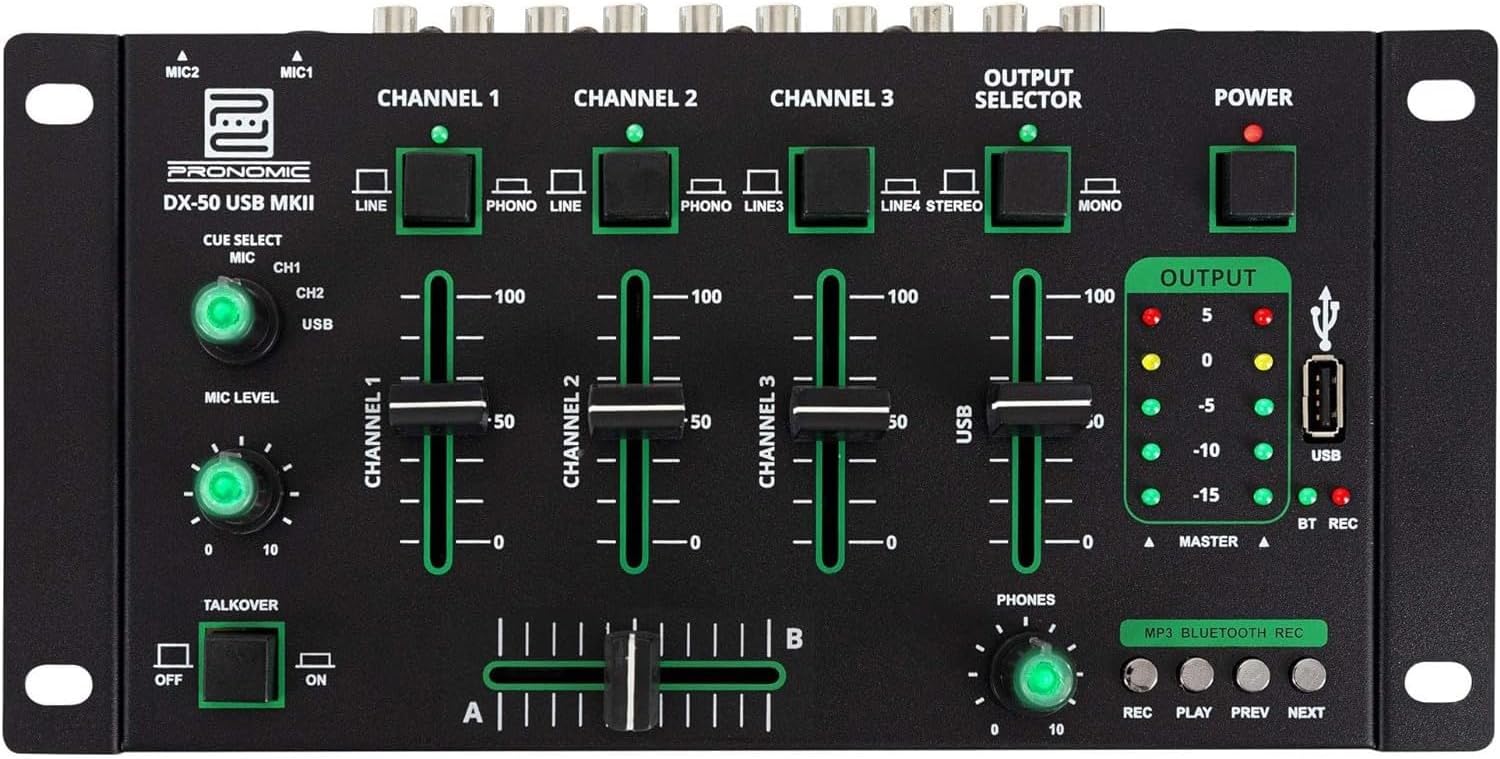
- MIC 1/2 Inputs: Микрофондорду туташтырыңыз.
- Channel 1-4 Input Selectors: Switch between LINE, PHONO, or USB/Bluetooth inputs for each channel.
- Канал Faders: Adjust the volume level for each channel.
- CUE Select Buttons: Route specific channels to the headphone output for monitoring.
- MIC деңгээлинин баскычы: Adjust the volume of the microphone inputs.
- Talkover Switch: Activates the talkover function, which automatically lowers music volume when speaking into the microphone.
- Output Selector: Choose between Stereo or Mono master output.
- Кубат которгучу: Миксерди күйгүзөт/өчүрөт.
- Чыгуу деңгээлин өлчөгүчтөр: LED indicators showing the master output level.
- USB порт: Connect a USB drive for MP3 playback and recording.
- MP3/Bluetooth/REC Player Controls: Buttons for Play/Pause, Previous, Next, and Record functions for the integrated player.
- Phones Level Knob: Кулакчындын чыгышынын үнүн тууралайт.
- Crossfader (A/B): Blends between channels assigned to A and B.
4.2 Арткы панелдин туташуулары

- AC 12V кубат киргизүү: Берилген кубат адаптерин бул жерге туташтырыңыз.
- PHONES Чыгуу: Наушниктерди туташтыруу үчүн 6.3 мм уяча.
- MASTER OUT L/R (RCA): Connect to your main ampкөтөргүч же кубаттуу динамиктер.
- Channel 1 & 2 Inputs (RCA Line/Phono): Connect turntables (Phono) or other line-level devices (CD players, media players). Use the front panel selector to switch.
- Channel 3 & 4 Inputs (RCA Line): Connect line-level devices.
- MIC 1 & 2 Inputs (6.3mm Jack): Микрофондорду туташтырыңыз.
5. Орнотуу
Follow these steps to set up your Pronomic DX-50 USB MKII mixer:
- Кубат туташуу: Ensure the mixer's power switch is in the OFF position. Connect the supplied AC 12V power adapter to the "AC 12V" input on the rear panel of the mixer. Plug the adapter into a suitable power outlet.
- Master Output Connection: Connect the "MASTER OUT L/R" RCA outputs on the rear panel to the inputs of your ampкөтөргүч же кубаттуу динамиктер.
- Киргизүү түзмөгүнүн туташуусу:
- Айланма табактар: Connect turntables to the "CHANNEL 1" or "CHANNEL 2" RCA inputs. Set the corresponding input selector on the front panel to "PHONO".
- CD Players/Line Devices: Connect CD players, media players, or other line-level devices to "CHANNEL 1", "CHANNEL 2", "CHANNEL 3", or "CHANNEL 4" RCA inputs. Set the corresponding input selector on the front panel to "LINE".
- Микрофондор: Connect microphones to the "MIC 1" or "MIC 2" 6.3mm jack inputs on the rear panel.
- Гарнитура туташуу: Connect your headphones to the "PHONES" 6.3mm jack on the rear panel.
- USB Drive (Optional): If using a USB drive for playback or recording, insert it into the "USB" port on the front panel.
- Күйгүзүү: Once all connections are made, switch the mixer's power switch to the ON position. The power indicator LED will illuminate.
6. Иштөө нускамалары
6.1 Негизги аралаштыруу
- Киргизүүнү тандоо: For each channel, use the input selector switch (LINE/PHONO/USB/BT) to choose the desired audio source.
- Каналдын үнүн тууралоо: Use the vertical faders for each channel to adjust its individual volume level.
- Башкы жыйынтык: Monitor the "OUTPUT" LED meters and adjust the master volume knob (if present, otherwise rely on channel faders and amplifier volume) to achieve a suitable overall output level without clipping.
- Кроссфейдер: Use the crossfader to smoothly transition between channels assigned to A and B. Channels 1 and 2 are typically assigned to the crossfader.
6.2 Микрофонду колдонуу
- Connect your microphone to one of the MIC inputs on the rear panel.
- Adjust the "MIC LEVEL" knob on the front panel to control the microphone's volume.
- Talkover Function: Activate the "TALKOVER" switch to automatically reduce the volume of the music when you speak into the microphone. This is useful for announcements.
6.3 USB ойнотуу жана жаздыруу
- USB ойнотуу: MP3 камтыган USB дискти салыңыз files into the "USB" port. Select "USB" as the input source for the dedicated USB channel. Use the "PLAY/PAUSE", "PREV", and "NEXT" buttons to control playback.
- USB жаздыруу: Press the "REC" button to start recording the master output to the connected USB drive. Press "REC" again to stop recording. Ensure your USB drive has sufficient free space and is formatted correctly (FAT32 is commonly supported).
6.4 Bluetooth байланышы
- Bluetooth иштетүү: Select "BT" as the input source for the dedicated Bluetooth channel. The mixer will enter pairing mode.
- Түзмөктү жупташтыруу: On your Bluetooth-enabled device (smartphone, tablet, etc.), search for available Bluetooth devices. Select "Pronomic DX-50 USB MKII" (or similar name) from the list to pair.
- Аудио ойнотуу: Once paired, you can play audio from your device through the mixer. Control playback from your device or using the mixer's transport controls (if supported by your device).
6.5 Кулакчындар менен мониторинг жүргүзүү
- Connect headphones to the "PHONES" output.
- Use the "CUE SELECT" buttons to choose which channels you want to monitor in your headphones without affecting the main output.
- Adjust the "PHONES" level knob to set your desired headphone volume.
7. Техникалык тейлөө
- Тазалоо: Disconnect the power before cleaning. Use a soft, dry cloth to wipe the surface of the mixer. Do not use liquid cleaners, aerosols, or solvents.
- Сактагыч: Миксерди күн нурунан жана экстремалдык температурадан алыс салкын, кургак жерде сактаңыз.
- Фейдер жана Кнобго кам көрүү: Avoid excessive force when operating faders and knobs. Periodically check for dust or debris accumulation around moving parts.
- Кабелдик башкаруу: Ensure cables are not kinked or strained, which can lead to damage.
8. Кыйынчылыктарды
| Көйгөй | Мүмкүн себеп | Чечим |
|---|---|---|
| Күч жок | Power adapter not connected; Power switch off; Faulty power outlet. | Check power adapter connection; Ensure power switch is ON; Try a different power outlet. |
| Негизги чыгаруудан үн чыкпайт | Master volume too low; Amplifier/speakers off or disconnected; Incorrect input selection; Channel faders down. | Increase master volume; Check amplifier/speaker connections and power; Verify correct input selected for channels; Raise channel faders. |
| Наушниктен үн жок | Headphone volume too low; Headphones not connected; No CUE selected. | Increase PHONES level; Connect headphones properly; Press CUE button for desired channel. |
| Bluetooth жупташкан жок | Миксер жупташтыруу режиминде эмес; Түзмөк өтө алыс; Интервенция. | Ensure BT input is selected; Bring device closer; Restart mixer and device. |
| USB ойнотуу иштебей жатат | USB drive not inserted correctly; Incorrect file форматтоо; USB диск туура эмес форматталган. | Re-insert USB drive; Ensure files are MP3; Format USB drive to FAT32. |
9. Техникалык шарттар
| Модел | Pronomic DX-50 USB MKII |
| Каналдардын саны | 4 |
| Байланыш технологиясы | Bluetooth, USB |
| Аудио киргизүү | RCA (line/phono), 6.3mm microphone, Bluetooth, USB |
| Output Connector Type | RCA (Master Out), 6.3mm (Phones) |
| Power Source | Electric Cable (AC 12V adapter) |
| Dimensions (without corner brackets and controls) | 222 x 129 x 28 мм (туурасы x тереңдик x бийиктик) |
| Total Dimensions (with corner brackets and controls) | 267 x 136 x 51 мм (туурасы x тереңдик x бийиктик) |
| Салмагы | 790 г |
10. Кепилдик жана колдоо
Кепилдик жөнүндө маалымат жана техникалык колдоо алуу үчүн, сатып алууңуз менен кошо берилген документтерди караңыз же сатуучуга кайрылыңыз. Кепилдик боюнча дооматтар үчүн сатып алууну тастыктаган документти сактап коюңуз.
For further assistance, you may also visit the official Pronomic webсайтка же кардарларды тейлөө бөлүмүнө кайрылыңыз.


