1. Киришүү
The STRONG Leap-S3+ Google TV Box is a powerful media streaming adapter designed to enhance your entertainment experience. It provides easy access to applications, games, and streaming services via Google Play, transforming your television into a comprehensive entertainment hub. This device supports advanced audio and video technologies, ensuring a high-quality viewугуу жана угуу тажрыйбасы.
2. Пакеттин мазмуну
Пакетте бардык буюмдар бар экенин текшериңиз:
- STRONG Leap-S3+ Android TV Box
- Алыстан башкаруу (2 AA батарейкасы менен)
- Кубат адаптери (DC 12V/1A)
- HDMI кабели
- Колдонуучунун Колдонмосу (бул документ)

Image: The retail packaging of the STRONG Leap-S3+ Android TV Box, showing the device, remote control, and branding.
3. Орнотуу колдонмосу
- Сыналгыга туташуу: Connect one end of the HDMI cable to the HDMI port on the STRONG Leap-S3+ box and the other end to an available HDMI input on your television.
- Туташуу кубаты: Plug the power adapter into the DC 12V/1A port on the box and then into a power outlet.
- Тармакка туташуу (милдеттүү эмес): For a wired connection, connect an Ethernet cable from your router to the LAN port on the box. For Wi-Fi, you will configure this during the initial setup on screen.
- Батареяларды салыңыз: Open the battery compartment of the remote control and insert the two AA batteries, ensuring correct polarity.
- Күйгүзүү: Turn on your television and select the correct HDMI input source using your TV remote. The STRONG Leap-S3+ box should power on automatically.
- Баштапкы орнотуу: Follow the on-screen instructions to complete the initial setup, including language selection, Wi-Fi connection (if not using Ethernet), and Google account login. Manual setup is recommended if automatic setup via Google Home encounters issues.

Image: Rear panel of the device illustrating the various connection ports including S/PDIF, HDMI, LAN, DC power input, and USB.
4. Иштөө нускамалары
4.1. Алыстан башкаруу функциялары
The included remote control allows navigation through the Google TV interface. Key functions include:
- Навигация аянтчасы: Менюлар аркылуу жылдыруу жана элементтерди тандоо үчүн багыттоочу баскычтарды колдонуңуз.
- OK баскычы: Тандоолорду ырастайт.
- Артка баскычы: Мурунку экранга кайтат.
- Үй баскычы: Google TV башкы экранына кайтып келет.
- Google Жардамчы баскычы: Activates voice control for searching content or controlling the device.
- Үн баскычтары: Аудионун үнүн тууралайт.
- Колдонмонун атайын баскычтары: Netflix, YouTube, Disney+ жана Prime Video сыяктуу популярдуу агымдык кызматтарга тез жетүү.

Image: The remote control demonstrating the Google Assistant voice command feature, with a TV screen displaying search results.
4.2. Accessing Streaming Services and Apps
Once connected to the internet and logged into your Google account, you can access a wide range of content:
- Google Play дүкөнү: Download and install additional applications and games.
- Алдын ала орнотулган колдонмолор: Utilize dedicated buttons or navigate to pre-installed apps like Netflix, YouTube, Disney+, and Prime Video.
- Chromecast камтылган: Cast content directly from your mobile phone or other compatible devices to your TV screen.

Image: A smartphone screen mirroring content to a large television, demonstrating the Chromecast built-in feature.

Image: A television screen showing the Google TV interface with icons for various streaming applications, alongside the STRONG Leap-S3+ box and remote.
5. Негизги өзгөчөлүктөрү
- 4K UHD токтому: Supports Ultra High Definition (UHD) 2160p resolution for crisp and detailed visuals.
- Dolby Vision: Provides enhanced HDR (High Dynamic Range) for superior brightness, contrast, and color accuracy.
- Dolby Atmos: Delivers immersive, multi-dimensional audio that moves around you, creating a realistic sound experience.
- Chromecast камтылган: Seamlessly cast movies, shows, photos, and more from your mobile device to your TV.
- Google Жардамчысы: Use voice commands via the remote control to search for content, control playback, and manage smart home devices.
- Кеңири байланыш: Includes S/PDIF, HDMI, USB 2.0, LAN/Internet, Wi-Fi, and Bluetooth for versatile device connections and data transfer.

Image: Visual representation of 4K UHD 2160p resolution, highlighting fine detail.

Image: The Dolby Vision logo, indicating enhanced visual quality.

Image: The Dolby Atmos logo, representing immersive audio technology.
6. Техникалык тейлөө
- Тазалоо: Түзмөктү тазалоо үчүн жумшак, кургак чүпүрөктү колдонуңуз. Суюк тазалоочу каражаттарды же абразивдүү материалдарды колдонбоңуз.
- Вентиляция: Ашыкча ысып кетпеши үчүн, түзмөк жакшы желдетилген жерге коюлганын текшериңиз. Желдетүүчү тешиктерди жаппаңыз.
- Программалык камсыздоо жаңыртуулары: Түзмөк автоматтык түрдө программалык камсыздоо жаңыртууларын алышы мүмкүн. Бул жаңыртууларды алуу үчүн анын интернетке туташканын текшериңиз, анткени алар иштин натыйжалуулугун жакшыртып, жаңы функцияларды кошо алат.
- Сактагыч: Узак мөөнөткө колдонулбаганда, кубат адаптерин ажыратып, аппаратты салкын, кургак жерде сактаңыз.
7. Кыйынчылыктарды
| Көйгөй | Мүмкүн себеп | Чечим |
|---|---|---|
| Кубат жок/Түзмөк күйбөй жатат | Кубат адаптери туташкан эмес же туура эмес. | Ensure the power adapter is securely connected to the device and a working power outlet. Check if the outlet is functional. |
| Телевизордо сүрөт жок | Incorrect HDMI input selected on TV; HDMI cable loose or faulty. | Verify your TV is set to the correct HDMI input. Check HDMI cable connections at both ends. Try a different HDMI port or cable. |
| Үн жок | TV volume muted or too low; audio settings incorrect. | Increase TV volume. Check audio output settings on the STRONG Leap-S3+ box. Ensure Dolby Atmos is correctly configured if used. |
| Пульт иштебей жатат | Batteries depleted or incorrectly inserted; remote not paired. | Replace batteries, ensuring correct polarity. Re-pair the remote control with the device if necessary (refer to on-screen instructions during initial setup or device settings). |
| Жай аткаруу же тоңуу | Poor internet connection; too many apps running in background; insufficient storage. | Check your internet connection speed. Close unused applications. Clear cache or uninstall unnecessary apps to free up storage. Restart the device. |
| Automatic setup via Google Home fails | Connectivity issues or software glitch. | Proceed with manual setup directly on the TV screen using the remote control. This often resolves such issues. |
8. Техникалык шарттар
| Өзгөчөлүк | Деталь |
|---|---|
| Бренд | Күчтүү |
| Модель аты | LEAP-S3 plus |
| Түс | Ак |
| Продукт түрү | Box form factor |
| Байланыш технологиясы | Bluetooth, Ethernet, HDMI, USB, Wi-Fi |
| Туташтыргыч түрү | HDMI |
| Өзгөчөлүктөр | 4K UHD, Chromecast, Browser |
| Резолюция | 4K (2160p) |
| Колдоого алынган Интернет кызматтары | Apple TV, Disney, Free Sat/Free View, Freesat/Freeview, Google TV, Magenta TV, Browser, Netflix, Prime Video, RTL, Wow, YouTube |
| Controller Type | Алыстан башкаруу |
| Шайкеш түзмөктөр | Smartphone, Television, Screen |
| Электр камсыздоо | DC 12V/1A |
| Өлчөмдөрү (болжол менен) | 9.6 cm x 9.6 cm x 2.3 cm (from image) |
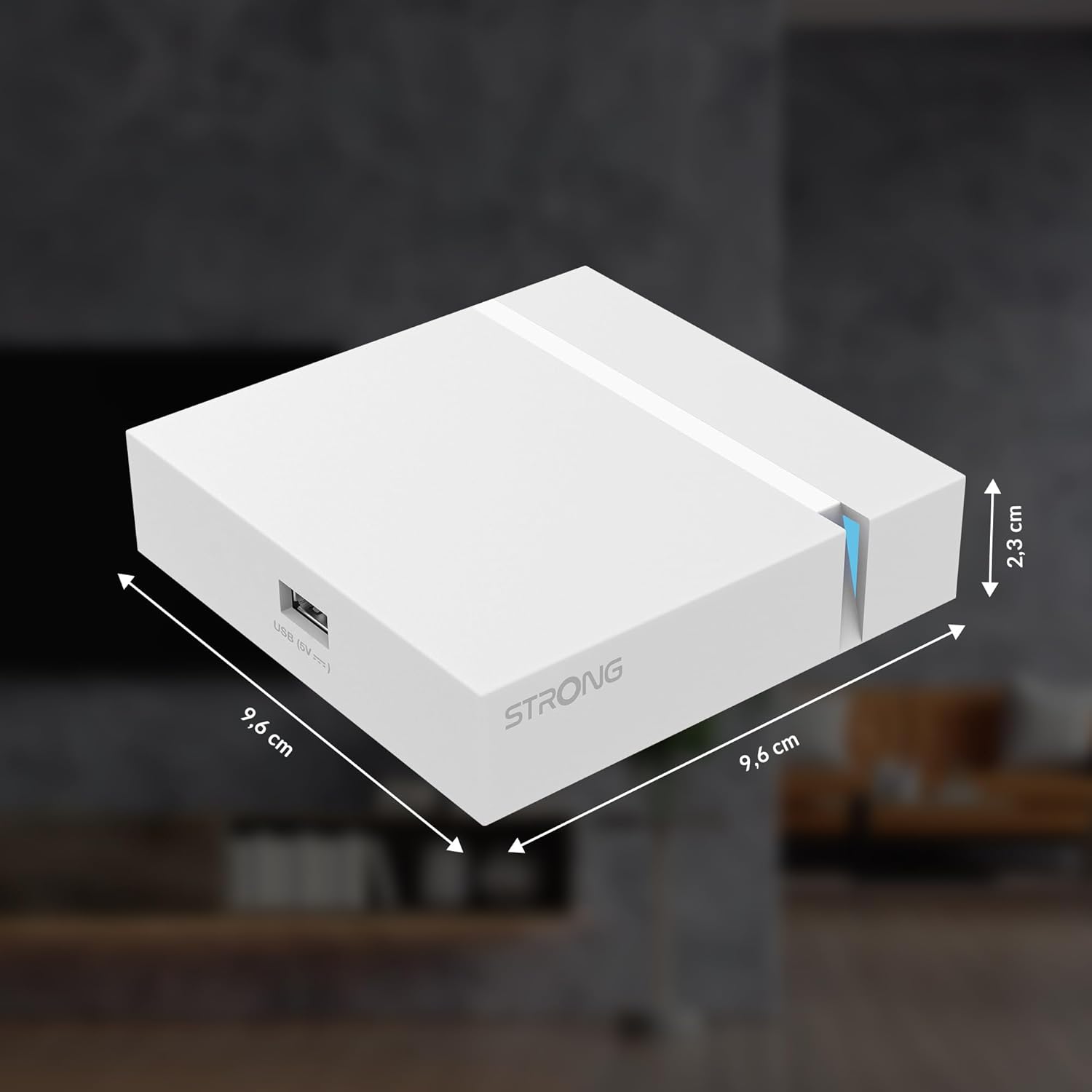
Image: The physical dimensions of the STRONG Leap-S3+ Android TV Box.
9. Кепилдик жана колдоо
For warranty information and technical support, please refer to the documentation provided with your purchase or visit the official Strong website. Information regarding spare parts availability and software update guarantees is not available in this manual.


