Introduction
Welcome to the user manual for your AXIL XCOR NASCAR Wireless Earbuds. These earbuds are designed to provide a powerful audio experience with advanced hearing protection and enhancement technology. Featuring a true wireless design, touch controls, and robust dust and water resistance, they are ideal for various activities requiring both audio and hearing safety.
Кутуда эмне бар
Upon unboxing your AXIL XCOR NASCAR Wireless Earbuds, please ensure all components are present:
- AXIL XCOR NASCAR Wireless Earbuds (Left and Right)
- Заряддоо кутусу
- USB-C заряддоо кабели
- Eartips (3 pairs of foam, 3 pairs of silicone for optimal fit)
- Carry Case

Image: All components included in the AXIL XCOR NASCAR Wireless Earbuds package.
Жайгашуу
1. Кулакчындарды жана кутуну кубаттоо
Before first use, fully charge the earbuds and the charging case. The charging case provides approximately 2 additional full recharges for the earbuds.
- Connect the provided USB-C charging cord to the charging port on the case and to a power source.
- The earbuds and case will fully charge in approximately 2 hours.
- Батареянын иштөө мөөнөтү:
- 12 hours with Hear Control™ only.
- 6 hours with Bluetooth audio only.
- 4 hours with Hear Control™ and Bluetooth audio simultaneously.
2. Туура кулак учун тандоо
A proper seal is crucial for both sound quality and effective hearing protection. Experiment with the included foam and silicone eartips to find the size that provides the best fit and seal for your ears.
- Foam tips are recommended for loud environments where maximum hearing protection is desired.
- Silicone tips are suitable for general listening and comfort.
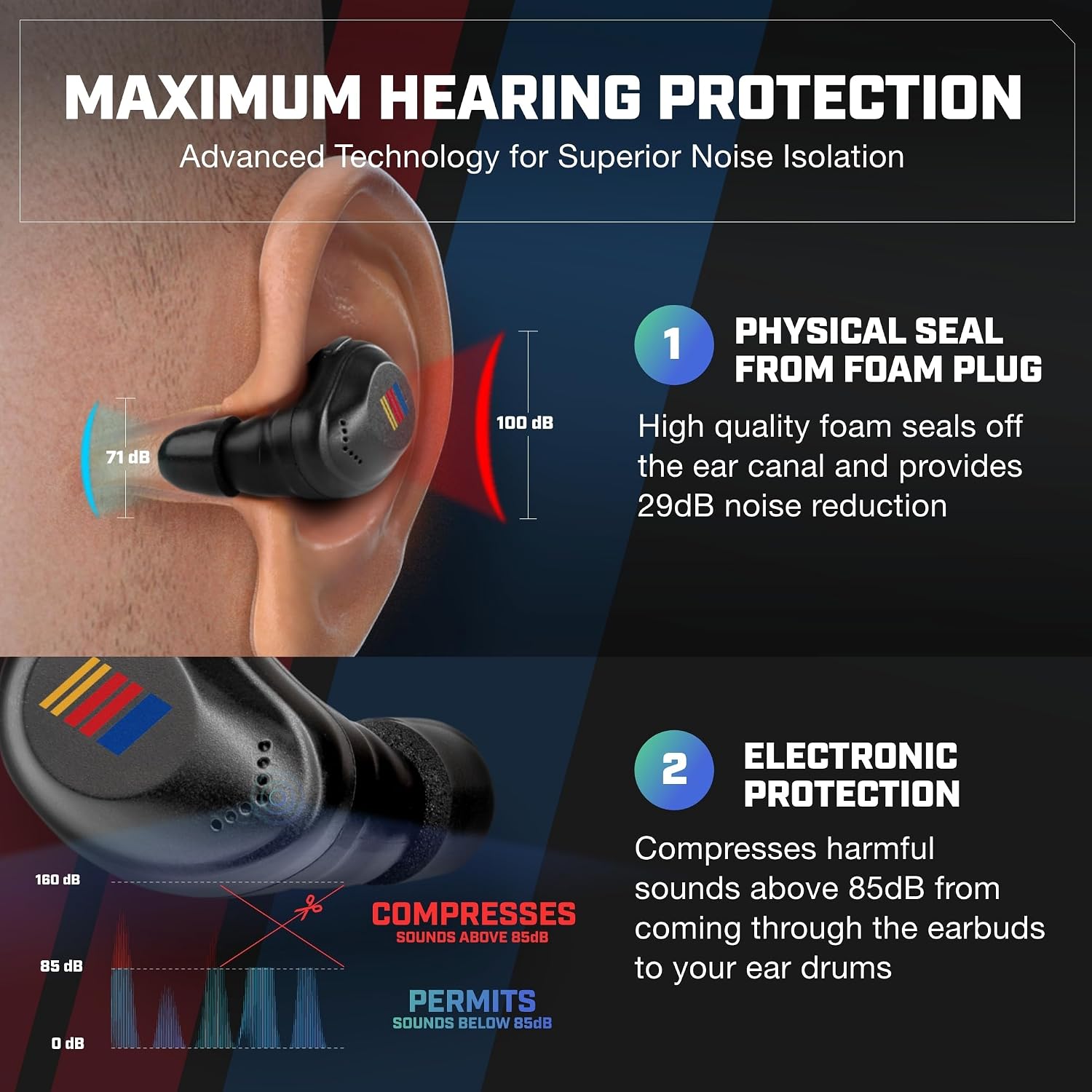
Image: Illustration of how the eartips create a physical seal for noise reduction and how the earbuds electronically compress loud sounds.
3. Bluetooth Жупташтыруу
To connect your earbuds to a device via Bluetooth:
- Кулакчындардын кубатталганын жана кубаттоочу кутудан чыгарылганын текшериңиз. Алар автоматтык түрдө жупташтыруу режимине кириши керек.
- Түзмөгүңүздө (смартфон, планшет ж.б.) Bluetooth жөндөөлөрүнө өтүңүз.
- Select "AXIL XCOR" from the list of available devices.
- Туташкандан кийин, сиз үндүү тастыктоо угасыз.

Image: The earbuds are shown connecting to a smartphone via Bluetooth, alongside examples of their use in tactical, hunting, fitness, and DIY/construction scenarios.
Кулакчындарды иштетүү
Touch Controls
The AXIL XCOR NASCAR Earbuds feature intuitive touch controls on each earbud for managing audio, calls, and hearing modes.
| Акция | Функция |
|---|---|
| Long Press (Touch Control Area) | Turn Hearing Protection ON / OFF |
| Single Tap | Play/Pause Audio, Answer/End Call |
| Эки жолу таптаңыз (оң кулакчын) | Кийинки трек |
| Эки жолу таптаңыз (Сол кулакчын) | Мурунку трек |
| Үч жолу таптаңыз | Үн жардамчысын жандырыңыз |
| Volume Button (Hear Control™ & Protection Mode) | Adjust Ambient Sound Volume |

Сүрөт: деталдуу view of the earbud's touch control area and the dedicated volume button for Hear Control™ and protection modes.
Hearing Protection and Enhancement
These earbuds offer advanced hearing protection and enhancement:
- Digital Hearing Enhancement: The digital microphone provides up to 6X hearing enhancement, allowing you to hear ambient sounds clearly.
- Smart Compression: Sounds over 85 dB are automatically compressed, reducing harmful noise levels without completely blocking out your surroundings. This is ideal for environments with sudden loud noises.
- Активдүү ызы-чууну жокко чыгаруу (ANC): ANC technology helps reduce background noise during calls or media playback, providing a focused listening experience.

Сүрөт: бүттүview of the earbuds' key benefits, including maximum hearing protection (up to 29 dB SNR), conversation boosting, Bluetooth connectivity, and touch controls.
Техникалык тейлөө
Туура тейлөө кулакчындарыңыздын узак иштөөсүн жана оптималдуу иштешин камсыз кылат.
- Тазалоо: Regularly clean the earbuds and charging case with a soft, dry, lint-free cloth. For eartips, remove them and clean with mild soap and water, ensuring they are completely dry before reattaching. Do not use harsh chemicals or abrasive materials.
- Суу каршылык: The earbuds are IPX5 water resistant, meaning they can withstand splashes and light rain. Do not submerge them in water. Ensure the charging port is dry before charging.
- Сактагыч: Колдонулбаганда, кулакчындарды чаңдан жана бузулуудан коргоо үчүн кубаттоочу кутуга салып сактаңыз. Салкын, кургак жерде, экстремалдык температурадан алыс сактаңыз.
Проблемаларды чечүү
If you encounter issues with your AXIL XCOR NASCAR Wireless Earbuds, try the following solutions:
| Көйгөй | Чечим |
|---|---|
| Кулакчындар заряддалбай жатат | Ensure the charging cable is securely connected to both the case and power source. Check if the charging contacts on the earbuds and inside the case are clean and free of debris. Try a different USB-C cable or power adapter. |
| Түзмөк менен жупташтыруу мүмкүн эмес | Ensure earbuds are out of the case and in pairing mode. Turn off and on Bluetooth on your device. Forget "AXIL XCOR" from your device's Bluetooth list and try pairing again. Ensure earbuds are sufficiently charged. |
| Үн жок же үнү төмөн | Check the volume level on both the earbuds (using the volume button) and your connected device. Ensure earbuds are properly seated in your ears for a good seal. Reconnect Bluetooth. |
| Hearing protection not working | Ensure the hearing protection mode is activated via the touch controls (long press). Verify that the eartips provide a tight seal in your ear canal. |
| Тийүү башкаруулары жооп бербейт | Ensure your fingers are clean and dry. Try restarting the earbuds by placing them back in the case and then taking them out again. |
Техникалык шарттар
| Өзгөчөлүк | Деталь |
|---|---|
| Модель аты | XCOR-E NASCAR |
| Байланыш технологиясы | Зымсыз (Bluetooth 5.2) |
| Bluetooth диапазону | 10 метр |
| Noise Control | Active Noise Cancellation, Smart Compression (above 85 dB) |
| Earing Enhancement | Up to 6X via Digital Mic |
| Сууга туруктуулук деңгээли | IPX5 сууга туруктуу |
| Башкаруу түрү | Touch Control, Media Control |
| Battery Life (Hear Control Only) | 12 саат |
| Battery Life (Bluetooth Audio Only) | 6 саат |
| Battery Life (Hear Control & BT Audio) | 4 саат |
| Заряддоо убактысы | Approximately 2 Hours (Earbuds & Case) |
| Материал | Пластик |
| Элемент Салмагы | 181 г |
| Камтылган компоненттер | Earbuds, Charging Case, USB-C Charging Cord, Eartips |
| Сунушталган Колдонуулар | Exercising, Shooting, Sports |
Кепилдик жана колдоо
For warranty information, technical support, or service inquiries, please refer to the official AXIL webсайтка же түздөн-түз кардарларды колдоо менен байланышыңыз. Кепилдик дооматтар үчүн сатып алганыңыздын далилин сактаңыз.
AXIL operates with a clear vision that innovation is the heart of its business, providing product designs and advancements to the sporting goods industry.


