1. Киришүү
Thank you for choosing the VIMAR K42931 Double Family Video Door Phone Kit. This comprehensive kit provides a secure and convenient way to manage access to your property. Designed for two-family or quad-family configurations, it features two 7-inch LCD color hands-free video door phones with capacitive keypads, an audiovisual outdoor plate with an RFID reader, and all necessary power supplies and distributors for a complete wired system. This manual provides detailed instructions for installation, operation, and maintenance to ensure optimal performance and longevity of your device.
2. Продукт бүтүп калдыview
The VIMAR K42931 kit is engineered for reliability and ease of use, offering advanced features for home security and communication.
2.1. Комплекттин компоненттери
- 2 x 7" LCD Colour Hands-Free Video Door Phones: Indoor monitors with capacitive keypads for intuitive control.
- 1 x Audiovisual Plate with RFID Reader: Outdoor unit featuring a camera, speaker, microphone, RFID reader, and two call buttons, suitable for bi-family or quad-family setups.
- Raincover Frame: Provides additional protection for the outdoor plate.
- 2 x 40103 Power Supply: Essential for powering the system components.
- 1 x 4-Way Bus Distributor: Facilitates connection and communication between multiple indoor and outdoor units.
- Бекитүү кашаалары: For secure wall mounting of components.

Сүрөт 2.1: Бүттүview of the VIMAR K42931 Double Family Video Door Phone Kit components, including two indoor monitors, an outdoor call panel, and power supplies.
2.2. Негизги өзгөчөлүктөрү
- Кеңейтүү: The system can be expanded to include up to 3 monitors and 2 outdoor plates, offering flexibility for larger properties.
- Байланыш: Allows for internal communication between indoor units within the same housing unit.
- Capacitive Keyboard: Soft-touch capacitive keyboard on indoor monitors for easy navigation and control.
- Durable Outdoor Plate: Made of anodised aluminium with IP54 and IK07 protection ratings, ensuring resistance against dust, water, and impact.
- Lock and Auxiliary Services: Supports connection to electric locks and other auxiliary services, with a dedicated connection for a door opener button.
- Зымдуу туташуу: Ensures stable and reliable communication.

Сүрөт 2.2: Diagram illustrating key features and specifications of the VIMAR K42931 system, including expandability, intercommunication, and protection ratings.
3. Орнотуу жана орнотуу
Proper installation is crucial for the optimal performance of your video door phone system. It is highly recommended that installation be performed by a qualified electrician or technician.
3.1. Коопсуздук чаралары
- Always disconnect power before beginning any installation or maintenance work.
- Бардык зымдар жергиликтүү электр эрежелерине жана эрежелерине ылайык келишин текшериңиз.
- Do not expose components to excessive moisture or extreme temperatures.
3.2. Орнотуу кадамдары (Жалпы көрсөтмөлөр)
- Mount the Outdoor Plate:
Select a suitable location near your entrance, ensuring it is at an appropriate height for visitors and protected from direct weather exposure (though the unit is IP54/IK07 rated, a raincover frame is included for added protection). Use the provided fixing brackets to securely mount the outdoor plate. Ensure proper cable routing for power and communication.

Сүрөт 3.1: Example of the outdoor call panel installed on a gate post, demonstrating typical placement.
- Mount the Indoor Monitors:
Choose convenient locations inside your home for the 7-inch LCD monitors. Mount them using the provided brackets, ensuring they are easily accessible and visible. Route the necessary wiring from the bus distributor to each monitor.

Сүрөт 3.2: The indoor monitor mounted on a wall, showing its sleek design and placement within a home environment.
- Connect Power Supplies and Bus Distributor:
Install the two 40103 power supplies and the 4-way bus distributor in a secure, accessible location, typically near your main electrical panel. Follow the wiring diagrams provided in the full installation manual (not included here) to connect the outdoor plate, indoor monitors, and power supplies to the bus distributor. Ensure all connections are secure and correctly polarized.
- Connect Electric Lock (Optional):
If using an electric lock, connect it to the designated terminals on the outdoor plate or bus distributor as per the wiring diagram. Test the lock operation after connection.
- Күйгүзүү жана сыноо:
Once all components are securely mounted and wired, restore power to the system. Test all functions: calling from the outdoor plate, answering on indoor monitors, two-way audio, video display, door release, and intercommunication between monitors.
For detailed wiring diagrams and specific installation instructions, please refer to the complete installation guide provided with your VIMAR K42931 kit.
4. Иштөө нускамалары
The VIMAR K42931 system is designed for intuitive operation. Here are the basic functions:
4.1. Answering a Call from the Outdoor Plate
- When a visitor presses a call button on the outdoor plate, the indoor monitor(s) will ring and display the visitor's video feed.
- To answer the call, touch the Жооп icon (typically a telephone receiver symbol) on the monitor's capacitive keypad.
- You can now communicate with the visitor using the two-way audio function.
4.2. Эшикти ачуу
- Чалуу учурунда же качан viewing the outdoor camera, touch the Door Reliz icon (typically a key or unlock symbol) on the monitor to activate the electric lock and open the door or gate.
- The system also supports an auxiliary service button for other connected devices.
4.3. Сырткы аймакты көзөмөлдөө
- үчүн view the outdoor camera feed without a call, touch the Монитор icon (typically a camera symbol) on the indoor monitor. This allows you to check the entrance at any time.
4.4. Intercommunication Between Indoor Monitors
- If multiple indoor monitors are installed within the same housing unit, you can initiate a call between them. Refer to the full user manual for specific instructions on using the intercommunication function, typically involving selecting the desired monitor from a list or using a dedicated intercommunication button.
4.5. Using the RFID Reader (Outdoor Plate)
- The outdoor plate includes an RFID reader for access control. Present a pre-programmed RFID key fob or card to the designated area on the outdoor plate to unlock the door without needing to use the indoor monitor. Programming of RFID credentials is detailed in the advanced setup section of the complete manual.
5. Техникалык тейлөө
Regular maintenance ensures the longevity and reliable operation of your VIMAR K42931 system.
5.1. Тазалоо
- Үй ичиндеги мониторлор: Clean the screen and capacitive keypad with a soft, dry, lint-free cloth. For stubborn marks, slightly dampкездемени суу же жумшак, абразивдүү эмес тазалоочу каражат менен сүртүңүз. Күчтүү химиялык заттардан алыс болуңуз.
- Сырткы плита: Wipe the anodised aluminium surface and camera lens with a soft, damp cloth. Ensure the camera lens is free from dirt or smudges for clear video quality. Do not use abrasive materials that could scratch the surface or lens.
5.2. Системаны текшерүү
- Regular Functionality Test: Periodically test all functions, including calling, answering, door release, and intercommunication, to ensure everything is working correctly.
- Зымдарды текшерүү: Annually, or if issues arise, visually inspect all visible wiring and connections for any signs of wear, damage, or corrosion. Ensure all connections remain secure.
- Outdoor Plate Protection: Verify that the raincover frame is securely in place and free from obstructions.
6. Кыйынчылыктарды
If you encounter issues with your VIMAR K42931 system, refer to the following common problems and solutions:
| Көйгөй | Мүмкүн себеп | Чечим |
|---|---|---|
| No Power to Monitors/Outdoor Plate | Power supply disconnected or faulty; circuit breaker tripped. | Check power supply connections. Verify circuit breaker is not tripped. Ensure power supplies are functioning. |
| No Video on Indoor Monitor | Loose or damaged video cable; faulty outdoor camera; monitor settings. | Inspect video wiring for secure connections. Check for physical damage to the outdoor camera. Consult the full manual for monitor display settings. |
| No Audio (Two-Way Communication) | Loose audio cables; faulty microphone/speaker; volume settings. | Check audio wiring connections. Ensure volume settings on the monitor are not muted or too low. |
| Door Lock Not Releasing | Incorrect wiring to electric lock; faulty lock mechanism; insufficient power to lock. | Verify electric lock wiring according to the diagram. Test the lock independently if possible. Ensure adequate power supply to the lock. |
| RFID Reader Not Working | RFID card/fob not programmed; faulty reader. | Ensure RFID credentials are correctly programmed into the system. Contact support if the reader appears faulty. |
If the problem persists after attempting these solutions, please contact VIMAR customer support or a qualified technician.
7. Техникалык шарттар
Below are the technical specifications for the VIMAR K42931 Double Family Video Door Phone Kit:
| Өзгөчөлүк | Деталь |
|---|---|
| Модель номери | K42931 |
| Бренд | VIMAR |
| Ички монитордун өлчөмү | 7 дюймдук LCD |
| Outdoor Plate Material | Anodised Aluminum |
| Outdoor Plate Protection Rating | IP54 (Dust and Splash Protected), IK07 (Impact Resistant) |
| Байланыш | Зымдуу туташуу |
| Кеңейтүү | 3кө чейин монитор жана 2 сырткы плита |
| Өзгөчөлүктөр | Capacitive Keypad, RFID Reader, Intercommunication, Lock/Auxiliary Services |
| Product Dimensions (Outdoor Plate) | 102.5 мм (W) x 198.8 mm (H) x 43.8 mm (D) |
| Product Dimensions (Indoor Monitor) | 205.2 мм (W) x 128.1 mm (H) x 20.9 mm (D) |
| Элемент Салмагы | 2.15 килограмм (жалпы комплект) |
| Түс | White (Monitor), Grey (License Plate) |

Сүрөт 7.1: Detailed dimensions of the outdoor call panel.
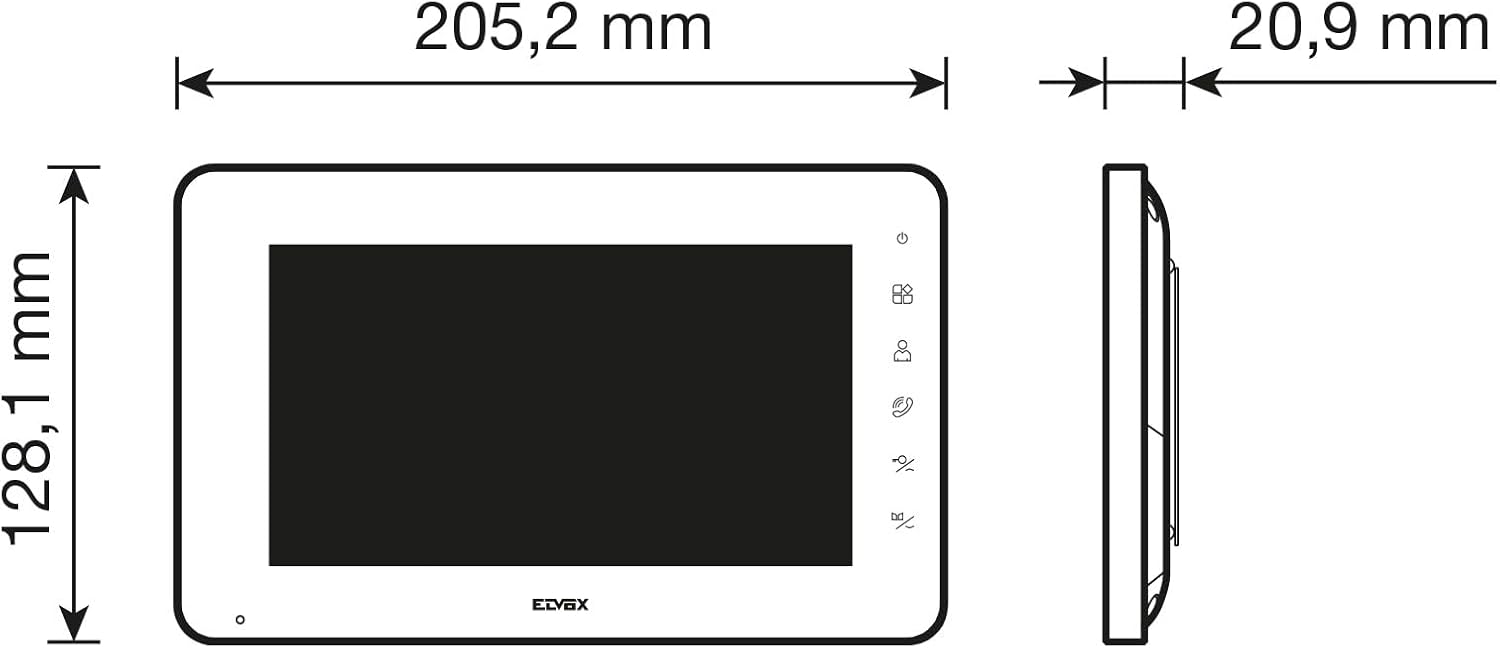
Сүрөт 7.2: Detailed dimensions of the indoor monitor.
8. Кепилдик жана колдоо
VIMAR products are manufactured to high-quality standards. For information regarding the warranty period and terms for your K42931 Video Door Phone Kit, please refer to the warranty card included in the product packaging or visit the official VIMAR webсайт.
For technical assistance, troubleshooting beyond this manual, or to inquire about spare parts, please contact VIMAR customer support. Contact details can typically be found on the VIMAR webсайтында же продукт документациясында.
VIMAR Official Webсайт: www.vimar.com


