1. Коопсуздук маалыматы
Please read this manual carefully before using the LEVENHUK Atom DNB200 Digital Night Vision Binoculars to ensure proper operation and to prevent damage. Keep this manual for future reference.
- Do not attempt to disassemble or repair the device yourself. Refer all servicing to qualified specialists.
- Avoid direct exposure to strong light sources, especially sunlight, as this can damage the internal components.
- Keep the device away from high temperatures, direct sunlight, and high humidity.
- Use only the specified battery type (18650 Li-ion) and charger. Improper use can lead to fire or explosion.
- Балдар жетпеген жерде сактаңыз.
2. Пакеттин мазмуну
Төмөндө тизмеленген нерселердин баары пакетиңизде бар экенин текшериңиз:
- LEVENHUK Atom DNB200 Digital Night Vision Binoculars
- Ташуу кутусу
- Моюн боосу
- USB кабели
- Тазалоочу кездеме
- MicroSD Card (pre-installed or separate)
- User Manual

Image 2.1: All items included in the LEVENHUK Atom DNB200 package, including the binoculars, carrying case, neck strap, USB cable, cleaning cloth, and a microSD card.
3. Продукциянын компоненттери
Familiarize yourself with the main parts and controls of your digital night vision binoculars.

Сүрөт 3.1: Жогорку view of the binoculars, highlighting the control panel with various buttons.
- Кубат баскычы: Аппаратты күйгүзөт/өчүрөт.
- Режим (M) баскычы: Сүрөт, видео жана ойнотуу режимдеринин ортосунда которулат.
- IR Illuminator Button (Sun/Light icon): Adjusts the infrared illumination level.
- OK баскычы: Confirms selections in the menu or takes a photo/starts video recording.
- Zoom In/Up Button (Magnifying glass with +): Increases digital zoom or navigates up in menus.
- Zoom Out/Down Button (Magnifying glass with -): Decreases digital zoom or navigates down in menus.
- Фокус дөңгөлөк: Located on the side, adjusts optical focus for clear viewing.
- Eyepiece/Display: Viewfinder for observing images.
- Объективдүү линза: Front lens for capturing light.
- IR LED: Infrared light emitter for night vision.
- Батарея бөлүмү: Located at the rear.
- USB-C порту: Заряддоо жана маалыматтарды өткөрүү үчүн.
- MicroSD картасынын уячасы: Эстутум картасын киргизүү үчүн.

Сүрөт 3.2: Алдыңкы view of the binoculars, showcasing the display screen and objective lens.
4. Баштоо
4.1. Батареяны орнотуу
The device uses one 18650 Li-ion rechargeable battery.
- Locate the battery compartment cover on the rear of the binoculars.
- Капкакты ачыңыз.
- Insert the 18650 battery according to the polarity markings (+/-) inside the compartment.
- Батарея уясынын капкагын бекем жабыңыз.
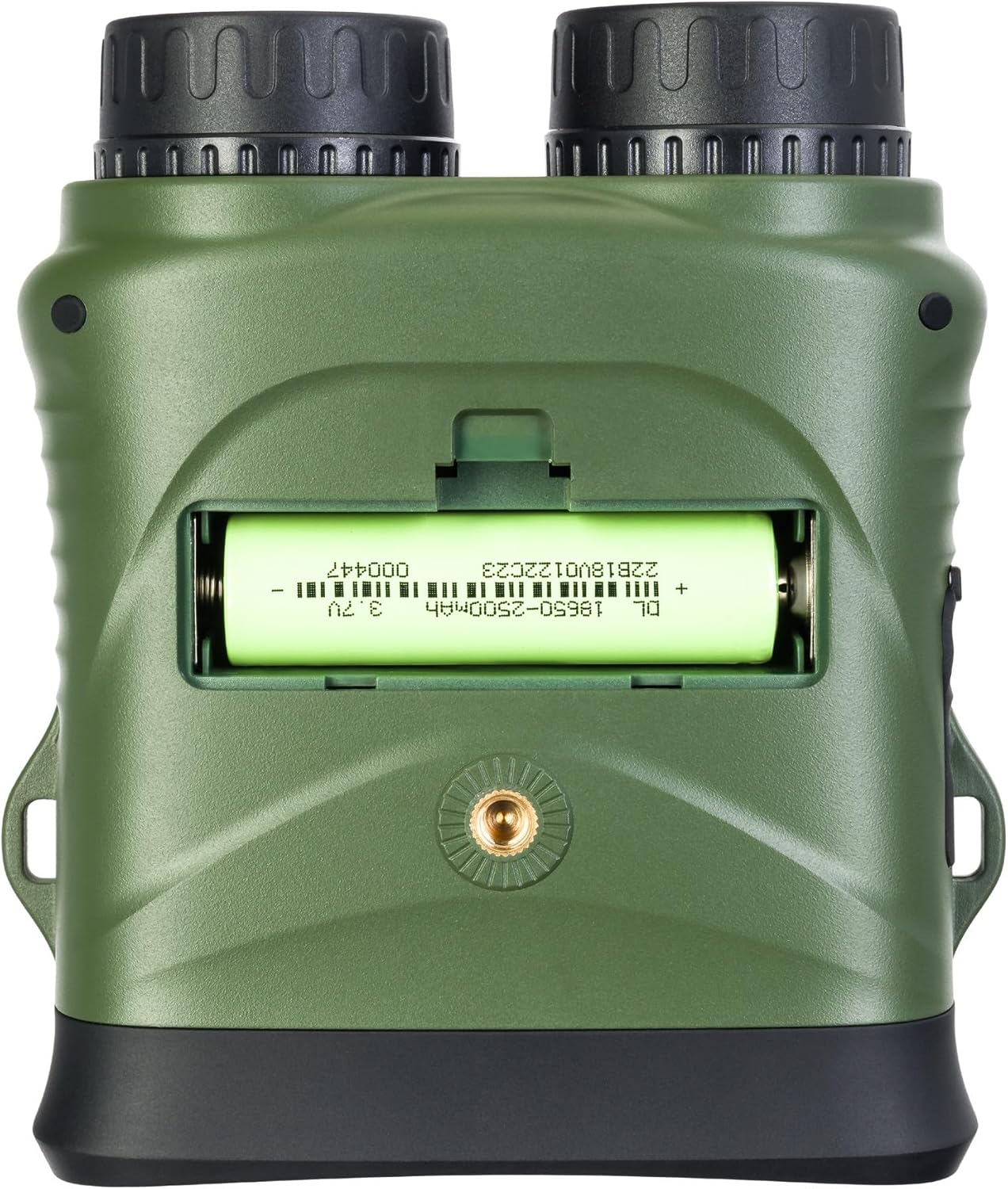
Сүрөт 4.1: Арткы view of the binoculars with the battery compartment open, illustrating correct battery insertion.
4.2. Эстутум картасын орнотуу
A microSD card (up to 32GB, Class 10 recommended) is required to save photos and videos.
- Locate the microSD card slot on the side of the binoculars, usually protected by a rubber flap.
- Резина капкагын акырын ачыңыз.
- MicroSD картаны алтын контакттарын ылдый каратып, чыкылдагыча кыстарыңыз.
- Close the rubber flap to protect the port from dust and moisture.

Сүрөт 4.2: Каптал view of the binoculars, showing the USB-C port and the microSD card slot under a protective cover.
4.3. Күйгүзүү / Өчүрүү
- Күйгүзүү үчүн: Press and hold the Power button (⑁) for a few seconds until the display illuminates.
- Өчүрүү үчүн: Press and hold the Power button (⑁) again until the display turns off.
5. Иштөө нускамалары
5.1. Фокусту тууралоо
To achieve a clear image, adjust the focus:
- Окуляр аркылуу кара.
- Rotate the focus wheel (located on the side of the binoculars) until the image appears sharp.
5.2. Режимди тандоо
басыңыз Режим (M) жеткиликтүү режимдер аркылуу айлануу үчүн баскыч:
- Сүрөт режими: Кыймылсыз сүрөттөрдү тартуу үчүн.
- Видео режими: Видео жаздыруу үчүн тамак-ашtage.
- Ойнотуу режими: кайра үчүнviewтартылган сүрөттөрдү жана видеолорду алуу.
5.3. Night Vision and IR Illumination
The device automatically switches to night vision mode in low light conditions. To enhance visibility in complete darkness:
- Сүрөт же Видео режиминде, басыңыз IR Illuminator button (Sun/Light icon).
- Each press will cycle through different IR illumination levels (e.g., Off, Level 1, Level 2, Level 3). Higher levels provide more illumination but consume more battery.
5.4. Digital Zoom
колдонуу Zoom In (+) жана Zoom Out (-) buttons to adjust the digital magnification of the image on the display.
5.5. Сүрөттөрдү жана видеолорду тартуу
- Сүрөткө тартуу үчүн: In Photo Mode, frame your subject and press the OK баскычы.
- Видео жаздыруу үчүн: Видео режиминде, баскычын басыңыз OK button once to start recording. Press it again to stop recording. A recording indicator will appear on the screen.
5.6. Меню Жөндөөлөрү
To access and adjust device settings:
- басып, кармап туруңуз Режим (M) менюга кирүү үчүн баскычты басыңыз.
- колдонуу Zoom In (+) жана Zoom Out (-) баскычтар меню параметрлери боюнча чабыттоо.
- басыңыз OK button to select an option or enter a sub-menu.
- басыңыз Режим (M) button again to exit the menu.
Common settings include: Video Resolution, Photo Resolution, Date Stamp, Language, Auto Power Off, Format SD Card.
6. Техникалык тейлөө
6.1. Тазалоо
- Линзалар: Use the included cleaning cloth or a soft, lint-free cloth specifically designed for optical surfaces. Breathe lightly on the lens or use a small amount of lens cleaning fluid if necessary.
- Дене: Wipe the body of the device with a soft, dry cloth. Do not use abrasive cleaners or solvents.
6.2. Сактоо
- When not in use, store the binoculars in their carrying case in a cool, dry place.
- Эгерде түзмөк көпкө чейин колдонулбаса, агып кетүүнүн алдын алуу үчүн батарейканы чыгарып коюңуз.
7. Кыйынчылыктарды
| Көйгөй | Мүмкүн себеп | Чечим |
|---|---|---|
| Түзмөк күйбөйт. | Батарея өлүп калган же туура эмес салынган. | Charge the battery or re-insert it with correct polarity. |
| Сүрөт бүдөмүк. | Focus is not adjusted. | Rotate the focus wheel until the image is sharp. |
| Сүрөттөрдү/видеолорду сактоо мүмкүн эмес. | No microSD card or card is full/corrupted. | Insert a microSD card, delete old fileс, же картаны форматтаңыз (бул бардык маалыматтарды өчүрөт). |
| Түнкү көрүү жөндөмүнүн начардыгы. | IR illuminator is off or set too low. | Increase the IR illumination level using the IR button. |
| Device freezes. | Программанын катасы. | Press and hold the Power button for 10 seconds to force a shutdown, then restart. |
8. Техникалык шарттар
| Өзгөчөлүк | Спецификация |
|---|---|
| Модель номери | 81702 |
| Продукциянын өлчөмдөрү | 3.94 x 1.97 x 0.5 дюйм |
| Элемент Салмагы | 3.53 унция |
| Бренд | Левенхук |
| Өзгөчө өзгөчөлүк | Түнкү көрүнүш |
| Түс | Кара |
| Eye Relief | 5 миллиметр |
| Бинокулярдык призманын сүрөттөмөсү | Чатыр призмасы |
| Power Source | 18650 Li-ion Rechargeable Battery (included) |
| Сактагыч | MicroSD card (up to 32GB, Class 10 recommended) |
9. Кепилдик жана Кардарларды колдоо
LEVENHUK products are covered by a manufacturer's warranty. For detailed warranty terms and conditions, please refer to the warranty card included with your product or visit the official Levenhuk webсайт.
If you encounter any issues or have questions regarding your LEVENHUK Atom DNB200 Digital Night Vision Binoculars, please contact our customer support team:
- Webсайт: www.levenhuk.com
- Электрондук почта: кайрылыңыз website for support contact.
- Телефон: кайрылыңыз website for support contact.
Please have your product model (DNB200) and serial number ready when contacting support.


