Introduction
This manual provides detailed instructions for the setup, operation, and maintenance of your BUFFBEE RS11 Radio Alarm Clock. Please read this manual thoroughly before using the device to ensure proper function and to maximize your user experience. Keep this manual for future reference.
Пакеттин мазмуну
Таңгактан чыгаргандан кийин, төмөндө көрсөтүлгөн нерселердин бардыгы бар экенин жана жакшы абалда экендигин текшериңиз:
- 1 x BUFFBEE RS11 Radio Alarm Clock
- 1 x DC кубат адаптери
- 1 х Колдонуучунун колдонмосу (бул документ)
- 1 x CR2032 Battery (pre-installed or included separately for backup)
Продукт бүттүview
The BUFFBEE RS11 is a compact device combining an alarm clock, FM radio, and a 7-color night light. It features a clear digital display and intuitive controls.

1-сүрөт: Фронт view of the BUFFBEE RS11 Radio Alarm Clock, displaying the digital time and accessible control buttons on top.

2-сүрөт: Internal structure highlighting the 5W Hi-Fi speaker, designed for clear and authentic sound reproduction.
Жайгашуу
1. Power Connection
- Connect the provided DC power adapter to the 'DC 5V' port on the back of the alarm clock.
- Plug the adapter into a standard wall outlet. The display will illuminate, and the clock will be ready for initial setup.
2. Камдык батареяны орнотуу
The BUFFBEE RS11 includes a CR2032 battery for backup, which preserves time and alarm settings during a power outage.
- Аппараттын астындагы батарея отсегин табыңыз.
- CR2032 батареясын оң (+) тарабын өйдө каратып салыңыз.
- Батарея отсегин бекем жабыңыз.
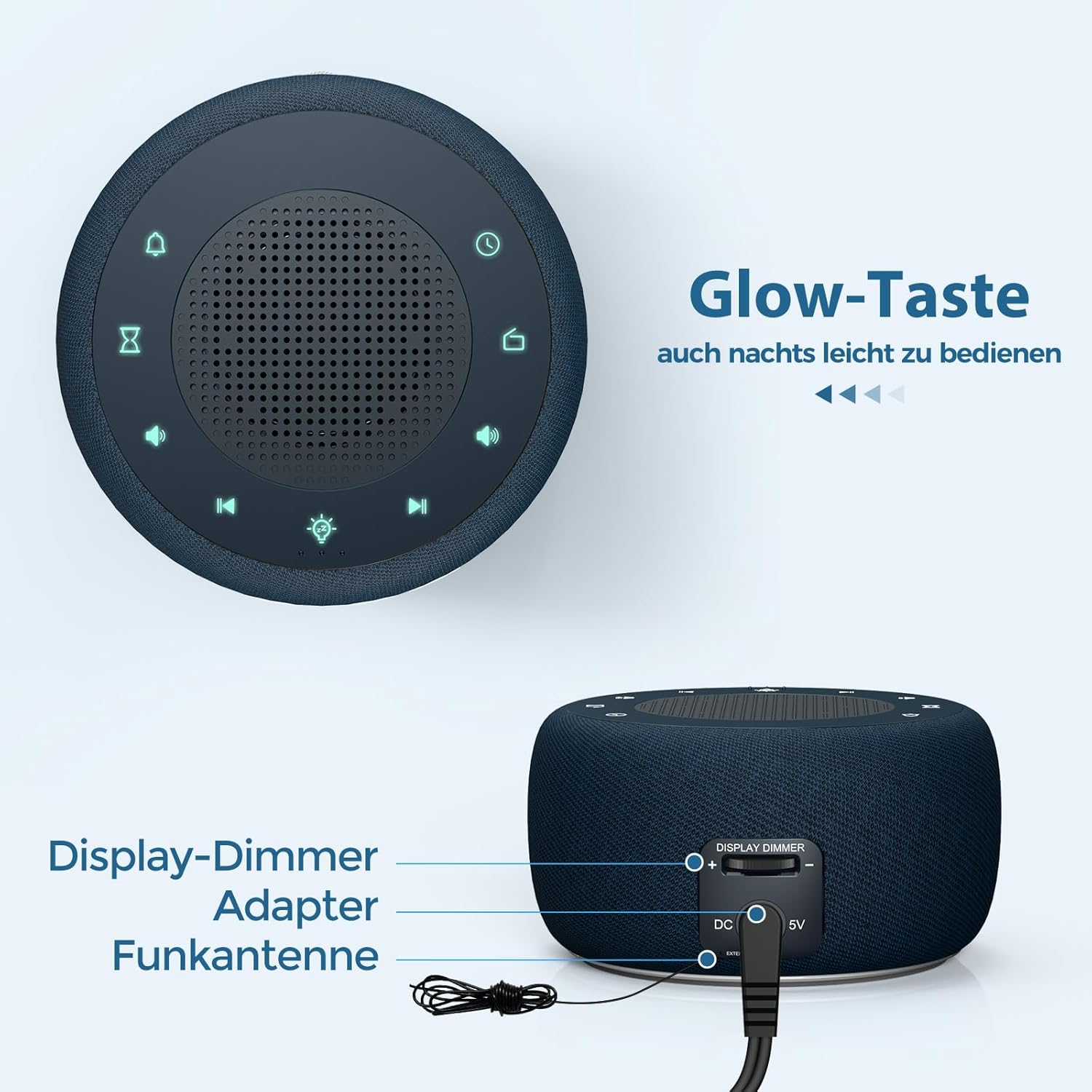
3-сүрөт: Rear panel connections, showing the display dimmer control, DC 5V power input, and FM antenna port.
Иштөө нускамалары
1. Убакытты белгилөө
- Press and hold the 'Time Set' button (often indicated by a clock icon) until the hour digits begin to flash.
- Саатты тууралоо үчүн '+' жана '-' баскычтарын колдонуңуз.
- Press the 'Time Set' button again to switch to minute adjustment. Use '+' and '-' to set the minutes.
- Press 'Time Set' once more to confirm and exit time setting mode.
2. Ойготкучту орнотуу
- Press and hold the 'Alarm Set' button (often indicated by an alarm clock icon) until the alarm hour digits flash.
- Ойготкучтун саатын тууралоо үчүн '+' жана '-' баскычтарын колдонуңуз.
- Press 'Alarm Set' again to switch to alarm minute adjustment. Use '+' and '-' to set the alarm minutes.
- Press 'Alarm Set' to select the alarm tone. Options include: Bird sounds, Piano, Beep, or FM Radio.
- Press 'Alarm Set' once more to confirm and exit alarm setting mode.
- To activate/deactivate the alarm, briefly press the 'Alarm Set' button. An alarm icon will appear/disappear on the display.

4-сүрөт: Wake-up options with four distinct alarm tones, including the option to wake to your favorite radio station.
3. Радио иштетүү (FM)
- Press the 'Radio' button (often indicated by a radio icon) to turn the FM radio on or off.
- Use the 'Previous Track' and 'Next Track' buttons (often indicated by ◀◀ and ▶▶ icons) to tune to different FM stations.
- Press and hold the 'Previous Track' or 'Next Track' buttons to automatically scan for the next available station.
- Adjust the volume using the 'Volume Up' and 'Volume Down' buttons (often indicated by '+' and '-' speaker icons). The volume can be adjusted in 16 levels.

5-сүрөт: Enjoying the radio alarm clock, featuring a 0-120 minute sleep timer and 0-30 levels of adjustable volume.
4. Түнкү жарык функциясы
- Press the 'Night Light' button (often indicated by a light bulb icon) to turn the night light on or off.
- Press the 'Night Light' button repeatedly to cycle through the 7 available colors.
- To activate the sleep timer for the night light (or radio), press the 'Sleep Timer' button (often indicated by an hourglass icon).
- Use the '+' and '-' buttons to set the desired duration (0-120 minutes). The night light/radio will automatically turn off after the set time.

6-сүрөт: The 7-color night light feature, with options to turn on/off and change colors.
5. Дисплейдин жарыктыгын жөндөө (күңүрттөө)
The display brightness can be adjusted from 0% to 100% to suit your preference.
- Locate the 'Display Dimmer' control on the back of the unit (refer to Figure 3).
- Slide the control to increase or decrease the display brightness.
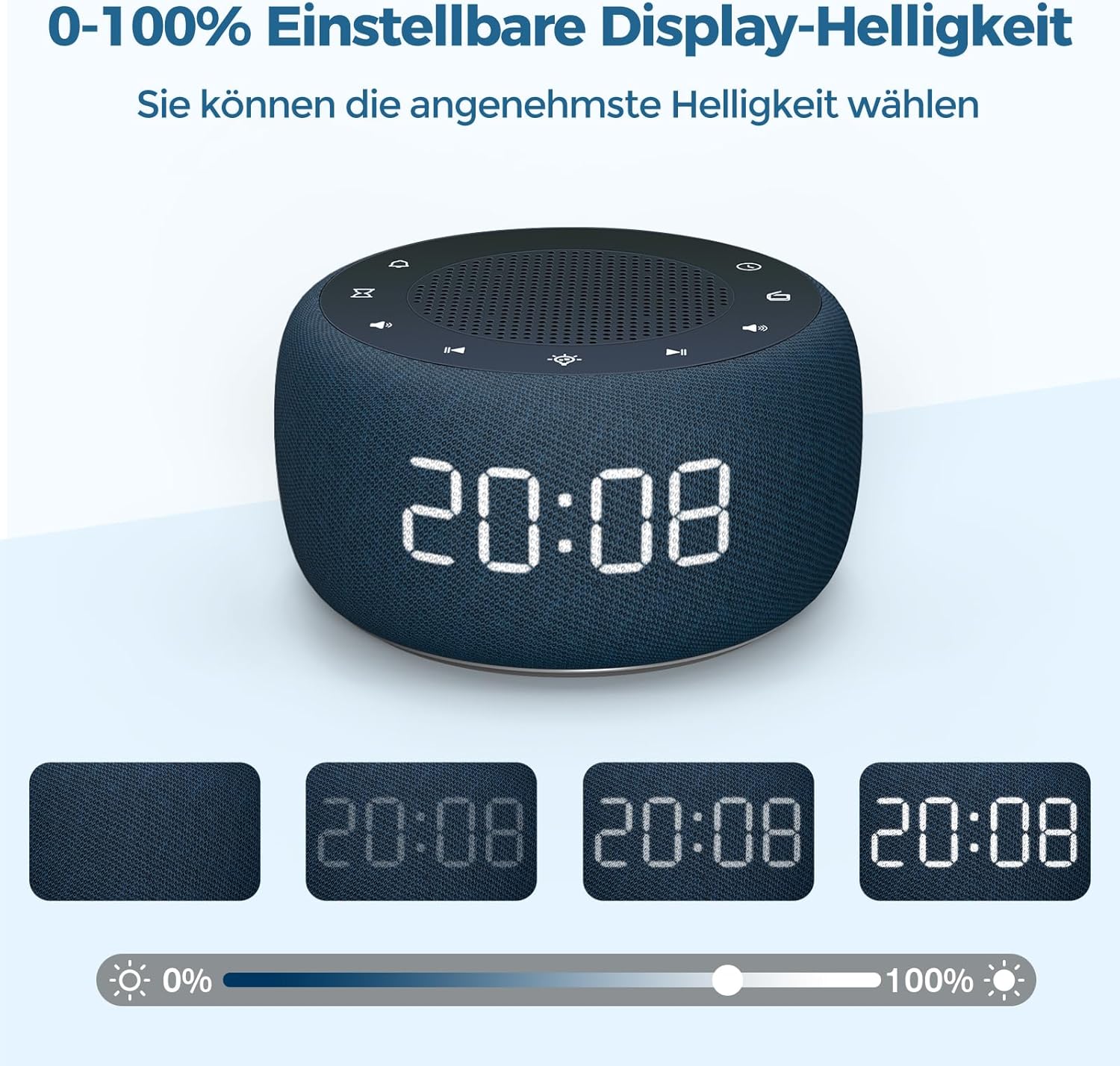
7-сүрөт: Demonstrating the 0-100% adjustable display brightness, allowing users to select their preferred comfort level.
6. Luminous Buttons
The control buttons on the top of the unit are designed to illuminate for 5 seconds when pressed, making operation easier in low-light conditions.
7. 12/24 саат форматы
To switch between 12-hour and 24-hour time formats, briefly press the '12/24H' button (if available, or often combined with the 'Time Set' button by a quick press after setting time).
Техникалык тейлөө
- Тазалоо: Use a soft, dry cloth to clean the surface of the alarm clock. Do not use liquid cleaners or abrasive materials.
- Сактагыч: If storing the device for an extended period, disconnect it from power and remove the backup battery. Store in a cool, dry place.
- Батареяны алмаштыруу: The CR2032 backup battery should be replaced periodically (e.g., every 1-2 years) to ensure settings are retained during power outages.
Проблемаларды чечүү
| Көйгөй | Мүмкүн себеп | Чечим |
|---|---|---|
| Дисплей бош. | Электр байланышы жок. | Ensure the DC power adapter is securely plugged into the unit and a working wall outlet. |
| Ойготкуч угулбайт. | Ойготкуч иштетилген эмес же үн өтө төмөн. | Check if the alarm icon is visible on the display. Increase alarm volume. |
| Радио кабыл алуу начар. | FM antenna not extended or poor signal area. | Extend the FM antenna fully. Reposition the unit for better reception. |
| Убакыт/жөндөөлөр өчүрүлгөндөн кийин жоголдуtage. | Резервдик батарея түгөндү же орнотулган эмес. | Install or replace the CR2032 backup battery. |
Техникалык шарттар
- Модел: RS11
- Бренд: BUFFBEE
- Өлчөмдөрү (L x W x Y): 9.5 x 3.81 x 6 см (болжол менен 3.74 x 1.5 x 2.36 дюйм)
- Салмагы: 340 грамм (болжол менен 0.75 фунт)
- Чыгуу кубаттуулугу: 5 Ватт
- FM Frequency колому: 87.5-108 МГц
- Дисплей түрү: Санарип
- Түнкү жарык түстөр: 7
- Камдык батарея: CR2032 (камтылган)
- Кубат булагы: Cable Electric (DC Adapter)
Кепилдик жана колдоо
This product comes with a standard manufacturer's warranty. For specific warranty details, please refer to the documentation provided at the time of purchase or contact BUFFBEE customer support. If you encounter any issues not covered in this manual, please contact our customer service for assistance.


