1. Киришүү
Thank you for choosing the LHKNL TG-T069 Rechargeable HeadlampБул колдонмодо башыңызды коопсуз жана натыйжалуу колдонуу боюнча кеңири көрсөтмөлөр берилген.amp. The TG-T069 features a super bright LED, motion sensor functionality, multiple lighting modes, and a rechargeable battery, making it ideal for various outdoor and indoor activities.

Image 1.1: LHKNL TG-T069 Rechargeable Headlamps (Black and Orange)
This image displays both the black and orange versions of the LHKNL TG-T069 headlamp, showcasing their design and illuminated state.
2. Коопсуздук нускамалары
- Do not look directly into the LED light. The high intensity light can cause temporary vision impairment or eye damage.
- Башты кармаңызamp балдар жетпеген жерде.
- Do not attempt to disassemble, repair, or modify the headlamp. Бул кепилдикти жокко чыгарат жана зыянга же жаракатка алып келиши мүмкүн.
- Dispose of batteries according to local regulations. Do not expose batteries to fire or extreme temperatures.
- Башты ачыкка чыгаруудан алыс болуңузamp to extreme heat or cold.
- Сууга туруштук берүү үчүн кубатталбай жатканда кубаттоочу порттун капкагы бекем жабылганын текшериңиз.
3. Пакеттин мазмуну
Сураныч, пакетте төмөнкү нерселерди текшериңиз:
- 1 x LHKNL TG-T069 Rechargeable Headlamp (Кара)
- 1 x LHKNL TG-T069 Rechargeable Headlamp (Ачык күрөң)
- 2 x USB заряддоо кабелдери
- 1 x User Manual
4. Продукт бүтүп калдыview
Familiarize yourself with the components of your LHKNL TG-T069 Headlamp:
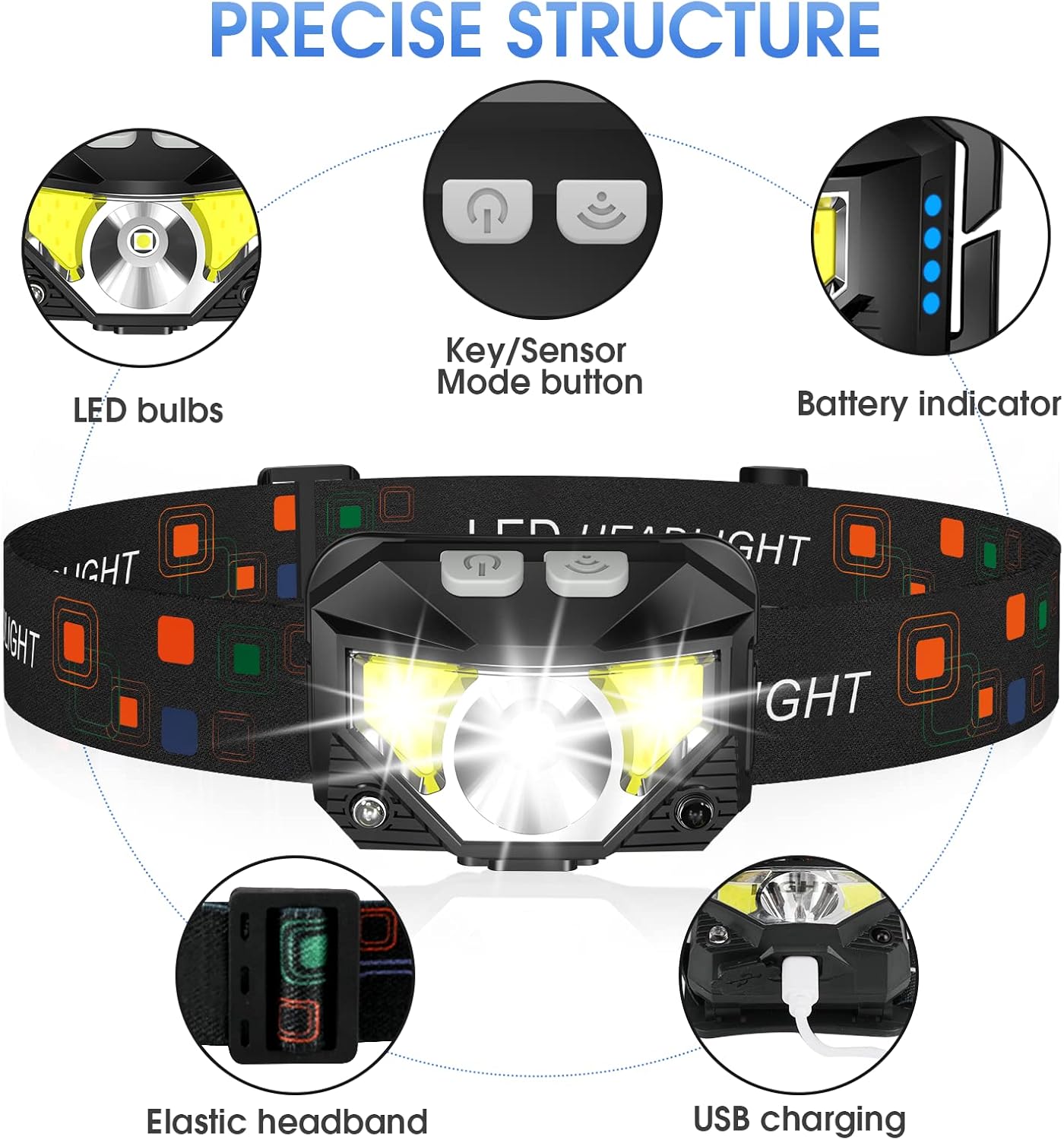
Image 4.1: LHKNL TG-T069 Headlamp Компоненттер
This diagram illustrates the key components of the headlamp, including the LED bulbs, the combined Key/Sensor Mode button, the battery indicator lights, the elastic headband, and the USB charging port.
- LED лампалары: Main and side LED lights for various illumination needs.
- Key/Sensor Mode Button: Controls power, lighting modes, and activates motion sensor.
- Батарея көрсөткүчү: Калган батарея зарядын көрсөтөт.
- Elastic Headband: Adjustable for a comfortable and secure fit.
- USB кубаттоо порту: Камтылган батареяны кайра заряддоо үчүн.
5. Орнотуу
5.1 Алгачкы заряддоо
Before first use, it is recommended to fully charge your headlamp.
- USB кубаттоо портун баштын капталынан табыңызamp.
- Open the protective cover of the USB port.
- Берилген USB заряддоо кабелин баштыкка туташтырыңызamp and a suitable USB power source (e.g., wall adapter, computer USB port, power bank).
- Батареянын кубаттоо абалын көрсөтүү үчүн индикатор чырактары күйөт. Толук кубатталганда бардык чырактар туруктуу күйөт.
- Once fully charged, disconnect the cable and securely close the USB port cover to maintain water resistance.
5.2 Баш боону тууралоо
The elastic headband is adjustable to fit various head sizes, for both adults and children.
- Башты койamp сенин башыңда.
- Adjust the sliding buckle on the headband until it feels snug and comfortable, without being too tight.
- лamp head can be rotated up to 60 degrees to direct the light where needed. Adjust the angle as desired.
6. Иштөө нускамалары
6.1 Key Mode Operation
The main button controls the standard lighting modes.

Image 6.1: Key Mode and Motion Sensor Button Functions
This image highlights the two main control buttons: the Key Mode button for cycling through light modes and the Sensor Mode button for activating motion control.
- Power On/Mode Cycle: Press the Key Mode button once to turn on the headlamp. Subsequent presses will cycle through the following modes:
Main Strong Beam → Main Weak Beam → Side Strong Beam → Side Weak Beam → Red Beam → SOS Red Strobe. - Power Off (Long Press): Башты өчүрүү үчүнamp directly from any mode, press and hold the Key Mode button for approximately 3 seconds. This eliminates the need to cycle through all modes to turn off the device.
6.2 Кыймыл сенсорунун иштеши
The motion sensor allows for hands-free control of specific lighting modes.
- Кыймыл сенсорун иштетүү: Press the Sensor Mode button once. The indicator light for the motion sensor will illuminate.
- Cycle Sensor Modes: While in motion sensor mode, press the Key Mode button to cycle between:
Sensor Main Beam → Sensor Side Beam. - Hands-Free On/Off: Wave your hand in front of the headlamp's sensor to turn the light ON or OFF.
- Кыймыл сенсорун өчүрүү: Press the Sensor Mode button again to exit motion sensor mode.

Image 6.2: All 8 Working Modes
This image visually represents all eight available lighting modes, including both manual and motion-sensor activated options, demonstrating the versatility of the headlamp.
7. Заряддоо
The LHKNL TG-T069 Headlamp is equipped with a powerful 1500mAh built-in rechargeable battery. It can be charged and used simultaneously.
- Use the provided USB cable to connect the headlamp to a 5V USB power source.
- Батареянын индикатор жарыктары заряддоонун жүрүшүн көрсөтөт.
- A full charge typically provides 4-10 hours of usage, depending on the selected mode.
- Always ensure the USB port cover is sealed after charging to maintain the IPX4 waterproof rating.
8. Техникалык тейлөө
8.1 Тазалоо
- Башын сүртүңүзamp денеси жумшак, гamp кездеме. Абразивдүү тазалагычтарды же эриткичтерди колдонбоңуз.
- Заряддоо портунда чаң жана таштанды жок экенин текшериңиз.
8.2 Сактоо
- Башты сактаңызamp күн нурунан алыс салкын, кургак жерде.
- Узак мөөнөткө сактасаңыз, батарейканын ден соолугун сактоо үчүн батареяны 3-6 ай сайын заряддап туруңуз.
9. Кыйынчылыктарды
| Көйгөй | Мүмкүн себеп | Чечим |
|---|---|---|
| Headlamp күйбөйт. | Батарея түгөнүп калды. | Башты заряддаңызamp толугу менен. |
| Жарык бүлбүлдөп же күңүрт. | Батарея аз. | Башты кайра заряддаңызamp. |
| Кыймыл сенсору жооп бербей жатат. | Motion sensor mode not activated or sensor obstructed. | Ensure the Sensor Mode button is pressed. Clear any obstructions in front of the sensor. |
| Headlamp заряддалбай жатат. | Кабель же кубат булагы туура эмес. | Try a different USB cable or power adapter. Ensure the cable is securely connected. |
10. Техникалык шарттар
| Өзгөчөлүк | Спецификация |
|---|---|
| Модел | TG-T069 |
| Жарык булагы түрү | LED |
| Жарыктык | 1100 люменге чейин |
| Power Source | Батарея менен иштейт (кайра заряддалуучу) |
| Батарея түрү | Литий-ион (1500 мАч орнотулган) |
| Элемент Салмагы | 1.87 унция (болжол менен 53г) |
| Сууга туруктуулук деңгээли | IPX4 (Суу өткөрбөйт) |
| Өзгөчөлүктөр | Long Press Function, Motion Sensor, 8 Lighting Modes |
| Материал | Пластик же резина |
| Өндүрүүчү | ЛХКНЛ |
11. Кепилдик жана колдоо
LHKNL products are designed for reliability and performance. For any questions, technical support, or warranty claims, please contact LHKNL customer service through the retailer where the product was purchased or visit the official LHKNL webбайланыш маалыматы үчүн сайт.
Сураныч, кепилдик максаттары үчүн сатып алганыңыздын далилин сактап коюңуз.


