Introduction
This manual provides instructions for the TIME TIMER 8-inch 60-Minute Visual Timer and the TIME TIMER PLUS 20-Minute Visual Timer. These devices are designed to visually represent the passage of time, aiding in time management, task completion, and focus for various activities in educational, professional, and home environments.
Продукт бүттүview
This package includes two distinct visual timers:
- TIME TIMER Original 8-inch 60-Minute Visual Timer: Features a large display with a red disk that disappears as time elapses. It includes a dry-erase activity card slot and magnetic backing.
- TIME TIMER PLUS 20-Minute Visual Timer: A portable timer with a handle, featuring a blue disk for a 20-minute countdown.
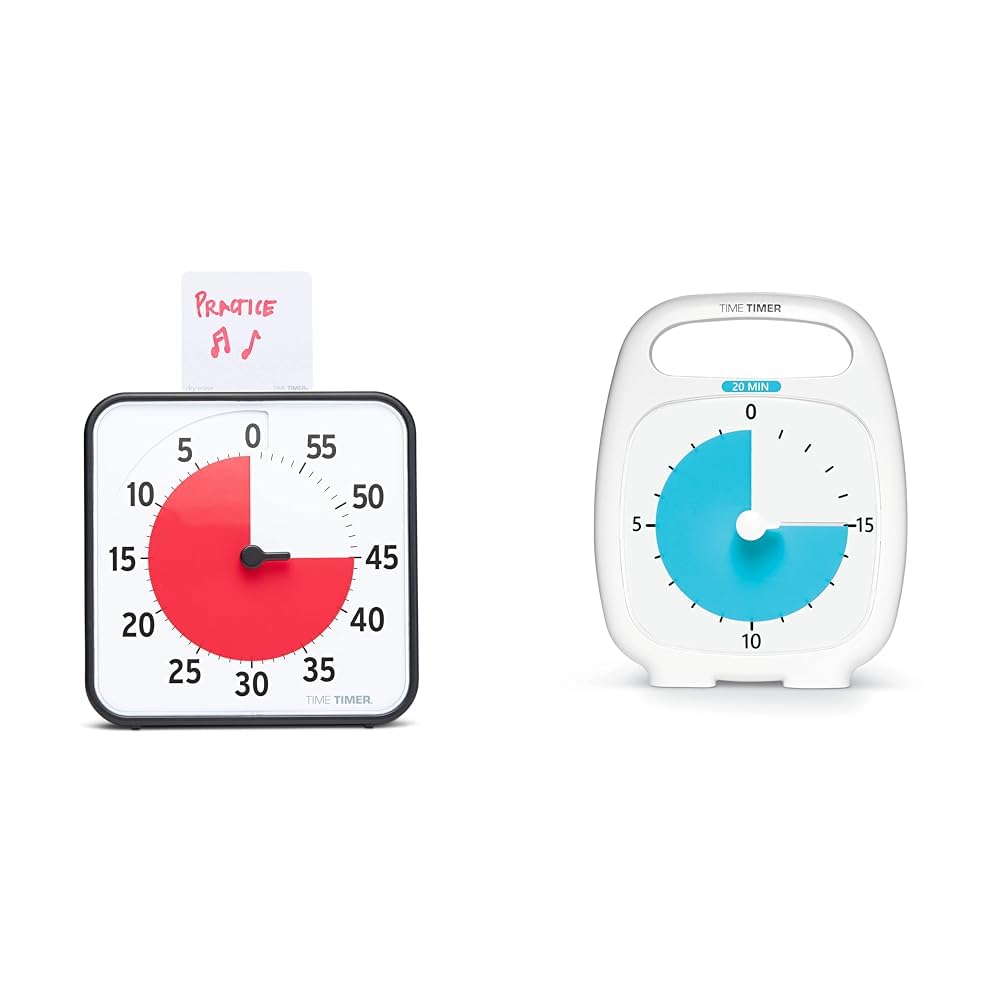
Image: The 8-inch 60-minute visual timer (left) and the 20-minute visual timer (right).
Жайгашуу
TIME TIMER Original 8-inch 60-Minute Visual Timer
- Батарея орнотуу: Locate the battery compartment on the back of the timer. Insert 2 AA batteries (not included), ensuring correct polarity.
- Жайгашкан жери:
- Үстөлдө колдонуу: Extend the two foldable feet on the back to stand the timer on a flat surface.
- Магниттик орнотуу: The timer features a magnetic back, allowing it to be attached to magnetic whiteboards or other metallic surfaces.
- Дубалга орнотуу: The timer can also be hung on a wall using a suitable hook (not included).
- Activity Card: If desired, write or draw the task on the included dry-erase activity card and place it in the top slot of the timer.

Image: The 8-inch 60-minute visual timer with an activity card in its slot.
TIME TIMER PLUS 20-Minute Visual Timer
- Батарея орнотуу: Locate the battery compartment on the back. Insert 1 AA battery (not included), observing polarity.
- Жайгашкан жери: This portable timer can be placed on any flat surface. Its integrated handle allows for easy transport.

Image: The TIME TIMER PLUS 20-Minute Visual Timer, white with a blue disk.
Иштөө нускамалары
Setting the TIME TIMER Original 8-inch 60-Minute Visual Timer
- Убакытты коюу: Turn the center knob counter-clockwise to move the red disk to your desired duration, up to 60 minutes.
- Артка саноо: The red disk will begin to disappear clockwise as time elapses. The timer operates silently, without a ticking sound.
- Кошумча эскертүү: An on/off switch on the back of the timer controls an audible alert that sounds when the timing cycle is complete. Adjust this setting based on your environment and preference.

Image: The 8-inch 60-minute visual timer in use on a whiteboard, demonstrating its magnetic capability.
Setting the TIME TIMER PLUS 20-Minute Visual Timer
- Убакытты коюу: Use the center set knob to move the colored disk to the desired time, up to 20 minutes.
- Артка саноо: The colored disk will recede as time passes. This timer also features silent operation.
- Кошумча эскертүү: An optional alarm feature is available for this timer, providing an audible signal upon completion of the countdown.

Image: A child interacting with the 20-minute visual timer, demonstrating its ease of use.
Өзгөчөлүктөрү жана артыкчылыктары
- Visual Time Management: The disappearing colored disk provides a clear, intuitive representation of remaining time, reducing anxiety and improving focus.
- Тынч операция: Both timers operate without a ticking sound, making them suitable for sound-sensitive environments such as classrooms, libraries, or quiet study areas.
- Versatile Placement (8-inch model): Can be used on a desk with foldable feet, magnetically attached to surfaces, or hung on a wall.
- Dry-Erase Activity Card (8-inch model): Allows users to write or draw tasks directly on the card, providing a visual reminder of the activity associated with the timed period.
- Portability (20-minute model): Features an integrated handle and protective lens for easy transport and durability.
- Support for Special Needs: The visual nature of the timers aids individuals with autism, ADHD, or other learning disabilities in understanding time transitions and managing tasks.
Техникалык тейлөө
- Тазалоо: Wipe the timers with a soft, dry cloth. Avoid using abrasive cleaners or solvents.
- Батареяны алмаштыруу: Replace batteries when the timer's functionality diminishes or ceases. Dispose of used batteries responsibly.
- Сактагыч: Store timers in a cool, dry place when not in use.
Проблемаларды чечүү
- Timer Not Moving:
- Батареялардын туура орнотулганын жана түгөнүп калбагандыгын текшериңиз.
- Check that the center knob is turned sufficiently to set the red/blue disk.
- Audible Alert Not Sounding (8-inch model):
- Verify that the alert switch on the back of the timer is in the "on" position.
- Батареянын деңгээлин текшериңиз.
- Dry-Erase Card Issues:
- Use only dry-erase markers on the activity card.
- Clean with a dry-erase board eraser or a soft cloth.
Техникалык шарттар
| Бренд | Убакыт таймери |
| Модел | Original 8-inch 60-Minute Visual Timer |
| Өлчөмдөрү (болжол менен) | 7.5"W x 7.5"H x 1.25"D |
| Power Source | 2 AA батарейкалар (киргизилген эмес) |
| Max Time Setting | 60 мүнөт |
| Өзгөчөлүктөрү | Magnetic back, foldable feet, dry-erase activity card slot, optional audible alert |
| Бренд | Убакыт таймери |
| Модел | PLUS 20-Minute Visual Timer |
| Power Source | 1 AA батарейка (киргизилген эмес) |
| Max Time Setting | 20 мүнөт |
| Өзгөчөлүктөрү | Portable handle, protective lens, silent operation, optional audible alert |
Коопсуздук маалыматы
- Батареяларды кичинекей балдар жетпеген жерде сактаңыз.
- Эски жана жаңы батарейкаларды же ар кандай типтеги батареяларды аралаштырбаңыз.
- Do not expose the timers to extreme temperatures or moisture.
- Бул продукт оюнчук эмес. Кичинекей балдарды чоңдордун көзөмөлүндө кармоо сунушталат.
Кепилдик жана колдоо
Кепилдик маалыматы же техникалык колдоо үчүн өндүрүүчүнүн расмий өкүлүнө кайрылыңыз webсайтка же кардарларды тейлөө бөлүмүнө кайрылыңыз. Кепилдик дооматтар үчүн сатып алуу дүмүрчөгүңүздү сактаңыз.


