1. Киришүү
Thank you for choosing the Muse MH08MB Portable Radio. This device is designed for versatility and durability, offering multiple power sources, audio playback options, and emergency features. Please read this manual carefully to ensure proper use and maintenance of your device.

1-сүрөт: Muse MH08MB Portable Radio. This image displays the Muse MH08MB portable radio from a side angle, highlighting its integrated hand crank for dynamo charging, the solar panel on top, and the powerful LED flashlight on the front. A green lanyard is attached for portability.
2. Коопсуздук маалыматы
- Түзмөктү узак убакыт бою өтө жогорку температурага же түз күн нуруна дуушар кылбаңыз.
- Аппаратты жерге түшүрүүдөн же катуу таасирлерден сактаныңыз.
- Keep the device away from water and moisture, despite its splash-proof design, to prevent damage.
- Аппаратты өз алдынча бөлүүгө же оңдоого аракет кылбаңыз. Бардык тейлөөлөрдү квалификациялуу кызматкерлерге тапшырыңыз.
- Use only the specified charging methods (USB-C, solar, dynamo) to power the device.
3. Пакеттин мазмуну
Сураныч, бардык элементтер бар экенин текшериңиз:
- Muse MH08MB Portable Radio
- USB-C заряддоо кабели
- Кубаттуу адаптер
- Колдонуучунун Колдонмосу (бул документ)
4. Продукт бүтүп калдыview
Familiarize yourself with the various parts and controls of your Muse MH08MB radio.

2-сүрөт: Бүттүview of Muse MH08MB Features. A detailed infographic summarizing all major features of the Muse MH08MB portable radio. It includes a jumbo display, FM radio with 5 presets, hands-free function, IP64 dust and splash resistance, siren, clock, 6 hours playtime, multiple charging options (USB-C, hand crank, solar), stereo pairing, LED flashlight, and an AUX-in jack.
Негизги компоненттер:
- Санариптик дисплей: Shows frequency, time, and other indicators.
- Башкаруу баскычтары: Power, Play/Pause, Skip, Preset selection (1-5).
- Телескопиялык антенна: Жакшыртылган радио кабыл алуу үчүн.
- LED фонарик: Интегралдык жарык булагы.
- Кол бурчу: For dynamo charging.
- Күн панели: Күн кубаттоо үчүн.
- USB-C порту: For charging the device and external devices.
- AUX-IN уячасы: Тышкы аудио булактарын туташтыруу үчүн.
- Микрофон: Үнсүз чалуулар үчүн.
- Сирена: Emergency alert function.

3-сүрөт: Жогорку View with Antenna and Controls. This view of the Muse MH08MB portable radio features its telescopic antenna fully extended for improved radio reception. The top panel shows various control buttons, and the digital display is active.
5. Аппаратты заряддоо
The Muse MH08MB offers multiple charging methods to ensure you always have power.
5.1. USB-C заряддоо
- Connect the provided USB-C cable to the USB-C port on the radio.
- Кабелдин экинчи учун кубат адаптерине туташтырыңыз жана аны розеткага сайыңыз.
- The charging indicator on the display will show the charging status.
5.2. Күн кубаттоо
Place the radio with the solar panel facing direct sunlight. The solar panel will convert sunlight into energy to charge the internal battery. This method is ideal for maintaining charge or slow charging in outdoor environments.
5.3. Dynamo (Hand Crank) Charging
Extend the hand crank located on the side of the radio. Rotate the crank clockwise or counter-clockwise at a steady pace. Continuous cranking will generate power to charge the internal battery, useful in emergency situations or when other power sources are unavailable.

4-сүрөт: Charging Options and IP64 Design. This infographic illustrates the versatile charging options of the Muse MH08MB, including solar power and hand-crank dynamo. It also points out the USB-C port for charging other devices and emphasizes its IP64 dust and splash-proof design.
6. Орнотуу
6.1. Баштапкы күйгүзүү
басып, кармап туруңуз Күч button to turn on the device. The digital display will illuminate.
6.2. Саатты коюу
Аппарат күйүп турганда, басыңыз Саат button (if available, or refer to the general controls for time setting). Use the Tune/Skip buttons to adjust the hour and minute. Press the Саат ырастоо үчүн кайра басыңыз.
7. Иштөө нускамалары
7.1. Күйгүзүү/өчүрүү
басып, кармап туруңуз Күч button for approximately 2 seconds to turn the radio on or off.
7.2. Радио операциясы (AM/FM)
- Радиону күйгүзүңүз.
- Extend the telescopic antenna for optimal FM reception.
- басыңыз Mode FM же AM тилкесин тандоо үчүн баскыч.
- колдонуу Tune/Skip buttons to manually tune to a station or press and hold to auto-scan for the next available station.
- To save a preset, tune to your desired station, then press and hold one of the Алдын ала коюлган (1-5) buttons until the display confirms it's saved. To recall a preset, simply press the corresponding Алдын ала коюлган баскычы.
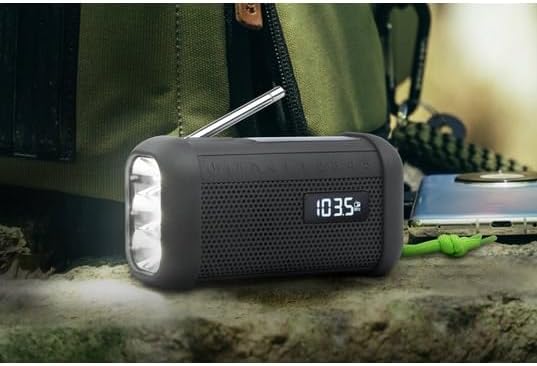
5-сүрөт: Digital Display in Radio Mode. The Muse MH08MB portable radio is shown resting on a surface, with its digital display clearly indicating "103.5 MHz", signifying active FM radio tuning. The speaker grille and flashlight are also visible.
7.3. Bluetooth Жупташтыруу
- Turn on the radio and switch to Bluetooth mode using the Mode button. The display will show a Bluetooth indicator.
- Мобилдик түзмөгүңүздө Bluetooth иштетип, жеткиликтүү түзмөктөрдү издеңиз.
- Select "MH08MB" from the list of devices.
- Once paired, the radio will confirm the connection, and you can play audio from your device.
7.4. Hands-Free Microphone
When connected via Bluetooth to a smartphone, the integrated microphone allows for hands-free calling. When a call comes in, the radio will pause playback. Press the Ойнотуу/Тыныгуу Чалууга жооп берүү же аяктоо үчүн баскыч.
7.5. Жарык диод
басыңыз Кол чырак button (or designated button) to turn the LED flashlight on or off. The flashlight features 3 ultra-bright LEDs.
7.6. Siren Function
In an emergency, press and hold the Сирена button to activate the emergency siren and flashing light. Press again to deactivate.
7.7. Stereo Pairing (TWS)
If you have two Muse MH08MB units, you can pair them for True Wireless Stereo (TWS) sound. Turn on both units and ensure they are in Bluetooth mode. On one unit, press and hold the Стерео жуп button (refer to controls for exact button). The units will connect, providing a wider stereo soundstage.
7.8. AUX-IN режими
Connect an external audio device (e.g., MP3 player) to the AUX-IN jack using a 3.5mm audio cable. Switch the radio to AUX mode using the Mode button. Audio from the external device will play through the radio's speaker.
8. Техникалык тейлөө
- Тазалоо: Аппаратты жумшак, кургак чүпүрөк менен сүртүңүз. Абразивдүү тазалагычтарды же эриткичтерди колдонбоңуз.
- Сактагыч: Store the radio in a cool, dry place away from direct sunlight when not in use for extended periods.
- Батареяга кам көрүү: To prolong battery life, avoid fully discharging the battery frequently. Charge it regularly, especially if stored for a long time.
9. Кыйынчылыктарды
| Көйгөй | Мүмкүн себеп | Чечим |
|---|---|---|
| Күч жок | Батарея түгөндү | Charge the device using USB-C, solar, or dynamo. |
| Радио кабыл алуу начар | Antenna not extended or weak signal | Телескопиялык антеннаны толугу менен жайыңыз. Башка жерге көчүп көрүңүз. |
| Bluetooth туташпай жатат | Radio not in pairing mode or device too far | Ensure radio is in Bluetooth mode. Move your device closer. Forget and re-pair on your mobile device. |
| Үн жок | Volume too low or incorrect mode | Increase volume. Ensure the correct mode (Radio, Bluetooth, AUX) is selected. |
10. Техникалык шарттар
| Өзгөчөлүк | Деталь |
|---|---|
| Модель номери | MH08MB |
| Бренд | MUSE |
| Түс | Кара |
| Байланыш | Bluetooth |
| Radio Bands | AM/FM (5 digital presets) |
| Кубат булактары | USB-C, Solar, Dynamo (Hand Crank) |
| Батарея | 1 Литий-ион (кошулган) |
| Батареянын иштөө мөөнөтү | Up to 6 hours (depending on volume/content) |
| Өзгөчөлүктөр | Integrated Clock, Hands-free Microphone, LED Flashlight (3 ultra-bright LEDs), Siren, Stereo Pairing (TWS), NFC |
| Суу каршылык | IP64 (Dust and Splash-proof) |
| Өлчөмдөрү (L x W x Y) | 15.8 x 6.4 x 8 см |
| Камтылган компоненттер | Power adapter, USB-C Charging Cable, User manual |

6-сүрөт: Product Dimensions. A technical diagram showing the dimensions of the Muse MH08MB portable radio: 158mm length, 80mm height, and 64mm width.
11. Кепилдик жана колдоо
Muse products are designed for reliability and performance. For warranty information and technical support, please refer to the warranty card included with your purchase or visit the official Muse webсайт. Ар кандай кепилдик дооматтары үчүн сатып алганыңыздын далилин сактаңыз.
For further assistance, please contact Muse customer service.


