1. Продукт бүтүп калдыview
The LIORQUE Digital Kitchen Timer Model YGH5249 is a multi-functional device designed to assist with various timing needs. It features a large LCD display, adjustable alarm volume, and multiple placement options. This timer can function as a countdown timer, a count-up stopwatch, and a digital clock.

Сүрөт 1.1: Алдыңкы view of the LIORQUE Digital Kitchen Timer, highlighting its large LCD screen and control buttons.
Негизги өзгөчөлүктөрү:
- 3-ин-1 Функциясы: Timer, Stopwatch, and Clock modes.
- Чоң LCD дисплей: Ensures clear readability of time.
- Жөнгө салынуучу ойготкучтун үнү: Three levels (Mute, Low, High) to suit different environments.
- Ыңгайлаштырылган режим: Save frequently used countdown times for quick access.
- Ар тараптуу жайгаштыруу: Magnetic back, foldable stand, and lanyard hole for flexible use.
- Delay Reminder: Automatically starts counting up after countdown finishes.
- Auto-Restore: Remembers the last set countdown time.

Image 1.2: Visual representation of the timer's main features and functions.
2. Орнотуу жана Батареяны орнотуу
The timer requires 2 AAA batteries (included) for operation. Follow these steps to install them:
- Locate the battery compartment cover on the back of the timer.
- Капкакты жылдырыңыз.
- Бөлүмдүн ичинде көрсөтүлгөндөй туура полярдуулукту (+ жана -) камсыз кылып, эки AAA батарейкасын салыңыз.
- Батарея уясынын капкагын бекем жабыңыз.
The timer will power on automatically once batteries are installed.
3. Иштөө нускамалары
3.1 Switching Modes (Timer/Stopwatch/Clock)
The LIORQUE timer offers three modes: Timer (countdown), Stopwatch (count-up), and Clock. To switch between Timer mode and Clock mode, press and hold the ST/SP button for 2 seconds. The timer will display the current time in Clock mode or the timer interface in Timer mode.

Image 3.1: Switching between Counting Mode and Clock Mode.
3.2 Артка саноо таймерин орнотуу
- Ensure the timer is in Timer mode (displaying H:M:S).
- колдонуу 1H, 5M, 1M, жана 5S баскычтарын басып, каалаган тескери саноо убактысын коюңуз. Ар бир басуу тиешелүү убакытты кошот.
- басыңыз ST/SP артка саноону баштоо үчүн баскычты басыңыз.
- Артка саноону тындыруу үчүн, баскычын басыңыз ST/SP кайра. Улантуу үчүн аны дагы бир жолу басыңыз.
- To reset the timer to zero, press the RESET баскычы.
- When the countdown reaches zero, the alarm will sound for 1 minute.
3.3 Using Stopwatch (Count-Up)
- Ensure the timer is in Timer mode and reset to 00:00:00.
- басыңыз ST/SP button to start counting up.
- Секундомерди тындыруу үчүн, басыңыз ST/SP кайра. Улантуу үчүн аны дагы бир жолу басыңыз.
- Секундомерди нөлгө коюу үчүн, басыңыз RESET баскычы.

Image 3.2: Illustration of Count-up and Countdown modes.
3.4 Shortcut Setting
The timer allows for quick setting of common intervals:
- Басыңыз 1H 1 саатка.
- Басыңыз 5M 5 мүнөткө.
- Басыңыз 1M 1 мүнөткө.
- Басыңыз 5S 5 секундга.

Сүрөт 3.3: Мисamples of using shortcut buttons for quick time setting.
3.5 Ыңгайлаштырылган режим
The Custom Mode allows you to save a frequently used countdown time for instant recall.
- In Timer mode, set your desired countdown time using the 1H, 5M, 1M, жана 5S баскычтар.
- басып, кармап туруңуз CUSTOM button for 2 seconds. The timer will remember this setting.
- Each subsequent short press of the CUSTOM button will automatically load the saved time.

Image 3.4: Setting and recalling a custom timer value.
3.6 Ойготкучтун үнүн тууралоо
The timer features a 3-level alarm volume adjustment (Mute, Low, High). A switch on the side of the timer allows you to select the desired volume level.

Image 3.5: Volume adjustment switch and its three settings.
3.7 Жайгаштыруу параметрлери
The LIORQUE timer offers flexible placement options:
- Магниттик: Attach the timer to metal surfaces like refrigerators using its strong magnetic back.
- Стенд: Use the integrated foldable stand to place the timer on any flat surface, such as a countertop or desk.
- Lanyard тешик: Hang the timer using a rope through the designated lanyard hole.
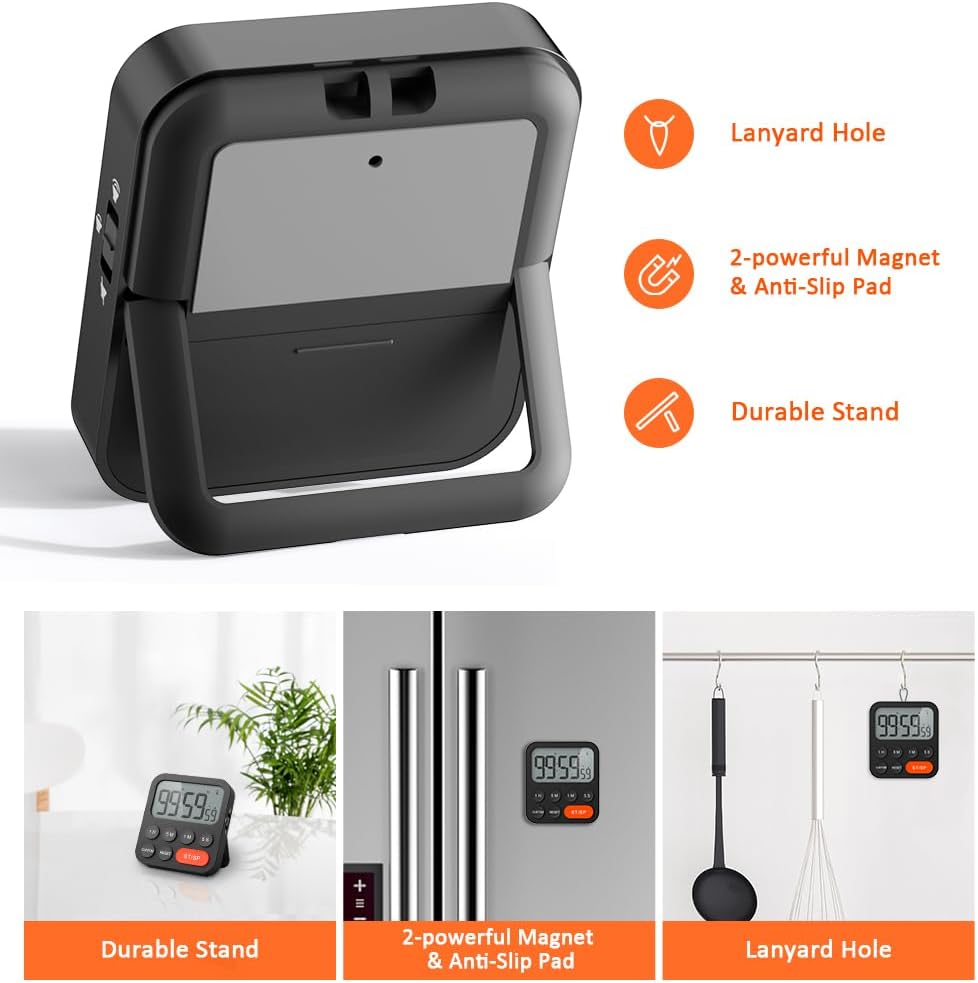
Image 3.6: Various ways to place and use the timer.
3.8 Кошумча функциялар
- Delay Reminder: After a countdown finishes, the timer will automatically start counting up, indicating the elapsed time since the alarm.
- Auto-Restore: Once a countdown is complete and the alarm has sounded, pressing the ST/SP button will restore the timer to the last set countdown time, making it convenient for repetitive tasks.

Image 3.7: Explanation of Delay Reminder and Auto-restore features.
4. Техникалык тейлөө
- Clean the timer with a soft, dry cloth. Do not use abrasive cleaners or immerse in water.
- Replace batteries when the display becomes dim or the timer functions erratically.
- Таймерди узак убакыт бою колдонбогон учурда салкын, кургак жерде сактаңыз.
5. Кыйынчылыктарды
- Таймер жооп бербей жатат: Батареялар туура орнотулганын жана заряды жетиштүү экендигин текшериңиз. Керек болсо алмаштырыңыз.
- Alarm too quiet/loud: Adjust the volume switch on the side of the timer to your preferred level.
- Дисплей бош: Ensure batteries are installed and functional. If the issue persists, contact customer support.
6. Техникалык шарттар
| Өзгөчөлүк | Деталь |
|---|---|
| Бренд | ЛИОРК |
| Модель номери | YGH5249 |
| Түс | Кара |
| Продукциянын өлчөмдөрү | 0.94"D x 0.94"H |
| Элемент Салмагы | 4.2 унция |
| Power Source | 2 AAA батарейка (кошулган) |
| Орнотуулардын саны | 3 (Көлөмү) |
| Screen Size | 1E+1 сантиметр |
7. Кепилдик жана колдоо
For warranty information or technical support, please refer to the product packaging or contact LIORQUE customer service through their official website or the retailer where the product was purchased. Keep your purchase receipt for warranty claims.


