1. Киришүү
Сатып алганыңыз үчүн рахматasing the ODK L-Shaped Gaming Desk. This manual provides detailed instructions for assembly, operation, maintenance, and troubleshooting to ensure safe and efficient use of your new desk. Please read this manual thoroughly before assembly and retain it for future reference.

Image 1.1: The ODK L-Shaped Gaming Desk in a typical gaming environment, showcasing its spacious design and integrated features.
2. Коопсуздук маалыматы
- Монтаждоону баштоодон мурун бардык компоненттердин бар экенин жана бузулбаганын текшериңиз. Эгерде кандайдыр бир бөлүктөрү жок же бузулуп калса, колдонбоңуз.
- Чийип кетпеш үчүн үстөлдү жумшак, таза бетке чогултуңуз.
- Материалга зыян келтирбөө үчүн монтаждоо учурунда буроолорду ашыкча тартпаңыз.
- Тумчугуп калуу коркунучун болтурбоо үчүн кичинекей бөлүктөрүн балдардан алыс кармаңыз.
- Do not exceed the maximum load capacity of 50 kg for the desktop.
- Ensure all electrical connections (power outlets, USB ports) are properly grounded and used with compatible devices.
- Ысык буюмдарды столдун бетине коргоочу каражатсыз түз коюудан алыс болуңуз.
3. Пакеттин мазмуну
Verify that all parts listed below are included in your package. A wrench is provided for assembly.
- Иш стол панелдери (L формасындагы бөлүктөрү)
- Болоттон жасалган каркас компоненттери
- Adjustable monitor stand components
- Two integrated drawers
- Storage shelves and racks
- Power strip with 2 AC outlets and 2 USB ports (5V-2A)
- RGB LED light strip with controller
- Кулакчын илгичи
- Assembly hardware (screws, bolts, adjustable feet)
- Монтаж ачкычы
- Колдонмо
4. Монтаждоо боюнча нускамалар
Assembly is required for this product. Follow the included detailed instruction manual step-by-step. The rack and drawers can be installed on either the left or right side to suit your preference and room layout.
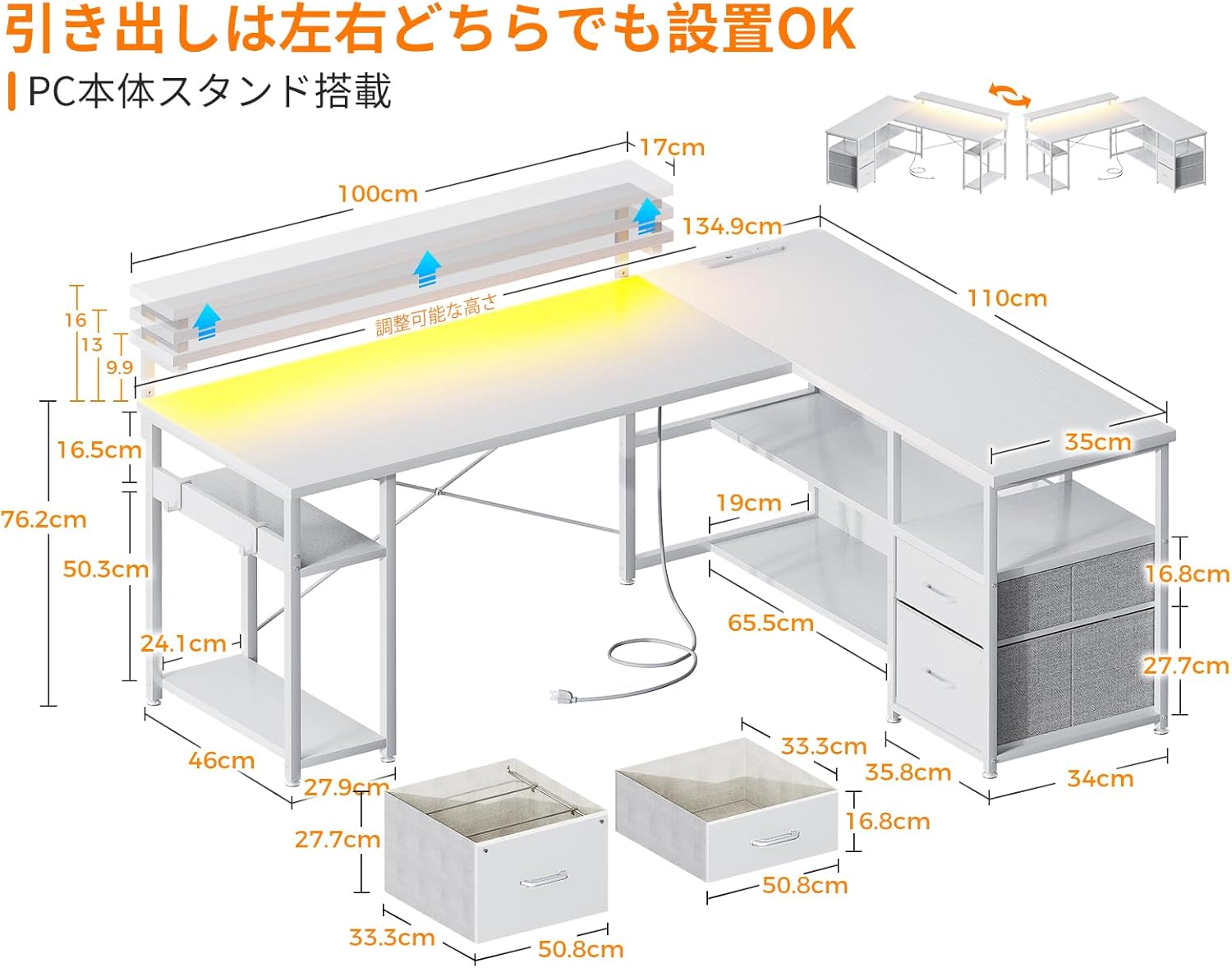
Сүрөт 4.1: Өлчөмдүүview and reversible design of the desk, illustrating how the storage unit can be positioned on either side.
4.1. Башкы Ассамблеянын кеңештери
- Identify all parts before starting.
- Use the provided wrench for tightening fasteners.
- Do not fully tighten all screws until the entire structure is loosely assembled. This allows for minor adjustments.
- Once the desk is fully assembled, tighten all screws securely.
4.2. Adjustable Feet Installation
The desk is equipped with adjustable feet to ensure stability on uneven surfaces. Install these feet at the bottom of the desk legs. Rotate them clockwise to extend and counter-clockwise to retract until the desk is level and stable.

Image 4.2: Detail of the adjustable feet, which allow for leveling the desk on uneven floors.
5. Иштөө нускамалары
5.1. Электр розеткалары жана USB порттору
The desk includes a built-in power strip with two AC outlets (100-240V/15A) and two USB ports (5V-2A). Connect the desk's power cord to a wall outlet. These ports provide convenient charging for your computer, smartphone, and other electronic devices.

Image 5.1: The integrated power strip, showing the AC outlets and USB ports for device charging.
5.2. RGB LED жарыктандыруу
The desk features an RGB LED light strip to enhance your gaming or work environment. Use the included controller to switch between 10 different lighting modes and adjust colors. The light system includes a memory function that retains the last selected mode when turned off and on again.

Image 5.2: The remote control for the RGB LED lighting, illustrating the various color and mode selections.
5.3. Adjustable Monitor Stand
The monitor stand can be adjusted to three different heights: 9cm, 12cm, and 15cm. Adjust the height according to your preference to improve posture and reduce strain on your neck and shoulders during long periods of use.
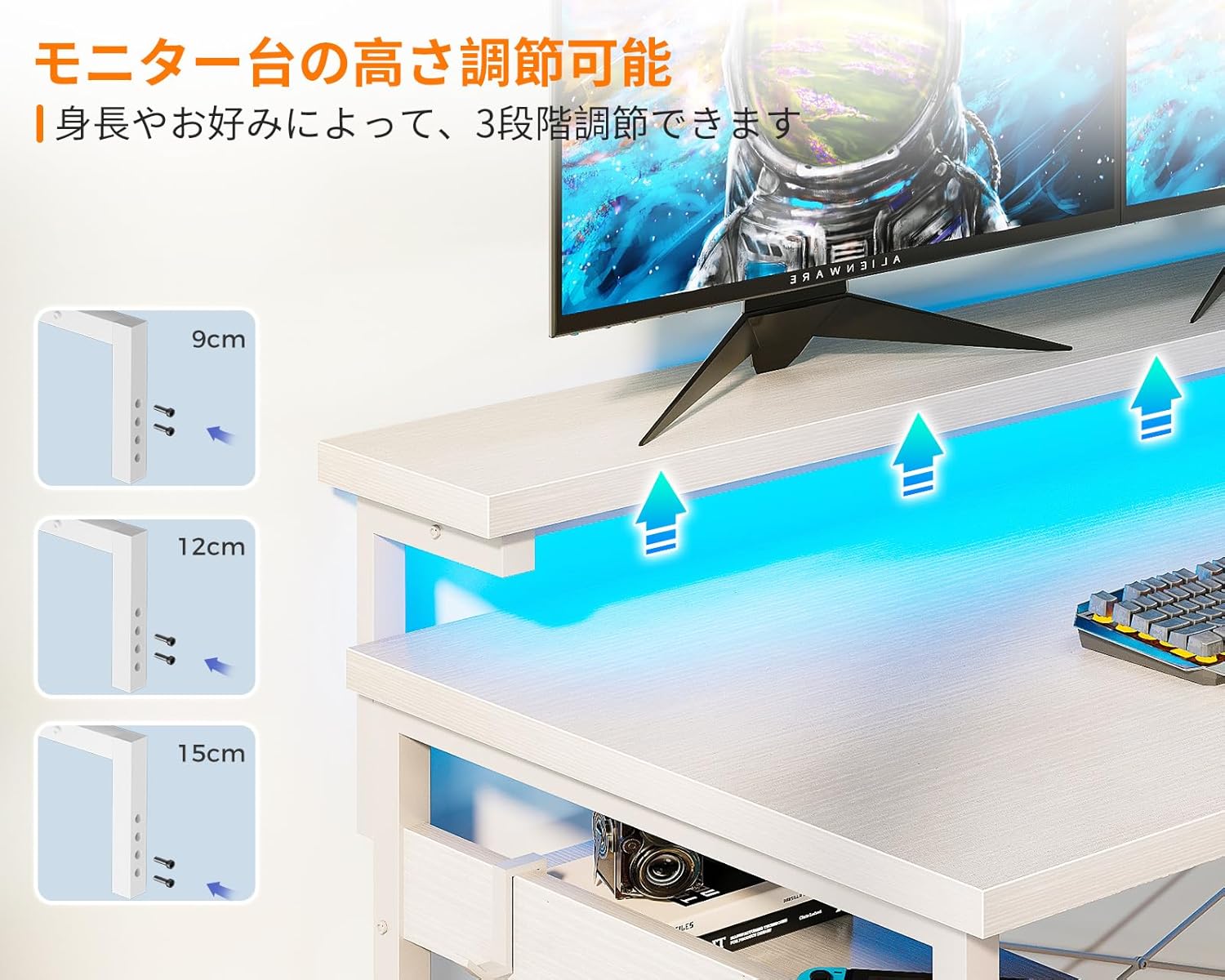
Image 5.3: The adjustable monitor stand, demonstrating the three height options for ergonomic positioning.
5.4. Сактоочу суурмалар
The desk includes two integrated drawers for organized storage of books, documents, and other office supplies. These drawers are designed for easy access and contribute to a tidy workspace.

Image 5.4: The integrated drawers, providing convenient storage for various items.
6. Техникалык тейлөө
- Тазалоо: Үстөлдүн бетин жумшак менен сүртүңүз, гamp cloth. Avoid using harsh chemicals or abrasive cleaners, as these can damage the melamine finish.
- Төгүлүүлөр: Immediately wipe up any spills to prevent water damage or staining. The melamine board is resistant to water, but prolonged exposure should be avoided.
- бекиткичтер: Мезгил-мезгили менен бардык бурамалар менен болтторду текшерип туруңуз, алар бекем бойдон калууда. Туруктуулукту сактоо үчүн зарыл болсо, кайра тартыңыз.
- Электр компоненттери: Ensure the power cord and connections are free from damage. Do not attempt to repair electrical components yourself.
7. Кыйынчылыктарды
7.1. Desk is Unstable/Wobbly
- Жөнгө салынуучу буттарды текшерүү: Ensure all adjustable feet are making firm contact with the floor and are adjusted to level the desk.
- бекиткичтерди бекемдөө: Бардык монтаждоочу бурамалар жана болттор бекем бекитилгенин текшериңиз.
- Cross Bracing: Confirm that the cross-bracing hardware is correctly installed and tightened, as this significantly contributes to stability.
7.2. RGB LED Lights Not Working
- Кубат туташуу: Ensure the LED light strip is properly connected to its power source and the desk's main power.
- Контроллердин батареясы: If the controller is wireless, check its battery.
- Кайтаруу: Try unplugging the desk from the wall outlet for a few minutes, then plug it back in to reset the electrical components.
7.3. Power Outlets/USB Ports Not Functioning
- Негизги күч: Үстөлдүн негизги кубат шнуру иштеп жаткан розеткага бекем сайылганын текшериңиз.
- Түзмөктүн шайкештиги: Verify that the devices you are trying to charge are compatible with the provided voltagд жана ampөчүрүү.
- Ашыкча жүктөө: Avoid overloading the power strip. If too many high-power devices are connected, it may trip a circuit.
8. Техникалык шарттар
| Өзгөчөлүк | Спецификация |
|---|---|
| Бренд | ODK |
| Модел | B0CWH3746N |
| Форма | L түрүндөгү |
| Түс | Ак |
| Жалпы өлчөмдөр | Болжол менен 135 см (туурасы) x 110 см (тереңдик) x 76 см (бийиктик) |
| Продукт Салмагы | Болжол менен 25.2 кг |
| Иш тактасынын жүктөө жөндөмдүүлүгү | 50 кг |
| Материал | High-strength Melamine Faced Board, Steel Frame |
| Электр розеткалары | 2 x AC (100-240V/15A) |
| USB порттору | 2 x USB (5V-2A) |
| Монитор стенди тууралоо | 3 levels (9cm, 12cm, 15cm) |
| LED жарыктандыруу | RGB, 10 lighting modes, memory function |
| Ассамблея | Customer assembly required (wrench included) |
9. Кепилдик жана колдоо
ODK provides customer support for product defects. If you encounter any issues or have questions regarding your ODK L-Shaped Gaming Desk, please do not hesitate to contact us. Refer to your purchase documentation for specific warranty terms and contact information.
For assistance, please contact ODK customer service through the platform where you purchased the product or visit the official ODK webсайт.


