1. Киришүү
The EPOMAKER TH40 is a compact 40% layout mechanical keyboard designed for efficiency and portability. It features tri-mode connectivity (Bluetooth, 2.4GHz wireless, and USB-C), VIA programmability, hot-swappable switches, and dynamic RGB lighting. This manual provides detailed instructions for setting up, operating, and maintaining your keyboard.

Image: The EPOMAKER TH40 keyboard showcasing its compact design and RGB backlighting.
2. Кутуда эмне бар
Пакетте бардык буюмдар бар экенин текшериңиз:
- EPOMAKER TH40 Mechanical Keyboard
- Баскыч капкагын тарткыч
- USB кабели (USB-Cден USB-Aга)
- Колдонуучунун Колдонмосу (бул документ)
3. Продукт бүтүп калдыview
The EPOMAKER TH40 features an ultra-compact 40% layout, optimizing desk space while retaining essential functionality through programmable layers. Its gasket-mount design and pre-lubed switches contribute to a comfortable and satisfying typing experience.

Сүрөт: бүттүview of EPOMAKER TH40 key features including hot-swappable, VIA programming, south-facing RGB, N-Key Rollover, split spacebar, and tri-mode wireless.

Image: The keyboard held in hand, emphasizing its portable 40% layout and light weight of 0.44kg.

Image: Diagram showing the ultra-compact dimensions of the keyboard: 19cm length, 7cm width, and 2cm height.
4. Орнотуу
4.1. Байланыш режимдери
The TH40 supports three connection modes: USB-C wired, 2.4GHz wireless, and Bluetooth. Use the switch located on the top edge of the keyboard to select your desired mode.

Image: The connectivity switch and USB-C port located on the side of the keyboard.
4.1.1. USB-C зымдуу туташуусу
- Берилген USB-C кабелин клавиатуранын USB-C портуна туташтырыңыз.
- Connect the other end of the cable to your computer's USB port.
- Ensure the mode switch on the keyboard is set to 'USB'.
- Баскычтоп системаңыз тарабынан автоматтык түрдө таанылат.
4.1.2. 2.4 ГГц зымсыз туташуу
- Locate the 2.4GHz USB receiver (dongle) included in the package.
- USB ресиверди компьютериңиздеги жеткиликтүү USB портуна сайыңыз.
- Баскычтоптогу режим которгучун "2.4G" абалына коюңуз.
- Баскычтоп автоматтык түрдө туташуу керек.
Video: Demonstration of the EPOMAKER TH40's portable design and wireless connectivity options.
4.1.3. Bluetooth туташуусу
- Set the mode switch on the keyboard to 'BT'.
- Басып кармап туруңуз FN + A, FN + S, же FN + D Bluetooth түзмөгү 1, 2 же 3 үчүн жупташтыруу режимине өтүү үчүн 3-5 секунд басыңыз. Индикатор жарыгы тез күйүп-өчөт.
- On your device (computer, tablet, smartphone), open Bluetooth settings and search for 'EPOMAKER TH40'.
- Жупташтыруу үчүн баскычтопту тандаңыз. Туташтырылгандан кийин индикатор жарыгы өчүп-өчүп токтойт.
- Жупташтырылган Bluetooth түзмөктөрүнүн ортосунда которулуу үчүн басыңыз FN + A, FN + S, же FN + D кыскача.

Image: Visual representation of the keyboard's tri-mode wireless capabilities, connecting to laptops, smartphones, and tablets via USB-C, 2.4GHz, and Bluetooth.
4.2. Индикатор жарыктары
The keyboard features indicator lights for various statuses:
- Caps Lock көрсөткүчү: Lights up when Caps Lock is active.
- Win Lock көрсөткүчү: Lights up when the Windows key is locked.
- Connectivity Indicator: Flashes during Bluetooth pairing and indicates connection status.

Image: Close-up of the indicator lights on the keyboard for Caps Lock, Win Lock, and connectivity status.
5. Иштөө нускамалары
5.1. VIA Programmability
The EPOMAKER TH40 is fully programmable using VIA software, allowing you to customize key assignments, macros, and lighting effects across multiple layers. This is crucial for adapting the 40% layout to your specific workflow.
- Download the appropriate JSON file for your TH40 (USB or 2.4G) from the EPOMAKER webсайт.
- Access the VIA configurator online (usevia.app) or download the desktop application.
- Load the JSON definition file into VIA.
- Connect your keyboard via USB-C or 2.4GHz wireless.
- Use the VIA interface to remap keys, create macros, and adjust lighting. Changes are applied in real-time.
Video: A guide on how to use the VIA software for customizing the EPOMAKER TH40 keyboard.

Image: Screenshot of the VIA software interface, demonstrating the layout and customization options for the TH40.
5.2. Key Functions and Layers
The TH40 utilizes a split spacebar with an FN key in the center, allowing for efficient access to multiple layers of key functions without extensive finger travel. There are four switchable layers, three of which are programmable via VIA.

Image: The innovative split spacebar design with the FN key positioned between the two spacebar segments, enhancing ergonomic typing.
5.3. RGB жарыкты башкаруу
The keyboard features dynamic RGB backlighting with south-facing LEDs. You can control various aspects of the lighting directly from the keyboard:
- FN + Enter: Toggle RGB backlight On/Off.
- FN + Z: Ар кандай RGB жарыктандыруу эффекттерин айланып өтүңүз.
- FN + N/H: Adjust brightness (N for decrease, H for increase).
- FN + B/M: Adjust hue (B for decrease, M for increase).

Image: Diagram illustrating the FN key combinations for controlling RGB backlight brightness, color, and effects.
5.4. Батареяны текшерүү
To check the current battery level, press FN + Left Spacebar. The RGB lighting will indicate the battery status.

Image: Illustration of pressing FN + Left Spacebar to check the keyboard's battery level.
5.5. N-Key оодарылып кетүү (NKRO)
The TH40 supports full N-Key Rollover, ensuring that every keystroke is registered accurately, even when multiple keys are pressed simultaneously. This feature is beneficial for fast typists and gamers.

Image: Visual highlighting of the N-Key Rollover and anti-ghosting capabilities for accurate and fast typing.
5.6. Mac & Windows Compatibility
Windows жана Mac макеттеринин ортосунда которулуу үчүн басыңыз FN + Оңго Shift.

Image: Iconographic representation of switching between Mac and Windows operating system compatibility using FN + Right Shift.
6. Техникалык тейлөө
6.1. Тазалоо
Regularly clean your keyboard to ensure optimal performance. Use a soft brush or compressed air to remove dust and debris from between the keycaps. For stubborn dirt, gently wipe the keycaps with a damp кездеме.
6.2. Ыкчам алмаштыруучу которгучтар
The TH40 features hot-swappable sockets, allowing you to change switches without soldering. Use the provided switch puller to carefully remove switches. Ensure replacement switches are compatible (3-pin or 5-pin).
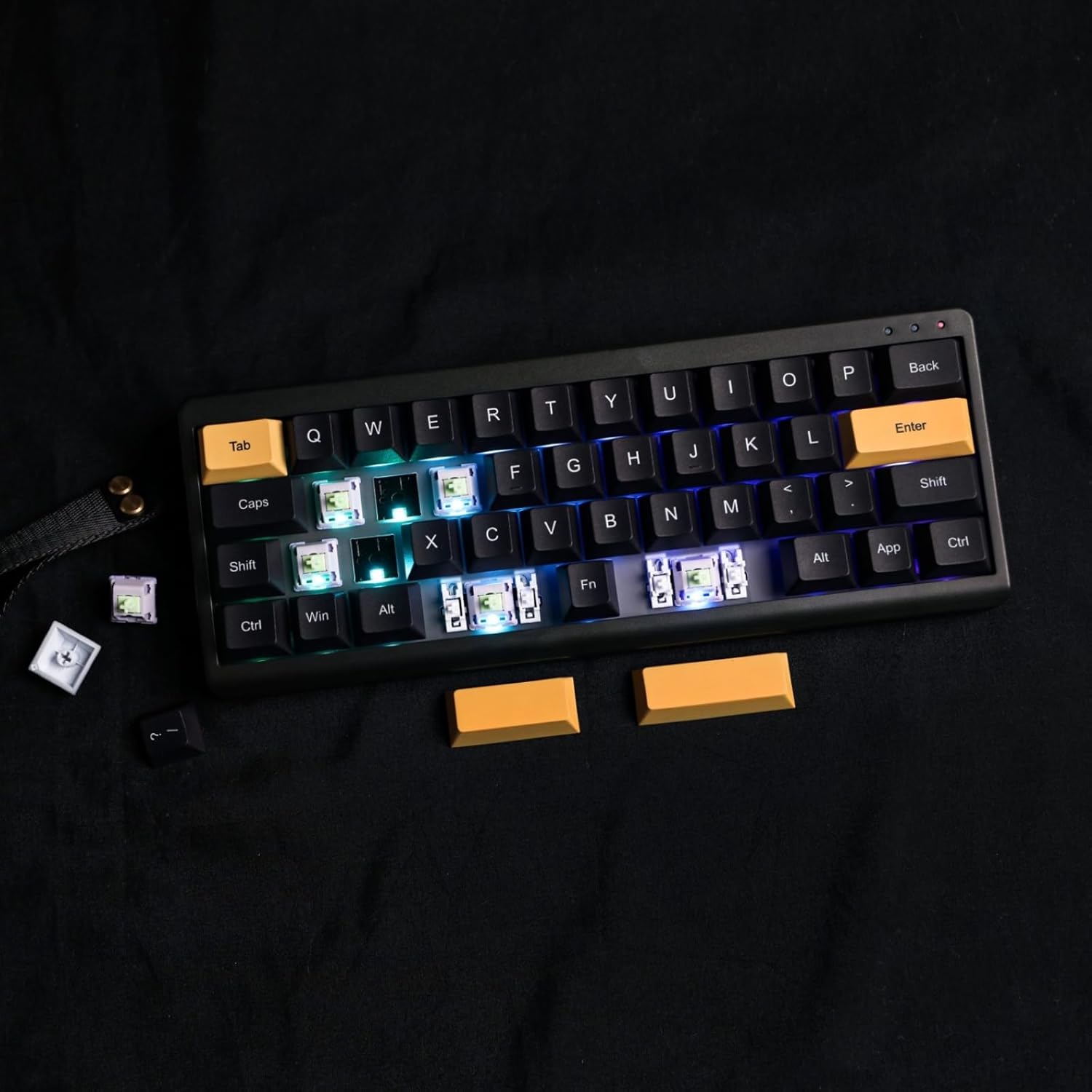
Image: Demonstration of removing a switch from the keyboard using a switch puller, highlighting the hot-swappable feature.

Сүрөт: Жакын план view of the keyboard's south-facing LEDs and pre-lubed switches, indicating the quality of components and ease of customization.
7. Кыйынчылыктарды
- Баскычтоп туташпай жатат: Ensure the mode switch is set correctly (USB, 2.4G, or BT). For wireless modes, check battery level and ensure the receiver is properly plugged in or Bluetooth is paired.
- Ачкычтар жооп бербейт: Check if the keyboard is properly connected. If using VIA, ensure the correct layer is active and key assignments are as expected.
- RGB жарыктандыруу маселелери: Use FN key combinations to cycle effects, adjust brightness, and hue. If issues persist, check VIA software settings.
- VIA software not detecting keyboard: Ensure the keyboard is connected via USB-C and the correct JSON file is loaded in VIA.
8. Техникалык шарттар
| Өзгөчөлүк | Деталь |
|---|---|
| Модель номери | TH40 |
| Макет | 40% (44 ачкыч) |
| Байланыш | Bluetooth (5.0), 2.4 ГГц зымсыз, USB-C зымдуу |
| Которуу түрү | Hot-swappable (3-pin/5-pin) |
| Арткы жарыктандыруу | RGB (түштүктү караган LEDдер) |
| Программалануу | VIA программалык камсыздоо |
| Батарея сыйымдуулугу | 3000 мАч литий-ион |
| Өлчөмдөрү (L x W x Y) | 10.16 x 3.82 x 1.38 дюйм (25.8 x 9.7 x 3.5 см) |
| Элемент Салмагы | 1.76 фунт (0.8 кг) |
| Шайкеш түзмөктөр | Ноутбук, компьютер, смартфон, планшет |
9. Кепилдик жана колдоо
For warranty information, technical support, or further assistance, please visit the official EPOMAKER webсайтка же кардарларды тейлөөгө кайрылыңыз. Кепилдик дооматтар үчүн сатып алуу дүмүрчөгүңүздү сактаңыз.


