1. Киришүү
This user manual provides detailed instructions for the assembly, operation, and maintenance of your FLEXISPOT Lite Electric Standing Desk. Please read this manual thoroughly before installation and use to ensure proper function and safety. Keep this manual for future reference.
2. Коопсуздук боюнча маанилүү маалымат
Бул коопсуздук нускамаларын аткарбоо жаракатка же буюмдун бузулушуна алып келиши мүмкүн.
- The desk has a maximum load capacity of 70 кг (154 фунт)Бул салмак чегинен ашпаңыз.
- Чогултуу чоң киши тарабынан аткарылышы керек.
- Колдонуудан мурун бардык бурамалар жана болттор бекем бекемделгенин текшериңиз.
- Кыймылдуу бөлүктөрдөн жаракат албаш үчүн иш учурунда балдарды жана үй жаныбарларын столдон алыс кармаңыз.
- Стол кыймылда турганда көтөрүү механизминин жанына колуңузду же башка буюмдарды койбоңуз.
- Тазалоодон же тейлөөдөн мурун электр энергиясын өчүрүңүз.
- Use only the power adapter supplied with the desk.
- Башкаруу панелине же мотор тетиктерине суюктуктарды төгүүдөн сактаңыз.
3. Продукт бүтүп калдыview жана өзгөчөлүктөрү
The FLEXISPOT Lite Electric Standing Desk is designed to promote a healthy work environment by allowing seamless transitions between sitting and standing positions. It features a robust motor, memory presets, and an anti-collision system.

Figure 3.1: FLEXISPOT Lite Electric Standing Desk setup with accessories.
Негизги өзгөчөлүктөрү:
- Эргономикалык дизайн: Facilitates alternating between sitting and standing to reduce physical strain.
- Quiet and Durable Motor: Operates at less than 50 dB, ensuring a quiet workspace.
- Electric Height Adjustment with Memory: Easily adjust height with a control panel and save up to four preferred height settings.
- Мыкты курулуш: Steel frame with a T-foot design provides stability and supports up to 70 kg.
- Кең иш тактасы: 140x60 cm maple tabletop with rounded corners and integrated wire holes.
- Anti-Collision Rebound Function: Кыймыл учурунда тоскоолдук табылса, автоматтык түрдө токтоп, артка жылат.
- Интегралдык аксессуарлар: Includes two hooks and a cup holder for convenience.
4. Орнотуу жана чогултуу
This section outlines the general steps for assembling your FLEXISPOT Lite Electric Standing Desk. Refer to the separate assembly guide included in your package for detailed, step-by-step instructions and diagrams.
4.1 Пакеттен чыгаруу
- Этияттык менен таңгакты ачып, бардык компоненттерин алып салыңыз.
- Place all parts on a clean, flat, and soft surface (e.g., a carpet) to prevent scratches.
- Чогултуу боюнча колдонмодо көрсөтүлгөн бардык бөлүктөр бар экенин текшериңиз.
4.2 Компонентти идентификациялоо
Негизги компоненттер менен таанышып алыңыз:
- Иш такта бөлүмдөрү
- Leg columns (lifting columns)
- Бут колдойт
- Башкаруу кутучасы
- Башкаруу панели
- Кубат адаптери жана кабели
- Hardware (screws, bolts, tools)
- Accessories (hooks, cup holder)
4.3 Ассамблея кадамдары (Жалпы)
- Көтөргүч мамычаларды жумушчу столдун алкагына бекитиңиз.
- Көтөрүүчү мамылардын түбүнө бут таянычтарын бекитиңиз.
- Mount the control box and control panel to the underside of the desktop.
- Connect all cables from the motors to the control box, and then connect the power adapter.
- Attach the desktop sections together (if applicable) and secure them to the frame.
- Install the cup holder and hooks as desired.
Note: Refer to the detailed assembly manual for specific screw types, torque requirements, and visual aids for each step.
5. Үстөлүңүздү иштетүү
This section explains how to use the control panel to adjust your desk height and utilize its features.

Figure 5.1: Smart Control Panel.
5.1 Башкаруу панелинин функциялары
- LED дисплей: Учурдагы столдун бийиктигин сантиметр менен көрсөтөт.
- Өйдө/Төмөн баскычтары (▲ / ▼): Press and hold to continuously adjust the desk height upwards or downwards. Release the button to stop at the desired height.
- Sit/Stand Button (i): This button may function as a quick switch between a default sitting and standing height, or as a general indicator. Refer to your specific control panel model for exact functionality.
- Эстутум алдын ала коюлган баскычтары (1, 2, 3, 4): Бул баскычтар төрт тандалган бийиктик жөндөөлөрүн сактоого жана кайра чакырып алууга мүмкүндүк берет.
5.2 Эстутум алдын ала орнотууларды орнотуу
- Өйдө/Төмөн баскычтары менен үстөлдү каалаган бийиктикке тууралаңыз.
- Press the 'M' or 'Set' button (if available, otherwise proceed to step 3). The display may flash.
- Immediately press one of the number buttons (1, 2, 3, or 4) to save the current height to that preset. The display will show 'S-' followed by the number, confirming the setting.
5.3 Эстутумдун алдын ала орнотууларын кайра чакырып алуу
Жөн гана каалаган сан баскычын басыңыз (1, 2, 3 же 4). Үстел сакталган бийиктикке автоматтык түрдө жылат.
5.4 Anti-Collision Rebound Function
The desk is equipped with an anti-collision system. If the desk encounters an obstruction while moving up or down, it will automatically stop and reverse slightly to prevent damage or injury.
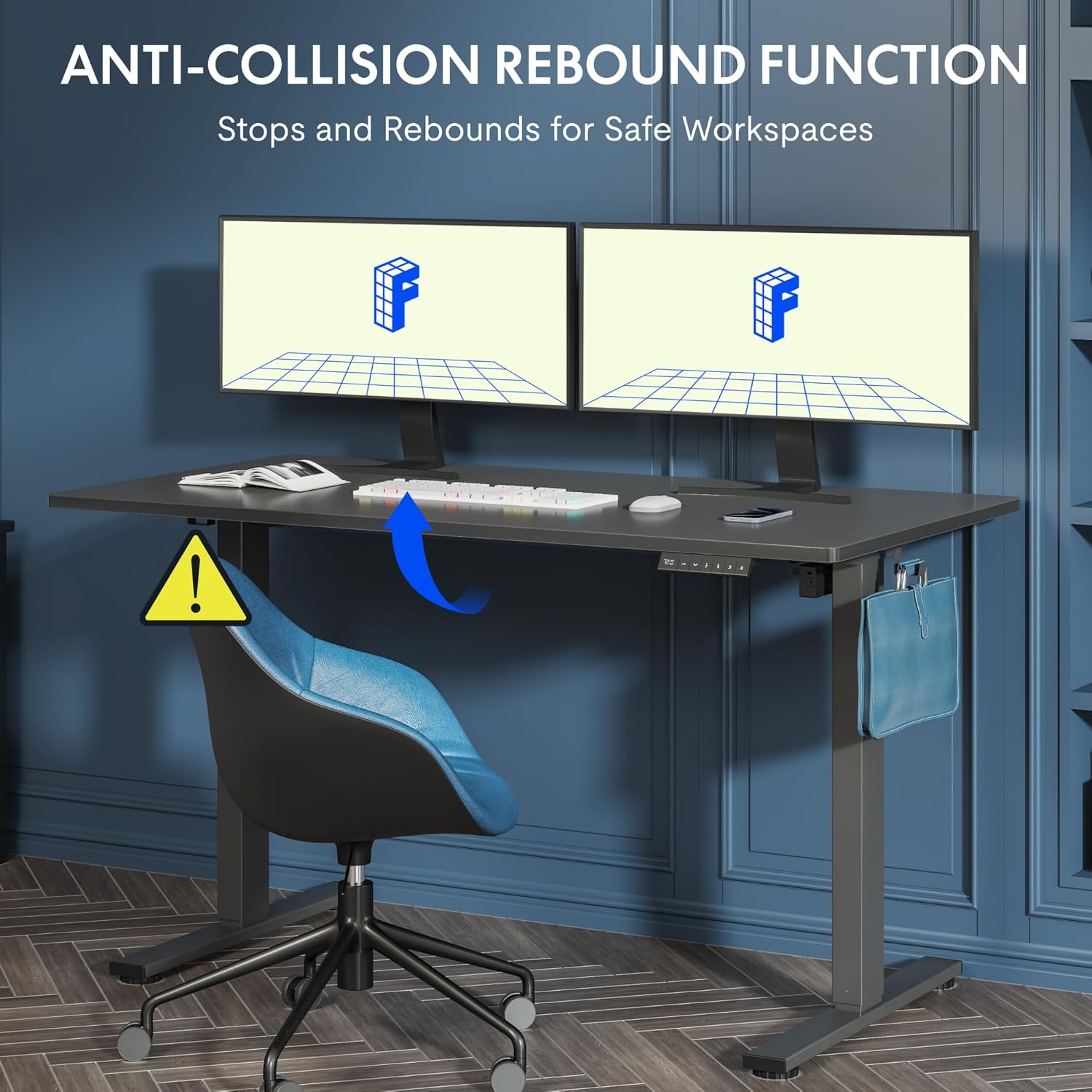
5.2-сүрөт: Кагылышууга каршы кайра келүү функциясы иштеп жатат.
6. Техникалык тейлөө жана кам көрүү
Үзгүлтүксүз тейлөө сиздин үстөлүңүздүн узак мөөнөттүү жана оптималдуу иштешин камсыз кылат.
- Тазалоо: Иш тактасын жана алкакты жумшак менен сүртүңүз, гamp кездеме. Абразивдүү тазалагычтардан же катуу химиялык заттардан алыс болуңуз.
- Текшерүү: Мезгил-мезгили менен бардык бурамалар менен болттордун бекемдигин текшерип туруңуз. Керек болсо кайра тартыңыз.
- Кабелдик башкаруу: Ensure all cables are neatly routed and not pinched or tangled, which could affect operation.
- Жүктөө жөндөмдүүлүгү: Үстөлдү 70 кг салмактан ашыкча жүктөбөңүз.
7. Көйгөйлөрдү чечүү боюнча колдонмо
Үстөлүңүздө көйгөйлөргө туш болсоңуз, төмөнкү жалпы көйгөйлөрдү жана чечимдерди караңыз:
| Көйгөй | Мүмкүн себеп | Чечим |
|---|---|---|
| Иш стол кыймылдабайт же башкаруу элементтерине жооп бербейт. | Power cable disconnected; control box cable loose; motor cable loose. | Check all cable connections. Ensure the power cable is securely plugged into the wall outlet and the control box. |
| Үстел бир калыпта эмес кыймылдайт же адаттан тыш үндөрдү чыгарат. | Overload; loose screws; obstruction. | Reduce weight on the desk. Check and tighten all assembly screws. Ensure no obstructions are in the path of the lifting columns. |
| Стол күтүүсүздөн кыймылдабай калат. | Anti-collision system activated; motor overheating. | Check for obstructions and remove them. If no obstruction, allow the motor to cool down for 20 minutes before attempting operation again. |
| Ката коду башкаруу панелинде көрсөтүлөт. | Атайын система катасы. | Refer to the detailed assembly manual for specific error code meanings and troubleshooting steps. If the issue persists, contact customer support. |
8. Техникалык шарттар

Figure 8.1: Desk Dimensions and Performance Metrics.
| Спецификация | Деталь |
|---|---|
| Бренд | FLEXISPOT |
| Модель номери | QS1M-1460-IE |
| Түс | Ак рамка + Клен үстүнкү бөлүгү |
| Иш тактанын өлчөмдөрү (узундугу x туурасы) | 140 см х 60 см |
| Бийиктигин тууралоо диапазону | 73.5 см - 118 см |
| Материал | Wood (Maple Top), Metal (Alloy Steel Frame) |
| Максималдуу жүктөө жөндөмдүүлүгү | 70 кг |
| Элемент Салмагы | 26.9 кг |
| Ызы-чуу деңгээли | < 50 дБ |
| Жөнгө салуу ылдамдыгы | 20 мм/с |
| Өзгөчөлүктөр | Ergonomic, Adjustable, Anti-Collision, Memory Presets |
9. Кепилдик жана Кардарларды колдоо
For warranty information, specific troubleshooting not covered in this manual, or to purchase replacement parts, please contact FLEXISPOT customer support directly. Refer to the product packaging or the official FLEXISPOT webбайланыш маалыматы үчүн сайт.


